
I recently shared simple yet cool search boxes for blogger. Now its time for something new, cool, beautiful and sleek.
So here comes sleek and cool search boxes for blogger/blogspot. It’s using simple image and css, HTML. Actually these are PSD source designed by Design3edge. I work hard in converting this to Blogger for YOU. Hope you enjoyed with this!
Update: For WordPress Version Click Here!
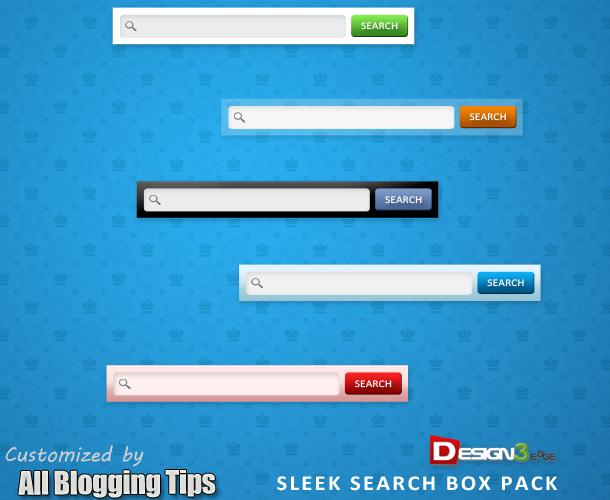
Adding Add Cool Search Boxes For Blogger
- Login to Blogger Dashboard => Design tab => Page Elements .
- Click on Add a Gadget where you wish to place this Search Boxes.
- Choose HTML/JavaScript from the List.
- Place any one Search Box code in to it and Save the Gadget.
Style 1

<style type="text/css">
#abt-searchbox{
border-radius:5px;
background:URL(http://2.bp.blogspot.com/-vGjST2sX6Ts/T88uy-eRYUI/AAAAAAAAAog/xhJ2A0nGnpw/s1600/black.png) no-repeat scroll center center transparent;width:307px;height:50px;disaply:block;}
form#abt-searchform{display: block;padding: 10px 12px;margin:0;}
form#abt-searchform #s{padding-left:16px !important; padding:7.5px;margin:0;width: 235px;font-size:14px;vertical-align: top;border:none;background:transparent;}
form#abt-searchform
#sbutton{margin:0;padding:0;height:40px; width:44px;vertical-align: top;border:none;background:transparent;}
</style>
<div id="abt-searchbox">

<form id="abt-searchform" action="/search" method="get">
    <input type="text" id="s" name="q" value="Search..." onfocus='if (this.value == "Search...") {this.value = ""}' onblur='if (this.value == "") {this.value = "Search...";}'/>
    <input type="image" src="http://img1.blogblog.com/img/blank.gif" id="sbutton" />
</form>
</div>
Style 2

<style type="text/css">
#abt-searchbox{
border-radius:5px;
background:URL(http://4.bp.blogspot.com/-hxd1468RbE4/T88u0xTfk1I/AAAAAAAAApQ/BZ1WB9VG_3g/s400/whitez%2Bby%2Babt.png) no-repeat scroll center center transparent;width:307px;height:50px;disaply:block;}
form#abt-searchform{display: block;padding: 10px 12px;margin:0;}
form#abt-searchform #s{padding-left:16px !important; padding:7.5px;margin:0;width: 235px;font-size:14px;vertical-align: top;border:none;background:transparent;}
form#abt-searchform
#sbutton{margin:0;padding:0;height:40px; width:44px;vertical-align: top;border:none;background:transparent;}
</style>
<div id="abt-searchbox">

<form id="abt-searchform" action="/search" method="get">
    <input type="text" id="s" name="q" value="Search..." onfocus='if (this.value == "Search...") {this.value = ""}' onblur='if (this.value == "") {this.value = "Search...";}'/>
    <input type="image" src="http://img1.blogblog.com/img/blank.gif" id="sbutton" />
</form>
</div>
Style 3

<style type="text/css">
#abt-searchbox{
border-radius:5px;
background:URL(http://4.bp.blogspot.com/-Z_Bf8C64sWs/T88uy_rLu3I/AAAAAAAAAow/EcYyd6sKjxA/s400/bluez%2Bby%2Ballbloggingtips.png) no-repeat scroll center center transparent;width:307px;height:50px;disaply:block;}
form#abt-searchform{display: block;padding: 10px 12px;margin:0;}
form#abt-searchform #s{padding-left:16px !important; padding:7.5px;margin:0;width: 235px;font-size:14px;vertical-align: top;border:none;background:transparent;}
form#abt-searchform
#sbutton{margin:0;padding:0;height:40px; width:44px;vertical-align: top;border:none;background:transparent;}
</style>
<div id="abt-searchbox">

<form id="abt-searchform" action="/search" method="get">
    <input type="text" id="s" name="q" value="Search..." onfocus='if (this.value == "Search...") {this.value = ""}' onblur='if (this.value == "") {this.value = "Search...";}'/>
    <input type="image" src="http://img1.blogblog.com/img/blank.gif" id="sbutton" />
</form>
</div>
Style 4

<style type="text/css">
#abt-searchbox{
border-radius:5px;
background:URL(http://4.bp.blogspot.com/-T2F6d51MVw8/T88u0v_kIqI/AAAAAAAAApE/pB5bbugoVoM/s400/transparent%2Bby%2Ballbloggingtips.png) no-repeat scroll center center transparent;width:307px;height:50px;disaply:block;}
form#abt-searchform{display: block;padding: 10px 12px;margin:0;}
form#abt-searchform #s{padding-left:16px !important; padding:7.5px;margin:0;width: 235px;font-size:14px;vertical-align: top;border:none;background:transparent;}
form#abt-searchform
#sbutton{margin:0;padding:0;height:40px; width:44px;vertical-align: top;border:none;background:transparent;}
</style>
<div id="abt-searchbox">

<form id="abt-searchform" action="/search" method="get">
    <input type="text" id="s" name="q" value="Search..." onfocus='if (this.value == "Search...") {this.value = ""}' onblur='if (this.value == "") {this.value = "Search...";}'/>
    <input type="image" src="http://img1.blogblog.com/img/blank.gif" id="sbutton" />
</form>
</div>
Style 5

<style type="text/css">
#abt-searchbox{
border-radius:5px;
background:URL(http://1.bp.blogspot.com/-D98wjamWcwk/T88u0dnSPuI/AAAAAAAAAo4/U4Oy3x-zhRg/s400/pinkz.png) no-repeat scroll center center transparent;width:307px;height:50px;disaply:block;}
form#abt-searchform{display: block;padding: 10px 12px;margin:0;}
form#abt-searchform #s{padding-left:16px !important; padding:7.5px;margin:0;width: 235px;font-size:14px;vertical-align: top;border:none;background:transparent;}
form#abt-searchform
#sbutton{margin:0;padding:0;height:40px; width:44px;vertical-align: top;border:none;background:transparent;}
</style>
<div id="abt-searchbox">

<form id="abt-searchform" action="/search" method="get">
    <input type="text" id="s" name="q" value="Search..." onfocus='if (this.value == "Search...") {this.value = ""}' onblur='if (this.value == "") {this.value = "Search...";}'/>
    <input type="image" src="http://img1.blogblog.com/img/blank.gif" id="sbutton" />
</form>
</div>
Credits
This is again a first time shared tutorial guide by AllBloggingTips. These scripts, widget and style sheets are provided only by ABT therefore if you wish to share this tutorial with your readers and friends then kindly link back to this post as the only favour in return. :D
That’s all!. We hope you enjoyed this Cool Search Boxes. You can also subscribe us to get our next tutorial in your inbox ;)
Subscribe Here!