
 You’re reading this chances are you have made the decision to delete your blogger blog or account.
Blogger is one of the most popular blogging platforms that allows you to create your own blog for free without any charges.
You don’t have to worry about hosting, technical stuff or anything like that. That’s why many people jump over to blogger to start their first blog and that’s absolutely fine.
However, at some point, you realize that you no longer want to maintain it and want to delete your old blogger blog account.
There could be many reasons, you made the mistake with your first blog, you did everything wrong or whatever the reason may be.
So how can you permanently delete your blogger blog or account? This post is going to give you a step by step guide to delete a blogger blog. I also added answers to some most frequently asked questions about deleting a blogger account or a blog to remove any doubts you have.
Warning: Deleting your blog will remove everything including posts and pages.
How to delete a blogger blog permanently?
Step 1: Login to your blogger account using your Gmail.
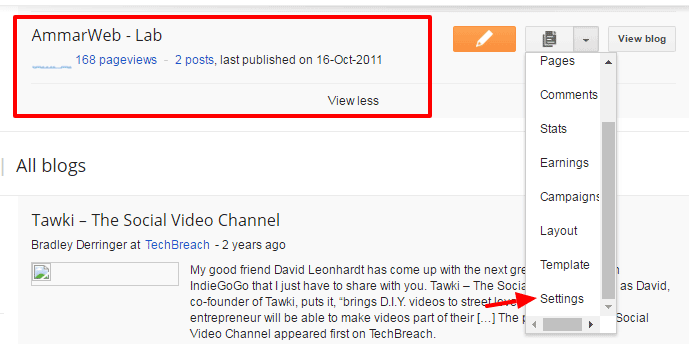
Step 2: Choose the blog that you want to delete and click the down arrow button as shown in picture.
Step 3: Click on setting button and choose “Other” located at the left side.
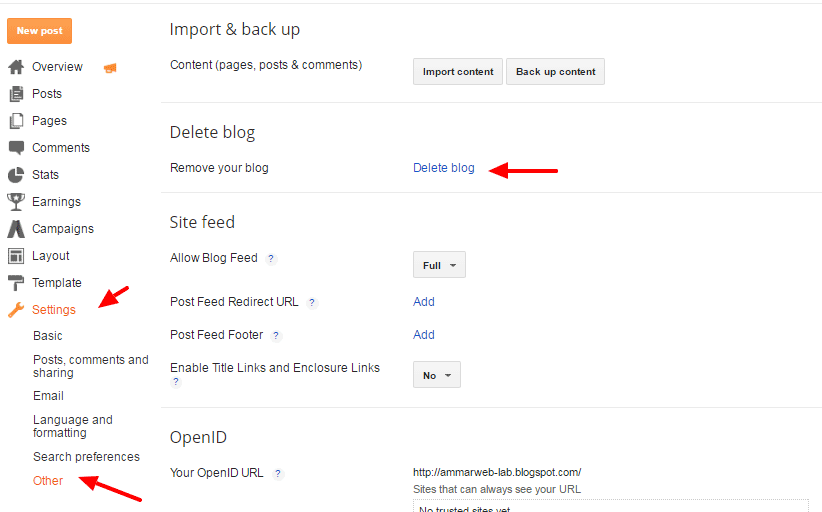
Step 5: Click on “delete blog” and this window will pop up.
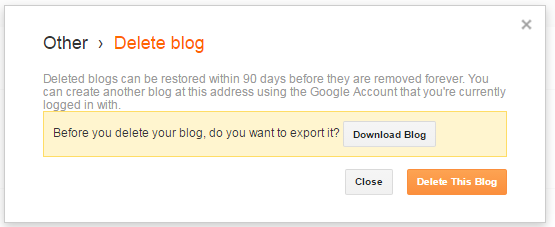
Step 6: It’s highly recommended download your blog first just in case you decide to move back. Once you’re done click on “Delete this blog”
Now your blogger blog will be deleted. Here’s what you’ll get in your blogger homepage.
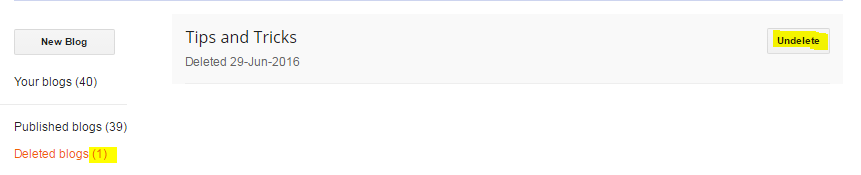
You’ll find the list of all your deleted blog over there. You will have 90 days to restore your blog and if you don’t do that it will be removed completely.
Frequently asked questions
Here are some of the most frequently asked questions that I come across on different forums so I decided to write all of them over here to help you out.
Q: How to delete my blogger account permanently after deleting my blog?
You can’t. You need to understand that your blogger account is associated with the Google account and Gmail. You just can’t separate blogger from Google account. Hence, a blogger account can’t be deleted without deleting your gmail account.
If you still want to delete your blogger account permanently simply close your Google account but be careful before taking this final decision.
Q: How to delete blogger blog without logging in?
First thing would be to recover your account if possible. If you don’t remember password then recover your email address from Google accounts.
If nothing works, simply submit the request to Google and they’ll verify if you are the sole owner of the blog and will solve your issue.
Q: How can I delete my blog when I don’t remember my email or can’t log in?
If you created a blog with an old unknown email and you forgot it. There is no way to gain access to your get blog back. Unfortunately, blogger support does not help in solving ownership issues.
Conclusion
Deleting a blogger blog is easier than you think. However, things might get worse when you forget login details or have no access to your Gmail account.
What was the last time you deleted your blogger blog? Was it easy? Is there’s anything I missed in this post, feel free to let me know in comments.

I have seven blogs with my Google account.
I deleted six blogs in my account.
All were deleted by me in the way you described.
When it came to the seventh blog there was no longer any ‘Other’ option on my Settings menu.
That setting had vanished.
How to delete the last blog?
Hi Ammar,
Thank You for this short and useful tip, after 90 days will you never able to get your old blog back. I mean I have some graphics files on my old blog and need them for new one. I deleted it last year and now, its gone.
If you can somehow find the way please let me know.
Thank You
Mr Ali you are a very bright blogger i have the whole of this article, it is very educative and the procedure are easy to follow and understand even the tecnical questions are all explained too otherwise thank you so much.