• Skip to primary navigation
  • Skip to main content
  • Skip to primary sidebar
  • Skip to footer
logo

All Blogging Tips

Everything About Blogging

  • Home
  • Start a Blog
  • Grow Your Blog
  • About
  • Contact
  • Tools I Use

Search Results for: ai

Stylish & Cute Subscription Form Widget For Blogs

By Ammar Ali 23 Comments

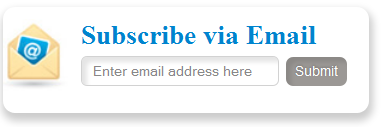
subscribe box v1 demo abtMost of peoples want simple, clean yet Stylish and Cute Subscription Form for their WordPress and Blogger/blogspot Blogs. Today we came with Stylish and Cute Subscription Form Widget  For Blogs , Easy to edit subscription form dozed with new CSS effects. This widget will keep your sidebar neat and clean and will surely attract visitors to subscribe. Follow following steps to add this Stylish and Cute Subscription Form Widget to WordPress and Blogspot

 Tip: Copy the code given below and paste it inside this editor to see a live demo.

Live Demo

Adding Stylish and Cute Subscription Form Widget

You just need to place a code to your blog widget Follow following steps to add Stylish and Cute Subscription Form Widget to WordPress and Blogger.

Adding To Blogger

  1. Go to Design > Page Elements.
  2. Click Add A Gadget.
  3. In Add A Gadget window, select HTML/Javascript .
  4. Copy the code below and paste it inside the content box.
  5. Save the gadget.
  6. Drag the gadget and reposition it under Blog Posts gadget.
  7. Click Save button (top right hand corner).

Adding To WordPress

  1. Go to Dashboard > Appearance > Widgets > Available Widgets.
  2. Drag Text widget into a sidebar.
  3. Paste in the code.
  4. Save.
Note: If This widget is not working on you blogspot and wordpress blogs then download this code  and place it as a widget nstead of give below.
 <style>
.abt-email{
background:url(https://lh3.googleusercontent.com/-3mMr7bVkJEA/T2mKAcZEBkI/AAAAAAAAAZI/IWMC_nG_foU/h120/service-email.jpg) no-repeat -8px 10px ;
width:240px;
padding:10px 0 0 65px;
float:left;
font-size:1.2em;
font-weight:bold;
margin:0 0 10px 0;
color:#0084CE;
box-shadow: 1px 1px 5px 1px #eee;
-moz-border-radius:10px;
-webkit-border-radius:10px;
border-radius:10px;
}

.abt-emailsubmit{
background:#9B9895;
cursor:pointer;
color:#fff;
border:none;
padding:4.4px;
text-shadow:0 -1px 1px rgba(0,0,0,0.25);
-moz-border-radius:6px;
-webkit-border-radius:6px;
border-radius:6px;
font:12px sans-serif; box-shadow:inset 4px 4px 3px rgba(0,0,0,0.1);

}
.abt-emailsubmit:hover{
background:#0084CE; box-shadow:inset 8px 8px 6px rgba(0,0,0,0.1);
}
.textarea{background: #fff !important;box-shadow:inset 4px 4px 3px rgba(0,0,0,0.1);
border: 1px solid #d2d2d2;
padding: 0px 8px 0px 8px;
color: #888; font-size: 12px;
height: 25px; width: 165px;
border-radius: 5px;
-moz-border-radius: 5px;
-webkit-border-radius: 5px;
margin:0px; }

</style>

<div class='abt-email'>
Subscribe via Email
<form action="http://feedburner.google.com/fb/a/mailverify" id="feedform" method="post" target="popupwindow" onsubmit="window.open('http://feedburner.google.com/fb/a/mailverify?uri=AllBloggingTips', 'popupwindow', 'scrollbars=yes,width=550,height=520');return true">
<input gtbfieldid="3" class="textarea" name="email" onblur="if (this.value == &quot;&quot;) {this.value = &quot;Enter email address here&quot;;}" onfocus="if (this.value == &quot;Enter email address here&quot;) {this.value = &quot;&quot;;}" value="Enter email address here" type="text" />
<input type="hidden" value="AllBloggingTips" name="uri"/><input type="hidden" name="loc" value="en_US"/>
<input class="abt-emailsubmit" value="Submit" type="submit" />
</form> 

</div>

Now make these changes,

  • Now replace AllBloggingTips with your Feedburner Email Feed link. You can get it by visiting your feedburner account then navigate to Publicize and then to Email Subscriptions.
  • Replace AllBloggingTips with your feed title. It appear at the end of your feed link. In my case it is AllBloggingTips

Save your widget and view your blog to see it showcasing live! :)

That’s All!

Do let me know if you needed any help in customizing the widget.

Creating a Classroom Blog

By harpermac11 3 Comments

Creating a classroom blog is an excellent way to foster interactions among your students through online teaching. As your students read and react to the blog, their reading and writing skills will improve. They will also gain experience in communicating with one another, formulating opinions, and defending them. In addition, requiring your students to participate in a blog helps them learn about using the Internet for social interaction and networking.blogging

Setting up the Blog

There are several platforms teachers can use to create blogs, many of which are free. Some of the most popular free blogging platforms include WordPress, Blogger, and Edublogs. Make sure that the platform you choose is simple for your students to use. After you choose a platform, you can create and customize a profile for your classroom’s blog. You can also use a platform to create accounts for each student, or you can allow students to create their own accounts.

After your blog is complete, you can begin making live posts for your students to read. If you allow your students to comment on your posts, make sure that you choose options on the blogging platform that allow you to read students’ posts before they go live. Taking this precaution will help prevent inappropriate comments. In addition, instruct your students to use only their first initial and last name when making their posts. Students should never give out personally identifiable information on the Internet.

Technical Concerns

Because you are making posts for students to read, you need to make them as easy to follow as possible. Align all of your writing to the left of the page. Left-aligned text is easier to read than centered text. You should also use paragraphs and subheadings whenever possible. Subheadings and paragraphs break up your text so that students can easily digest it.

Keeping Interest

When your blog is up and running, make sure that you post often enough to keep your students coming back. However, you should not post so often that your students can’t keep up with reading and commenting. Most teachers find that posting two to three times per week is sufficient. Allow students to subscribe to your blog via email so that they know immediately about new posts.

To keep your students interested in your blog, change your themes regularly. Add some fun widgets, but try not to add so many that your students lose track of the blog’s purpose. To help students find past blog content, add a search box to your blog and teach them how to use it. End each post with a question so that students will be inspired to respond with comments. You should also make sure that you reply to the comments students make on your posts. Interacting with your students is the best way to foster their communication skills.

Blogging for Success

Creating an effective classroom blog takes time and dedication. Don’t give up if the blog doesn’t seem immediately successful, especially if your students are inexperienced in the blogging world. Continue to make your posts and encourage communication, and your classroom blog will become a valuable tool that your students can use to share and defend their ideas.


Lindsey Harper Mac is a professional writer living in the Indianapolis area. She specializes in writing guest posts on social media and education and writes on behalf of Colorado Technical University. Currently, Lindsey is completing work on her master’s degree.

Generating Income From Online Blogging

By Amrik Virdi 2 Comments

Can you really generate income nowadays without scamming your clients but from Generating Income From Online Blogging? Given the amount of over-blown offers one will discover on the web, an ambitious internet entrepreneur might question if you can find legit ways to earn money online. And surely you will find possibilities for ethically generating income online. No scams are essential.

Blogging For Money

Probably the most broadly used legit ways to earn money on the internet is your blog associated with an internet site. But to discover how you can do this ethically, one should remember exactly what a blog is.

A blog, or weblog, is definitely an internet journal through which it’s possible to communicate a person’s ideas, beliefs, and views to others. Therefore, it is mainly a communication medium, no advertising medium. So your blog should not provide the initial impression it’s simply an online billboard. Individuals will not arrived at your blog to be able to view a lot of ads. When they don’t get helpful information, or support for his or her own sights and concepts, they will not come whatsoever.

However, while you can start a blog only to share your ideas with other people, a particular type of blog is made to earn money blogging. To earn money blogging, a blogger “monetizes” the posts he’s written initially for communication reasons. As lengthy because the blogger is constantly on the offer his site visitors helpful information, the next could be legit ways to earn money online.

Sharing visitors to some website where they might buy some service or product from the blog writer’s. For example, when the blogger has written an e-book, or created a relevant video, which increases the details he normally includes on his blog, he might mention this and supply a hyperlink in which the customer can buy the e-book or video.

You can include links to sites which your blog author is definitely an affiliate.
Selling ad space on the website. To become effective at selling ad space, your blog author needs to show he’s produced enough visitors to his site to create the advertiser’s acquisition of space on that website worth the money he makes.

These could be legit methods for generating income online, although if a person will probably be a joint venture partner, he might want to take a look at the standard from the service or product he’s connecting to.

Many occasions effective professionals in off-line jobs begin using these methods simply in an effort to supplement their earnings, not to mention this really is one goal you may have. However, some writers make handsome full-time earnings using their blogs.

This is guest post by Amrik who blogs at Blogging For Money

Selecting Your Blog Design Theme

By Amrik Virdi 5 Comments

If you wish to earn money with blogs or doing blogging for money, you will find a variety of options to think about, for example: What your blog’s focus ought to be, where it ought to be located, what advertising programs you need to use, and exactly what the blog need to look like. When it comes to the feel and look of the blog, you will want to select a great blog theme. WordPress may be the top blogging service and you’ll find lot of different WordPress styles available to select from. See Also. : 6 tips to design your website like pro.

Blogging For Money

Themes for blogs could be free of charge, premium, and custom. Here are a few benefits of Selecting Your Blog Design Theme and drawbacks of three options:

Free Blog Themes

A totally free theme has got the large professional it is provided for free. But it is frequently have a couple of cons because of that $ cost. You’ll routinely have to help keep links within the footer from the site, listing the designer’s title and URL. You will also have limited options when it comes to altering the appearance and the design of your blog. You might discover that your site does not look everything unique from others because many writers opt for a totally free WordPress theme and you will find only a lot of offered out there. Another disadvantage of free options is you will not have the ability to rely on any tech support team for those who have an issue. It is a “use at the own risk” kind of factor. You can choose these free themes for your wordpress or blogger blog.

  • 40 Great Looking Best Free Blogger Templates Of 2011
  • 40 Awesome Best Free WordPress Themes 2011

Premium Blog Themes

Premium styles for WordPress include tech support team and several options. They are typically very easy to customize, too, meaning you are able to change photos and colour schemes, and simply manipulate the headers and footers. They routinely have some popular features and therefore are highly enhanced for search engines like google, which could improve your capability to easier get the blog available on search engines like google. Premium options include a fee attached and you will want to be certain you purchase from the trustworthy templates marketplace to ensure that you’re pleased with your outcomes. Below are most commonly used top premium wordpress theme providers.

  • Elegant Themes
  • WooThemes
  • Theme Junkie

Custom Blog Themes

Custom blog themes may have all you want in addition to connected support. But they are likely to include the steepest cost you’ll also find to hold back as the programmer produces the theme for you personally. You can also hire us to design your template or theme in cheap rates.

Selecting your site theme is really a personal decision. Whether you decide to go with free, custom, or premium, search for something that will assist you to increase your blog’s success. Search for simplicity of use, great looks, as well as for something which can help you achieve the goals you’ve for that blog.

AllBloggingTips Redesigned Version 2.0

By Ammar Ali 41 Comments

ABTHi all, We are very proud to announce that we redesigned out blog to meet better experience of you.  Our blog runs on Thesis Theme and is customized by me. We now comes with more cool features and design of this blog. First Check Out our new look of design v2.
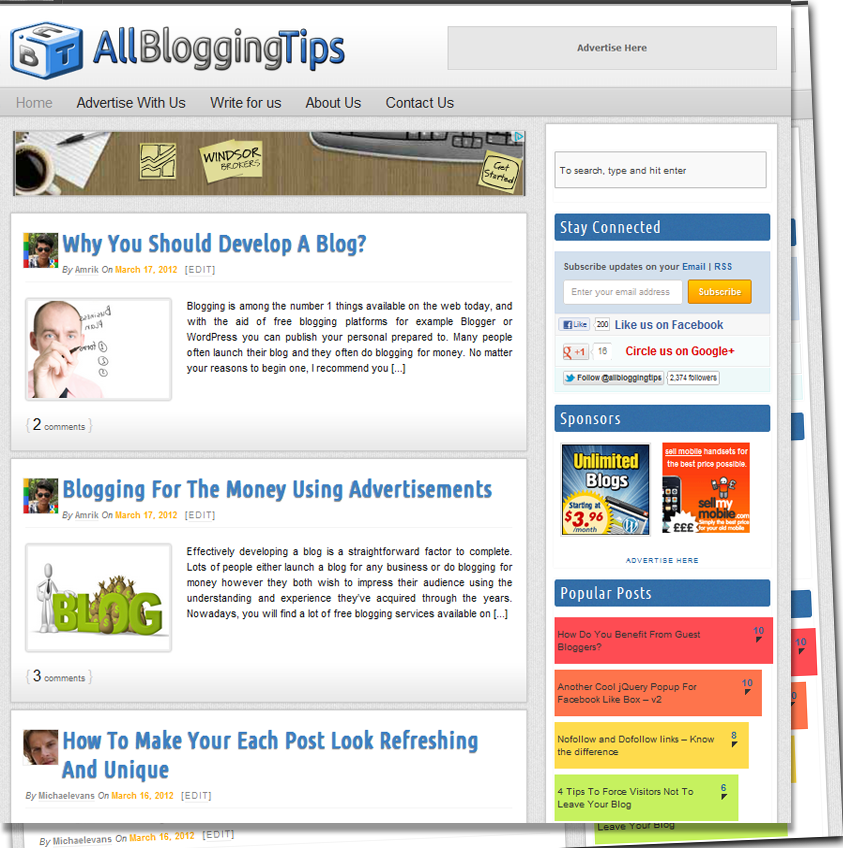
allbloggingtips new design v2 0


Features of New Design Version 2.0

This theme is coded with HTML5, CSS3 and using latest version of WordPress 3.3. Valid HTML5 markup, and also a Responsive Design. Check out some features of this new design.

  • Full Width Header and Menu Bar
  • New Logo Added and Favicon
  • Site Background with Texture
  • Post Body with new style
  • Cool Sidebar
  • Animating Footer on Hover
  • Comment Section Updated
  • Stylish Author Box
  • Related Posts with Thumbnails
  • Heading Styles with Author Avatar on Homepage
  • Top Commentators and Author Widget Added

What’s More?

 Not only above features are added we all updated some of our recent pages , widgets and much more some of them are:

  • About Us Page Updated
  • Advertise with AllBloggingTips Page Launched
  • Write For Us Page Updated
  • New Contact Form Added

 Some Numbers

Stats recorded on 18/03/2012

Number of Posts : 96
Number of Comments : 600
Fans at Facebook 200+
Twitter Followers 2440+
Alexa Rank : 64k
Pagerank : 3


This site is in Version 2.0 , and open for your Feedback. if you found any Dispute or Error, then please let me know through Comments or Contact form.

  • « Go to Previous Page
  • Page 1
  • Interim pages omitted …
  • Page 58
  • Page 59
  • Page 60
  • Page 61
  • Page 62
  • Interim pages omitted …
  • Page 70
  • Go to Next Page »

Primary Sidebar

Get Blogging & SEO Tips by Email

Get helpful blogging, SEO, and content tips delivered straight to your inbox. No spam.

Join 3,489 other subscribers

Popular Posts

  • Is Your Blog Properly Optimized for Performance and SEO?
  • 10 Powerful Ways to Become a Famous Blogger
  • Google AdSense vs Affiliate Marketing: A Simple Comparison for Beginners
  • Effective Ways to Increase Content Reach and Audience Engagement
  • 12 Things to Do Before Applying for Google AdSense
  • Are Backlinks Becoming Less Valuable in Modern SEO?
  • Step-by-Step Guide to Creating a Successful Travel Blog
  • How to Start as a Freelance Writer & Is It Worth?
  • Add Smooth Multi Level Drop-Down Menu In Blogger
  • How To Delete A Blogger Blog Permanently In 5 Minutes (+ FAQs)

Blogging Tools I Use

Over the years, I’ve tested dozens of blogging and WordPress tools. Below are the tools I personally use and recommend for blogging, performance, SEO, and monetization.

Blogging Tools I Use →

Footer

About This Site

All Blogging Tips helps beginners learn how to start, grow, and monetize blogs using WordPress. I share practical guides and honest recommendations based on real blogging experience.

Read more →

Site & Resources

  • Tools I Use
  • About
  • Advertise Here
  • Contact
  • Disclosure Policy
  • Copyright Policy
  • Privacy Policy

Start & Grow Your Blog

  • A Ridiculously Helpful Guide to Start Your Own Blog In 10 Minutes
  • How To Grow Your Blog And Build An Audience
  • How To Make Money From Your Blog
  • Cheap WordPress Hosting
  • Free WordPress Hosting

Copyright © 2026 All Blogging Tips · Powered by InMotion Hosting · WordPress · Log in