• Skip to primary navigation
  • Skip to main content
  • Skip to primary sidebar
  • Skip to footer
logo

All Blogging Tips

Everything About Blogging

  • Home
  • Start a Blog
  • Grow Your Blog
  • About
  • Contact
  • Tools I Use

Search Results for: ai

Getresponse Vs Leadpages Vs Unbounce : Landing Page Builder Comparison

By Ammar Ali 2 Comments

If you own a website and you want it to be the best, then you must have the best landing page for it. There is a number of software available in the market that will provide you with the attractive and right landing page.

To be very precise, the Getresponse Landing Page, Leadpages and Unbounce are one of their kinds of software which are highly recommended by the experts.

Why is landing page so important?

The very first face of any company or any product is its website’s landing page. In this digital era, the companies are focusing on building up the page that will define more about their services and their objective. The companies collect visitor’s information through various ways or by asking them to fill the visitor’s form.
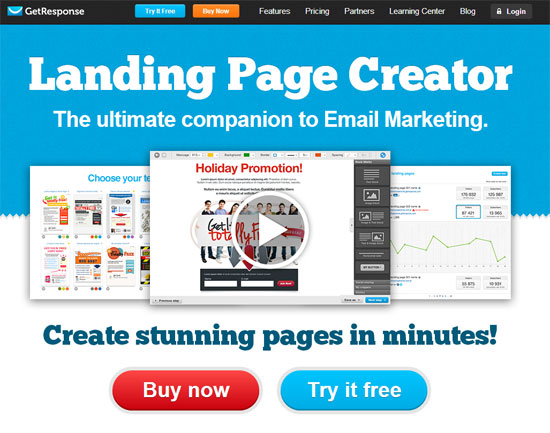
getresponse landing page

Now, how this software helps the developers and website marketers to enhance their landing pages and which one is the best, let’s take a look!

[Read more…] about Getresponse Vs Leadpages Vs Unbounce : Landing Page Builder Comparison

Quick Starter Guide to Launch a WordPress Website in 5 Minutes

After doing my research, the #1 hosting service that I found is Bluehost. It’s one and only hosting company I recommend to new bloggers. For just $3.49 a month, you can get started!

I’m also Bluehost affiliate partner, you can use this special link to get hosting for as low as $3.49 per month along with one free domain name for a year!

Why I Recommend Bluehost?

  • Outstanding customer support 24-hour via chat, email and the phone.
  • 99.9% up-time record, you can’t get any better.
  • Affordable and reliable
  • Get a domain name for FREE!
  • 30 Days Money Back Guarantee


Click here to Signup for Bluehost

Now let me guide you through the process of setting up your very own WordPress blog with bluehost.

Choose a Domain Name

You have a couple of options when it comes to registering your domain. You could either:

Register with your host (Easier)
Register with a domain provider and change your nameservers over to your host

I always recommend first option for beginners, because it’s very simple and easy.

If you choose to signup for bluehost, you can use my special link to get free domain name for a year!

www.bluehost.com/allbloggingtips

Sign up with Bluehost

Go to Bluehost and press Get Started Now:


Click here to get Special 50% OFF DISCOUNT

1-Homepage

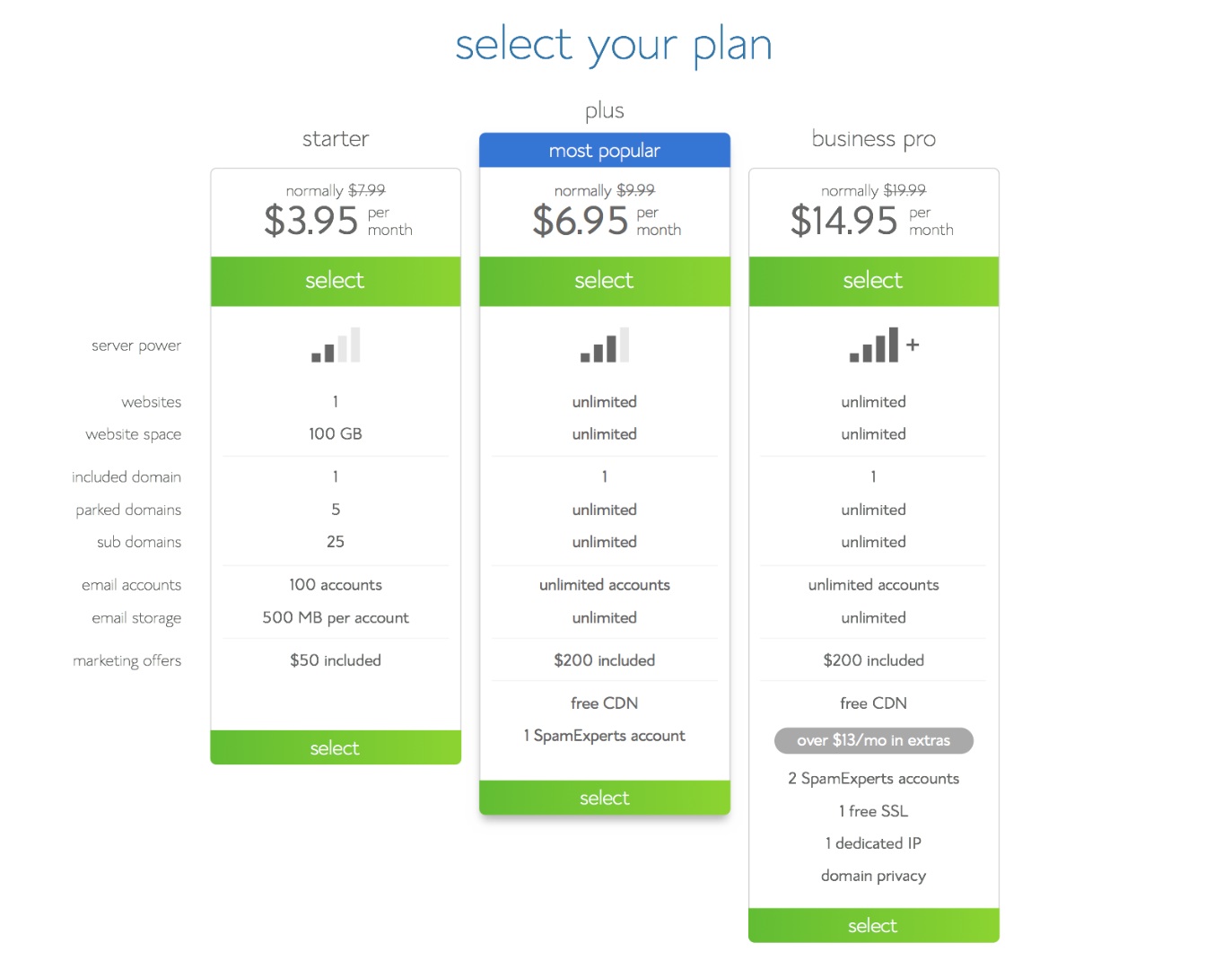
Select your plan:

If you’re just starting out, you only need the starter plan. You can always upgrade if you decide to later on.

2-Plans

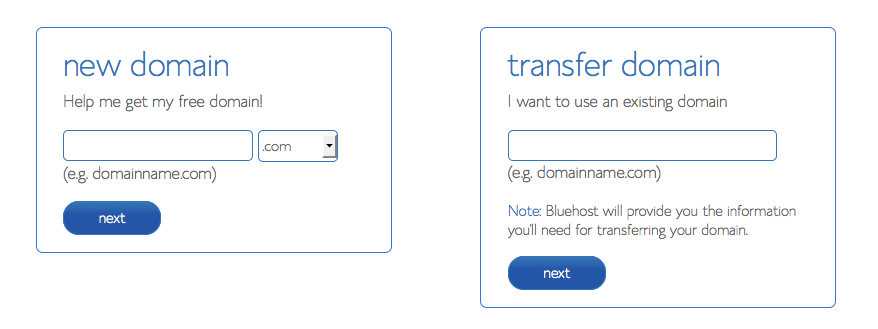
  • If you already bought your domain, type it in on the right.
  • If you’re taking advantage of FREE domain you chose to the left.

3-Domain Registartion

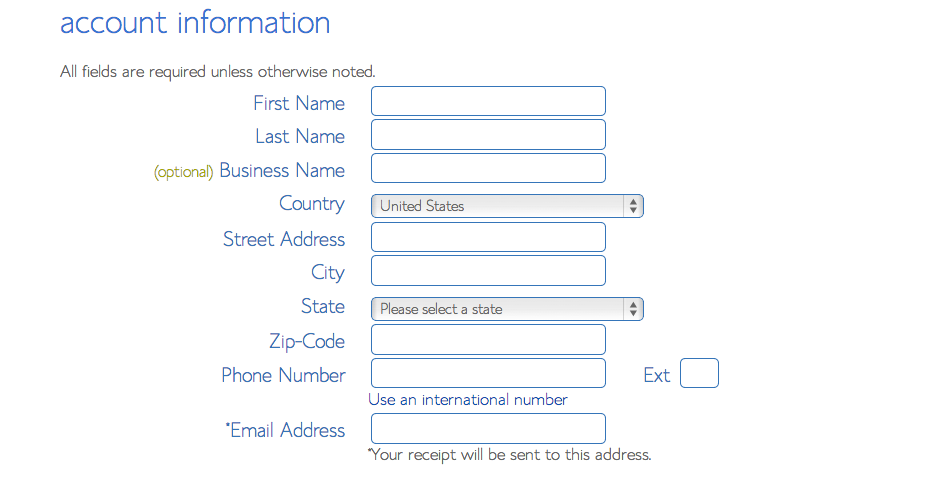
Fill out your account information:

4-Contact info

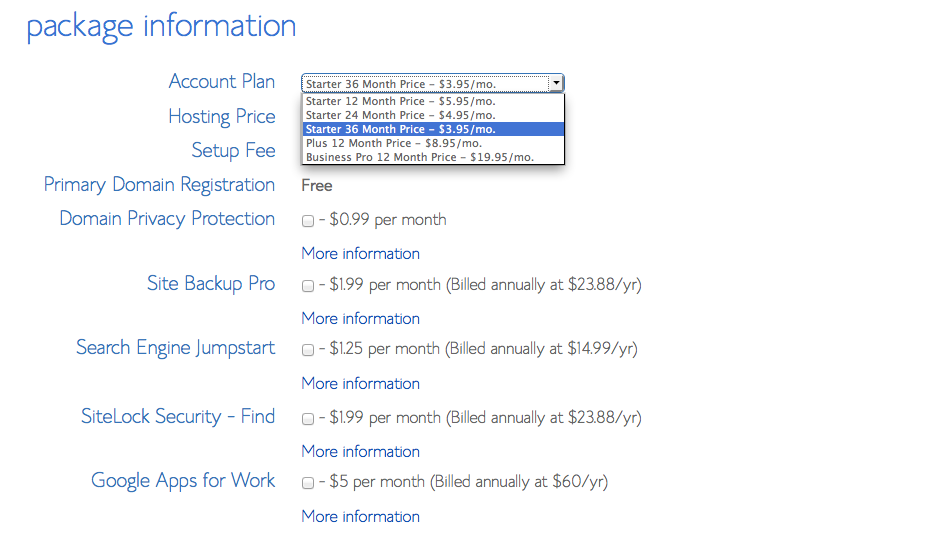
These are the checkboxes that I suggest to check off. Because you don’t really need them.

5 - Choose Plan

After you’ve choosed the package, now include your billing information and press next.

When you get your login information, login to Bluehost.

Installing WordPress

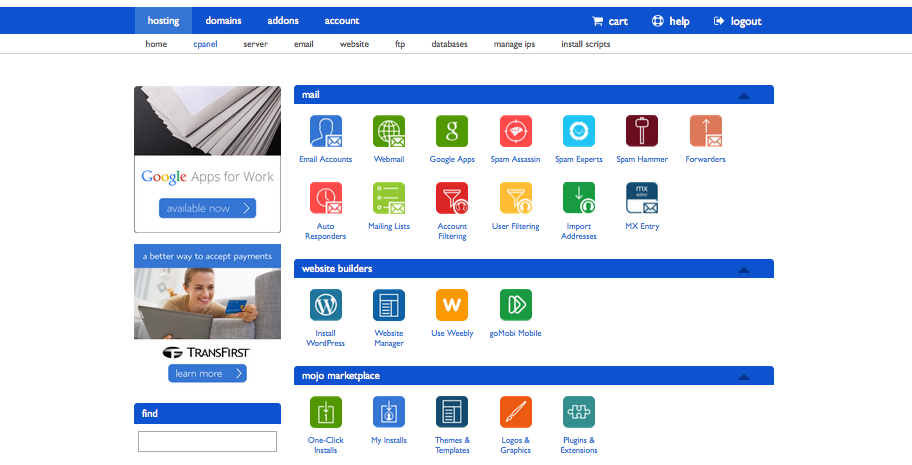
Here is what you you need to install WordPress.

6 -cPanel

Under “Website Builders”, click “Install WordPress”.

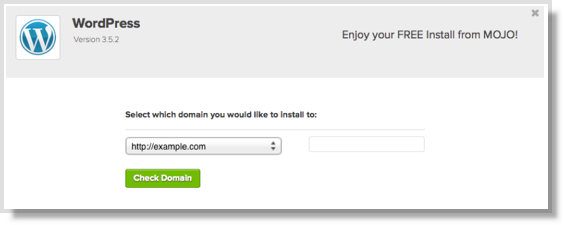
This will open a new tab or window, where you will press “install” button.

Select “Do It Yourself (FREE)” portion.

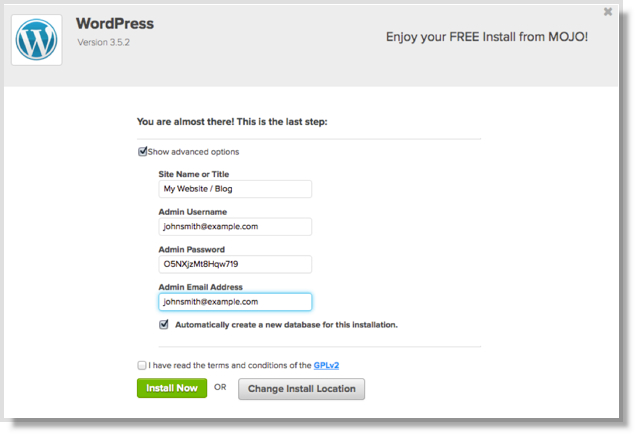
Select your domain with the dropdown list. After bluehost check the domain, it will ask you to check off the terms and conditions box.

8-Install WP

Do that, and press: Install Now.

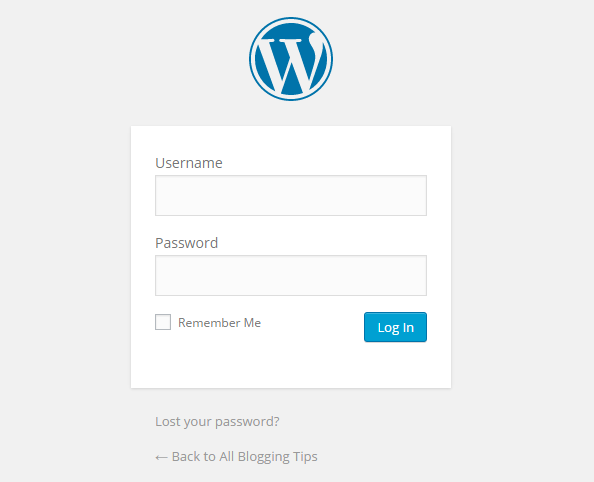
9-WP Login

You may be directed to a themes page.. Don’t buy any of them yet. You can easily find many great themes for free.

When the install is complete, press the “View Credentials” button.

Press “view” button, and click on the “Admin URL”.

Log Into WordPress

Your login URL for blog will look like this

domain.com/wp-admin

Type in your username and password and you’re logged in!

You’re looking at your WordPress Dashboard.

LOGIN SCREEN

Congratulations!

You’ve now set up your website.

5 Surprising Blog Hosting Myths Bloggers Still Believe

By Ammar Ali 5 Comments

hosting mythNew bloggers — and even some more established site owners — are often surprised at the complexities of establishing a blog and making it profitable. Those who wish to turn their blogs into a source of income often find that in order to do so, they can’t rely on the free hosting services that are so easy to use, but so limiting to real growth.
The fact is, to grow a blog, you need to self-host it, so you have the freedom to expand and increase the functionality of the site. However, if you are like many people, you probably believe some of these myths — all of which hold you back.

[Read more…] about 5 Surprising Blog Hosting Myths Bloggers Still Believe

Turn Your Blog into an Income Machine with These Quick Tips

By Rohan Ayyar 6 Comments

There was a time when a blog was something only super-nerds maintained. Getting online was tough, expensive and had not much real returns for the average Joe. The last decade has changed all of that. We’ve seen the internet go from being a curiosity to a necessity. Communication methods that we never imagined could exist are now integral parts of our lives. Most importantly, the internet has become a place where new ventures can achieve multi-billion dollar statures in a matter of months – something that most definitely was not the case a decade ago.

Here are six strategies for you to pick from and get started on building your own empire.

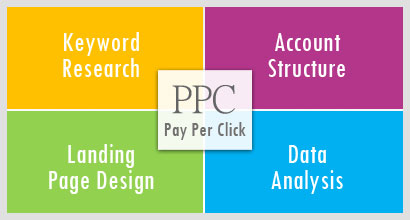
Run PPC Ads

ppc

[Read more…] about Turn Your Blog into an Income Machine with These Quick Tips

5 Unexpected Ways SEO + Web Design Can Give You Better Results

By Ammar Ali 3 Comments

SEO WEB DESIGNWhen SEO and web design are worked on in silos, it can lead to the duplication of work and potential development issues that may negatively impact the SEO performance of the website. Both SEO and web design need to work in collaboration like two peas in a pod. If one is to compare a synergised SEO & web design strategy to formula one racing, web designers would be the engineers and the SEO team would be in the driving seat aiming to get pole position.

Experienced SEO companies work closely with web design teams to ensure that the process continues to develop value with the company’s long-term SEO strategy, while aiming to reduce any potential SEO threats during the build and any additional work that could duplicate costs. Below are a few considerations to keep in mind when synergising both SEO and web design activities.

[Read more…] about 5 Unexpected Ways SEO + Web Design Can Give You Better Results

  • « Go to Previous Page
  • Page 1
  • Interim pages omitted …
  • Page 11
  • Page 12
  • Page 13
  • Page 14
  • Page 15
  • Interim pages omitted …
  • Page 70
  • Go to Next Page »

Primary Sidebar

Get Blogging & SEO Tips by Email

Get helpful blogging, SEO, and content tips delivered straight to your inbox. No spam.

Join 3,489 other subscribers

Popular Posts

  • Is Your Blog Properly Optimized for Performance and SEO?
  • 10 Powerful Ways to Become a Famous Blogger
  • Google AdSense vs Affiliate Marketing: A Simple Comparison for Beginners
  • Effective Ways to Increase Content Reach and Audience Engagement
  • 12 Things to Do Before Applying for Google AdSense
  • Are Backlinks Becoming Less Valuable in Modern SEO?
  • Step-by-Step Guide to Creating a Successful Travel Blog
  • How to Start as a Freelance Writer & Is It Worth?
  • Add Smooth Multi Level Drop-Down Menu In Blogger
  • How To Delete A Blogger Blog Permanently In 5 Minutes (+ FAQs)

Blogging Tools I Use

Over the years, I’ve tested dozens of blogging and WordPress tools. Below are the tools I personally use and recommend for blogging, performance, SEO, and monetization.

Blogging Tools I Use →

Footer

About This Site

All Blogging Tips helps beginners learn how to start, grow, and monetize blogs using WordPress. I share practical guides and honest recommendations based on real blogging experience.

Read more →

Site & Resources

  • Tools I Use
  • About
  • Advertise Here
  • Contact
  • Disclosure Policy
  • Copyright Policy
  • Privacy Policy

Start & Grow Your Blog

  • A Ridiculously Helpful Guide to Start Your Own Blog In 10 Minutes
  • How To Grow Your Blog And Build An Audience
  • How To Make Money From Your Blog
  • Cheap WordPress Hosting
  • Free WordPress Hosting

Copyright © 2026 All Blogging Tips · Powered by InMotion Hosting · WordPress · Log in