• Skip to primary navigation
  • Skip to main content
  • Skip to primary sidebar
  • Skip to footer
logo

All Blogging Tips

Everything About Blogging

  • Home
  • Start a Blog
  • Grow Your Blog
  • About
  • Contact
  • Tools I Use

Search Results for: ai

A Ridiculously Helpful Guide to Start Your Own Blog In 10 Minutes (Or Less)

how to start a blog

Congratulations on taking the first step to start your own blog which is ACTION.

I’ll walk you through 5 easy steps to start your own self-hosted WordPress blog in few minutes. This is an easy to follow step by step guide for you to have your own blog where you can post whatever you want.

Let’s jump in!

Step 1: Decide your domain name

The first step to starting your blog is to decide your domain name. Domain name is basically the address of your blog which people will use to visit it and similarly, web hosting is a house where your blog will be store.

Brainstorm few ideas that comes in your mind. Here are quick tips for choosing a domain name.

  • Choose short and unique domain name.
  • Make it easy to remember and say
  • Avoid using hyphens (-) or numbers in your domain as far as possible.
  • Make domain easily to remember. It’ll make blog better. This is also useful for branding your blog.

Make a list of at least 3-5 domains that you like and choose the best one. If you’re confused simply ask your friends and family for the best one and then go for it.

Step 2: Signup for Hosting

The next step is to signup for hosting for your blog.

I recommend Bluehost to host your blog because of following reasons:

  • When you signup for the first time you’ll get free domain name for the first year!
  • Bluehost provides affordable hosting and you can start your blog for just $3.49/month only
  • They have great customer support – they’re ready to help you fix any issue with your blog in few minutes through live support, email or phone.

Signup for Bluehost and get free domain

Now to get your blog up and running quickly. Go to Bluehost and click “get started”
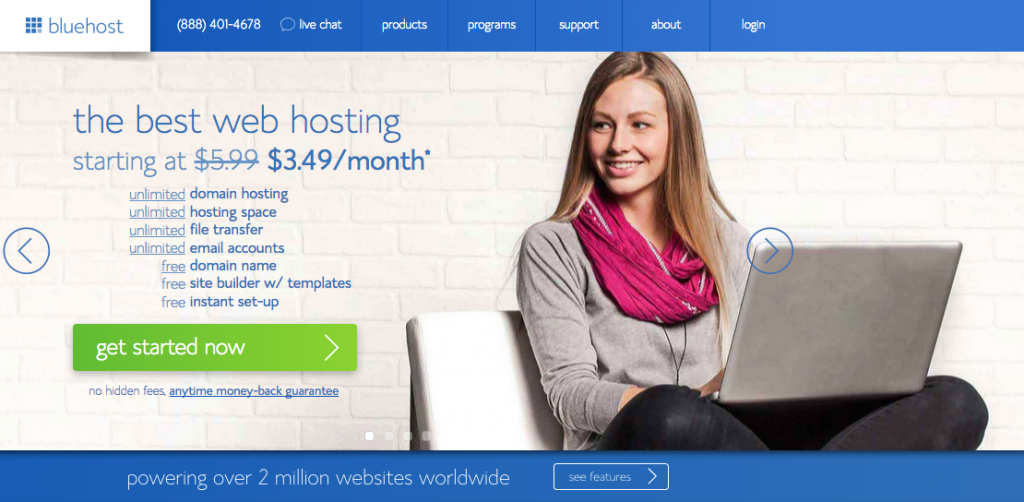
1 - get started

Select your hosting plan. I recommend Basic if you’re just starting out. You can always upgrade later if your needs change.

Enter the domain name you want to register
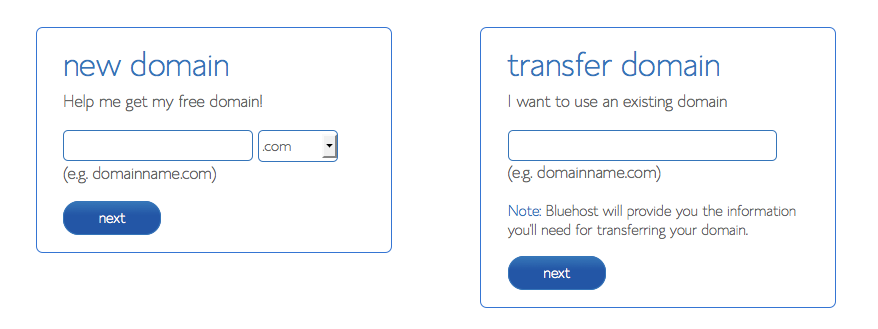
2-Domain-Registartion

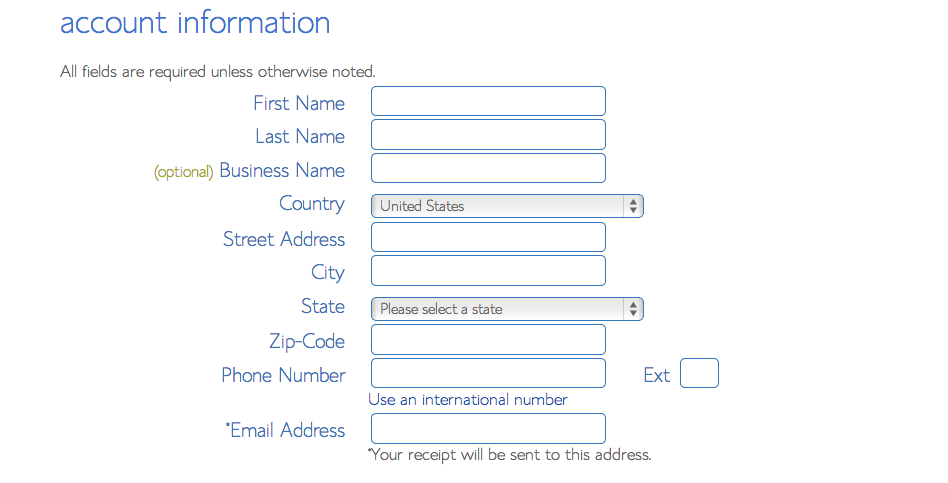
Fill out your information

3-Contact-info

Once you’ve finished, scroll down to this part:

You don’t have to select every option available there. So, remove all the checkmarks. You don’t really need any of them.
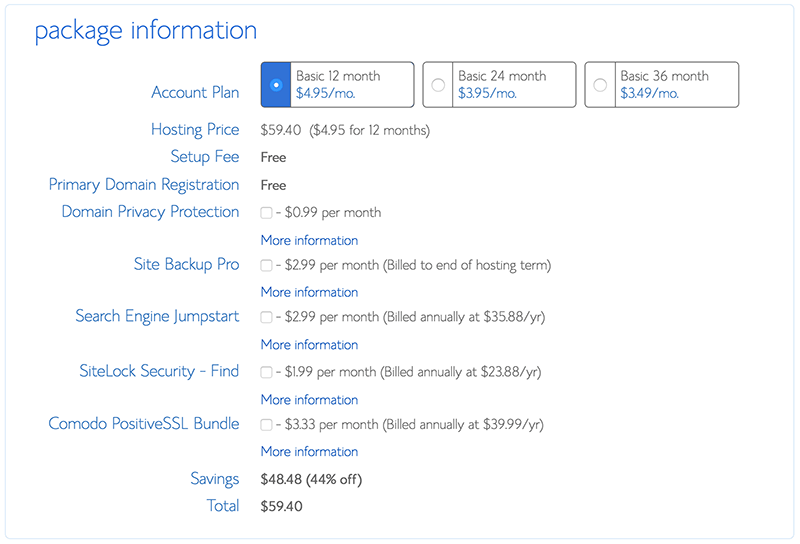
4- uncheck unwanted addon

You may want to consider checklist the Domain Privacy Protection option if you’ve more money. It’ll hide your personal information.

And..the last step is to enter your credit card information to pay.

Step 3: Installing WordPress

Under “Website Builders”, click “Install WordPress”.
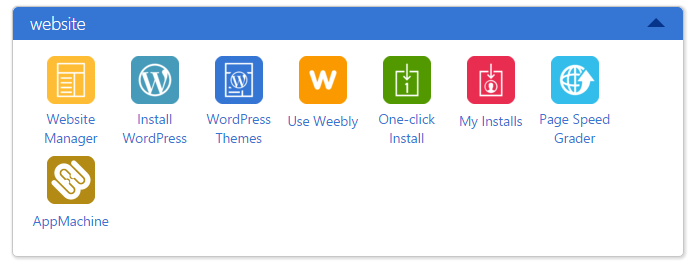
5 - install wordpress step1

Select “Do It Yourself (FREE)” portion.

This will open a new tab or window, where you will press “install” button.

6 - select WP

Select your domain with the dropdown list. After bluehost check the domain, it will ask you to check off the terms and conditions box.
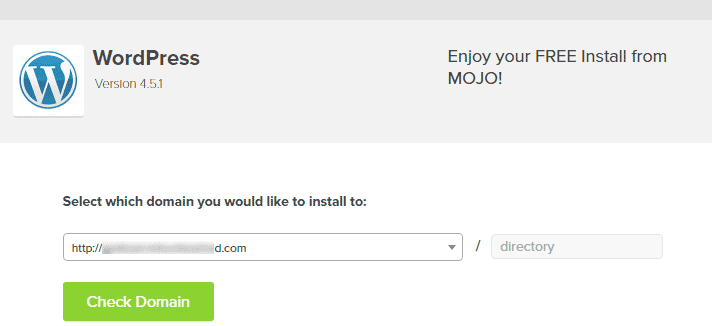
7---choose-domain

Now enter your blog title, username and password that will be used to login to your new WordPress blog.
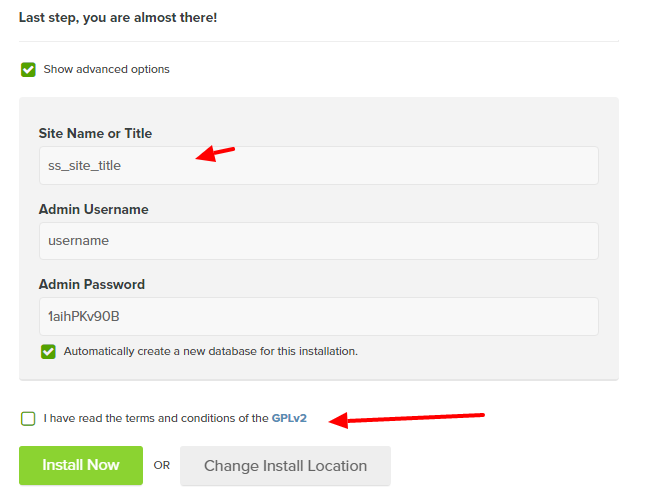
8 - laststep wp

Do that, and press: Install Now.

You may be directed to a themes page. Don’t buy any of them yet. You can easily find many great themes for free.

When the install is complete, press the “View Credentials” button.
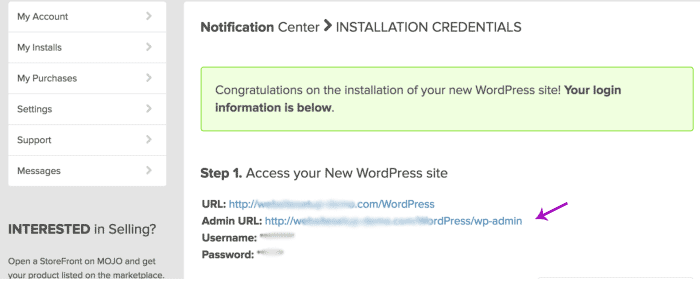
9---view-credients-wp

Press “view” button, and click on the “Admin URL”.

Step 4: Install WordPress Theme

Next thing you need to do is to install a good looking WordPress theme.

There are many free themes available for your WordPress blog and you can choose them if you are not ready to spend money on getting a premium theme and features.

Here’s how to find a free theme. Log into your WordPress dashboard and go to Appearance > Themes and now select Add New Theme option
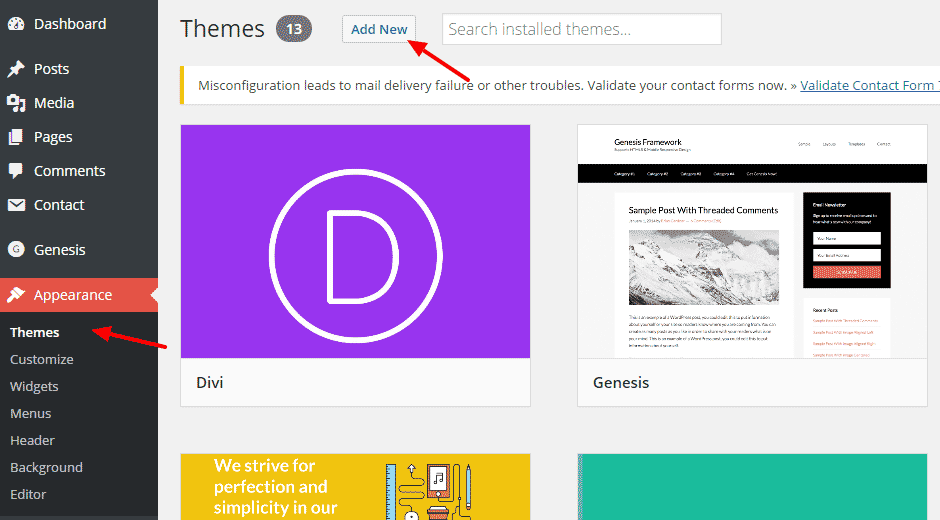
manage-themes

Click Popular button as shown below. There you’ll find many great themes simply click on anyone you like and install it.
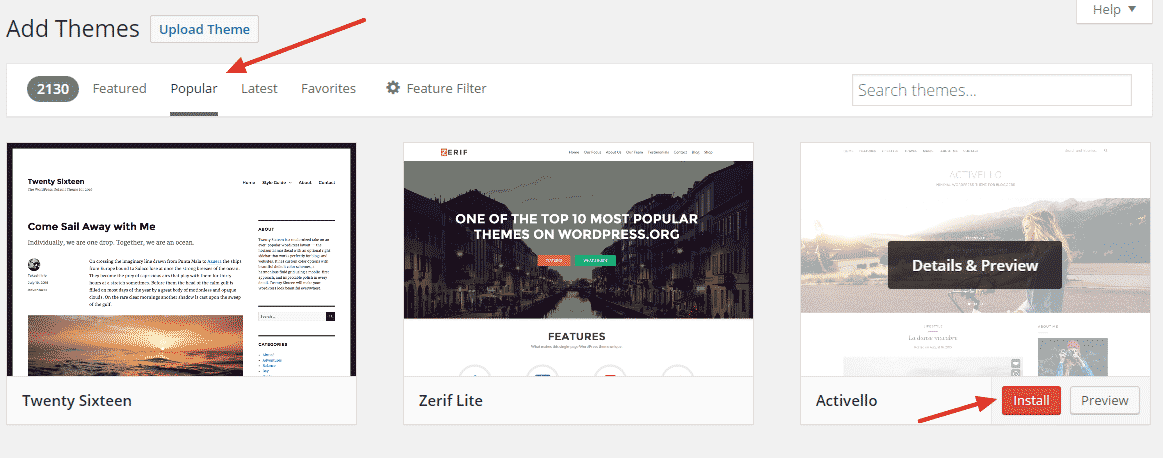
add-new-themes

You’re done!

Step 5: Publish your first blog post

Let’s publish your first post ever so you can tell your friends and family that you’ve a blog.

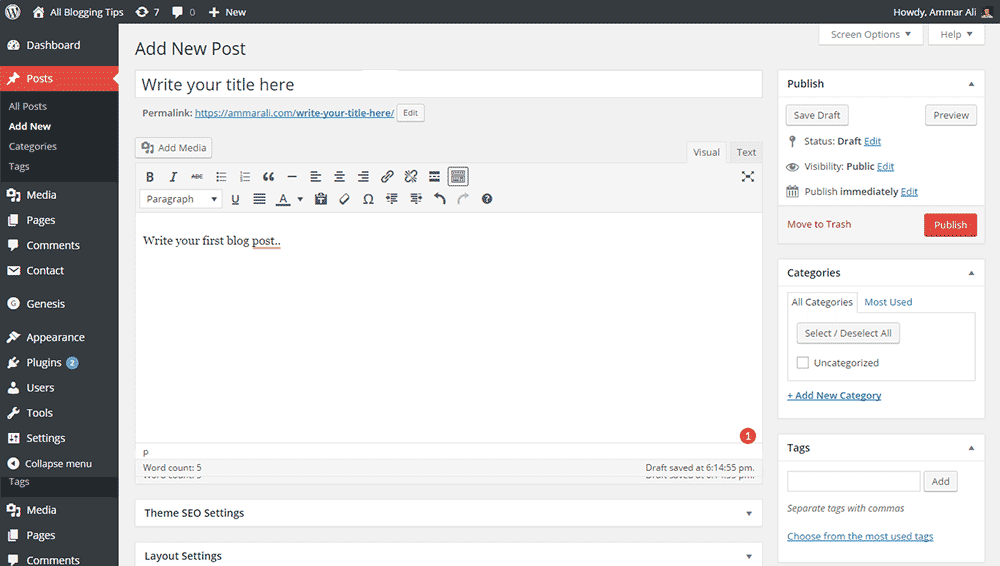
WordPress makes publishing a new blog post quite easy. Here’s a visual guide to publish your post.
publish-first-post

Click on Add New under Posts > Write your title > Write your post content > Add the tags > Choose category > Hit the publish button.

You’re done!

Congratulations on publishing your first blog post. Don’t forget to tell your friends and family about it. ;-)
Next: Grow your blog

6 Signs That Confirm It’s Time to Self-Host Your Blog

By Ammar Ali 9 Comments

signs-its-time-to-selfhost-your-blog

Most people, when they begin blogging, start with a free blog on a hosted service, like WordPress.com or Blogger. Easy-to-use and inexpensive, these services are ideal for a hobbyist or someone just testing the blogger waters.

As your blog starts to take off, though, and the audience increases, there’s a good chance that you’ll begin to see the limitations of the free platform, and wish you could do more to customize your blog and take it to the next level.

While free blogging services have many great features, they aren’t always ideal for the serious blogger. There almost inevitably comes a point when you have to ask yourself if it’s time to make a bigger investment and self-host your blog. If you aren’t sure, here are five telltale signs that it’s time to take the plunge.
[Read more…] about 6 Signs That Confirm It’s Time to Self-Host Your Blog

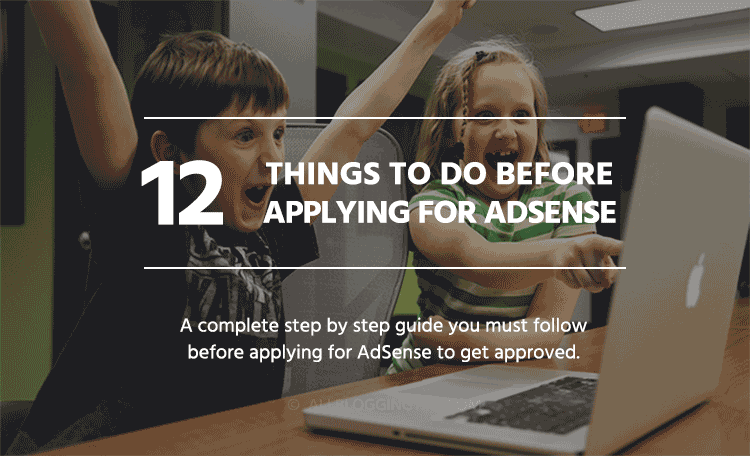
12 Things to Do Before Applying for Google AdSense

By Ammar Ali 439 Comments

↪ Updated for 2026: This article was originally published earlier and has been updated to reflect the latest Google AdSense guidelines.

Apply for Google AdSense

Are you interested in applying for Google AdSense to get approved and start making money from your blog? That’s the dream of every blogger. But wait—I need to tell you something. It’s not easy.

Google AdSense is very strict when it comes to approving new applications. Since many people try to trick the system, Google has made the approval process even harder. Don’t worry, though—you’re not alone.

In this article, I’m going to share everything you need to do before applying for the Google AdSense program so you can actually get approved.

[Read more…] about 12 Things to Do Before Applying for Google AdSense

Double Your Website Income With Infolinks Native Advertising

By Ammar Ali 11 Comments

infolinks
Making money online has never been easier since the past few years. But now, it is easy to make money online, and all you have to do is just a little effort!

You might have seen people earning money through Google AdSense, but have you ever thought there is another reliable method to earn money online? Yes, there is. You can also earn your online money from your site or blog through Infolinks.

In fact, you might agree with the statement that, the visitors dislike the advertisements while they are reading your blog. Even if they somehow find some highly exasperating web, there are chances, that the visitors won’t click on the ads. There are many reasons for lower earning of blogs, that includes, the lack of clicks per visitors, the unsatisfactory reviews of the visitors and the also the irrelevant ads.
[Read more…] about Double Your Website Income With Infolinks Native Advertising

Quick SEO Traffic Building Tips To Improve Your Blog

By Ammar Ali 20 Comments

SEO traffic tipsFor any website owner that has a blog, the dream is to build an engaged audience that leaves comments, shares the published content, regularly returns to the site and is happy to endorse or recommend the site to other users on the web. The combination of these actions amplifies a blog’s SEO visibility. Unfortunately, many bloggers struggle when it comes to building their blog traffic. SEO Agency Online Marketing Gurus have provided the following content marketing tips that will help your blog increase its organic search traffic.

Create Valuable Posts

Different bloggers have different success with long or short posts. However, the key to being successful with blogging is by delivering valuable content to your readers. Many successful bloggers have found that by producing well-researched long-form content, they were able to improve engagement on the site, reduce bounce rates, increase readership and improve their keyword reach for their posts. Ways to create valuable posts include:

[Read more…] about Quick SEO Traffic Building Tips To Improve Your Blog

  • « Go to Previous Page
  • Page 1
  • Interim pages omitted …
  • Page 9
  • Page 10
  • Page 11
  • Page 12
  • Page 13
  • Interim pages omitted …
  • Page 70
  • Go to Next Page »

Primary Sidebar

Get Blogging & SEO Tips by Email

Get helpful blogging, SEO, and content tips delivered straight to your inbox. No spam.

Join 3,489 other subscribers

Popular Posts

  • Is Your Blog Properly Optimized for Performance and SEO?
  • 10 Powerful Ways to Become a Famous Blogger
  • Google AdSense vs Affiliate Marketing: A Simple Comparison for Beginners
  • Effective Ways to Increase Content Reach and Audience Engagement
  • 12 Things to Do Before Applying for Google AdSense
  • Are Backlinks Becoming Less Valuable in Modern SEO?
  • Step-by-Step Guide to Creating a Successful Travel Blog
  • How to Start as a Freelance Writer & Is It Worth?
  • Add Smooth Multi Level Drop-Down Menu In Blogger
  • How To Delete A Blogger Blog Permanently In 5 Minutes (+ FAQs)

Blogging Tools I Use

Over the years, I’ve tested dozens of blogging and WordPress tools. Below are the tools I personally use and recommend for blogging, performance, SEO, and monetization.

Blogging Tools I Use →

Footer

About This Site

All Blogging Tips helps beginners learn how to start, grow, and monetize blogs using WordPress. I share practical guides and honest recommendations based on real blogging experience.

Read more →

Site & Resources

  • Tools I Use
  • About
  • Advertise Here
  • Contact
  • Disclosure Policy
  • Copyright Policy
  • Privacy Policy

Start & Grow Your Blog

  • A Ridiculously Helpful Guide to Start Your Own Blog In 10 Minutes
  • How To Grow Your Blog And Build An Audience
  • How To Make Money From Your Blog
  • Cheap WordPress Hosting
  • Free WordPress Hosting

Copyright © 2026 All Blogging Tips · Powered by InMotion Hosting · WordPress · Log in