
Recently we shared Stylish followers count widget for WordPress. Now its time for something new and advance. Today we came with Best Advance Social Subscription Widget for WordPress. This plugin is provided by CodeCanyon one of best marketplace that provide wordpress plugins and much more.
Right now Advance Social Subscription widget comes with 2 editions for WordPress. If you are using feedburner than 1st edition works perfect for you ;) cost is just 8$
- Advanced Social Widget FeedBurner Edition
- Advanced Social Widget – MailChimp Edition WordPress Plugin
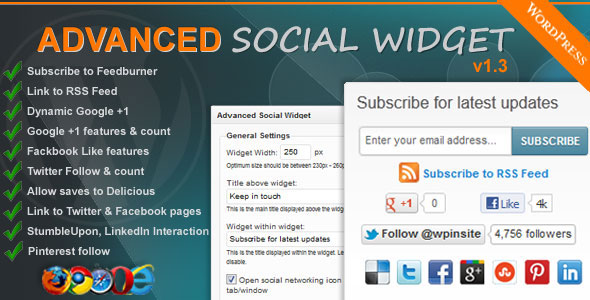
Advanced Social Widget Subscription widget FeedBurner Edition Adds an advanced widget box to your sidebar giving users the ability to link your site/blog to all popular Social Networking websites such as Delicious, Twitter, Facebook, StumbleUpon, Pinterest and awesome FeedBurner Email Subscription with easy.
Live Demo | Download | More Info
Features of Advanced Social Subscription Widget
- Highly functional dynamic widget interface
- Allow visitors to easily and effortlessly subscribe to your FeedBurner also display link to your sites RSS feed
- Dynamic Google +1 features & follower count, Facebook Like features and Like count, Twitter Follows features & follower count
- Allows you to save to Delicious. Automatically determines whether you are on homepage, category pages, single pages or other and dynamically creates the Delicious link to share
- Links to your Twitter page, Facebook page, Pinterest account and page, LinkedIn
- Open links in same window or new window with 1 click.
- Decide whether to display social networking site name under social icons or not to display it.
- Multiple widgets configurations
- Inherits CSS styles from current active theme – fonts and colors
How to Install Advanced Social Subscription Widget ?
It’s very easy. Just download widget from here (Pay 8$ ;) ) and then watch video given below!
So what you are waiting for ? Go and download this great WordPress plugin Best Advanced Social Subscription Widget for WordPress.. :) Let me know if you face any problem?

finally i got this widget in your blog. this is one of my Favorite widget.
thanks for this awesome widget bro.
Using this right now, i have disabled the most amazing and yeah common subscription box (wp mash social) for this, lets see how it goes :)
This is the best Subscription and Follow us Widget i have ever seen, Thanx for d Important Information, i will definetly use it in my Website………
Hi Ammar,
Nice post and finally I’ve chance to get rid of my old Subscription plugin. going to buy one. BTW have you written something on your Hostgator migrating? Will be waiting for you reply ;)
Very nice sharing widget! Let me know when you are going to create this for Blogger Users. :)
Now you said. So I will gonna release this soon for blogger users too ;)
This social subscription box looks more unique & clean. It will soon get popularity
hello ammar
visiting your blog for first time and i must say it is awesome. this post rocks as i was searching for a code or plugin like you have mentioned above and finally i found it. keep up the good work
Hi Prabhat,
Welcome to my blog! ;) I am glad that you like that post! Keep visiting!
i personally use wp social mash widget. it is better with more options for customizing
Looking really promising. One inclusive tool which will do everything you need.
This looks to be an awesome all in one solution for your list building and social sharing needs. I tend to like to do it by hand so I don’t need to run so many plugins – but this is a great elegant solution for a quick setup!
Hi Jason,
Welcome to my blog. ;) Nice to see you here!
Yes. That is all in one solution plugin. That’s the reason it’s name is Best Advanced Social Subscription Widget. :) I am glad you liked it!
Regards.
Hi Ammar Ali this is great, I’m a huge fan of social media so this plugin is right up my alley. I think it’s important that is also is able to connect with Mail Chimp it’s by far the best one I think. I have a local blog client here in Canada that uses it and loves it. I’m going to suggest this product for her. Thanks for sharing on Facebook. I’ll make sure to socially share it for you.
Hi Brian,
I am glad that you visited my blog and liked that plugin. Mailchimp is good. Thanks for recommending this to your friend. :)
Regards.
Nice subscription box ammar..
Thanks for sharing :)
Greetings Ammar,
Nice subscription widget the best thing of this widget is to link your site to all the popular Social Networking sites. I’ll going to visit this soon.
Thanks for put the informative efforts.
Thanks for commenting here! :)
Have a great weekend..
any for free like this, Something is needed to buy :(
Try Mashable Bar Widget It’s gud :)
Thanks for the useful tip! I have had my eyes out for a plugin that could provide this functionality for a while.
This is quite a steal. :)
nice review keep it up @ammar Ali
Hey Ammar,
You’ve brought something new here! BTW I had already looked into it some days back.. Good to see that you’ve writing reviews. And now’re posting more than before, am happy and congrats you that you got finally shifted to HostGator.
Advanced Subscription Widget can really impress our new readers, which may make them loyal reader or returning reader.. It can also improve our Bouce rate. Great!
Special Thanks for writing on it.
Hi Mairaj,
Nice to see you again here after a long time. ;) Yes, I decided to write something great that my readers actually need. I have very big plan for future for this blog. That’s reason I shifted to Hostgator Baby Plan.. :)
Thanks for commenting here!
Yeah, I didn’t visit your blog from a long time. As there were no new posts at your blog.. Was feeling much sad, to your blog.
Kindly post what we always need, not what we never need.. Little Tip: Post on FB asking what should be the next post at All Blogging Tips..
Yes, I was some busy with work like changing host that’s reason I was not posting new article. Now everything is fine. Will comes up with great content soon. :)
This is one of the best scubscription widget for wordpress easy customization for all popular social media nice review.