• Skip to primary navigation
  • Skip to main content
  • Skip to primary sidebar
  • Skip to footer
logo

All Blogging Tips

Everything About Blogging

  • Home
  • Start a Blog
  • Grow Your Blog
  • About
  • Contact
  • Tools I Use

Search Results for: ai

Show Me Your Blog Design and I’ll Show You Your Blog’s Future

By Gilbert Samuel 76 Comments

I won’t agree with you if you tell me that your blog design has nothing to do with your traffic and how you make money online.

If I should show you two houses, one with a beautiful design and the other with a rough design and voluntarily ask you to choose one out of it as a gift (I wish I could), you’ll definitely go for the one with a beautiful design.

Let’s draw this back to the aspect of blogging.

Your blog design has a great role to play; it’s the first thing to consider before thinking of writing quality content, generating traffic or making money online.

Definitely it can affect your blog in a positive way and also in a negative way, a good design attracts visitors while a bad design bids them farewell.

blog design

What are the blog designs that can affect your blog and how can you avoid them?

1. Use a simple theme

Too much of everything is bad, there’s this saying that goes thus “one man’s food is another man’s poison”. You might optimize your theme in a way that will look good to you but do you know if it looks good to your readers?

I have an idea, why not ask friends or other bloggers you’ve created connections with to check out your blog and tell you their opinion about your design.

If you get a negative answer from three different bloggers then you must make a change to your blog design. Make your blog design simple and avoid over optimization. It’ll not only make your blog look good but will also welcome visitors to your blog.

There’re many sites that provide premium WordPress Theme. But Below I’m sharing 2 top and best, affordable WordPress Club That provide great Premium WordPress Themes!

ElegantThemes – Looking for great, professional looking, elegant style wordpress themes? Elegant themes have it all. They provide great quality wordpress themes. Get 100% complete access to their entire collection of 76 themes for only $39!

Theme-Junkie – ThemeJunkie provide best wordpress Themes for very low price, Professional looking, Fast loading and great lifetime support.

2. Navigation counts

You’re building an empty desert on your blog if readers find it difficult to navigate through your blog.

I’ve received few messages from bloggers contacting me to check their blog if it’s eligible for google adsense and to my surprise, most of the blogs have no navigation at all. I managed to type “/contact” after the blog URL in order to get to the contact page, I know that’s a no-brainer.

If a visitor visits your blog, will they find it easy to contact you or know more about you? Those pages are very essential, you also need to group your blog posts into categories; this will make it easy for readers to access your blog. You can make navigations easier by placing your pages at the header and at the footer of your blog, it really counts.

3. Font types and size

Of course, you want to make your blog beautiful and attractive by using fancy fonts.

Before doing this, the question you should ask yourself is; will my readers be able to read my blog content?

If yes, then you’re safe but if no, there are two things involved. It’s either they put on a google glass for easy readability or they won’t bother stressing their eyes thereby leaving your blog. The size and type of your font matters a lot. There are fancy fonts that can slow down a blog and of course, you know we’re all in a hurry. If I should visit your blog and find out that it has a lazy load, I won’t hesitate to leave your blog. So try as much as possible and optimize your fonts for your readers and not for yourself.

blog design

4. Using multiple colors

The eyes naturally gets attracted to anything colorful but too much of it is a distraction to the eyes. The maximum number and range of color you can use on your blog is around 4 – 6 major colors, it depends on the theme of your blog. If you’re using a red theme then the background of your navigation bar and sidebar title must be red, your blog background color can be different and your footer color can be different too, making it a total of 4 colors on your blog. This makes your color a uniform and professional. Avoid multiple colors on your blog; it’s nothing but a color riot.

  • Why You Should Use Premium WordPress Themes?

Conclusion

Go back and do some architectural work on your blog, I’m sure you know how it looks like. Try to make some amendment if you fall on any of the categories mentioned above.

Remember, a bad blog design welcomes a high bounce rate and a high bounce rate can get your blog de-ranked.

I’m sure these tips are definitely incomplete; I would love to hear your view.

Have you previously fall into any of these categories? How did they affect your blog?
Boost Your Affiliate Marketing Sales With Your Landing Pages

By Joseph 19 Comments

It’s always great to generate new leads for your affiliate marketing program, but every experienced business owner knows that it’s never easy (or cheap) to attract new customers. Instead of fretting over new marketing methods to grow your customer base, you should look towards your affiliates’ existing visitors and focus on increasing conversions from that group.

One important element that you should improve upon for conversion rate optimization (CRO) is the landing page. Before you do get started, you should get in touch with your affiliates. Brief them about your plans so that they can take the necessary steps in making their content and affiliate links consistent with your enhanced landing pages.

Once you’ve communicated your intentions clearly to your affiliate network, you can begin implementing the tips you’ll read below.

optimizing landing pages


Keep Visitors Focused

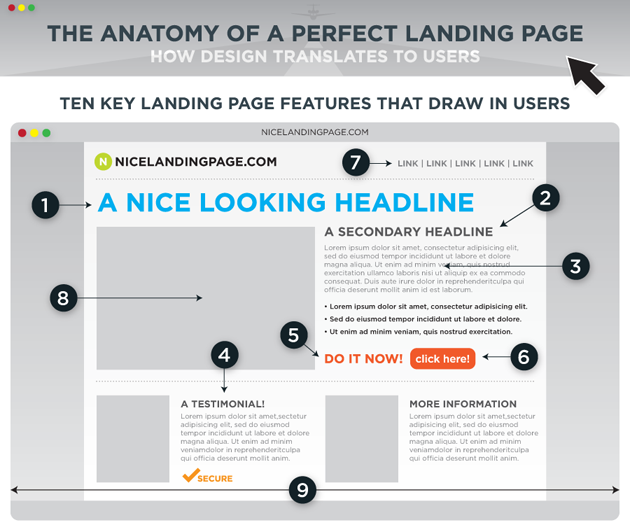
When people find their way onto your landing pages, you want their attention to be focused squarely on doing the one thing you want them to do on that page. If you want them to subscribe to a newsletter, don’t give them any links to other pages on your site or stuff a long article within the same page. Just place the form with easy-to-follow instructions.

By doing so, you place them in a mindset that has them concentrating on accomplishing one goal. They won’t be distracted by anything else that would lead them out of the page, thereby increasing your conversion rate.

  • How to Earn $50-$100 Daily with Affiliate Marketing?

Shoot Straight with Your Copy and Design

The very moment the page loads up, the visitors must know exactly what you can offer them. You have to capture their attention with a value proposition that’s both clear, useful, and of course, honest. There are many different ways of writing a compelling headline such as posing it as a question that your product/service can answer, and using the phrase “How to” in the beginning.

You can have a short summary of how your offer can help visitors. Include the biggest benefits to elaborate on your headline’s promise, keeping it to a concise bullet-points list of three to five items.

As for the overall design of the landing pages, it’s best to keep them as clutter-free as possible. Your layouts have to guide the visitor’s eyes in a way that directs them from reading the headline to the benefits and to the call-to-action button. Contrast your colors and the size of the copy with the button so that the latter stands out from the former.  Make the copy on the button specific so they know what will happen once they click on it.

Simplify the Process

The forms that you require visitors to fill out should be as simple as possible. You don’t have to get all the information from those signing-up at once. In fact, you run the risk of people not completing the conversion if you ask for every single detail in one long form. The name, the email address, and probably one phone number should suffice.

Make the labels for the input boxes clear, and they have to be aligned correctly for no confusion. Provide an example for tricky data like phone and credit card numbers, or limit the characters that can be typed in. If you really need a lot of information from the visitors, break up the form into multiple pages with a progress bar indicating where they are in the form-filling process.

It also helps if you allow them to go to previous pages without having them start over an entire page if they leave it.

Include Real Recommendations

To help overcome any worries your prospects might have about the quality of your product, ask those who’ve already tried out your offer to vouch for you through testimonials. People are more likely to trust a human face than your own marketing, so make use of your happy customers to be your brand evangelists.

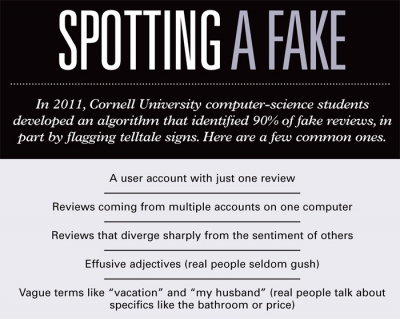
Just don’t settle for generic phrases that sound phony. Get them to write a more detailed testimonial that outlines how exactly your product benefited them, and include their business titles if possible. It would also greatly help if your business has been mentioned by mass media channels or if you’ve partnered with well-known companies. Request their permission to use their logos. Above all else, don’t be tempted to get fake reviews on your site, as that can lead to a PR disaster if you’re exposed.

avoid fake reviews

Match the Message

Quite possibly the most important thing to keep in mind when updating your landing pages is that it has to make a connection with the page where the visitors came from. It’s only logical that when you click on a link that tells you how you can make money online, the page you end up on has to provide you the way. If you get anything other than what you’re expecting, you probably wouldn’t even bother sticking around to read anything on the page.

Talk to your affiliates about where they place the affiliate links. You have to know if the content on the page linking to your landing pages prepare visitors properly for what you’ll be selling them. If you want to target specific audiences to take specific actions, start creating more landing pages that are customized to their expectations.

Conclusion

Optimizing landing pages never quite ends, as you can always find one element of your landing pages that can be tweaked to bump up your conversions. Introduce changes bit by bit so you see which parts work and which don’t, and keep on testing.

Did I missed any points? Which method you’re using to boost your affiliate marketing sales?

Images by AdAge| Formstack

How To Upgrade AdSense Hosted to Non-hosted Account

By Ammar Ali 86 Comments

upgrade adsense hosted account

The leading advertisement network Google Adsense has changed its policies for the Adsense account approval.

Earlier, getting AdSense account approved was very easy. All you needed was to apply for AdSense through Blogspot or YouTube and use it on any other websites you want.

That was a very easy process but people started misusing it. After getting AdSense approved, they started using it in low quality and spamming blogs. [Read more…] about How To Upgrade AdSense Hosted to Non-hosted Account

6 Reasons Your Guest Posts Will Be Rejected For Sure

By Efoghor Joseph 76 Comments

Probloggers and authority sites don’t hate guest posts like you may want to believe. But there are reasons your guest posts are sure to be rejected on their websites or blogs. These guys are human; they have catalogs of issues to attend – they need to attend to their teeming readers, customers, family, other businesses, and also attend social functions. So sometimes they are overworked and need time to rest.

Your guest post would go a long way at enabling these bloggers observe their siesta. They don’t have all the time in the world to do everything including writing daily posts for their blogs.

That is where you as a guest poster come in. They need rest, yet they also need to update their blogs. So who should update the blog at that time of need? It is you of course! So why think they don’t love your offer?

There are certainly some reasons your guest posts are sure to be rejected even at such time of intense need. We shall find that out later in this post.

guest posts

Why blogs accept guest posts

Blogs accepts guest posts for various reasons. They are not accepted just for the fun of it; they have a void to fill, they have a role to play, and they have needs to meet. Like I mentioned earlier, guest bloggers have workloads to take care of, hence there is need to accept guest posts on their sites. So the reasons include:

  1. Maintain regular update for their readers
  2. Provide their audience with new experience
  3. Give new bloggers opportunity to express themselves
  4. Have time to rest and attend to other pressing issues
  5. Get more traffic to their blogs

Now the question is, does it mean your post does not meet any of the afore-mentioned needs? There is certainly a reason why the blogger would gladly accept your offer because there are at least 5 needs I have identified, one of which your article should take care of.

Unfortunately, there are reasons your guest post are sure to be rejected even in the midst of problems begging to be taken care of by a guest blogger. Once we can identify these reasons, your dream of having your guest posts approved with speed on any website would come true.

Why your guest posts are always rejected?

Your offers are rejected not because the host blogger hates your face, or because you offended him sometime in the past. It is simply because they do not meet certain criteria. So note these points and fix them, and then see what happens next time you make an offer

write article

Not playing by the rules

Every blog has set rules for anybody who wishes to submit a guest article to it. The rules for blog A are different from the rules for blog B. Every guest author is expected to abide to the rules.

Why?

It is because they are the ones who are desperately in need of help. The host blogger owns the blog, pays the bills, drives traffic, built the blog reputation, etc. You are just looking for a ready-made place to help improve your blog reputation and increase traffic. So you are to play by the rules, not the other way round.

So what rules do you violate? You hardly have time to read the rules set on the blog; as such when you present your guest post, it flouts some sections of the blog’s rules. Why? You never read the rules, so there was no way to keep the rules you didn’t know of. Some bloggers don’t have the time to point this out to you. The best thing they think they should do is to dump your article in the recycle bin

Poor content

Remember the site you are approaching already has reputation. It has maintained a quality that kept its readers visiting on regular basis. The fact the site owner is busy doesn’t mean he should accept junk for his readers. It is better his site is not updated for weeks than to provide poor quality that would drive away his readers.

When you present a hastily assembled article that is laden with grammatical blunders, incoherent sentences, etc, what should you expect? That the site owner should accept it out of pity?

Of course, you should know better. To avoid this trouble, find time to write quality piece, with extensive research and reference links, and something highly informative. No blogger would ever reject quality content that should benefit his audience.

  • How To Create Awesome Content That Worth Reading

Duplicate content

There is nothing as embarrassing to a blogger than a situation where he discovers that the content submitted as a guest post on his blog has already been published elsewhere before it was submitted to him. One may find oneself hooked in this web if one doesn’t have the time to do a copyscape check on an article before publishing.

Some smart guest bloggers (so they thought) had submitted articles to me, only for me to later discover they had been published elsewhere. So one reason your guest posts are sure to be rejected is because they are duplicates. Google frowns at duplicate content; webmasters/blog owners frown at it, and even readers also frown at it.

  • Should You Copy Content From Other Blogs Without Giving Credit ?

Deception

Do you ever submit a sponsored post to a blog owner and tell him the post belongs to you? Somebody submitted one to me recently and told me to provide a link back in the body of the article to a particular website.

He said he was a content writer without a website. But I couldn’t just understand why the insistence of providing a link in the content when he said he didn’t have a website. He only tried to make me believe he was writing as a content writer on that site and that he needed exposure.

In that case, I felt a link in the Bio should do; but he insisted and I had no choice but to let him go with his article. It was obvious he was writing for an SEO site because I did a whois check on that.

If you try to lie to a blogger in order to get your sponsored post published, he would do his little research and discover the truth about the site owner and every other information he wants. The next thing is to throw away your article for trying to present a deceptive front. So try to be plain to the website owner if you are writing on behalf of a third party and leave him to make his decision. Chances are that he might publish your work if it is good enough.

Unacceptable links

Some people want to see guest post as a way of promoting their affiliate links. So, they just add links to their affiliate products or to affiliate sites they are promoting. I

f you were the blogger, what would you do?

Leave the links or bring this to his attention? Unfortunately, these are spelt out in the guest blogging rules on the “write for us” page of many of the sites. This automatically disqualifies your post.

Poor formatting

Like I mentioned at the beginning of this post, bloggers are very busy; so most of them don’t have the time to proof read your article over and over again. They don’t have the patience to begin to try to reformat the content you formatted poorly. To save their time, they just dump the article in the bin.

You can see it is not the fault of the blogger that your posts are not accepted; it is actually your fault. If you avoid those pitfalls, the blog owner would jump at your offer because it has something useful for him and his readers. But poor formatting is one of the reasons your guest posts are sure to be rejected.

  • Why You Can’t Achieve Success in Blogging Career?

Conclusion

Provide the quality a blogger wants in your content, follow the set rules, be sincere while presenting your offer and you are sure to get your guest posts published on even the best of blogs and websites.

10 Ways to Use Mind Maps to Grow Your Blog

By Chuck Frey 11 Comments

Mind mapping software is not only useful for outlining articles, reports and other forms of content. It is also a powerful tool for planning and managing many aspects your blog business.

As a blogger, you must manage a prodigious amount of information every day: content ideas social network strategies social network content, people with whom to network, monitoring competitive blogs, identifying opportunities for new reports and resources of value you can provide to your readers, identifying potential collaborators and much more.

In short, to run a successful blogging business, you must gather, analyze and make decisions about a mountain of information, ideas and opportunities. In addition, you need to elevate and differentiate your thinking and your blog’s content to capture the attention of potential readers and customers.

To do all of this effectively, you need a tool that can efficiently gather, organize, distill and communicate information with a great deal of flexibility. Mind mapping software enables you to handle thinking, planning and basic project management tasks in ways that aren’t possible with any other type of business software. It also works the way your brain does – by associating ideas, concepts and information in a visual hierarchy, which means it tends to be fairly intuitive and easy to use.

10 ways bloggers can use mind mapping software

Mind mapping software also helps you reach clarity faster on complex business issues, make better informed decisions and be more productive. In surveys of the readers of my Mind Mapping Software Blog, users of it say that it increases their productivity by 20-30% – the equivalent of gaining an extra day per work week of productive working time.

In addition, over 59% of survey respondents indicated they wouldn’t be able to create the same quality of work if they didn’t have mind mapping software.

Mind mapping software enables you to take a more strategic approach to blogging rather than just hacking away at projects haphazardly. Most importantly, it can help you develop a tightly integrated approach to build a strong, distinctive online brand. No, it’s not a panacea. It won’t make you better looking or help you find a cure for cancer. But it does bring some unique capabilities to your work that no other productivity software can match – capabilities that are ideally suited to your needs as a blogger. If you’re not using mind mapping software in your blog business, you should be.

What can you do with mind mapping software?

A-list bloggers like Chris Brogan, Darren Rowse (CopyBlogger), Chris Garrett and David Risley (Blog Marketing Academy) make it no secret that mind mapping software is their preferred power tool for thinking and planning.

Why?

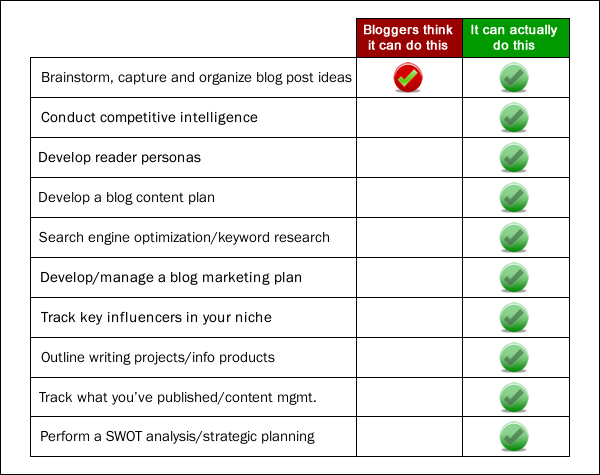
Because it helps them see information and ideas from new perspectives that tend to be invisible in linear documents and outlines. Based on what they have written about it, you would think the only way that bloggers can use it is for brainstorming blog post and information product ideas. But it can be used for far more – it’s actually a powerful tool that can help you manage your business and operations more effectively.

blogger perceptions of mind mapping software

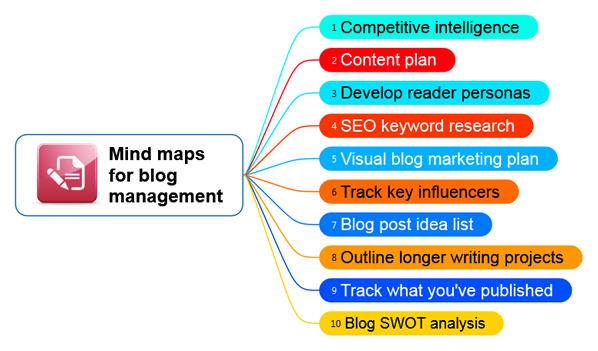
I have identified 10 ways bloggers can use mind maps to grow your business:

1.    Brainstorm, capture and organize ideas

2.    Conduct competitive intelligence

3.    Develop reader personas

4.    Develop a blog content plan

5.    Search engine optimization and keyword research

6.    Develop and manage a blog marketing plan

7.    Track key influencers in your niche and plan how you will interact with them

8.    Outline longer writing projects and information products

9.    Track what you’ve published – content management

10.    Perform a SWOT analysis and do strategic planning to help drive your blog’s growth

How does mind mapping software compare to traditional information management?

Consider for a moment how most bloggers manage information. Typically, it’s stored in text-based files, such as Word or Evernote. It’s scattered in e-mails and files that are stored in numerous folders. Chances are, you waste several hours a week hunting for information you need.

What if you could do away with that, by being able to see a higher-level view of all of your project and blog assets, and could organize them and link out to all of the supporting information you need? Mind mapping software enables you to do that. You can attach numerous types of content to individual topics, and add links to web pages and other assets. When you rearrange the topics, these assets follow along. In other words, each topic acts as a “container” for information. This enables you to centralize all the information, data and resources you need to manage your blog’s operations in one place, which can save you countless hours of time and a eliminate a great deal frustration.

Software-produced mind maps can incorporate almost any kind of digital data – everything from Excel spreadsheet ranges and Outlook e-mails to links that help you keep project files and supporting information well organized, only one click away. Think of it as a “visual database” of your ideas and information.

In addition, most mind mapping program enables you to export your visual maps to other popular file formats, such as Microsoft Word, PowerPoint and Project. This enables you to do your thinking and planning in visual outline form using your mind mapping software, and then transfer your ideas and information to other applications to continue the process of refining your ideas and adding details to them.

Now think about the way in which you write plans. If you use a popular tool like Microsoft Word, how do you know that the structure of your plan is complete? How can you tell if something is missing, or if you have completely thought through all aspects of it? How do you decide what’s superfluous and can be eliminated? It’s difficult at best. Why? Because the structure of your document is hidden within its sentences and paragraphs.

In contrast, mind mapping software can help you to see a higher-level view of your information and dig down into the details when you’re ready to do so. You can work with the forest AND the trees, so to speak. You can move topics around at will, grouping and regrouping information until it makes most sense to you. You can perform “What if?” analyses with ease. You can see how all of the pieces of your plan fit together. Ultimately, it can make you a better, more strategic planner. And that, in turn, can make a major difference to the success of your blog business.

Light-weight project management

From a project management standpoint, mind mapping software can help you do everything from the “front end” work of projects (envisioning what you want to create, setting the scope of the project and determining the people and resources you’ll need to accomplish it) to managing its implementation (collaborating with others, creating, assigning and monitoring tasks and monitoring project progress by creating a visual “dashboard” to see clearly what’s going well and what isn’t) – all within a flexible visual interface.

Better thinking – better results

In short, when it comes to growing any kind of business today, better thinking tends to lead to better results. Most of us are blogging in niches that are increasingly crowded. In order to survive and grow your blog, you need to differentiate and elevate your thinking. Mind mapping software can help you to do that.

As you’ve seen, mind maps enable you to see information and ideas from new perspectives that tend to be invisible in linear documents and outlines. It isn’t just a powerful thinking and planning tool, its light-weight project management capabilities make it a great tool for managing your ideas from “birth to death” – from ideation and development to implementation and tracking of progress and results.

In short, mind mapping software can help you to manage your day-to-day tasks with greater efficiency, which can free up more of your time to think about strategic opportunities and ideas to help you grow your blogging business.

When you switch to thinking and planning mode, it can be your companion there, too, helping you to capture, organize and refine your ideas into winning solutions that meet the needs of your blog’s readers and help you to capture their minds and hearts. It can help you to extend your thought leadership in some exciting ways and can help you build a more innovative and successful business. If you want to play at the A-level of blogging, you need to up your thinking. Mind mapping software can help you to do that.

Learn more in this webinar recording

In mid-August, I conducted a 70-minute webinar where I described how to use mind mapping software to manage each of the blog management tasks I have described in this article and the benefits of doing so. A recording of it is now available.

As part of this information-packed learning session, you will receive 11 mind map templates, which you can use to get started using these techniques immediately. They will save you many hours of time and will help you benefit from this webinar faster. Not only that, but instructions are embedded in the templates that will help you understand how  to use them.

Click here to learn why one webinar participant said, ““This is excellent. You covered everything I hoped you would – and more. In a world of useless webinars, this was definitely worth the time and money.”

  • « Go to Previous Page
  • Page 1
  • Interim pages omitted …
  • Page 25
  • Page 26
  • Page 27
  • Page 28
  • Page 29
  • Interim pages omitted …
  • Page 70
  • Go to Next Page »

Primary Sidebar

Get Blogging & SEO Tips by Email

Get helpful blogging, SEO, and content tips delivered straight to your inbox. No spam.

Join 3,489 other subscribers

Popular Posts

  • Is Your Blog Properly Optimized for Performance and SEO?
  • 10 Powerful Ways to Become a Famous Blogger
  • Google AdSense vs Affiliate Marketing: A Simple Comparison for Beginners
  • Effective Ways to Increase Content Reach and Audience Engagement
  • 12 Things to Do Before Applying for Google AdSense
  • Are Backlinks Becoming Less Valuable in Modern SEO?
  • Step-by-Step Guide to Creating a Successful Travel Blog
  • How to Start as a Freelance Writer & Is It Worth?
  • Add Smooth Multi Level Drop-Down Menu In Blogger
  • How To Delete A Blogger Blog Permanently In 5 Minutes (+ FAQs)

Blogging Tools I Use

Over the years, I’ve tested dozens of blogging and WordPress tools. Below are the tools I personally use and recommend for blogging, performance, SEO, and monetization.

Blogging Tools I Use →

Footer

About This Site

All Blogging Tips helps beginners learn how to start, grow, and monetize blogs using WordPress. I share practical guides and honest recommendations based on real blogging experience.

Read more →

Site & Resources

  • Tools I Use
  • About
  • Advertise Here
  • Contact
  • Disclosure Policy
  • Copyright Policy
  • Privacy Policy

Start & Grow Your Blog

  • A Ridiculously Helpful Guide to Start Your Own Blog In 10 Minutes
  • How To Grow Your Blog And Build An Audience
  • How To Make Money From Your Blog
  • Cheap WordPress Hosting
  • Free WordPress Hosting

Copyright © 2026 All Blogging Tips · Powered by InMotion Hosting · WordPress · Log in