• Skip to primary navigation
  • Skip to main content
  • Skip to primary sidebar
  • Skip to footer
logo

All Blogging Tips

Everything About Blogging

  • Home
  • Start a Blog
  • Grow Your Blog
  • About
  • Contact
  • Tools I Use

Search Results for: ai

HOW TO: Increase Traffic To Your Photography Blog

By Paul Santosh 11 Comments

So, you have a photography blog and you’ve been posting pictures for a long time and you’re still not getting enough traffic. The same happened to my friend. Traffic means a lot especially for blogs. It’s easy to manage a photo blog, but when it comes to traffic it may be difficult to get it. In this article I’m gonna show you how to increase traffic to your photo blog making the best use of the social networking sites.

Photography

1. Use Watermarks while sharing your pictures

One of the best way to increase traffic to your photo blog is to share your pictures with your blog URL watermark or use some text like this on the image – “For Full Size Visit This Website – [YOURBLOG].com”. You small size pictures while sharing, and tell them to visit your site for the full size images.

2. Join Photography groups on Facebook

There are many groups on Facebook for photographers, you can find them in the search bar in the Facebook homepage, then there you’ll find some posting there, send a friend request to anyone of them, and then, after he accepts the request, tell him to add you to the group. And then post your images(which should have watermarks). And then wait for a few days, you’ll see the increase traffic to your blog!

3. Pin your Images

Pinterest is the largest growing social networking site. You can drive large amounts of traffic from Pinterest, if you have good amount of followers. You may google it to find tips and tricks about how to increase followers and repins. Here are a few tips to get more followers –

  • Keep pinning regularly
  • Don’t pin only your (blog’s) images, but also keep pinning other awesome pics.
  • Comment on others images to gain exposure
  • Follow as many as you can, so that you’ll gain exposure, since they’ll see you in their notifications and may follow you back!

4. Add your images in Flickr

As you know, Flickr is one of the largest image sharing sites. Add some images in Flickr with a watermark text(make sure your blog URL, is in the watermark text.)

5. Optimize your images for search engines

SEO is the best way to increase traffic for any kinda blog. This is the same for photo blogs too. Here are few tips to optimize your images for search engines –

  1. Use keyword in file name

For example, let us think you’ve bought a new Mercedes, and you want to post that image in your photo blog, then the image with file name my-new-mercedes.jpg would get a better ranking in search engines than IMG00010.jpg
So, it’s better to use a keyword in a file name, to get a better ranking.

  2. Descriptive Alt Tags

The alt attribute describes the contents of an image file.(You can read about the importance of alt attribute in the image publishing guidelines). An image with alt attribute is market up as follows –

<img src="my-new-mercedes" alt="My New Mercedes" />

  3. SEO Friendly Images WordPress Plugin

SEO Friendly Images is a WordPress Plugin which automatically updates all images with proper alt and title attributes. It makes your SEO for images easy. Read more about this plugin here – http://wordpress.org/extend/plugins/seo-image/

You can read more about optimizing images for SEO here – http://support.google.com/webmasters/bin/answer.py?hl=en&answer=114016&ctx=sibling

Some website which increase your photo blog’s exposure –

  • Cool PhotoBlogs
  • Photo Friday.

Hope you find this article useful :)
Elegant Style Drop Down Menu With Hover Effect

By Ammar Ali 16 Comments

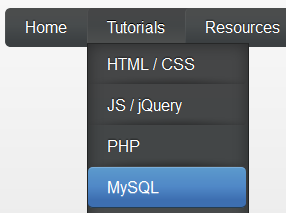
elegant style menu small iconWe already shared many drop down menus and now its time for Elegant Style Drop Down menu with smooth hover effect. This drop down menu use Css3, HTML. No Images no jquery.  It is compatible for almost all browsers like Mozilla Firefox and Google Chrome etc but the rounded corners and shadow will not be rendered properly. So without wasting anytime lets move on to create Elegant Style Drop Down Menu With Smooth Hover Effect for Blogger or WordPress..
Before we continue have a look at our other drop down menus.

  • Mac Style Menu with Search Box
  • Another CSS3 Menu V3
  • Css3 Pure Menu V2 For Blogger
  • Css3 Drop Down Menu For Blogger V1
  • Smooth Multi Level Drop Down Menu for Blogger

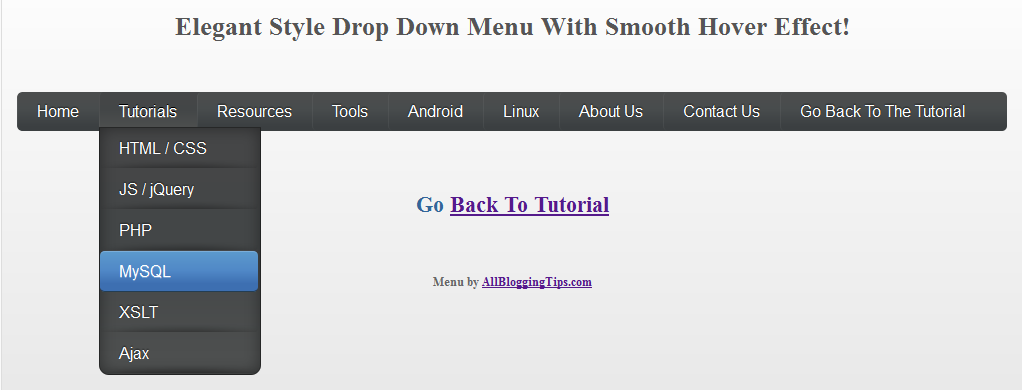
Elegant Style Drop Down Menu With Hover Effect Preview

elegant style drop down menu

Live Demo

The CSS

Below is the css of menu. You can add it to your main site css file. Like If you are using WordPress than paste CSS below in your style.css file and If you are using Blogger/Blogspot than go to Design>Edit HTML and place CSS give below just before  ]]></b:skin>


/* main and secondary top-level navigations */
#nav {
float: left;
font-family: 'Oswald', sans-serif;
-webkit-border-radius: 5px;
-moz-border-radius: 5px;
border-radius: 5px;
overflow: hidden;
width: 100%;
}

#nav ul {
margin:0;
padding:0;
list-style:none;

}

#nav ul li { -webkit-border-radius: 5px;
-moz-border-radius: 5px;
border-radius: 5px;
float:left; 

    background: url(http://4.bp.blogspot.com/-ZQjMkefe9n4/T8xGVbAMgyI/AAAAAAAAAoQ/H9ngLuwgkcc/s320/menu-link-bg.png) bottom center no-repeat;
}

#nav ul li a { 

  width: 100%;
       float: left;
    color:#fff;
    padding: 10px 19px;
    text-decoration:none;

  background:#3C4042;
     background: -webkit-gradient( linear, left bottom, left top, color-stop(0.09, rgb(59,63,65)), color-stop(0.55, rgb(72,76,77)), color-stop(0.78, rgb(75,77,77)) );
    background: -moz-linear-gradient( center bottom, rgb(59,63,65) 9%, rgb(72,76,77) 55%, rgb(75,77,77) 78% );
    background: -o-linear-gradient( center bottom, rgb(59,63,65) 9%, rgb(72,76,77) 55%, rgb(75,77,77) 78% );
    border-left: 1px solid rgba(255, 255, 255, 0.05);
        border-right: 1px solid rgba(0,0,0,0.2);
     text-shadow: 0 -1px 1px rgba(0, 0, 0, 0.6);

     -webkit-border-radius: 5px;
-moz-border-radius: 5px;
border-radius: 5px;

}

#nav ul li a:hover,
#nav ul li:hover > a {
        color: #fff;
        background:#3C4042;
    background: -webkit-gradient( linear, left bottom, left top, color-stop(0.09, rgb(77,79,79)), color-stop(0.55, rgb(67,70,71)), color-stop(0.78, rgb(69,70,71)) );
    background: -moz-linear-gradient( center bottom, rgb(77,79,79) 9%, rgb(67,70,71) 55%, rgb(69,70,71) 78% );
    background: -o-linear-gradient( center bottom, rgb(77,79,79) 9%, rgb(67,70,71) 55%, rgb(69,70,71) 78% );
        text-shadow: 0 1px 0 rgba(255, 255, 255, 0.2), 0 -1px #000;

}

#nav li ul a:hover,
#nav ul li li:hover > a  {
    color: #fff;
      background: #5C9ACD;
    background: -webkit-gradient( linear, left bottom, left top, color-stop(0.17, rgb(61,111,177)), color-stop(0.51, rgb(80,136,199)), color-stop(1, rgb(92,154,205)) );
    background: -moz-linear-gradient( center bottom, rgb(61,111,177) 17%, rgb(80,136,199) 51%, rgb(92,154,205) 100% );
    background: -o-linear-gradient( center bottom, rgb(61,111,177) 17%, rgb(80,136,199) 51%, rgb(92,154,205) 100% );
        border-bottom: 1px solid rgba(0,0,0,0.6);
        border-top: 1px solid #7BAED9;
        text-shadow: 0 1px rgba(255, 255, 255, 0.3);
}

#nav li ul {

        background:#3C4042;
        background-image: -webkit-gradient( linear, left bottom, left top, color-stop(0.09, rgb(77,79,79)), color-stop(0.55, rgb(67,70,71)), color-stop(0.78, rgb(69,70,71)) );
        background-image: -moz-linear-gradient( center bottom, rgb(77,79,79) 9%, rgb(67,70,71) 55%, rgb(69,70,71) 78% );
        background-image: -o-linear-gradient( center bottom, rgb(77,79,79) 9%, rgb(67,70,71) 55%, rgb(69,70,71) 78% );
        border-radius: 0 0 10px 10px;
        -moz-border-radius: 0 0 10px 10px;
        -webkit-border-radius: 0 0 10px 10px;
        left: -999em;
        margin: 35px 0 0;
        position: absolute;
        width: 160px;
        z-index: 9999;
        box-shadow: 0 0 15px rgba(0, 0, 0, 0.4) inset;
        -moz-box-shadow: 0 0 15px rgba(0, 0, 0, 0.4) inset;
        -webkit-box-shadow: 0 0 15px rgba(0, 0, 0, 0.4) inset;
        border: 1px solid rgba(0, 0, 0, 0.5);
}

#nav li:hover ul {
        left: auto;
}

#nav li ul a {
        background: none;
        border: 0 none;
        margin-right: 0;
        width: 120px;
        box-shadow: none;
        -moz-box-shadow: none;
        -webkit-box-shadow: none;
        border-bottom: 1px solid transparent;
        border-top: 1px solid transparent;
}

#nav li li ul {
        margin: -1px 0 0 160px;
        -webkit-border-radius: 0 6px 6px 6px;
        -moz-border-radius: 0 6px 7px 6px;
        border-radius: 0 6px 6px 6px;
        visibility:hidden;
}

#nav li li:hover ul {
        visibility:visible;
}

#nav ul ul li:last-child > a {

    -moz-border-radius:0 0 6px 6px;
    -webkit-border-radius:0 0 6px 6px;
    border-radius:0 0 6px 6px;

}

#nav ul ul ul li:first-child > a {
    -moz-border-radius:0 6px 0 0;
    -webkit-border-radius:0 6px 0 0;
    border-radius:0 6px 0 0;
}


The HTML

You can add this HTML code in any place of your site/blog. If you are using WordPress than add below HTML code in your header.php file and If you are using Blogspot than add below code in header gadget (widget)  ;)

<div id="nav">
<ul>

<li><a href="http://www.allbloggingtips.com/">Home</a></li>

 <li><a href="#">Tutorials</a>
            <ul>
                <li><a href="#">HTML / CSS</a></li>
                <li><a href="#">JS / jQuery</a>
                    <ul>
                        <li><a href="#">jQuery</a></li>
                        <li><a href="#">JS</a></li>
                    </ul>
                </li>
                <li><a href="#">PHP</a></li>
                <li><a href="#">MySQL</a></li>
                <li><a href="#">XSLT</a></li>
                <li><a href="#">Ajax</a></li>
            </ul>
        </li>
        <li><a href="#">Resources</a>
            <ul>
                <li><a href="#">By category</a>
                    <ul>
                        <li><a href="#">PHP</a></li>
                        <li><a href="#">MySQL</a></li>
                        <li><a href="#">XSLT</a></li>
                        <li><a href="#">Ajax</a></li>
                    </ul>
                </li>
                <li><a href="#">By tag name</a>
                    <ul>
                        <li><a href="#">captcha</a></li>
                        <li><a href="#">gallery</a></li>
                        <li><a href="#">animation</a></li>
                    </ul>
                </li>
            </ul>
        </li>

   <li><a href="#">Tools</a></li>
<li><a href="#">Android</a>
<ul>
<li><a href="#">Android Apps</a></li>
<li><a href="#">Android Games</a></li>
</ul>
</li>

<li><a href="#">Linux</a>
<ul>
<li><a href="#">RedHat</a></li>
<li><a href="#">CentOS</a></li>
<li><a href="#">Fedora</a></li>
<li><a href="#">Ubuntu</a></li>
<li><a href="#">Debian</a></li>
<li><a href="#">Linux Mint</a></li>
</ul>
</li>     

                  <li><a href="#">About</a></li>

<li><a href="#">Contact</a></li>

        <li><a href="#">Back To Tutorial </a></li>

</ul>
</div>


Confused or Need Help?

If you need some extra help in removing rows or columns then please feel free to post your questions. You can discus it as much with me as possible. This will help others to better understand on how to make further changes.

Credits: This Elegant Style Drop Down Menu With Smooth Hover Effect is first shared on AllBloggingTips. Bloggers are requested to link back if they are going to share above menu with there visitors.

How to Make Thesis Theme Responsive ?

By Ammar Ali 27 Comments

responsiveFinally, DIY Themes officially announced that now we can easily make thesis theme responsive with  “Responsive Skin + Child Theme Starter Set” for Thesis Theme.  All this work is done by Alex “the kid” Mangini. ;)
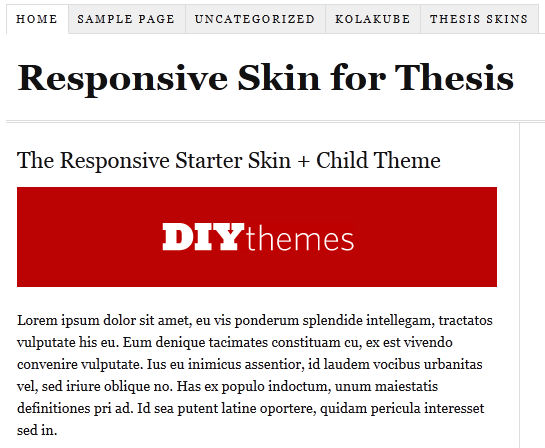
 
The starter kit is free. Here are thing which you need to make thesis theme responsive. 

  • Thesis Theme Framework (If you don’t have!)
  • Responsive Child Theme for Thesis
  • Responsive Starter Skin Set for Thesis

Some of you may be confused what is responsive design? Well, below I am writing a short info about what is responsive design!

What is responsive design?

Responsive design is, the design that will automatically adjust your website/blog/ based on width of device. You can say In the simple words, your blog will work perfectly on all the mobiles/smartphones/tablets without any mobile version WP plugin.

make thesis responsive

Now without wasting anytime. Let move on How to Make Thesis Theme Responsive ?

How to Make Thesis Theme Responsive ?

Below I am mentioning 2 simple ways you can do to make thesis theme responsive! If you are confused at any step just leave comment below :D

  • Manual Method.

Just download the thesis starter set and delete the current “ custom_functions.php ”  and  “ custom.css ” files  (remember to keep the backup of both the files in case if something went wrong ), then upload the custom_functions.php and custom.css files that you download recently from this link :) .

  • By Installing child theme easily !!

If you don’t want to manually upload the files, you can also use a child theme, instead. That won’t take much efforts from your side but it will only work with the fresh installations.

If you face any problem in installing that you are most welcome to ask any question in below comments. I will help you for sure :D

Stylish Followers Counts Widget for WordPress Using SocialBox

By Ammar Ali 8 Comments

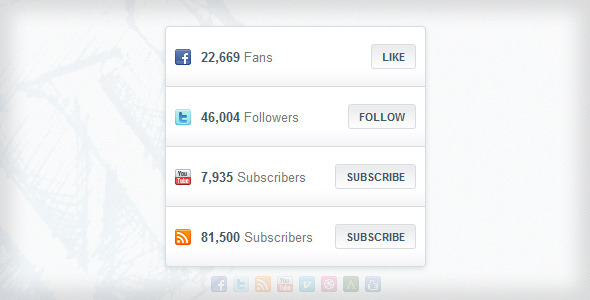
Today I was searching for good widget that adds Stylish Followers Counts Widget to wordpress and I landed to CodeCanyon.net one of the best website that provide scripts, tutorials, plugins, widgets. I chooses SocialBox Plugin for WordPress to add Stylish Followers Counts Widget with ease.

With  SocialBox Plugin for WordPress. You get an absolutely very easy to use WP Plugin that enables you to add a sleek social widget to any WordPress site or blog.  It all top social networks and displays current numbers of Counts for your Facebook Page Likes, Twitter Followers and YouTube Subscribers and Feedburner Feed Subscriptions. You can easily customize it as per your needs for just 4$ ;)

SocialBox preview

Live Demo   |   Download   |   More Info

Features of Stylish Followers Counts Widget Using SocialBox

  • Social Box Displays the number of:
    • Facebook Page Likes
    • Twitter Followers
    • YouTube and Feedburner Feed Subscribers
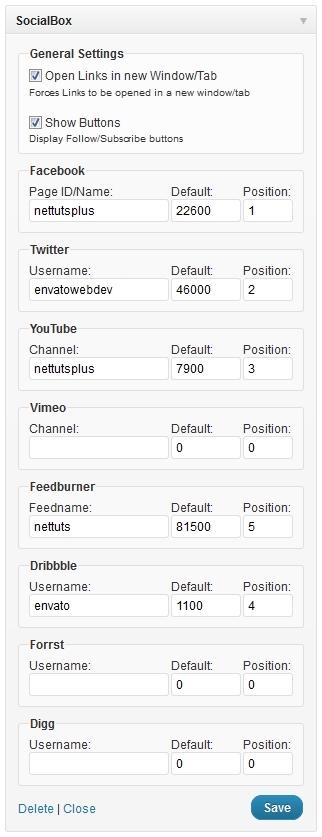
  • You can easily Rearrange and disable any of  social networks that fit your needs.

social box widget setting

  • Stylish Buttons and Look
  • Awesome Background that attract visitors
  • Automatic update notifications.
  • Full support for all major browsers like Chrome, Firefox, Internet Explorer
  • Free future updates to support even more social networks with many more additional features.

What’s More?

With social box plugin you can easily attract visitors to like your FB page, follow you and subscribe to your feed. Really easy to use plugin just for 4$ isn’t that too good ? you are getting awesome plugin just for 4$ ? :P

I personally not tried this Stylish Followers Counts Widget plugin but I am sure it will help you to increase your like, followers etc. All I can say you that you can get awesome Stylish Followers Counts Widget for WordPress Using SocialBox just for 4$.

SO what you are waiting for?  Visit SocialBox plugin page and buy it now and rock your wordpress blog. Before you go to buy make sure to use our affiliate link. So that we will get some bounce if you buy through our affiliate link. :)

Why Your Website Get Penalized by Google Penguin Update?

By deepak4466 18 Comments

google penguin updateOn April 24th Matt Cutts, the head in charge of webspam team at google announced that there will be another algorithm change to the google search engine and it will be named as google PENGUIN update.

 
Oh wait I said google search engine; yes my friend google again updated its self. But again the same question arises as it came last year during panda update. Why there was a need of a new algorithm? While the same simple answer to reduce or nullify the webspams and to make google SERP better.
 
To quote Matt’s words:

“The change will decrease rankings for sites that we believe are violating Google’s existing quality guidelines. We’ve always targeted webspam in our rankings, and this algorithm represents another improvement in our efforts to reduce webspam and promote high quality content.”

That’s the bad news for only those who use to spam google and make their blog on high SERP with specially use of black hat techniques. Black hat hummmm I don’t know whether you know about this, or not but still to explain you,
BLACK HAT SEO– this is an illegal activity which is done by most of the bloggers this technique just make any one blogs reputation up by awfully activities. Mostly it consists of keyword confusion games which mean wrong keyword stuffing, getting indexed within seconds and many more.

Yes that’s true for few days or forever this black hat techniques are stopped due to update. But again same thing goes as black hat peoples cracked panda update, there is maximum probability that they will crack down  google penguin update and remove more technique to recover them self but I personally suggest you that if you are blogging to make money wait for few days and just belief on your hard work.

Black Hat SEO

If you have started getting low search engine traffic it’s most likely that your website has penalized by google for not following guidelines of google.

As last time when Panda update took place in February 2011, the chief goal of that date was to penalize those site’s which contain poor quality content, site’s whose content doesn’t match with query. As it was a high profile update it affected the web spammers largely.

Every blogger and website owners should keep in mind that google is tracking your each and every moves. Google always tweak search engine algorithms because it’s the company which has multi bullion dollar a year business and it’s their responsibility that they make accurate and quality search result.

Mutt Cutt even says
“Google just wants to provide Search result which will enhance the experience of the users”

How Google Serves up Results to Users

Google works hard to make its search result better. Its working is quite simple it’s like a filter which filters the website according to your query. There is lots of website which contain the words which you input in search box but google knows that you won’t like to crawl on 100s of site but a user want what he wants. So the billion dollar company always works hard to make it better and valuable in minds of people.

How will google penguin update affect your sites?

For starters if you have created and maintained with solid and original with quality content articles which has been organically rising up the ranking then you won’t have much to worry.

By saying organically means the article you wrote where ranked in google and was indexed by search engine and steadily your page ranking and alexa ranking was increasing.

But if you have tried to fool google by use of short cuts and tried to rank you website above higher quality content websites with poor content, by using black hat techniques. Then there will be subsequent decrease in google page rank and traffic in few coming months.

panda and penguin update

Following are few things which would make a website to penalize.

Unnatural and excessive back-linking

You might know about Akismet Plugin if you are using wordpress, just go to administration panel of this plugin and watch out how much garbage your Akismet filters out of your comment area.

All those spam are comment are from people or from automated robots which leave comments with links going back to their site in the hope of that they will get one backlink. Sometimes that spammer cross the limit as their comment don’t even relate with the article. One more technique which spammers adopt is create an account in any famous fourm and post links of their website which is an illegal process giving the person lots of traffic and good quality backlinks. This things where previously building huge number of backlink and also increase search engine traffic. This type of tactics is now targeted more readily by google and this will be largely addressed I google penguin update.

Poorly written article which doesn’t make any sense because of worse grammar

In the effort of making any website full of content in a very short time period some people use what are known as article spinners. That is they start to recycle existing content which are already on other websites. This type of thing is an illegal activity which makes a blog without the new and fresh information and overall there is nothing new of yours. This thing is been seen by google and google is targeting such website which use article spinners and span over all SERP.

Keyword stuffing

Some of the spammers do this type of activity which refers of using unnatural placements of keyword in content. The keywords are those which rank better in SERP and when you actually read the content on website it doesn’t make any sense but its only stuffed with lots of keywords.

There is lot more things in black hat technique but this are on the top list which makes a blog to Get Penalized by Google Penguin Update. Read also : Common SEO Mistakes & Tips From Google for New Bloggers

In future when your blog will be in surveillance of google may get penalize due to such activity which you use to make you website famous in SERP. The only way to rescue from penguin beaks is to only perform White Hat SEO techniques and nothing else. If you have already harmed by penguin update then just leave a comment I will try my best to help you out.

  • « Go to Previous Page
  • Page 1
  • Interim pages omitted …
  • Page 47
  • Page 48
  • Page 49
  • Page 50
  • Page 51
  • Interim pages omitted …
  • Page 70
  • Go to Next Page »

Primary Sidebar

Get Blogging & SEO Tips by Email

Get helpful blogging, SEO, and content tips delivered straight to your inbox. No spam.

Join 3,489 other subscribers

Popular Posts

  • Is Your Blog Properly Optimized for Performance and SEO?
  • 10 Powerful Ways to Become a Famous Blogger
  • Google AdSense vs Affiliate Marketing: A Simple Comparison for Beginners
  • Effective Ways to Increase Content Reach and Audience Engagement
  • 12 Things to Do Before Applying for Google AdSense
  • Are Backlinks Becoming Less Valuable in Modern SEO?
  • Step-by-Step Guide to Creating a Successful Travel Blog
  • How to Start as a Freelance Writer & Is It Worth?
  • Add Smooth Multi Level Drop-Down Menu In Blogger
  • How To Delete A Blogger Blog Permanently In 5 Minutes (+ FAQs)

Blogging Tools I Use

Over the years, I’ve tested dozens of blogging and WordPress tools. Below are the tools I personally use and recommend for blogging, performance, SEO, and monetization.

Blogging Tools I Use →

Footer

About This Site

All Blogging Tips helps beginners learn how to start, grow, and monetize blogs using WordPress. I share practical guides and honest recommendations based on real blogging experience.

Read more →

Site & Resources

  • Tools I Use
  • About
  • Advertise Here
  • Contact
  • Disclosure Policy
  • Copyright Policy
  • Privacy Policy

Start & Grow Your Blog

  • A Ridiculously Helpful Guide to Start Your Own Blog In 10 Minutes
  • How To Grow Your Blog And Build An Audience
  • How To Make Money From Your Blog
  • Cheap WordPress Hosting
  • Free WordPress Hosting

Copyright © 2026 All Blogging Tips · Powered by InMotion Hosting · WordPress · Log in