• Skip to primary navigation
  • Skip to main content
  • Skip to primary sidebar
  • Skip to footer
logo

All Blogging Tips

Everything About Blogging

  • Home
  • Start a Blog
  • Grow Your Blog
  • About
  • Contact
  • Privacy Policy
  • Tools I Use

Criticism of Social Media

By Brianne walter Leave a Comment

As organizations take to the social media for product promotion and customer service management, there is more that the service providers need to deal with. This relates to the negative feedback or blatant criticism of an organization’s products and services. This is something which is neither unusual nor unexpected for an organization.

This is because just as a product finds favor with some; it falls short of some people’s expectations. Organizations need to be prepared to contain the damage that criticism on social media can bring about. This is because negative comments can mar the future sales prospects of a product. This is more so in the dynamic world of social media where information spreads quickly via the popular social media platforms and the latest apps including best ebook readers.

Things to do

1. Revert and pacify
Before the problem degenerates into a major hassle for the company’s PR machinery, get to the root of the problem. Assure the client of a quick look-in. Social media management requires your online customer service initiative to offer a time frame to irate consumers for resolution of the problem.

2. Offer a solution
Any issue cannot be overlooked or delayed for long. Further onslaught of criticism will stop only if the consumer is reasonably satisfied at the manner in which the issue is being handled. If a consumer continues to rant against a product despite assurances, ignore the person as someone who is out to malign a product for no apparent reason. The main concern of genuine complainants is to get the issue resolved and not to deride a product or service.

3. Post details relating to the resolution of the matter
This is important as people look for reviews and information over the web before making a purchase. Lack of appropriate information and unresolved issues can spell doom for a product’s sales.

4. Ensure that the complaints get their due share of attention
Poor service will make your clients opt for the services from your competitors. Build a strong problem resolution channel for your clients. Attend to the issues as soon as possible.

5. Portray the organization as the one that values its clients
For any organization to retain customers and to increase its client base, it is important for the organization to serve its customers in the best possible manner. This increases the trust of the consumers in the organization’s products.

Things to avoid

1. A considerable delay in attending to people’s concerns
A delay will direct your clients to your competitors. Avoid this to ensure that the organization’s revenues do not suffer.

2. Outright denial of a lapse in service
Never make claims on behalf of the organization without verifying the reported matter.

3. Do not term the criticism as invalid without making an attempt at proper evaluation
Remember that no product can satisfy all kinds of consumers. Take criticism in your stride just as you appreciate the positive feedback. Evaluate the services offered against the criticism voiced.

Attending to criticism of social media requires a detached and objective approach. Businesses thrive upon improvements and enhancements in products. These only come after market research and an attempt at doing away with the reported shortcomings of the products. Constructive criticism of products should thus be seen as an opportunity to understand the target market segment and it should be dealt with in accordance.

About the author: Brianne is a blogger by profession. She loves writing on technology. Beside this she is fond of gadgets. Recently an article on flying giants attracted her attention.

Power of The WordPress Website Design

By Sathish Arumugam 6 Comments

CMS which is also said to be the Content Management System, this is one of the most considerable tools which we should have in our website it would take care of al our website development needs. Initially in our online business we want to set it up as cost-effective one, this also includes the locating of our website as well.

  • 20 Best WordPress Plugins That I Used

Over the period we should observe that word press is the best blogging platform in the market, and it would be the most popular platform in the online hosting and content management. Whether we start a blog or the website, there are a number of CMS platform that we could pick from, but only with the word press website design we could obtain certain benefits that we do not get in the other CMS frame works.
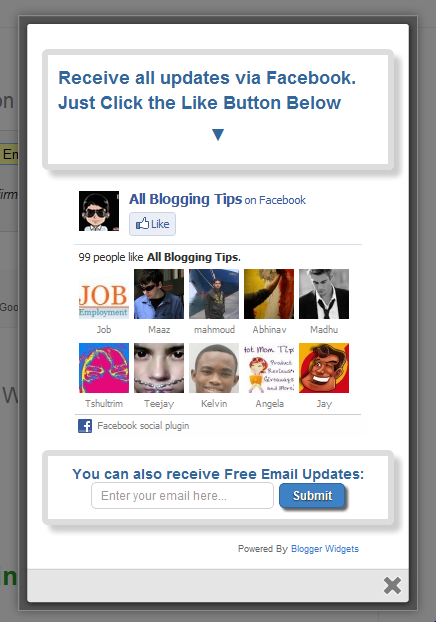
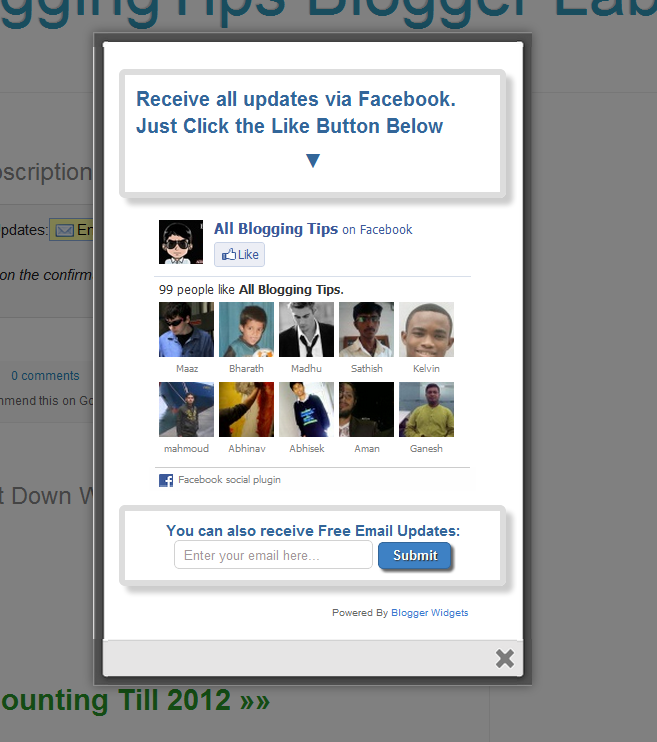
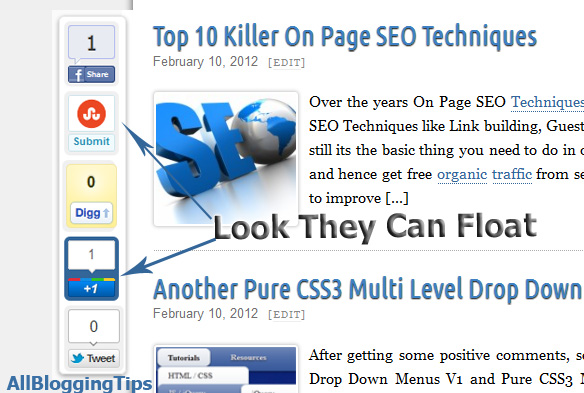
Image Source Code

The merits of the wordpress frameworks are:

  • As a laymen we would find for usual updates and changes, which are often required for blogs, nothing could make more logic than the wordpress. There is no need to have any sort of technical or the computer proficiency to take care about the updates, modifications and also the changes.
  • The most important merits of the notorious wordpress is, it is super SEO friendly. For many companies being SEO friendly is a mandatory necessity, and this is considered to be a thing which the wordpress could automatically provide.
  • We could decide on so many different wordpress themes. All these would provide our website a unique and dynamic look; there are so many custom wordpress themes that we could pick from and we could even see for ourselves, which would be the most suited for our website.
  • This would also make the work of the developers easy and fast, when we try to get to see the immediate results.
  • Along with the wordpress CMS templates building and designing websites, from scratch is no longer a problem. We could even set up our own website with ease. All we need is to pick the right developer to seek help from him.
  • The bus words with word press are Add-ons, plugins, and the themes. There are several things to choose from and the most of them are low at cost. We could have lot of varieties at the same time and it is all very low on cost, word press has just got better.

These are only the few of the advantages which we could get with wordpress, but for the great experience we not only require the best CMS framework but we also require expert, experienced, qualified and also the skilled wordpress theme designers so hope you had enjoyed Power of The WordPress Website Design. See also Tips To Design And Launch a New Website – blog.sgsmediasoft.com

Another Cool jQuery Popup For Facebook Like Box – v2

By Ammar Ali 32 Comments

jQuery Popup For Facebook Like BoxAfter our previous Cute jQuery Popup For Facebook Like Box.  We decided to release Another Cool jQuery Popup For Facebook Like Box – v2. This is a great widget to increase likes. You may see on most sites or blogs which are using Popups to increase there subscribers, fans and followers.  As soon as new visitors arrive your blog the popup will be showed to your visitors which can help you to increase likes and get more traffic from Facebook.

Check out demo below and than I show you How to Add Another Cool jQuery Popup For Facebook Like Box – v2  in Blogger or WordPress?

Live Demo

How To Another Cool jQuery Popup For Facebook Like Box – v2

I am discussing here steps for WordPress and Blogger but if you know how to deal simple HTML code then you can easily add it to your any blog too.

Adding To Blogger

  1. Go to Design > Page Elements.
  2. Click Add A Gadget.
  3. In Add A Gadget window, select HTML/Javascript .
  4. Copy the code below and paste it inside the content box.
  5. Save the gadget.
  6. Drag the gadget and reposition it under Blog Posts gadget.
  7. Click Save button (top right hand corner).

Adding To WordPress

  1. Go to Dashboard > Appearance > Widgets > Available Widgets.
  2. Drag Text widget into a sidebar.
  3. Paste in the code.
  4. Save.


Download Code Here!

Make this simple change:

  • Replace allbloggingtips with your facebook username.
  • Replace latestbloggingtips4u with your feedburner name

Are you Want the widget to appear Repeatedly

If you want to prompt the likebox every time the visitor enters your blog then simply delete this *30 from the code above.
Visit your blog to see Facebook popup. To review the widget again and again just delete your browser cookies and refresh the page to see it appearing again. That’s it a cool Facebook pop up widget that will surly increase your facebook fan count.Thanks again to MBT for the original gadget.

jQuery Popup For Facebook Like Box

Need Help?

I hope that all unanswered queries on the previous tutorial are covered in this post. If you still need help in changing colors and other stuff then you are most welcomed to post your queries below. Have a nice day pals! )

New Floating Social Media Buttons With Cool Hover Effect

By Ammar Ali 37 Comments

Today  I comes with New Floating Social Media Buttons With Cool Hover Effect. You can add floating social media buttons to WordPress and Blogger. You may have seen floating social media buttons on other website and blogs but we try to provide you some unique style widget which you never seen anywhere. I made this into a simple widget so you don’t need to go into your template or theme source just paste code below to your blog.

Only of best feature of this is a hover effect. When you hover your mouse the button comes with a cool background hover. I had included some most used social media sharing buttons like Google+, Facebook Like Buttons, Stumbleupon, Twitter and Digg. Each of them comes with a live counter.You can add more social bookmarking or sharing buttons later if you wish.


Social Media Sharing Buttons from ABT


Live Demo


Adding Floating Social Media Buttons With Cool Hover Effect

You just need to place a code to your blog widget Follow following steps to add floating social media buttons to WordPress and Blogger.

Adding To Blogger

  1. Go to Design > Page Elements.
  2. Click Add A Gadget.
  3. In Add A Gadget window, select HTML/Javascript .
  4. Copy the code below and paste it inside the content box.
  5. Save the gadget.
  6. Drag the gadget and reposition it under Blog Posts gadget.
  7. Click Save button (top right hand corner).

Adding To WordPress

  1. Go to Dashboard > Appearance > Widgets > Available Widgets.
  2. Drag Text widget into a sidebar.
  3. Paste in the code.
  4. Save.
 <!-- floating share bar Start AllBloggingTips.com-->
<style type="text/css">
.sbutton{
background:#f0f0f0;
cursor:pointer;
color:#fff;
border:none;
padding:4px;
text-shadow:0 -1px 1px rgba(0,0,0,0.25);
-moz-border-radius:6px;
-webkit-border-radius:6px;
border-radius:6px; margin-left:8px;
font:12px sans-serif;
}
.sbutton:hover{
background:#336699;
}
#pageshare {position:fixed; bottom:15%; margin-left:-81px; float:left; border-radius:5px;-moz-border-radius:5px;-webkit-border-radius:5px;background:#fff;border: 1px solid #f7f7f7; padding:0 0 2px 0;z-index:10;}
#pageshare .sbutton {float:left;clear:both;margin:5px 2px 0 5px;}
#pageshare:hover {-moz-border-radius:6px;
    -moz-box-shadow: 0 2px 4px hsla(0,0%,0%,.35);
    -webkit-box-shadow: 0 2px 4px hsla(0,0%,0%,.35);border: 1px solid #ddd;}
.fb_share_count_top {width:48px !important;}
.fb_share_count_top, .fb_share_count_inner {-moz-border-radius:3px;-webkit-border-radius:3px;}
.FBConnectButton_Small, .FBConnectButton_RTL_Small {width:49px !important; -moz-border-radius:3px;/*bs-fsmsb*/-webkit-border-radius:3px;}
.FBConnectButton_Small .FBConnectButton_Text {padding:2px 2px 3px !important;-moz-border-radius:3px;-webkit-border-radius:3px;font-size:8px;}
</style>
<div id='pageshare' title="Get this from AllBloggingTips.com">
<div class='sbutton' id='fb'>
<a name="fb_share" type="box_count" href="http://www.facebook.com/sharer.php">Share</a><script src="http://static.ak.fbcdn.net/connect.php/js/FB.Share" type="text/javascript"></script>
</div>

<div class='sbutton' id='su'>
<script src="http://www.stumbleupon.com/hostedbadge.php?s=5"></script>
</div>

<div class='sbutton' id='digg' style='margin-left:3px;width:48px'>
<script src='http://widgets.digg.com/buttons.js' type='text/javascript'></script>
<a></a>
</div>
<div class='sbutton' id='gplusone'>
<script type="text/javascript" src="https://apis.google.com/js/plusone.js"></script>
<g:plusone size="tall"></g:plusone>
</div>
<div class='sbutton' id='rt'>
<a class='twitter-share-button' data-count='vertical' href='https://twitter.com/share'>Tweet</a><script src='//platform.twitter.com/widgets.js' type='text/javascript'/></script></div><div style="clear: both;font-size: 9px;text-align:center;"></div><!-- Do not remove this link -->
</div><!-- floating share bar End -->

Credits

This New Floating Social Media Buttons With Cool Hover Effect is first shared on AllBloggingTips. Bloggers are requested to link back if they are going to share above widget with there visitors.

If you face any problem in adding this floating social media buttons feel free to drop your comments. Enjoy! Peace

10 Crucial Points To Help You Write Better Blog Posts

By Rajkumar Jonnala 1 Comment

How many times have you had killer post ideas for your blog? Tons of times, you say? So how many readers did that get your post? The problem with most bloggers is that most of them have wonderful ideas coming out of their brains at regular intervals, but when they sit down to write a post, it does not really translate into something great. We understand your frustration. This is something most bloggers feel everyday of their lives. How does one write good content? Here are 10 crucial points to remember that will help you write better blog posts.

biodegradeable-pen

  1. A lot of bloggers are guilty of ‘punching’ out their posts instead of ‘creating’  them. Yes, that’s right. It is almost as if they are under some kind of influence to write the post fast or else they will somehow miss a deadline! Don’t do that. Take time in choosing a topic that will be of interest to your niche readers. When you pick out a topic that is interesting, you have all the more chance of becoming a conversation- starter.
  1. Creating a good blog post title is very important. If you are a blogger, you can’t ignore the importance of blog post titles. It is what creates an urge in the visitors to read the whole post and it is what drives search engine results to your blog.
  1. Have a great opening line. Once a visitor has come to your blog and been interested enough to read your post, it is important that you create an opening line that will draw her in. It should be something that is interesting and which creates a desire in the reader to read the whole post.
  1. Make your blog posts matter. Just a good title and opening line will not get you far. You need to have a point that deserves a whole post being written about it. Have an opinion about something and make sure you write it.
  1. It is important that your post urges your readers to ‘do’ something. It may be as simple as asking for their opinion or something that urges them to stop indulging in corruption. Whatever it is, asking them to do something often imprints your blog to their minds.
  1. Add a certain amount of depth to each of your posts to ensure that your readers remember it.
  1. Spend time re- reading each and every post before hitting the ‘Publish’ button. Spelling and punctuation mistakes will only showcase the fact that you don’t care for your readers.
  1. If you publish your posts at the right time, it will ensure that most readers read it. Weekdays are good for publishing as a lot of people are working in their offices and often like reading new posts that come up in their readers.
  1. Promote your post in forums and other related websites.

10. Make sure you reply to comments. This will make readers feel they have added something important and they will keep coming back.

Author Bio:Rajkumar Jonnala wishes to research and find out more on desk cable management operations. His field of interest spans across wider domains and business areas. His past work experience in cable cover and cable floor cover process helps him to share the real life knowledge to his friends and readers of his blogs.

  • « Go to Previous Page
  • Page 1
  • Interim pages omitted …
  • Page 62
  • Page 63
  • Page 64
  • Page 65
  • Page 66
  • Interim pages omitted …
  • Page 72
  • Go to Next Page »

Primary Sidebar

Get Blogging & SEO Tips by Email

Get helpful blogging, SEO, and content tips delivered straight to your inbox. No spam.

Join 3,489 other subscribers

Popular Posts

  • Is Your Blog Properly Optimized for Performance and SEO?
  • 10 Powerful Ways to Become a Famous Blogger
  • Google AdSense vs Affiliate Marketing: A Simple Comparison for Beginners
  • Effective Ways to Increase Content Reach and Audience Engagement
  • 12 Things to Do Before Applying for Google AdSense
  • Are Backlinks Becoming Less Valuable in Modern SEO?
  • Step-by-Step Guide to Creating a Successful Travel Blog
  • How to Start as a Freelance Writer & Is It Worth?
  • Add Smooth Multi Level Drop-Down Menu In Blogger
  • How To Delete A Blogger Blog Permanently In 5 Minutes (+ FAQs)

Blogging Tools I Use

Over the years, I’ve tested dozens of blogging and WordPress tools. Below are the tools I personally use and recommend for blogging, performance, SEO, and monetization.

Blogging Tools I Use →

Categories

  • Announcement (12)
  • Ask The Readers (2)
  • Blogger (56)
    • Blogger Hacks (4)
    • Blogger Tips (24)
  • Blogging (108)
    • Blogging Tips (81)
    • Writing Tips (6)
  • Coupons (2)
  • Design (5)
  • Email Marketing (4)
  • Free Themes (1)
    • WordPress Themes (1)
  • Free Traffic (40)
    • Guest Blogging (7)
    • Search Engine Optimization (4)
    • Social Media (13)
  • Giveaway (16)
  • Hosting (14)
  • How To (48)
  • Latest News (1)
  • Make Money Online (37)
    • Adsense (7)
    • Affiliate Marketing (8)
  • Reviews (17)
  • SEO (46)
  • Social Media (13)
    • Facebook (5)
      • Tips and Tricks (3)
    • Twitter (2)
  • WordPress (54)
    • WordPress Plugins (17)
    • WordPress Themes (5)
    • WordPress Tricks (2)
    • WordPress Widgets (14)

Footer

About This Site

All Blogging Tips helps beginners learn how to start, grow, and monetize blogs using WordPress. I share practical guides and honest recommendations based on real blogging experience.

Read more →

Site & Resources

  • Tools I Use
  • About
  • Advertise Here
  • Contact
  • Disclosure Policy
  • Copyright Policy
  • Privacy Policy

Start & Grow Your Blog

  • A Ridiculously Helpful Guide to Start Your Own Blog In 10 Minutes
  • How To Grow Your Blog And Build An Audience
  • How To Make Money From Your Blog
  • Cheap WordPress Hosting
  • Free WordPress Hosting

Copyright © 2026 All Blogging Tips · Powered by InMotion Hosting · WordPress · Log in