• Skip to primary navigation
  • Skip to main content
  • Skip to primary sidebar
  • Skip to footer
logo

All Blogging Tips

Everything About Blogging

  • Home
  • Start a Blog
  • Grow Your Blog
  • About
  • Contact
  • Tools I Use

Search Results for: ai

Free WordPress Installation Service Worth $197

adevices
Do you need a professional WordPress blog?

But you don’t have enough time to setup up or don’t know how to install and setup WordPress?

Or, you don’t have any penny to hire someone. It’s easy to setup WordPress blog even if you don’t have knowledge about coding

But…

I admit Installing, configuring and setting up a new WordPress blog can be confusing and overwhelming.

I still remember what it felt like with my first blog. –  I wasted a lot of time fixing WordPress issues, as my blog was not properly configured, and in this process I learn how to install and configure WordPress the right way to get better ranking in search engine.

You need to know about FTP, databases and nameservers just to install it. Then you need to go through hundreds of options and settings to configure your site.

..and those plugins you’ve to research and install. Confusing?

I can help YOU with that for FREE!

I will install WordPress and configure it for optimal performance. All that for free.

Order now, sit back and relax knowing your shiny new website will be installed correctly and securely by a professional.

I want a FREE WordPress installation!


Why Am I Providing for FREE?

First of all my this service is totally FREE! I will not ask you even a penny.

This service is free only if you buy hosting from Bluehost ($2.95/m) using my special affiliate link.

Bluehost pays me a commission and that’s how I’m able to provide this free service.

That’s a win-win situation. You’ll get a professional blog setup and I’ll get small commision from Bluehost.

Why use this page to create your WordPress blog? Why not elsewhere?

One: Bluehost is giving special discount to our readers $2.95/mo (limited time offer) and I’m providing professional installation for FREE worth $197

Two: You’ll get premium WordPress theme installation. You can choose any theme from ElegantThemes  (Details below!)

Third: You’ll get 7 days free email support along with WordPress training videos. No extra fee!


What’s included?

WordPress Installation: WordPress is the most popular blogging software on the planet. I’ll install the latest version of WordPress and customize all the settings for best performance and functionality.


Permalink Structure Permalinks are important! We will configure SEO friendly permalinks to ensure that search engines will rank you on search engines.


Premium WordPress Themes: I’ve full membership of elegant themes, you can choose any theme you want from over 87 themes and I’ll install it for you. (More details below)


Plugins: Plugins can make WordPress do even more. I’ll istall some of the most popular plugins available for WordPress. (More details below)


SEO: Your website will include built-in SEO features that will help your site to rank in better results in search engines. I’ll setup best SEO plugin, create SEO friendly page titles & meta descriptions.


Social Media Integration: Everyone is on social media today, Social media can be another big source of traffic after search engine. Your website will have social media features on all blog posts so your readers can easily share your content with their friends.


Contact Form Page: I’ll setup a professional contact form with all the required fields like Name, email, subject etc. And all the emails will land directly to your inbox. You can setup your desired email in contact form.


WordPress Training eBook: WordPress is easy to learn. I’ll share with you the WordPress training video tutorials over 5+ hours and ebooks.


FREE 7 Days Support: Even after setting up your new blog, I’ll provide you free 7 days email support, So if you get stuck you can ask me directly through email.


Premium Theme Installation
showcase abt

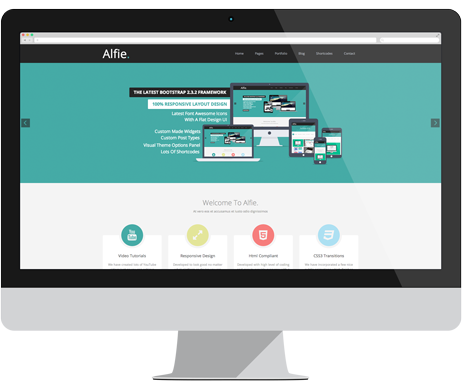
That’s the best part of my service. I provide premium theme installation.

I’ll install any theme you select from Elegant themes. I’ve full membership so you don’t have to buy.

Just let me know which theme you want through email, I’ll configure it for you. No extra charges!

This way you can see all the theme options working properly and get your website running in no time.


I’ll also install following essential plugins

  • WordPress SEO by Yoast
  • Google XML Sitemap
  • Contact Form 7
  • WordPress Super Cache
  • Jetpack
  • Akismet
  • Better WP Security
  • BackWPup
  • Google Analyticator

Order Below Before Offer ENDS!

All you need to do is to clear your browser cookies and cache. Click on Bluehost hosting link ($2.95/m) and signup for an account with them. You’ll also get FREE domain name. If you already have a domain from other registrar, you can send me domain details or change the name server.

Contact me with your website and bluehost details. I will get back to you as soon as possible to discuss about WordPress setup.

Sit back and relax. You’re website will be set up within 24 hours.

    Your Name (required)

    Your Email (required)

    Website

    Your Message


    Frequently Asked Questions

    What if I already have hosting?

    Not a problem! We can still help you but the cost is USD $97. Submit your details above and I’ll let you know how to get started.

    What if I need extra help?

    I provide 7 days email support. You can ask me any question in this time. Not only this, you’ll also get WordPress training videos.

    When will my website be ready?

    In 24 hours or less. You’ll need to give me temporary access to your web host. I’ll start installing WordPress and setting up your site as soon as you provide the necessary info. Your site will then be ready within three days.

    I’ve more questions..

    No problem, Just email with any questions you have

    Why You Are Not Able to Make Money Online Yet?

    By Tarun Jaitely 50 Comments

    Internet is now not only about playing games, surfing social networking sites and watching videos.

    Today, many people are making money online which changed the mindset of people about internet. Making money online is no more a difficult task these days but still according to reports more than 70% people fail to make money online.

    Not Making Money

    If you are one of those who are not able to Make Money Online then this post is for you. Here, I am going to share 5 reasons why you are not able to Make Money Online yet. Carry on reading to know about the reasons:

    Lack of Patience:

    Not Making Money

    In the 21st century most of the individuals are seen looking for quick results in each and every area of their lives. If you are unaware, let me tell you that making money online at a steady rate requires a lot of patience and is basically a long term benefit that can help you to reap fruits in the years to come. Many a times people kickstart their online money making journey with one activity in particular.

    However, as time passes they don’t see much funds flowing in and eventually switch to some other activity. This vicious cycle keeps continuing unless one day comes and you realize that you have goofed up big time with your online money making techniques. Hence it is absolutely crucial for you to maintain a consistent approach in order to be successful.

    Read: What to Do When Blogging Stops Working

    The “I am Always Right” Concept:

    One major reason behind a number of people failing in their online money making activity is solely because of their sky rocketing overconfidence levels. Most of the individuals who happen to be newbies in the online arena try to take a different route, instead of consciously following the masses at large. This is the first wrong step that they take, which eventually puts them into a soup.

    Most of the people instead of listening to their fellow mates and taking lessons from their mistakes, choose to do all the planning and finally end up failing badly. Hence, it is vital for each and every individual who is looking forward to venture into the online arena to do away with his or her “I am always right” concept.

    Playing Safe:

    Yet another reason that is absolutely significant as far as constantly failing online money making techniques are concerned is the fact that most of the individuals choose to settle down for activities that fall within the boundaries of their comfort zones, thus laying down restrictions on the much needed expansion and diversification plans. People try to be over cautious and thus end up venturing into self-friendly activities.

    However, it is not always possible for all the activities that fall within your comfort zone to be a successful person and help you to make money online. This is exactly why you need to lay down serious consideration on stepping out of your comfort zone and doing something distinct and extraordinary.

    Choosing the Wrong Mentor:

    Any and every time when we decide to venture into any new activity, we always look forward to tightly hold onto someone who can become just the right guide and mentor for us. This fact is true in case of venturing into online money making activities as well. It is a universal law that the follower only succeeds when he or she is being guided by an effective mentor.

    On the other hand, if you choose to be led by the wrong person, then it is quite obvious that your venture is going to be a big failure. This is exactly why you need to make a foolproof decision as far as shortlisting your mentor is concerned.

    Free is not Always Good:

    One word that happens to be an all time favorite of each one of us is nothing, but the word Free. Many a times when people are seen looking out for online money making activities they end up choosing sites that are offering something or the other for free. People are seen looking for activities that do not require any investment, but at the same time provide you with guaranteed returns.

    However, it is high time for you to realize that without any capital there are no profits. This is exactly why you need to start overlooking the free items and instead learn to part with your funds in order to get your hands on activities that are both productive and concrete.

    Did you found the article useful? Are you struggling to make money online? Do share with us in comments.

    Do You Lack These Vital Blogging Skills? Here’s How to Fix Now!

    By Adithya Shetty 28 Comments

    Blogging is like climbing a mountain, it should be done safely and precisely, one wrong move can kill you, but if you do it in a right way, you’ll definitely succeed to reach the top. ;)

    You might have stumbled upon internet and found out a thing called ‘blogging’ and the advantages of it, and then you decided to become blogger, right?

    Well, many of us have started blogging like that; without any background knowledge about content writing and the other vital skills that required for long-term blogging.

    Blogging is not that easy as it seems, there are some vital skills we need to have to be a good blogger. Having these skills will help you grow quickly in blogging.

    Blogging Skills

    So, if you’re just starting your blogging journey and wondering what are the vital skills that you need to be a blogger, then you’re in a right place. In this article, I’ll explain the major skills that you need to have/adopt to be a good blogger.

    If you can write, you can be a blogger – Writing Skills

    This is one of the essential and first set of skill that you need to have to be a blogger. As a blogger, you can’t just write whatever you like. Blogging is all about sharing quality information that will (should) help readers. And to do that you need to have a good set of writing skills.

    It is utterly impossible to become a blogger without having some basic writing skills. So, Improve your writing.

    Don’t have a good set of writing skills? Adopt it

    Genuinely speaking, I’m not a good writer, but over the period of last few months, I have improved it a lot. So, as a blogger, it is vital to improve your writing skills on a daily basis. I know it is very difficult to be perfectionist, but we can always improve to some extent.

    Tips to improve writing skills

    • Read, Read and Read; There is no shortcut to improve your writing skills, you have to read as much as possible
    • Take English courses
    • Write; keep writing even if your writing is terrible

    Ability to think out of the box – Creative skills

    Blogging is a Continues process of sharing fresh and unique information. What if you run out ideas within a month? Then you might quit blogging. So, you need to have this quality called – creativity; Ability to think and come up with new and fresh ideas every time.

    Gone are the days where you could write some 300 words and rank your articles. It is a Panda, Hummingbird era; to stand out from the crowd, you need to write in-depth quality articles. An in-depth article doesn’t mean you can fill your content with anything; Google Hummingbird algorithm might sue you.

    Creativity is the second important quality to be a blogger; you can’t write articles without having the ability to think out of the box.

    How to adopt creative skills?

    Well, creativity is a unique set of quality that not everybody has it. It is a quality that we see mostly in entrepreneurs and freelancers. So, if you’re a blogger then you can adopt creativeness in blogging.

    Tips to adopt creative skills

    • Try to invent something of your own
    • Read Interesting stuffs
    • Play with words

    Ability to bring audience – Promoting skills

    Recently, I read a status on a Blogger Confession page, where the confessor said; he is not getting any traffic to his blog even after writing quality articles. Here the problem is that the confessor doesn’t realize the fact that traffic doesn’t come of its own, and if you don’t know the ways to promote your work, then you’ll fail. Promoting is another skill that you need to have to be a successful blogger.

    So what are those promoting skills you need to have?

    Ability to write guest posts

    If you want to be recognized in blogosphere, then you need to write guest posts quite often. However, many novice hesitate to write guest posts because of varies reasons like; fear of rejection, fear of critics, or shyness. It might look difficult initially, but once you start writing guest-posts on top blogs, it’ll get easier. However, you need to adopt the first skill that I mentioned in this post, i.e. writing skills; without this it is hard to get your guest post published.

    Guest blogging also helps you to build links naturally, and the backlinks will help you get good traffic from search engines.

    Blog commenting

    As you know blog commenting is one of the easiest way to promote your blog, I don’t think blog commenting needs much more explanation.

    Once you get the recognition, your blog will be in a spotlight and the traffic will flow.

    Tips for Promoting

    • Be Everywhere; show your online presence
    • Be fearless and write guest posts; don’t hesitate
    • Use Social media as much as you can
    • Don’t leave an opportunity to Interview pro-bloggers

    Conclusion

    These are the vital skills that you need to have to be a blogger, apart from these you need to adopt some other skills like reading, proofreading etc. If you’re just starting your blogging journey, then make sure you have these major blogging skills. Else try to adopt these skills and qualities from now.

    [Image Credit: Chris Frick ]

    Revamping The Blog – New Logo, New Framework and Much More..

    By Ammar Ali 53 Comments

    responsive logoYou may have noticed that my website looks a little different recently.

    Hmm, let’s see.

    There’s a new logo and improved header?

    A better design?

    Different feature box and improved navigation menu?

    You are too quick to notice. ;)

    Yes, the blog has undergone a revamp on new year, and I am so proud.

    This blog is a part of my life, and I love to keep it growing.

    Now, lets get into the details about revamping the blog and why I took this step.

    Why The Change?

    Though thesis was doing pretty good. I was not happy with old design because it was not mobile responsive, no better user experience and old logo.

    The primary reason for new change was due to technical difficulties and negative design response from readers I had been receiving a few weeks ago.  Site kept crashing when I update anything in the setting page of theme, design was not responsive. Logo was bit old as well.

    Honestly, I started to hate the previous theme, and there were several reasons behind it. The new design gives the opportunity to provide better design to help users to browse the blog with ease.

    I love playing around with my blog, making it better, design improvements and just trying to make it feel better.

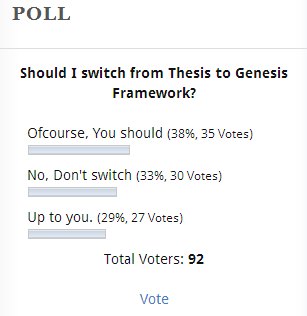
    If you are following this blog, you might have noticed that I ran a poll in sidebar to see response of blog readers. Here is result.

    poll result

    As, you can see. 38% votes are for Genesis framework.

    I’m not giving to write anything bad about Thesis or Genesis, revamping the blog and switching to Genesis is my personal preference.

    I’ll reveal the results after switching to Genesis in few days.

    What are the new changes here?

    Today, I am going to announce few changes that I did recently. I hope you will like these new change. If not? Do comment below to let me know if I missed something.

    New Logo and Social Media Branding

    It took me sometime to find out good designer who can design a better logo for my blog.

    A part from logo, I’ve got new favicon. Twitter, Google+ and Facebook cover & profile image too.

    Better Design

    The new design is built on Child Theme For Genesis 2.0 Framework. Which is currently one of the best framework out there for WordPress.

    Mobile Responsive

    New design is fully mobile responsive, you can navigate lot better now from any devices. Cool?

    New Optin Forms

    I use MadMimi as my newsletter system, it works quite well for me. I hired a web designer to design new optin forms for my blog. You can see the big feature box on homepage, better optin form on sidebar and after post.

    What’s More?

    • Improved User Experience
    • New Social Sharing Buttons
    • Better Header Navigation Menus
    • Sidebar Tabbed Widget with recent and popular posts.
    • WordPress  Hosting I Recommened
    • Extremely Useful 404 Page
    • Rebranding Twitter Profile
    • Rebranding Facebook Page
    • Rebranding Google+ Page

    The main reason I want to describe in this post New Framework, Better Design and New Logo. Rest are few things that I wanted to tell you.

    If you are reader here, bless you, and thank you for bearing with me.

    If you are new, thank you for dropping by and I hope you stick around!

    Your thoughts please..

    I’d love to hear your thoughts on the new design.  What do you like about the new design?

    Please give your feedback, postive or negative. Because that’s the only way to improve.

    More importantly, what don’t you like?  Have you noticed something that doesn’t work that I have missed?  How is the new logo?

    Let me know by leaving a comment below!

    The Idiot’s Guide to Write 1000 Words in 30 Minutes

    By Syed Faris Hussain 26 Comments

    There was a certain time that I had so many articles to write up for myself and for some freelance clients I had then. However, the problem at that time wasn’t that I couldn’t write fine, but simply because I had the inability to write fast – in short, I wrote articles slower than a snail during that period.

    For those who still write very slowly, you already understand what I mean – Write 100 words now and stop to read/edit it for close to 1 hour – this was one of the things I was busy doing enthusiastically then. And because of that much wasting of time on one article, I sometimes ended up writing a single 600 words article for close to 8 hours (and yes, it was that bad).

    What could an innocent me do?  ;)

    My clients were angrily waiting for their articles which I seriously was behind schedule and hadn’t sent; while my numerous readers were shouting their lungs out in other to have me write another post that I hadn’t written in like 2 weeks.

    That was when I knew this had to stop.

    no way

    So how did I stop writing like a snail and more like Usain Bolt?

    You want to know? Well, I went out, researched and found a remedy for slow writing that I could single-handedly use to write up a 1000 words post within 30 minutes.

    You want to know the tactics I used to write faster? Then, without wasting much of your time, these 4 nuggets below are exactly how you can also write faster than you present can.

    1. Write First . . . Edit Later.

    Believe me, I know it sounds insane to write and not cross check what you’re actually punching out to the screen. Yes, it’s weird, but it’s one of the fastest ways to write up any first draft.

    And believe me, no first draft is ever pretty, if you doubt me try asking Jeff Goins of GoinsWriter – he’ll surely back me up.

    However, you might ask yourself or even me, “How can I start this habit of not editing while I’m writing?” That’s a nice question. And to answer that – the best way to do this is to turn off your writing software’s spell checker.

    “Why on earth should I turn it off?” It’s simple. First of all, the job of a spell checker is to examine your write up and show you the typos and grammatical blunders readily available in the copy you’re writing.

    So when you turn it off, you won’t have any desire to go back and start correcting little errors you find, since you won’t see any red signal i.e. like in Microsoft word, indicating that you’ve committed an error.

    The next question will surely be, “How do I turn my writing software’s spell checker”?

    This depends on the type of writing software you use for your writings. I use Microsoft word – and I know majority of you also do – so let’s show you how to turn MS WORD’s spell checker off.

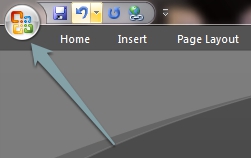
    To do exactly that –

    Click on the Microsoft Logo – at the top let hand side of your computer screen (shown below)

    ms logo

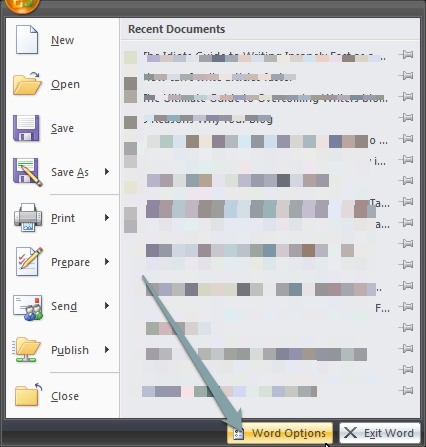
    This will bring out the menu of MS WORD. Find and click on “Word Options”.

    ddropddownn

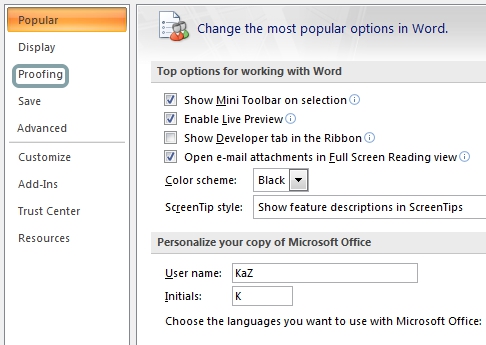
    That will bring the Grammar Setting Page. Locate and click on “Proofing”.
    proofing

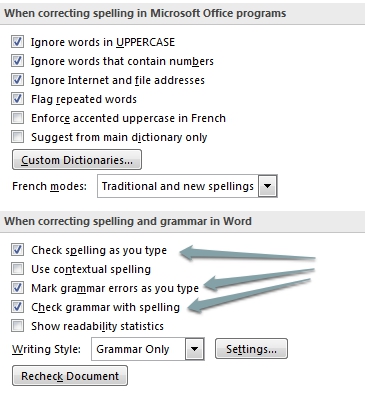
    Once Proofing page has been shown to you; go ahead to untick those three check button I pointed to in the image below (And of course, when you’re through with your first draft, then you can enable them again for proper proofreading).
    untickk

    That is it. Once you’ve un-ticked those check buttons, you’re done. You can now go ahead to write ceaselessly without thinking of editing.

    But if in case you’re not an MS WORD fan, then you can try out DarkRoom and WriteRoom (for Windows and Mac respectively) – and these writing softwares don’t come with spell checkers at default. So give them a try.

    2. Time Yourself. . . To Write Faster.

    A goal without a time constraint factor kind of sounds like a wish. If you want to see yourself writing faster than you do now, then you need to start restricting yourself to a set time. To do this, I normally make use of Pomodoro app for Windows to time my writing while I write.

    For those who haven’t heard of it before, it’s a desktop app that can be used to time oneself to a 25 minutes work period and a 5 minutes break time.

    How can you leverage it effectively in fast writing?

    Yes, I know you might ask this question. To use this app effectively, once you’re done your research and have read up everything you need to know about the topic. The next thing to logically do is click on the timer and immediately start writing.

    And the writing should be a continual thing until the timer rings for break period. Once you keep at it, you’ll notice that you’ll be writing faster than you’ve ever written.

    3. Research And Kill Your Distractions . . . Before Writing.

    Researching before writing any piece out can not be over emphasized. It’s very very important and can’t be casually overlooked. When we talk about fast writing, we’re simply talking about researching indepthly so that what’s left of the process would be to write the copy out to the end without going online to cross check facts and figures that we might have forgotten.

    And when we begin to continually check up on those figures and facts, the writing process starts to stall, to an extent that it’ll keep someone writing a little 500 words piece for over 2 long hours, instead of the usual 20 minutes.

    Believe me, before; I used to waste that amount of time on such small writing just because I was always going on the internet to read more about the parts that I forgot to research on. And sometimes, when I land on Google for research purposes, I usually end up researching entirely different figures or even go on to chat on facebook, thereby derailing and delaying the writing for quite some time.

    That said, to stop the derailing part of the writing process, I had to start researching more brilliantly and strategize ways not to forget what I’ve read up in other not to start going online to check up on more facts – and going off beat.

    So what I did was simply using Evernote to store up long or short materials related to what I was to write about (believe me, you need to try it out – it’s FREE). And also, I leveraged Evernote’s Skitch to clip/snap screens I needed for tutorial write ups so that I won’t go about getting derailed again in the name of getting online to do it when I wanted to write that section of the tutorial.

    Now, after all these have been taken cared of – I usually want to start writing at once, but even upon all these researches that I’ve done, I knew within me that I could still be tempted to go online and do other things amid writing (like facebooking and opening mails ). So I leveraged the use of the Chrome Pomodoro add-on to block me from using the internet (well, not entirely the internet per say; the add-on blocks selected time wasters’ websites you give it block), and yes, even though the app is a little bit annoying, but it helps me stay focused on writing only.

    So after researching crazily using all this aforementioned research tools, and also blocking the time wasting websites, what’s left will be to write only. And when writing is the only thing on your mind to do – you kind of see yourself finishing it in less time more than it would have taken you without these aforementioned apps and tools above.

    So give this strategy a try today and see a significant improvement in how long it’ll take for you to churn up a long piece of writing.

    4. Keep Writing Non-stop.

    This section is quite simple: Ignore the errors, grammatical blunders, typos, and any other things that have the power to stop you momentarily when you want to really start writing.

    Once all of them have been ignored, what remains now is to start writing. Just write. Don’t mind anything. Don’t even think of what to write up next, because each word being thrown across the screen have already been embedded way long in your head while you’ were researching on the topic you’re currently writing on.

    So leave thinking aside and just write. I know there will be enormous amounts of typos – especially mistyped words – but that’s the core beauty of writing fast. Just ignore them and keep on writing. I know that you will be overly tempted to clean up some typos using the backspace button; yes I know, because I’m always tempted to use it, too. However, even if you and I can’t stop using the backspace button, at least, we can limit how much we hit it whenever we type out grammatical typos.

    The best ways to limit the hit of that button is to make a vow not to press that particular button no matter how bad the typo looks like.
    When that has been taken cared of, you’ll notice that writing becomes a thing of joy since you’ll be writing so fast that you can literally be punching out 25- 30 words per minutes, and up to 1000 words in 15 -20 minutes

    And YES! That’s you being insanely fast! ;)

    If I have attempted it before and finished a write up of nearly 600 words in 15 minutes, then you can even finish yours in 10 -12 minutes if you keep on practicing this strategy of “writing nonstop” until you reach the end of the article.

    In conclusion. . 

    The world is going quite fast . . . And the internet is getting faster. If you want to meet up with those writing deadlines in no time and still be in the good books of your clients, then you’ve got to be a fast writer.

    Therefore, leverage this wonderful craft now and write your way to stardom.

    And finally, before I go I’ll like to ask, “How long does it take you to write up a 1000 word piece and what is that thing that’s presently stalling the writing process?”

    Lets meet in the comment section to interact on this awesome question.

    Thanks for reading . . . Don’t forget to share this awesome piece.

    • « Go to Previous Page
    • Page 1
    • Interim pages omitted …
    • Page 20
    • Page 21
    • Page 22
    • Page 23
    • Page 24
    • Interim pages omitted …
    • Page 70
    • Go to Next Page »

    Primary Sidebar

    Get Blogging & SEO Tips by Email

    Get helpful blogging, SEO, and content tips delivered straight to your inbox. No spam.

    Join 3,489 other subscribers

    Popular Posts

    • Is Your Blog Properly Optimized for Performance and SEO?
    • 10 Powerful Ways to Become a Famous Blogger
    • Google AdSense vs Affiliate Marketing: A Simple Comparison for Beginners
    • Effective Ways to Increase Content Reach and Audience Engagement
    • 12 Things to Do Before Applying for Google AdSense
    • Are Backlinks Becoming Less Valuable in Modern SEO?
    • Step-by-Step Guide to Creating a Successful Travel Blog
    • How to Start as a Freelance Writer & Is It Worth?
    • Add Smooth Multi Level Drop-Down Menu In Blogger
    • How To Delete A Blogger Blog Permanently In 5 Minutes (+ FAQs)

    Blogging Tools I Use

    Over the years, I’ve tested dozens of blogging and WordPress tools. Below are the tools I personally use and recommend for blogging, performance, SEO, and monetization.

    Blogging Tools I Use →

    Footer

    About This Site

    All Blogging Tips helps beginners learn how to start, grow, and monetize blogs using WordPress. I share practical guides and honest recommendations based on real blogging experience.

    Read more →

    Site & Resources

    • Tools I Use
    • About
    • Advertise Here
    • Contact
    • Disclosure Policy
    • Copyright Policy
    • Privacy Policy

    Start & Grow Your Blog

    • A Ridiculously Helpful Guide to Start Your Own Blog In 10 Minutes
    • How To Grow Your Blog And Build An Audience
    • How To Make Money From Your Blog
    • Cheap WordPress Hosting
    • Free WordPress Hosting

    Copyright © 2026 All Blogging Tips · Powered by InMotion Hosting · WordPress · Log in