• Skip to primary navigation
  • Skip to main content
  • Skip to primary sidebar
  • Skip to footer
logo

All Blogging Tips

Everything About Blogging

  • Home
  • Start a Blog
  • Grow Your Blog
  • About
  • Contact
  • Tools I Use

Search Results for: ai

How to Get Out of Niches and Blog for a Purpose Instead?

By Rohan Ayyar 18 Comments

Money is not everything. Anything beyond an optimum amount causes more misery than happiness.

Yet, with a stereotypical assumption that most of us want to make money (let’s not kid ourselves by saying “no” to this assumption), we all have a tendency to get stuck in a rut: the dirty groove of a routine that we get comfortable with over time. Even the advice we receive, the articles we write, and everything we believe in becomes congruent with this comfort zone.

For bloggers, it translates to finding niches, writing 500 word posts, and promoting your blog using the same methods we’ve always been used to. That includes social media, asking for links, putting up sign-up forms for opt-ins, some paid advertising, and then wondering how else to promote the blog.

If you’ve been doing whatever you’ve been doing, how will you get to where you want to go?

It’s time to do something different.

We all know passion pours energy into our life. It gives us more chutzpah to do what we want. It drives our efforts to reach our goals.

If you pick niches, blog multiple times a day, and work like a machine to promote your blog, here’s what happens..

Passion wears out..

Frustration sets in..

You’ll develop stress. Finally, you’ll give up.

Ignore the popular advice.

Forget the damn niches. ;)

If you have to blog, do so for a purpose. Here are different ways to find your purpose:

What is that one thing that pisses you off?

1 piss off

We all have our pet peeves, don’t we?

Maybe you love to do something but your lifestyle is your biggest enemy. Maybe you actually travel and you don’t like the way immigration procedures and visa restrictions don’t allow you to travel free. You could have been scammed online before and you just can’t get over it. Or maybe you got dumped unceremoniously by your girlfriend. Perhaps, you hate the well-orchestrated, social brainwash that marriage really is.

Find your biggest source of frustration; go and blog about it. Chances are that you’ll not worry about word counts and blog post lengths. There’s a possibility that many others in the world would relate to you.

Relating to the topic on hand, by the way, is half the business done.

Find a real business, blog for that business

2 real business

Don’t blog about a topic. Instead, find a real business and apply your passion for blogging into a blog built for your business. Why? An unbelievable amount of “you” gets into your business, whether you know it or not.

Hatching that idea, sticking with it, and grabbing a business plan template off the web are the starting points. Beyond that, you’d give your business everything (including startup capital, sacrifices, the comfort of a day job, and the wholesome approval of people who mean so much to you). You will not sound or feel normal after so much goes into starting and running a business.

Your blog now reflects the new “you,” doesn’t it? Whatever you went through until this stage of your business (assuming you go with this idea) helps you communicate better. You are stronger, and you have an attitude to kill for.

Blog for a cause, to make a difference

3 cause

If starting and running a full-fledged business (such as ecommerce, maybe) is not your thing, let’s get back to blogging.

Niches are popular and commercial. They evoke responses from customers such as “buy,” “buy later,” “no way, it’s too expensive,” and “nah, not for me.” If you don’t directly pitch for anything in your blog, all you’ll get is “ah,” “duh,” or “I see. Wow!”

Blog for a cause, instead, and you’ll mostly get responses like “I so want to help, if I could,” “Where is the donate button?” “I like what this person does,” “This is so true,” and “Wow, really?”

Now, causes don’t have to charitable. You could find a cause within commercial domains too. You can find a cause anywhere. All you have to do is look for something that’s troubling you, and you know that a lot of other people are also affected by it.

Look at what SaltyDroid does:

The trouble seed: Online scammers on the rise

The cause: Exposing scammers, thieves, and fraud “gurus” with make-believe opportunities

Does SaltyDroid sell anything? No.

Does it get traffic? Next question please.

Experiment until you find the purpose

4 experiment

Learning the art of blogging after you find your purpose will draw you in very late to the game. When the purpose comes calling, you have to hit the ground running. You have to be ready by then. That’s why it’s important to keep blogging everyday. How do you become a better blogger? Write blog posts every day.

What’s the secret to passionate blogging? Using your well-developed blogging skills to write about things that matter to you (and others).

In a nutshell, you have to do all the dreaming, thinking, and executing while you already have a blog in place. Now, you know that your choice of niche wouldn’t matter too. Pick a topic, start a blog and run with it. Think of this as your experiment.

Experiment until you find your passion. Once you find it, give your blog everything you’ve got.

Grammar? Rules? What’s that?

5 break rules

Read all the blogs you want on “how to blog better.” Brush up on your basics of writing (add copywriting to the mix). Yet, don’t think that what you read is the only “right” way to do things out there. You can make your own rules. Copywriters, for instance, break rules all the time. Find your voice. Make your writing reflect that voice. If you have to twist sentence structures, do so. If you have to invent your own words or phrases, like labeling yourself as an “anti-niche blogging rebel” go ahead and do it.

This is your playground. Go play. ;)

Your passion should show. Success will follow.

Are you stuck with niches or are you blogging from your heart? Do you have a purpose yet? Share it with us!


Elegant Themes Giveaway – Win 3 Developer Membership Worth $89 Each

By Ammar Ali 18 Comments

As, you know my blog just turned 2 years old. I was thinking to organize few giveaways but didn’t got much time.

But..

Today, I’m happy to introduce Premium WordPress Themes giveaway by Elegant Themes.

Elegant Themes is offering 3 Developer Membership worth $89 each for our readers.

An Elegant Themes Developer Membership is a fantastic prize – so make sure to enter this WordPress giveaway everyday!

divi_ad_wide

About Elegant Themes

Elegant Themes is one of the best premium WordPress theme club in WordPress industry. They are providing high quality WordPress themes with best customer support.

Elegant Themes have a great collection of themes and some plugin. For as low as $39 you will get access to 86+ themes & support for 12 months, definitely a great deal!!

Visit Elegant Themes

Each Developer Membership Contains;

  1. Complete access to all themes.
  2. Perpetual theme updates.
  3. Premium technical support.
  4. Complete access to all Plugins.
  5. Layered photoshop files.

Latest Elegant Theme  –  Divi

Divi WordPress Theme is the latest theme released by Elegant Themes with tons of amazing features, You should definitely check the Theme Release and features of the Divi Theme.

Giveaway Prize:

I’ll choose 3 winners and each winner will get Developer Account Worth $89

Winners will be announced 1 week from today. (On Thursday)

We will contact you through your emails for prize. So please make sure to provide valid email address while entering into giveaway!

 How to Enter the Giveaway?

  1. Like and Follow All Blogging Tips on Facebook and Twitter.
  2. Tell us why you want to win? (You can post your answer in the comment section below.)
  3. Just follow following widget to participate.
  4. NOTE: Share this giveaway everyday on social network to increase chances of winning.


a Rafflecopter giveaway


Quick Tip! Share this giveaway everyday on social network to have a higher chance of winning

Best of Luck to all participants!

Happy 2nd Birthday to My Blog – What I Achieved in 2 Years

By Ammar Ali 73 Comments

happy-2nd-birthdaySo, finally it’s 2nd year of blogging.
 
So many amazing things have happened in the past year because of this blog.
 
I can’t quite believe I have been blogging for two years now, (it has gone way too quickly)
 
At the beginning I didn’t know where to begin… my blog posts were short and awful, and I didn’t know what to post about but, I feel like my blog has come far in the year and although I still want to keep improving it.

Why I started this blog?

Before starting this blog, I was learning lot of things about Blogging and Web designing.

I used free hosting to learn WordPress and after sometime I decided to buy top level domain and paid web hosting to start this blog because I wanted to improve my writing, English, share what I learnt so far and make a little money. I already discussed in details here.

Here are quick reasons for starting this blog

  • Share what I learn
  • Help as many as I can
  • Learning new things
  • Improve writing skills and English
  • Make little money

Statistics

Here is what I achived in 2 years of this blog. Below is analytics screenshot

Audience Overview   Google Analytics

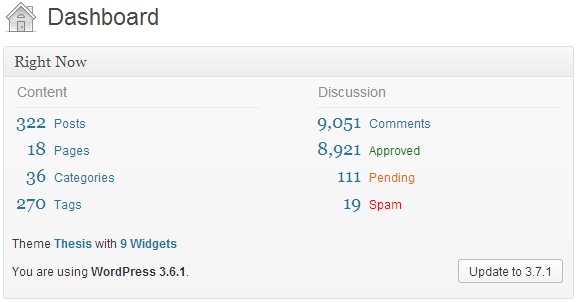
Wow, I cannot believe I have written 322 posts already! :D

At around 500-1000 words each I estimate that I have written more than 200,000 words something!

Dashboard ‹ All Blogging Tips — WordPress

Here are some interesting numbers.

  • Facebook Fans: 7,500+
  • Twitter Followers: 3,600+
  • Feed Subscribers 15,000+
  • Active Newsletter Subscribers: 2k
  • Published Articles: 322
  • Total Comments: 9000+
  • Alexa Rank:  9k
  • Page Rank : 3

Top Posts (# of Views)

These are interesting numbers, did you notice one thing?

7 out of 8 posts are list post.  Apparently everyone loves a good list!

Things to Do Before Applying for Google Adsense      68,125
Top 15 Killer Tips To Increase Page Rank!       51,516
10 Best Statistics Plugin For WordPress       30,045
7 Powerful Ways to Increase Website Traffic       16,399
Top 5 Ways to Make Money without Adsense       16,252
Top 10 Best Social Sharing Plugins For WordPress       13,289
8 Reasons Why I Hate Google Adsense       12,622
Earn $50-$100 Daily with Affiliate Marketing?      10,129

Thank You!

Many thanks to everyone who helped me – the readers, guest writers!

I’m still learning so much about it all. I have discovered some amazing new blogs, bloggers, friends and followers.

I’m so happy with the support I have had, and how much my blog has grown over this past year.

And I’d like to thank YOU for helping me in the 2 years of my blogging journey.

These guys worth mentioning here. I learnt lot of new things from their blog. In no particular and sorry if I have missed anyone out!

Special thanks to:

Harsh Agrawal of ShoutMeLoud

Zac Johnson of ZacJohnson

Ileane Smith of BasicBlogTips

Rahul Kuntala of LearnBlogTips

Pradeep Kumar of Slashsquare

Harleena Singh of Aha-Now

So what are my plans for the next year?

Well, I would love to keep my blog growing. I’d love to move up the Top Alexa rank. However, as a student, I wouldn’t get much time to spend on my blog.

Lastly, a big thank you to all that take the time to read my blog and comment. Your comments mean the world to me.

Thank you for your continued support.

Don’t forget to share What I Achieved in 2 Years with your friends.

Learn Blogging With Rise Forums : Win 3 Membership Worth $97 Each

By Kevin Muldoon 23 Comments

Rise Forums is a brand new private discussion forum that was created specifically for bloggers and internet marketers. I launched the forum as a way of providing help and feedback to aspiring bloggers. In the past, I would do this through email and video consultation, however I have always been of the opinion that discussion forums are the best way to provide direct support to people are there is a public record of all previous support queries and discussions.

The forum is completely different to other internet marketing forums such as Warrior Forum and Wicked Fire. It is not a place where experienced members are trying to sell informational products to newbies. Rise Forums is a community where members genuinely try and help fellow members out. That is what makes it so special.

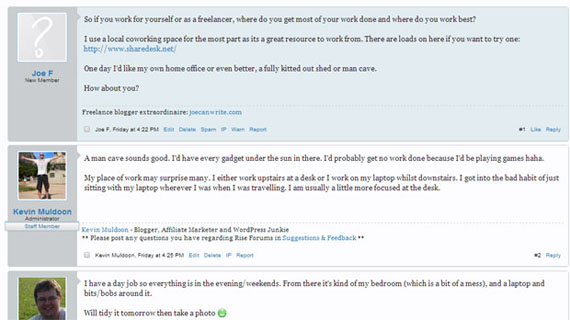
Rise Forums Example Discussion

A membership for Rise Forums retails at only $97 per year. That works out at only $8.08 per month. In addition to connecting with other bloggers, affiliate marketers and online entrepreneurs; members also get direct access to me. I will be offering my thirteen years of experience from working online to help members directly.

The problems that members face varies greatly. Some are just looking for feedback and advice on what direction to take their blog. Others are looking for help with the technical side of working online. Whatever the problem, our goal is for us to do everything we can to help members in any way we can.

Rise Forums Forum Home Page

To celebrate the launch of Rise Forums, we have teamed up with All Blogging Tips to offer three lucky readers the chance to win a free yearly membership.

How to Win a Membership to Rise Forums

Entering our competition for a Rise Forums membership is easy. All you have to do is enter is leave a comment on this post explaining why you need a membership at Rise Forums. Then simply register your entry using the RaffleCopter box below. Additional entries can be gained by following All Blogging Tips, Rise Forums and sharing this post.

Learn Blogging With RiseForums : Win 3 Membership worth $97 each

a Rafflecopter giveaway

Note: Share this giveaway everyday to increase chances of winning.

The deadline for the competition is 30 November 2013. We will announce all three winners on 1 December 2013 (This is very special day for this blog). Good luck to everyone who enters :)

Thanks,
Kevin

The Dirty Little Guide to Optimizing Your Blog for Google Hummingbird

By Akash KB 47 Comments

Google has dropped its age old Core Search Algorithm and replaced it with a brand new version called “Google Hummingbird.”

But have you optimized your website or blog for this new algo? Have you changed your content marketing strategy for higher ranking of your blog posts in Google SERPs?

Even though you think your answer is “Yes,” most probably, you are “Not.” The reasons – you are not clear:

1. What is Google Hummingbird?

2. Why Google introduced it?

3. How to optimize your blog or blog posts with this new Google Hummingbird algorithm?

Continue reading… to know in-depth about Google Hummingbird, and a simple yet effective SEO strategy to optimize your blog for this algorithm.

Google Hummingbird

Understanding Google Hummingbird

Google uses a set of search engine algorithms to index, analyze and rank web-content semantically to provide the best possible results to web-searchers.

Using these computer driven algorithms they index billions of web-pages and store them in large servers located in different parts of the world. Then analyze searcher’s query using semantic search technology. Finally, ranks different web-pages using various ranking signals. Google uses more than 200 search engine ranking signals to return the best possible results to searchers. So, indexing, analyzing and ranking are the three basic jobs of Google Search Engine.

Google Hummingbird is Google’s new Core Search Engine Algorithm to meet the search behavior of modern people, and to be the best answering engine in the world.

Query Rewriting: Back in year 2003, Google had filed a patent for query rewriting which was passed in 2011. Query rewriting is the technique to incorporate conversational search in Google.

It means – rephrasing searcher’s query implementing semantically available data to understand the actual meaning or intent. The data may be like place, device used, search history, synonyms of keywords used, and various information shared with Google by the searcher. And Google Hummingbird is better positioned to handle the query rewriting than its older counterpart.

Why Google is thinking about “Query Rewriting” now?

The change needed to be done, because people have become so reliant on Google that they now routinely enter lengthy questions into the search box instead of just a few words related to specific topics.

Amit Singhal, the head of Google’s core ranking team.

The statement speaks lot of things. It means – searchers are using long-tail queries instead of few head-terms. They usually enter their search keywords in the form of questions. That means conversational search is on rise. And most of the conversational or voice search comes from mobile devices like smartphones and tablets. To better understand the conversational search Google implemented query rewriting, and to better handle query rewriting Google Hummingbird is the right set of algorithm.

Entity Search: To return the best possible results to searchers Google has been constantly shifting its focus from few ranking signals like keywords, links and link anchor-texts. And focusing more and more on entity search or meaning search.

The reason- You can manipulate keywords, you can manipulate links and link anchor-texts, but you can’t manipulate the meaning or the theme of the web-page or article. So, Google uses query rewriting to understand the actual intent or meaning behind the search query and try to find and rank relevant web-content which actually fulfills the searcher’s needs.

In the context of search, entity means – people, places or things. Google has stored millions of structured data which are verified and validated in its knowledge graph. These data act as entity, or people, places or things. Semantic search technique uses various data like place of the searcher, device used for the search purpose, search history and behavior of the searcher and various other information shared with Google by the searcher.

By leveraging its vast knowledge graph along with semantically available data about the searcher, Google perform entity search or meaning search with the help of query rewriting. Entity search doesn’t mean Google only looks for a specific entity in their knowledge graph or in the web. It actually tries to establish a relation between the entities in the search query and find the searcher’s intent or actual needs.

For example: Suppose you do a Google search for “I want to buy an iPhone.”

“I” is an entity. “An iPhone” is an entity. And “want to buy” combines or links the other two entities to establish a meaning or intent.

Data shows – number of searches from mobile devices will surpass search performed from desktops by the end of 2014. Voice search or conversational search is gaining pace rapidly. And Google Hummingbird is the best search engine algorithm to understand meaning or intent of the searchers.

Authorship Rank: There has been lot of chatter about Google Authorship Rank since last one year or so. When you implement your authorship mark-up to a piece of content in the web, Google attributes you as the creator of the content or author of the content.

Authorship Rank acts like a double edged sword. When you create some really great content which people like to bookmark, share with their friends (via social media) and revisit again and again, then you become an authoritative publisher in the eyes of Google. That means your Authorship Rank goes up and Google ranks your content higher in search results. The opposite thing happens when you create low quality web-content or articles which don’t fulfill searchers needs.

Always keep in mind – You’ve implemented your Authorship Markup means you’re sending all possible data to Google as an author or creator of your content. Web-content with authorship markup not only get higher CTR, but also ranks high in search results. Google+ and Google Hummingbird combinedly helps Google to use Authorship Rank as a ranking signal.

Matt Cutts, the head of Google’s web-spam team hopes Authorship Rank will be explored by Google in near future. Check out the video here.

Social Signal: Before the release of Google Hummingbird, time and again, Google has said that they are not using social signals like Facebook likes, Tweets and G+ in their ranking algorithms. Matt Cutts, the head of Google’s web-spam team has personally cleared this fact at various meetings and conferences.

One argument is “Correlation doesn’t mean causation.” If a web-page is ranking high and has 100s of Facebook shares, re-tweets and Google +s; this doesn’t always mean the page is ranking because of high number of social sharing (or social sharing by influencers). It might be that more number of people found the page helpful and shared in the social media. The page may have other strong search engine ranking signals for which it ranked higher.

For example: This year there was heavy rain and maximum people were wearing Yellow rain coats. You can’t simply correlate Yellow rain coats with heavy rain. You can’t tell – there was heavy rain because maximum people were wearing Yellow rain coats.

Why Google is not using social signal for content ranking? Not because Google doesn’t like social signal; because it had technical limitations to use social signals as a ranking factor.

With Google Hummingbird Google can process social signals in a more efficient way. And in near future you will start seeing Google Plus impacting search results. So also the likes, tweets and stumbles.

  • Google Hummingbird is a platform for Google to incorporate existing algorithms like Panda, Penguin etc. and also the advanced algos to be developed in the future.

Google Hummingbird Takeaways (Act Now)

1. Keywords: Craft your content or web-pages around a theme or concept, instead of keywords. By encrypting all searches (https://) or making “keyword not provided” 100%, Google has cleared its intention. Google has gone beyond keywords.

It doesn’t mean you shouldn’t put keywords in your content which your target audience are actively searching for. But your content should answer some specific queries of your visitors or searchers.

2. Long-tail Keywords: Did Google Hummingbird kill long-tail keywords?

No. Google Hummingbird acts at query level and makes long search keywords used by searchers in to short by query rewriting. It doesn’t affect the long-tail keywords in your content while ranking. You should construct quality and meaningful content keeping long-tail keywords in mind.

3. Links: Did Google Hummingbird kill links and link anchor-texts?

No. Although the value of links and anchor-texts as a ranking signal has reduced a bit, but it will be here for long time. Page Rank (PR) still flows via links, and Google doesn’t want you solely depend on links for better ranking of your content.

4. Mobile Optimization: Your website or blog theme should be optimized for all types of mobile devices like smartphones and tablets. Basically, it should be responsive and fast loading.

If your website doesn’t offer a better mobile user experience, your rankings will drop in desktop search also, along with mobile devices.

5. Panda & Penguin: Where are Google Panda and Penguin?

Algorithms like Panda, Penguin, Top-heavy, EMD etc. which are filters or algorithmic penalties are parts of Google Hummingbird. Algorithms which will be developed in future to catch spammers or to rank web-content higher will also be parts of Google Hummingbird.

6. Author Rank: As of now Google has not declared about it officially. But be prepared for it. By introducing Google+, Google Hummingbird and Authorship Mark-up Google has made its intention clear.

Everything you create on the web, whether on your own blog or on others blog will be attributable by Google towards Authorship Rank. Spammy authors will be equally punished by reducing their AR.

7. Data Validation: Google thinks its Knowledge Graph and Wikipedia (to some extent) always provide correct facts and figures. If your article doesn’t resemble their data then it will be ranked lower. On the other hand, if you contribute Google’s Knowledge Graph by providing high quality and authentic data on your web-page, then Google will rank your content higher.

8. Social Signal: Google Plus will play a major role in coming days by providing social signals to Google for ranking content. Your brand or website should have its own Google+ page. And if you perform better, may be in future, your brand will be a part of Knowledge Graph.

Decreasing authority (sequence) of social signals will be like Google+, Twitter, Facebook etc.

9. Advanced Link Analysis: Google Hummingbird is going to fulfill Google’s long cherished wish of analyzing different kinds of links for assigning different values. Now also Google is doing it. But it will be more sophisticated in coming days.

The value of a link on the sidebar, on the footer, within the article and inside the author-box will be calculated with more accuracy.

10. User Experience: Time spent, CTR and user interaction with the web-page will be more important for ranking content with Google Hummingbird. Along with quality content, focus on your website or blog theme like navigation, readability, contrast etc. for better user experience.

Dear friends. Greetings from Google Hummingbird! ;)

Because you love to create content and always adopt White Hat SEO Techniques. With the introduction of Google Hummingbird there will be no place for spammers in the future. Bloggers and content marketers with good intention will be rewarded highly for their hard work.

This is Akash KB, signing-out from AllBloggingTips.com, till next post Happy Blogging :)

Don’t forget to shoot your comments (questions), I’ll be right here to answer them ;)

  • « Go to Previous Page
  • Page 1
  • Interim pages omitted …
  • Page 21
  • Page 22
  • Page 23
  • Page 24
  • Page 25
  • Interim pages omitted …
  • Page 70
  • Go to Next Page »

Primary Sidebar

Get Blogging & SEO Tips by Email

Get helpful blogging, SEO, and content tips delivered straight to your inbox. No spam.

Join 3,489 other subscribers

Popular Posts

  • Is Your Blog Properly Optimized for Performance and SEO?
  • 10 Powerful Ways to Become a Famous Blogger
  • Google AdSense vs Affiliate Marketing: A Simple Comparison for Beginners
  • Effective Ways to Increase Content Reach and Audience Engagement
  • 12 Things to Do Before Applying for Google AdSense
  • Are Backlinks Becoming Less Valuable in Modern SEO?
  • Step-by-Step Guide to Creating a Successful Travel Blog
  • How to Start as a Freelance Writer & Is It Worth?
  • Add Smooth Multi Level Drop-Down Menu In Blogger
  • How To Delete A Blogger Blog Permanently In 5 Minutes (+ FAQs)

Blogging Tools I Use

Over the years, I’ve tested dozens of blogging and WordPress tools. Below are the tools I personally use and recommend for blogging, performance, SEO, and monetization.

Blogging Tools I Use →

Footer

About This Site

All Blogging Tips helps beginners learn how to start, grow, and monetize blogs using WordPress. I share practical guides and honest recommendations based on real blogging experience.

Read more →

Site & Resources

  • Tools I Use
  • About
  • Advertise Here
  • Contact
  • Disclosure Policy
  • Copyright Policy
  • Privacy Policy

Start & Grow Your Blog

  • A Ridiculously Helpful Guide to Start Your Own Blog In 10 Minutes
  • How To Grow Your Blog And Build An Audience
  • How To Make Money From Your Blog
  • Cheap WordPress Hosting
  • Free WordPress Hosting

Copyright © 2026 All Blogging Tips · Powered by InMotion Hosting · WordPress · Log in