• Skip to primary navigation
  • Skip to main content
  • Skip to primary sidebar
  • Skip to footer
logo

All Blogging Tips

Everything About Blogging

  • Home
  • Start a Blog
  • Grow Your Blog
  • About
  • Contact
  • Privacy Policy
  • Tools I Use

How To

How To Reduce Bounce Rate Of Your Blog ?

By Arbaz Khan 12 Comments

The bloggers who are well aware of the do’s and don’ts of blogging will never face any problem in their blogging career. They are well aware of their reader’s taste and they know how to get visitors turning back to their blog. This is one thing. Even a newbie blogger can do the above things by promoting his/her blog on social networks or through any other medium. He can bring in more and more readers to his blog. But the main question that arises here is that the people who are visiting your blog are reading your articles or just closing the tab ??? This is one tough question to answer. This thing is termed as the “Bounce Rate” in the blogosphere.

reduce bounce rate

What is Bounce Rate ??

Bounce rate is a term, a percentage to be precise that tells you if your visitors are staying on your blog for sometime or are just opening and closing it. If your bounce rate percentage is higher than you have to worry about it. But if it is low then you are on the right track. To track the bounce rate of your blog/website, you can use Google Analytics. If your bounce rate is more than you will not get any benefit from blogging in spite of carrying out a hardcore promotional campaign.

How to reduce bounce rate ??

There are some factors you should take into consideration while doing this. If you know that your bounce rate is high, then its time to rethink your blogging strategy. Below I am listing some things that you should concentrate more in order to reduce bounce rate.

Design of your blog :-

The first thing you have to improve is your blog’s design. Choose such a template that has an eye-pleasing color scheme. The logo and the header of your blog is the first thing your visitor will see. So design your logo in such a way that it reflects your blog’s topic. Provide proper links to different topics on your blog so that your visitor don’t have to search for it.

Catchy titles :-

Use titles that immediately catch your readers’ attention. Once your reader finds the title interesting he will surely read your article and thus will spend more time on your blog. Get choosy with the titles, include keywords. Sometimes creating a controversy will also be helpful.

Content :-

The thing that plays a major part in your blog’s success is the content of your blog. The more engaging the content, the more will it compels your visitors to turn into readers. So always try to create content that will appeal to the readers.

Use of Ads on your blog :-

Don’t fill your blog with unnecessary ads by thinking that you will earn more money by doing such things. Your earnings will decrease instead of increasing. Place ads at relevant positions only. In sidebars, headers etc. Don’t go for many ad units and confuse your readers with your ads and content. In a bid to earn more, you will lose your regular readers and thus your steady income.

Provide proper widgets :-

This can also prove useful in decreasing the bounce rate. Using widgets such as ‘Popular Posts’, ‘Recent Posts’ can also help you in engaging your reader for a long time. You can play around with different titles of your widgets like ‘This week’s hot posts’, ‘All-time popular posts’ etc. Even include a ‘Related post’ widget after your every post and the ‘Recommended Slide’.

Final Words :-

I hope that the above post will prove helpful to you in reduce bounce rate of your blog. This has helped me and can even prove beneficial to you too. If you think I missed out on some important point about reduce bounce rate then please let me know. I will be more than happy.  Peace pals ! and Happy Blogging :)

Arbaz Khan is a passionate blogger who loves to write about technology updates, social media, blogging and computers on his own blog TechBreach.net


Top 10 Best Ways To Build Up Mailing List

By Rajkumar Jonnala 7 Comments

E-Mail technology is going viral than older days national postal service and it has just because of the quick action using the technology. It is also used to let the end users know about the products in the market by internet marketers. Internet marketers use the list of mail ids to market the product . The only easy way to get the e-mail list built in huge size, gaining a subscribers frequently. Here I sorted out the top 10 ways to build up mailing list by gaining large amount of subscriber to do viral marketing of any blog/website/product.

mailing list

1. E-Mail Subscription Box

This is the foremost and easy to get subscribers and their e-mail ids. Just create a killer content and make your visitors enjoyable on your content and convert the visitors to subscribers by placing a e-mail subscription feed box wherever it has the potential place to receive as much subscribers as possible.

2. Giveaways 

To attract the new visitors and make them as a subscribers, just announce a giveaway of any worthy product for free and put the subscription option as mandatory field to enter the giveaway.

3. Discount Incentives 

Offer some coupon codes for the products that you know lately and to keep them updated, put a subscription box under the coupon code or else make the subscription option as required field to view the coupon code.

4. Pop-up Plugin 

There are some of free and premium plugins and codes available to prompt the dialog box to ask the visitors to provide their e-mail id for the latest updates and newsletter subscription. This will gradually increase your subscribers and size of e-mail list can be hiked.

5. Encouraging Visitors To Comment 

At the end of each and every post, ask your visitors to comment their opinions and suggestions,  also ask them to share their doubts without any hesitation. Here already e-mail field is mandatory and it can be used to increase the mailing list.

6. E-Book Publication  

Do publicize an electronic book (e-book) on the field of expertise and ask subscribers to download by providing their e-mails and keep an eye on tracking those e-mails lists and build it up.

7. Forums  

Forum is the yet another good way to build huge e-mail lists in very short duration of time. Mostly all of you know about the process of getting in to forums by signing up with e-mail verification. This is a viral and mass way of building up mail list.

8. E-Mail export from social networks 

Mailing list can also be increased by exporting your friends e-mail id from the social network sites into CSV files for transferring friends to another social network.  It is most probably available on all social networks.

9. Subscribe prior to download

Any of your content has a download link or are you making up of it, just integrate this option (subscription box) to retrieve the download link and add their ids in your mailing list.

10. Surveys

Last, but not least. This way is very useful in building mail list and getting feedback from them as well. Open a survey to fill them up about your work and put the e-mail id field as mandatory to get into feedback and increase your mailing list size.

Author Bio: Rajkumar Jonnala is a full time SEO Blogger and has number of blogs related to health, technology, education, travel in which one of the best is PHP Training In Hyderabadand PHP Training.

Should You Copy Content From Other Blogs Without Giving Credit ?

By Arbaz Khan 38 Comments

copying content without creditBlogging is not that easy as it looks from outside. Once you explore it yourself you will come to know that it is one of the most difficult jobs in the world. But if you blog with a proper approach then you won’t face much problems. But if you start a blog just by reading some fancy story of “How I made $10k from blogging”, your blog and even you will reach nowhere. This has become like a trend today. Thousands of blogs are being created on a daily basis of which only 2-3 blogs are worth reading. And in this madness of ‘earning $10k per month’ they are left short of ideas. This is the point where all this copy content from other blogs take place. Today I will tell you about some unseen aspects of this very topic.

Why a Blogger Copies ?  What Happens After That ??

Some dumb people, just for the sake of posting on their blogs, copy full articles from others blogs. They don’t think that the owner of the host blog might have done some serious work to just create that post. Such people think that copying the most popular article from the successful blogs will give them high traffic and some search engine ranking. But they don’t know that search engines are much more smarter than such copy-cats. Search engines are able to differentiate between what’s original and what’s duplicate. Even if a blog gets some high amount of traffic, then also he won’t be able to earn a good amount of money. All the biggest monetizing programs demand quality content and don’t accept blogs not fitting in this criteria. Thus the dream of making “$10k per month” is shattered.

A different Perspective of Plagiarism (Copying From other Blogs)

Now let’s see upon it in a different way. A blogger, no matter how successful he is, at last he is a human. And we all know humans are not perfect. Our brains cannot produce new ideas everytime. And if you are the only author of your blog, this will be the greatest hurdle between you and your success. At this time, impatient people are bound to make mistakes like copying from other blogs. If a blogger wants to embrace the success than he should not produce content that is already posted somewhere else. So what he should do at such crucial time?? Simple, give the due credits. If you have liked some post on other blogs and want to share it then you should give the credits to its original author. Any author would never object to this thing. Make this as a habit. It will never harm you, it has never harmed anyone.

I will tell you something. A few days back, I was reading an article on Problogger and I saw that Darren Rowse has used a quote from a post on other blog. He even gave credits of a simple quote to its original author. And I am telling you to give the credits of a post. See around the biggest blogs, you will always find the credit links in the posts, maybe in the beginning or at the end. Some great bloggers are also providing credit links to even the images used. This is not possible if you are using Google images as you won’t know which one is original. Even I use Google for images as it is easy. But I emphasize on using Flickr or anything similar for images.

Final Words

Always give the  credits to the original author. You will take a few minutes to copy the article which might have been produced after some serious researching and hard work. So never copy. If you like the idea of the post, write it on your blog in your own words and don’t forget to provide the credit link. I hope that this might have proved helpful to you guys. Happy Blogging :D

Arbaz Khan is a passionate blogger who loves to write about technology updates, social media, blogging and computers on his own blog TechBreach.net
Awesome Mac Style Drop Down Menu With Search Box

By Ammar Ali 23 Comments

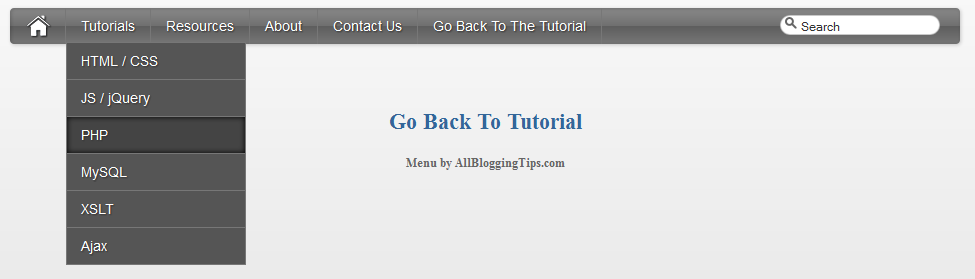
drop down menu thumb applySince the Apple-flavored Leopard-text-indent style is currently one of my favorite menu styles. So Today We just came across Stylish Apple Mac Style Drop Down Menu With Search Box. Its a simple yet stylish mac style drop down menu for blogger and wordpress and for any other use. It consists of only CSS + HTML . No jQuery No Images. Loads much faster than any menu :)

This works on almost all top web browsers. So without wasting anytime lets move on to create Stylish Apple Mac Style Drop Down Menu With Search Box for Blogger or WordPress..

Before we continue have a look at our other drop down menus.

  • Another CSS3 Menu V3
  • Css3 Pure Menu V2 For Blogger
  • Css3 Drop Down Menu For Blogger V1
  • Smooth Multi Level Drop Down Menu for Blogger

Stylish Apple Mac Style Drop Down Menu Preview!

 apply style drop down menu

Live Demo

The CSS

Below is the css of Awesome Mac Style Drop Down Menu With Search Box. You can add it to your main site css file. Like If you are using WordPress than paste CSS below in your style.css file and If you are using Blogger/Blogspot than go to Design>Edit HTML and place CSS give below just before  ]]></b:skin>

#imenu {
    background: #5e5e5e; /* Old browsers */
    background: -moz-linear-gradient(top, #8a8a8a 0%, #707070 49%, #5e5e5e 51%, #777777 100%); /* FF3.6+ */
    background: -webkit-gradient(linear, left top, left bottom, color-stop(0%,#8a8a8a), color-stop(49%,#707070), color-stop(51%,#5e5e5e), color-stop(100%,#777777)); /* Chrome,Safari4+ */
    background: -webkit-linear-gradient(top, #8a8a8a 0%,#707070 49%,#5e5e5e 51%,#777777 100%); /* Chrome10+,Safari5.1+ */
    background: -o-linear-gradient(top, #8a8a8a 0%,#707070 49%,#5e5e5e 51%,#777777 100%); /* Opera11.10+ */
    background: -ms-linear-gradient(top, #8a8a8a 0%,#707070 49%,#5e5e5e 51%,#777777 100%); /* IE10+ */
    background: linear-gradient(top, #8a8a8a 0%,#707070 49%,#5e5e5e 51%,#777777 100%); /* W3C */    
    -moz-border-radius: 4px;
    -webkit-border-radius: 4px;
    border-radius: 4px;
    color: #fff;
    border: none;
    text-decoration: none;
    text-shadow: -1px -1px 0 rgba(0, 0, 0, 0.15);
    overflow: visible;
    -moz-box-shadow: 1px 1px 3px rgba(0, 0, 0, 0.2), 1px 1px 3px rgba(0, 0, 0, 0.2) inset;
    -webkit-box-shadow: 1px 1px 3px rgba(0, 0, 0, 0.2), 1px 1px 3px rgba(0, 0, 0, 0.2) inset;
    box-shadow: 1px 1px 3px rgba(0, 0, 0, 0.2), 1px 1px 3px rgba(0, 0, 0, 0.2) inset;
    -webkit-appearance: none;
    margin-bottom: 15px;
    margin-left:0px;
}

#halfnav{float:right;}
#halfnav ul, #halfnav ul li{display:inline;list-style:none;padding:0;margin:0}
#halfnav ul li a{
    display:inline-block;
    margin: 5px;
    font-family:'Lucida Grande',Helvetica,Arial,Verdana,sans-serif;
    font-size:16px;
    padding: 5px;
    color:#fff;
    line-height:20px;
    text-decoration:none;
    background: #5e5e5e; /* Old browsers */
    background: -moz-linear-gradient(top, #8a8a8a 0%, #707070 49%, #5e5e5e 51%, #777777 100%); /* FF3.6+ */
    background: -webkit-gradient(linear, left top, left bottom, color-stop(0%,#8a8a8a), color-stop(49%,#707070), color-stop(51%,#5e5e5e), color-stop(100%,#777777)); /* Chrome,Safari4+ */
    background: -webkit-linear-gradient(top, #8a8a8a 0%,#707070 49%,#5e5e5e 51%,#777777 100%); /* Chrome10+,Safari5.1+ */
    background: -o-linear-gradient(top, #8a8a8a 0%,#707070 49%,#5e5e5e 51%,#777777 100%); /* Opera11.10+ */
    background: -ms-linear-gradient(top, #8a8a8a 0%,#707070 49%,#5e5e5e 51%,#777777 100%); /* IE10+ */
    background: linear-gradient(top, #8a8a8a 0%,#707070 49%,#5e5e5e 51%,#777777 100%); /* W3C */
    -moz-box-shadow: inset 0 1px 0 rgba(255,255,255,.5);
    -webkit-box-shadow: inset 0 1px 0 rgba(255,255,255,.5);
    text-shadow: 0 -1px 1px rgba(0,0,0,0.28);
    border: 1px solid #666;    
    -moz-border-radius: 4px;
    -webkit-border-radius: 4px;
    border-radius: 4px;
}
#halfnav ul li a:hover{border: 1px solid #222;box-shadow:inner 0 0 5px #000;-moz-box-shadow:inset 0 0 5px #000;-webkit-box-shadow:inset 0 0 5px#000;background:#444}
#halfnav .current-menu-item a{border: 1px solid #000;}

#nav{position:relative;z-index:2000}
#nav .parent > a, #nav .parent > a:hover{background-image:url(../images/arrow.png);background-position:right;background-repeat:no-repeat}
#nav ul ul .parent > a, #nav ul ul .parent:hover > a:hover, #nav ul ul li:hover ul .parent > a, #nav ul ul li:hover ul .parent > a:hover{background-image:url(../images/arrow-right.png);background-position:right;background-repeat:no-repeat}
#nav ul, #nav ul li{display:inline;list-style:none;padding:0;margin:0}
#nav ul li a{display:inline-block;font-family:'Lucida Grande',Helvetica,Arial,Verdana,sans-serif;font-size:14px;color:#fff;line-height:36px;text-decoration:none;text-shadow:1px 1px 1px #333;padding:0 15px;margin-left:-4px;border-right:#777 1px solid}
#nav ul li a:hover{box-shadow:inner 0 0 5px #000;-moz-box-shadow:inset 0 0 5px #000;-webkit-box-shadow:inset 0 0 5px#000;background:#444}
#nav .current-menu-item a{color:#ccc;}
#nav .current-menu-item .sub-menu a{color:#fff;text-shadow:1px 1px 1px #333}
#nav .menu > li:first-child a:hover{border-radius:0}
#nav .menu .sub-menu li a:hover{border-radius:0}
#nav ul li{position:relative}
#nav li ul{display:none;position:absolute;top:27px;left:7px}
#nav li ul a{background:#555}
#nav ul ul li:hover ul, #nav ul ul ul li:hover ul{left:0;margin:-37px 0 11px 180px}
#nav ul li:hover ul{display:inline-block}
#nav ul ul, #nav ul li:hover ul ul, #nav ul ul li:hover ul ul{display:none}
#nav ul li:hover ul, #nav ul ul li:hover ul, #nav ul ul ul li:hover ul{display:block}
#nav ul li:hover ul li a, #nav ul ul li:hover ul li a, #nav ul ul ul li:hover ul li a{border:#777 1px solid;margin:-1px 0 0 -11px}
#nav ul li:hover ul li a{width:150px;padding:0 14px}
#nav ul ul li:hover ul li a{width:150px;padding:0 14px;background-color:#888}
#nav ul ul ul li:hover ul li a{width:150px;padding:0 14px;background-color:#aaa}
#nav .children {z-index: 4000;}

#home {float: left;border-right:#777 1px solid;margin-right:4px;margin-left:15px; height: 36px;}
#home a:hover{opacity: .5}
#nohome {float: left; margin-right:4px;margin-left:5px; height: 35px;}

.searchform {
    -moz-border-radius: 15px;
    -webkit-border-radius: 15px;
    border-radius: 15px;
    width: 160px;
    padding: 0;
    margin: 7px 5px 5px 10px;
    height: 20px;
    box-shadow:inset 0 0 1px #222;
    background: #fff;
    float: right;
    margin-right: 20px;
}

.center .searchform {float:none;}

#morefoot .searchform {float:left;}

.searchform .s{
    margin:0;
    border: none;
    margin: 3px 2px 2px 20px;
    font-size: 12px;
    height: 14px;
    width:    130px;
    color: #333;
    overflow: hidden;
}
#magnify {float:left;position:absolute;margin: 2px 0 0 5px;}

#magnify {margin: 0 0 0 5px\0/IE8+9; /* IE8+9  */}

.searchform .s:focus {outline:0; border:none;}

.searchform .searchsubmit {display:none;}

.row { width: 100%; max-width: 980px; min-width: 727px; margin: 0 auto; }
    /* To fix the grid into a certain size, set max-width to width */
    .row .row { min-width: 0; }
    .column, .columns { margin-left: 4.4%; float: left; min-height: 1px; position: relative; }
    .column:first-child, .columns:first-child { margin-left: 0; }
    [class*="column"] + [class*="column"]:last-child { float: right; }
    .row .three     { width: 21.679%; }
    .row .nine         { width: 73.9%; }
    .row .ten         { width: 82.6%; }
    .row .twelve     { width: 100%; }

The HTML

You can add this HTML code in any place of your site/blog. If you are using WordPress than add below HTML code in your header.php file and If you are using Blogspot than add below code in header gadget (widget) ;)

<div class="container">
        <div class="row">
            <div class="twelve columns" id="imenu">
            <div id="nav" class="nine columns">
             <div id="home"><a href="http://marvblues.com"><img src="http://4.bp.blogspot.com/-btThtilNthE/T6dLHDZq9tI/AAAAAAAAAiw/E6bSVbOCeH4/s320/home.png" alt="home"></a></div>                           
     <ul id="nav_menu">
        <li><a href="#">Tutorials</a>
             <ul>
                 <li><a href="#">HTML / CSS</a></li>
                 <li><a href="#">JS / jQuery</a>
                     <ul>
                         <li><a href="#">jQuery</a></li>
                         <li><a href="#">JS</a></li>
                     </ul>
                 </li>
                 <li><a href="#">PHP</a></li>
                 <li><a href="#">MySQL</a></li>
                 <li><a href="#">XSLT</a></li>
                 <li><a href="#">Ajax</a></li>
             </ul>
         </li>
         <li><a href="#">Resources</a>
             <ul>
                 <li><a href="#">By category</a>
                     <ul>
                         <li><a href="#">PHP</a></li>
                         <li><a href="#">MySQL</a></li>
                         <li><a href="#">XSLT</a></li>
                         <li><a href="#">Ajax</a></li>
                     </ul>
                 </li>
                 <li><a href="#">By tag name</a>
                     <ul>
                         <li><a href="#">captcha</a></li>
                         <li><a href="#">gallery</a></li>
                         <li><a href="#">animation</a></li>
                     </ul>
                 </li>
             </ul>
         </li>
         <li><a href="#">About</a></li>
         <li><a href="#">Contact Us</a></li>
         <li><a href="http://www.allbloggingtips.com">Go Back To The Tutorial</a></li>
    </ul>               </div>
                            <div class="three columns">

 <form method="get" class="searchform" action="http://marvblues.com/">
     <div id="magnify"><img src="http://1.bp.blogspot.com/-Z-PCrVPeUKk/T6dLVTq-8ZI/AAAAAAAAAi8/n2DMxFGILwE/s320/magnify.png" alt="magnify"></div>
     <div><input name="s" class="s" value="Search" id="searchsubmit" onfocus="if (this.value == 'Search') this.value = '';" type="text"></div>
     <div><input class="searchsubmit" value="" type="submit"></div>
 </form>            </div>
                     </div>
     </div>
 </div>

Your turn

I hope you enjoyed this Awesome Mac Style Drop Down Menu With Search Box and the techniques I used. Please share your comments and questions below!

Top 5 Best WordPress Plugins to Beat Google Panda

By prav 24 Comments

Bloggers got hit by Panda owing to their mistakes in terms of content, SEO strategies, backlinks etc. If you are keen on getting traffic to your blog and want to regain your blog status, there is no other go than making your blog Panda love blog.

beat google pandaThere are certain WordPress plug-in that come in handy to work and fix your content. These are handy to make your blog innovative, new, virgin and unique information that satisfies the Panda easily. Be aware the fact that it is not easy to fool the Panda. Improving your own standards and making each post fresh to be better than the others is the only way to make it a Google eye candy.

Of course, making a panda recovered blog is not an easy task, it requires time, and you need to work overtime. However, it is not rocket-science as well. By understanding the basic concepts, you can make it and can beat google panda.

Some of the reasons for which your site could be hit by Panda update include:

  • Duplicate content
  • Spelling errors and grammar mistakes
  • Low quality content
  • inappropriate SEO strategies
  • Over optimization.

It is important to fix the reasons to get rid of Google Panda nightmare and beat google panda. I fixed the reasons:

  • weak On-Page optimization
  • weak internal links and broken links
  • having grammatical errors
  • Not employing Social media and bookmarking sites properly

I want to share the way in which I got rid of Panda’s clutches. WordPress Plug-ins helps me to overcome these issues and the excellent part is that these are free plug-ins.  So, now lets  start our list of Top 5 Best WordPress Plugins to Beat Google Panda in No Time  and start using some of them . But before we beat google panda , lets see this scared panda for fun:

Top 5 Best WordPress Plugins to Beat Google Panda

So, now lets start our list of Top 5 Best WordPress Plugins to Beat Google Panda in No Time and start using some of them. Just search for these plugins on wordpress.org plugin directory

1.     Meta Robots WordPress plug-in

Meta Tags plays a vital role in on-page optimization. . This plug-in comes in handy to add significant Meta tags to your page. The great part of this plug-in is that it allows to noidex low quality content that are linked by the search engine on that page. Low quality content is the prime target for Google Panda.

2.     Admin Word count Column:

This plug-in check for word counts of every post and show it in admin’s post manager. Less word count is another great reason for Google Panda hit. It is better to make your blog post’s word count around 400.

3.     SEO search terms tagging 2

It is one of the powerful on page SEO. It instantly tags the search phrases that make your page got hits. You can know the keywords that are relevant to your posts. It is extremely helpful.  However, be cautious in using this plug-in. There is a risk of tagging your post as over optimization by Google Panda. I used this plug-in to fix inferior content.

4.     Broken Link Checker

It is a handy tool to check for all broken links causing 404 errors. As I mentioned earlier, 404 errors effect my blog pathetically and this plug in is a boon to fix broken links.

5.     WordPress SEO by Yoast:

Finally yet importantly, this very effective SEO plug-in covers all the major SEO elements such as permalink, titles, Meta description and keywords.

This post is written by Prav. Prav is an article writer and marketer and loves to write for his clients all over the world. 
  • « Go to Previous Page
  • Page 1
  • Interim pages omitted …
  • Page 6
  • Page 7
  • Page 8
  • Page 9
  • Page 10
  • Go to Next Page »

Primary Sidebar

Get Blogging & SEO Tips by Email

Get helpful blogging, SEO, and content tips delivered straight to your inbox. No spam.

Join 3,489 other subscribers

Popular Posts

  • Is Your Blog Properly Optimized for Performance and SEO?
  • 10 Powerful Ways to Become a Famous Blogger
  • Google AdSense vs Affiliate Marketing: A Simple Comparison for Beginners
  • Effective Ways to Increase Content Reach and Audience Engagement
  • 12 Things to Do Before Applying for Google AdSense
  • Are Backlinks Becoming Less Valuable in Modern SEO?
  • Step-by-Step Guide to Creating a Successful Travel Blog
  • How to Start as a Freelance Writer & Is It Worth?
  • Add Smooth Multi Level Drop-Down Menu In Blogger
  • How To Delete A Blogger Blog Permanently In 5 Minutes (+ FAQs)

Blogging Tools I Use

Over the years, I’ve tested dozens of blogging and WordPress tools. Below are the tools I personally use and recommend for blogging, performance, SEO, and monetization.

Blogging Tools I Use →

Categories

  • Announcement (12)
  • Ask The Readers (2)
  • Blogger (56)
    • Blogger Hacks (4)
    • Blogger Tips (24)
  • Blogging (108)
    • Blogging Tips (81)
    • Writing Tips (6)
  • Coupons (2)
  • Design (5)
  • Email Marketing (4)
  • Free Themes (1)
    • WordPress Themes (1)
  • Free Traffic (40)
    • Guest Blogging (7)
    • Search Engine Optimization (4)
    • Social Media (13)
  • Giveaway (16)
  • Hosting (14)
  • How To (48)
  • Latest News (1)
  • Make Money Online (37)
    • Adsense (7)
    • Affiliate Marketing (8)
  • Reviews (17)
  • SEO (46)
  • Social Media (13)
    • Facebook (5)
      • Tips and Tricks (3)
    • Twitter (2)
  • WordPress (54)
    • WordPress Plugins (17)
    • WordPress Themes (5)
    • WordPress Tricks (2)
    • WordPress Widgets (14)

Footer

About This Site

All Blogging Tips helps beginners learn how to start, grow, and monetize blogs using WordPress. I share practical guides and honest recommendations based on real blogging experience.

Read more →

Site & Resources

  • Tools I Use
  • About
  • Advertise Here
  • Contact
  • Disclosure Policy
  • Copyright Policy
  • Privacy Policy

Start & Grow Your Blog

  • A Ridiculously Helpful Guide to Start Your Own Blog In 10 Minutes
  • How To Grow Your Blog And Build An Audience
  • How To Make Money From Your Blog
  • Cheap WordPress Hosting
  • Free WordPress Hosting

Copyright © 2026 All Blogging Tips · Powered by InMotion Hosting · WordPress · Log in