• Skip to primary navigation
  • Skip to main content
  • Skip to primary sidebar
  • Skip to footer
logo

All Blogging Tips

Everything About Blogging

  • Home
  • Start a Blog
  • Grow Your Blog
  • About
  • Contact
  • Privacy Policy
  • Tools I Use

Search Results for: ai image

The Problem Is Your Blog Titles Are Boring – Fix It Now!

By Garen Arnold 36 Comments

Blog Post TitlesGrabbing a readers attention is a vital aspect to composing a blog post.  Many people actually overlook this part of writing and copywriters are making a small fortune off “dressing” up post to make them more effective.
 
Obviously, if no one clicks on your post you milds well be writing to the air.  In terms of measuring your post effectiveness there are a number or things that come into play.  In this article I hope to show you some ways to improve your blog post.

Your Blog Post Title’s Shouldn’t Be Lame

It’s been said that you shouldn’t judge a book by its cover.  However, with a blog post people judge your article by its title, which is really the “cover” of your article.  For instance, if you title is lame no one will read your content which makes it a complete waste of time (unless you like writing to the error).

So how do you make your title pop?

To answer that question I will be referencing a book I read by Dan Kennedy.  For those of you that don’t know who he is; he’s a copywriter that charges 150k – 2 million per sales copy that he writes (so he knows a thing or two about writing).  While this article really isn’t about sales copies but the fundamental knowledge from sales copy still applies to blogging.

I have learned over the years what works and what doesn’t.  If you’re struggling to make your titles effective I would pick up a copy of Cosmopolitan magazine.  No, you don’t have to read it (unless you want to), but what you do need to do is take note of the titles.  They make you want to read it no matter what the article is about.  Take these headlines for example:

  • 9 Soul-Crushing Facebook Stalking Fails Everyone Makes
  • 6 Coworkers No One Warns You About
  • Why My Wedding Won’t Be The Best Day Of My Life

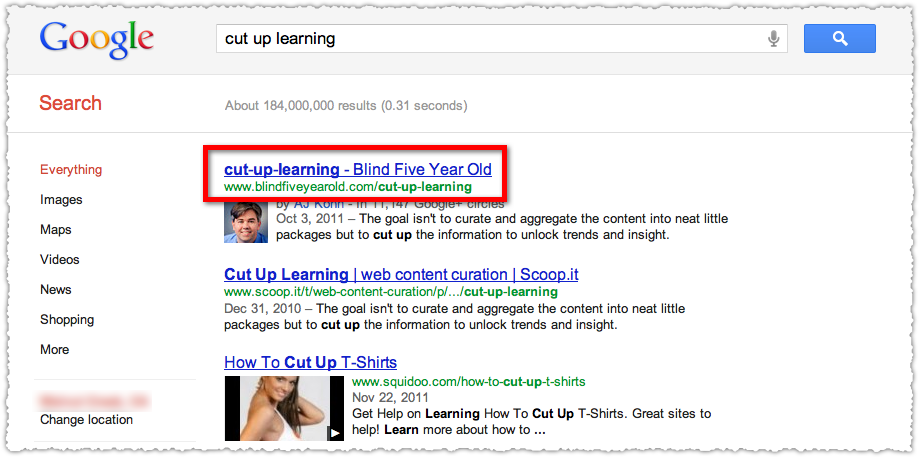
Google – Titles & Descriptions
Google Titles

So your title is the difference between a high CTR and low CTR in Google.  Obviously, if you have good content Google will reward you for it.  All to commonly, I see stuff on Google that could be improved upon.

In fact, SEO companies are making a small fortune by adjusting titles for clients, which people could easily do themselves.  I know this because I run a SEO company :)

You need to make your titles with your keywords in them (closer to the beginning for optimum SEO), but make it something that invokes a thought in someone’s head.  For instance, lets take an example of the keywords “buy bearded dragons online”.  How can me make this something that someone really wants to click on?  Here are a couple of examples:

  • “Buy Stunning Bearded Dragons – Rare Morphs & High Quality Reptiles”
  • “Buy Bearded Dragons Online – Your Friends Will Ask Where You Got It”
  • “Amazing Bearded Dragons – Buy The Rarest Reptiles Online”

Next, your description is one area you need to strongly consider revamping or doing correctly.  The basic idea behind this is you should make a couple sentences with your keywords in them that entices web viewers to click on your title and come to your site.  Sure “over the top” does work, but make sure you don’t make the mistake of overdoing it by stuffing your keywords into the description tab.

What I tend to do is write 10-15 descriptions and then pick the one that grabs my attention.  It might take a little time, but can drastically increase your CTR.  Remember that your description should be clear and to the point.  You get 2 sentences to write something that is descriptive and you really need to put some careful thought into it.

Sub Headings – Don’t Be Boring
Sub Headings - Blog PostOk, so now that we know how to get people to want to read your article; now we need to utilize sub headings to make our post attractive and cater to those skimmers on the net?

It’s been said that people don’t read on the internet they skim, and if something catches their eye they’ll then take the time to read your content.  So, lets take a hypothetical article I have written on “The Penguin Update & SEO.”

How can we make “The Penguin Update & SEO” more exciting?  Something like “6 Atrocious Ways Penguin Pecked At Your Google Rankings.”  Then a subheading that says “8 Simple Fixes – Post Penguin”.  Then another subheading that says “Don’t Quit After Penguin There Is Still Hope”.  Then another subheading “Checklist For Recovering Your Rankings”.

Basically, the idea behind sub headings is your viewers should be able to tell what your blog post is about without actually reading it.  It should be 4 sentences that you can read and decide if you want to read the entire article or just specific parts of it. Here is a useful post that contains 43 powerful headline ideas.

Clearly, you can see that blog titles, sub headings, and descriptions are a key component to a blog post.  Have you found yourself just winging it with your blog post?  I would highly consider that you start doing it right or overhaul your blog post to make them more enticing to your readers.

Are there any tips that you could add to this post?  I would love to hear your comments down below!

6 Surprising Signs Why You Will Quit Blogging

By Ammar Ali 44 Comments

Blogging is becoming more and more competitive and popular by every day passing, which is the reason more and more people are getting into this business. New bloggers mostly think of this business as a shortcut to make money and step into it. But sooner or later, they eventually quit blogging.

Are you one of those people? Are you ever going to quit blogging?

Here are the few signs that you will quit blogging.

i-quit-blogging-570x276

1. You don’t have time!

Everyone is busy in this world!

Blogging takes too much time! You’ll quit blogging soon if you don’t have time to blog. Every time you sit down to blog, something “more important” comes up and you just can’t spend time on your blog.

If you’re spending more time on social method or useless activites that have nothing to do with your blog. That’s when you’ll quit blogging.

2. You are always in Blogger’s Block:

Blogger’s block is when you can’t think of an idea of what to write. You lose the ability to work on your blog or producing content.

If you are always in blogger’s block, you are always struggling to get new ideas and you never know what next you are going to write about, then things are pointing towards a dark side for you.

If a blogger is fully determined to become famous and successful, he finally finds a way to get new ideas and keep going, but those who always complain that they don’t get ideas are the ones who have low levels of determination and they are destined to fail and quit blogging.

3. You hate to read other blogs:

If you find it boring to search your topics and read other people’s blogs, you are done.

In order to be different, unique and stand out in blogosphere you need to have killer quality content and the only way to produce killer quality content is by searching the topic a lot and then pouring a lot of information on the reader by using little number of words.

Hence, if you don’t love reading, you will soon stop loving writing and typing & saying good-bye to this business.

  • Why You’ve Not Been Getting Your Desired Result from Blogging

4. Your posts are not proofread:

One of the simplest ways to tell if a blogger will succeed or quit is by looking at his articles.

If you find no mistakes at all both in spellings and grammar, you can say that he is a horse of long ride. ;)

But if articles are filled with errors, it is safe to say that the guy who wrote this piece doesn’t really love to write, which is the reason he didn’t take the safe step and re-read his own articles and instead published as it was with errors and misspellings. 

5. You don’t have a Top Level Domain:

Blogging at sub domain indicates that blogger is not really serious about blogging and he will eventually disappear. Another reason why blogger with sub domains quit is because they have nothing to lose since; they have not invested anything at all.

While in case of top level domain, bloggers think thousands of times before saying good-bye to business. Hence, if you want to be a successful blogger and keep yourself safe from temptation of quitting blogging, get a top level domain as soon as possible.

  • Why You Can’t Achieve Success in Blogging Career?

6. You don’t have Niche Blog:

The most popular reason for ending careers of many bloggers is not having a clear plan. They don’t even have a clear concept of niche.

Such blogger publish anything and everything they want, but still don’t succeed because no one cares about such blogs. This is a sure-fire indication that blogger will go away very soon.

  • 5 Basic Pillars of Creating Successful and Profitable Blog!

Don’t worry!

The reason behind writing this post is not to make you feel like quiting blogging. These are just signs that you might quit blogging sooner than later. So you should avoid these.

To keep you motivated. I found a quote. I’m sure, you’ll love this.

quit blogging

What do you think about this? Do you ever feel like quitting blogging? Do let me know in comments

<Image Credit>

Giveaway: Win 3 Premium WordPress Themes from ThemeFuse

By Ammar Ali 26 Comments

It’s been long time, I’ve not organized any giveaway here.

So today I’m happy to announce the 7th giveaway on AllBloggingTips. That is 3 Premium WordPress Themes from ThemeFuse.

Our friends at ThemeFuse have gone completely insane. They are giving away three premium WordPress themes, and all you have to do is give them a shout-out to enter the contest.

Three winners will experience the facelift that a premium ThemeFuse theme will bring to their website. If your name is selected, you could receive the new look that will bring life to your current blog or website. Three winners will be selected. Will one of them be you?

themefuse

Entering the Giveaway

  • The first step and important is to comment below which theme would you like to win? How you would use your new theme if you are a winner. Will you be fixing an old site or launching a new one?
  • Follow the Rafflecopter widget below
  • Share this giveaway everyday on social network to increase the chances of wining.

Winners will be announced 1 week from today.

a Rafflecopter giveaway

Just Why Should You Participate?

ThemeFuse can provide just about any look and feel for your site, except for ordinary. Each premium WordPress theme provides a sensational new image for your site. From wedding pages to restaurant to opinionated blog, ThemeFuse has you covered.

ThemeFuse designs are more than just a pretty look. Careful design gives you an interface that is easy to customize for full functionality.

A ThemeFuse partnership with a trusted web hosting company can give you a way to get started easy. They take care of your install and throw in a free domain. All you have to do is choose your preferred theme and they do the rest. Within minutes your site can be ready to go. Find out more about this amazing partnership.

Check out these sample WordPress templates available from ThemeFuse.

AutoTrader – Auto WordPress Theme

Take your car dealership, detail business or car enthusiast website to a higher level with this customizable theme.

Auto WordPress Theme

MobilityApp – Mobile WordPress Theme

Easily promote your iPad, iPhone or Android mobile applications as more visitors use mobile devices.

Mobile WordPress Theme

Freshfolio – Minimalist WordPress Theme

Let your own works shine using this simple theme that promotes your own talents.

Minimalist WordPress Theme

Medica – Medical WordPress Theme

You control what your clients see using this theme. It is perfect for a professional practice or clinic.

Medical WordPress Theme

PixelWhiz – Designer WordPress Theme

Let your creative talents out of the box using this highly artistic theme.

Designer WordPress Theme

While you can snap up one of these themes, why not enter for a chance to win one for free? Enter today and share how you would use your new theme from ThemeFuse.

Sign up for this giveaway and you might just find yourself installing a ThemeFuse theme on your site at no cost and with all of the benefits that they offer!

More giveaways are coming soon: Subscribe to our newsletter to get our next giveaways to your inbox.

Best of Luck to all Participants!

Why You’ve Not Been Getting Your Desired Result from Blogging

By Theodore Nwangene 50 Comments

You’ve read a lot of Internet Marketing and blogging tips out there including some other things but, how many of those various tips that you’ve read have you tried on your own?

I’m speaking from my own personal experience here and, I think you really have to start seeing this the way I’m seeing it. Now, if you really want to start seeing amazing results from your business then, you have to pay attention and read this blog post from start to finish.

Reading

I started blogging about 18 months ago and, it might interest you to know that I love reading a lot which is good but, do I also put the things I learnt to practice? Of cause NO.

When I started blogging, I subscribed to almost 46 blogs RSS FEED which means that I’m always notified via email whenever these blogs published a new post and I’m sure you know what that mean…. Always reading blog posts.

For the first 7 months of my blogging career, I was busy reading all the blogging tips and tricks that comes my way and the funniest thing is that I was enjoying it .

Every day, I must read about 28 blog posts and, that’s the only thing I will do for the day after which I will be praising myself for working hard.

I continued like that for about 7 months and my own blog was not doing well at all until I decided to change what I was doing.

Now, I’m not saying that it’s not good to form the habit of reading but, don’t overdo things and, after reading any tip out there, see how you can practice what you’ve read on your own blog and if it didn’t work well, you can always reverse it. It will always make a difference and, it’s more honourable to try something and fail than to not do anything.

Don’t Mistake Activity for Achievement

Now, do you know that most of the things people always see as achievements are only activities? Yes, believe it or not.

Reading all the blogging tips and formula out there will never take you anywhere rather, it will only leave you with lots of confusion because, you will just be reading for reading sake and not to learn something new.

When you’re starting a blog, instead of reading articles about How To Build a Blog ranging from keyword research, registering and hosting your domain to installing the blog, you go and start reading articles about How to Drive Traffic to your blog then, you will only be wasting your precious time and that’s what I call activity.

This is because you don’t really need that information at that moment and reading it will add no meaning to your business. Bet me that you would have forgotten the tips you read from that post by the time you will need it.

Reading

So, everything in life has a process and for you to succeed on anything, you must follow the required process else, you will only be messing around. Even the holy bible also made it clear that there is time for everything.

This goes to say that, if what you’re doing at the moment is thinking about how to monetize your blog then, it’s better to focus on that and all the tips you should be reading are ones that are related to that and when you’re reading such tips, you should also be acting on them so that the time you spent to read them will be worthwhile.

Reading weight loss articles when you’re struggling to learn how to get your adsense account approved is just madness. This was the same thing that happened to me during my first 7 months of blogging, if someone has told me I was making a mistake then and show me the right thing to do just like I’m showing you now then, my blog would have grown passed the level it has attained now.

Is your blog stagnant? Are you not seeing any result from your efforts so far? then, its time you seat down and analyse what you’ve been doing and know where you’re doing it wrong, know if you’ve been mistaking activity for achievement.

Henry Ford defined insanity as doing the same thing over and over again while expecting different result so, if you really want things to change for you now, if you really want to start seeing your desired results then, you must also start changing the way you do things.

Stop reading all the articles out there now and start practising the ones you’ve learnt so far, this is the best thing you can do for your business right now.

Mind you, I’m not saying you should stop reading blog posts entirely but, all I’m saying is that you should always read less and practice more :)

Thanks

I’d like to start discussion on the comment section below, I’m here to answer all your questions, just ask my any.

It will also be kind of you to tweet and share this post with your friends if you find useful.


Photo Credit: Freedigitalphotos.net

The Speed of Your Website Is More Important Than You Think!

By Marius Florin 41 Comments

Before you start exporting images, you should familiarize yourself with some of the important issues relevant to using graphics on the Web, such as file size, file types, and image optimization. Many of the avail­able graphics tools will do this optimization for you, but to make good choices that best suit your situation, you should understand the how and why of optimization.

Graphics optimization is the process of reducing the file size of images used on web pages, while preserving the quality and clarity of those images. This process provides a few key benefits:

  • Smaller images are friendlier to your end users. People will be able to download the web page faster if you’ve opti­mized your images.
  • Your website will appear faster to them, and they will be less frustrated than if they had to wait thirty seconds for all your huge, unoptimized images to appear.
  • Smaller images are more bandwidth-friendly. Web hosts usually limit how much data your website can serve per month. If your images are smaller, you won’t hit your quota as fast. Some providers will even charge fees when you exceed your limit. Commercial organi­zations that host their own websites also pay a bandwidth fee. It might seem trivial, but the savings will add up if you get a signifi­cant amount of unique visitors to your site.
  • Smaller images take up less space. Sure, we’ve all heard the argument that disk space is cheap, but disk space is even cheaper if you don’t have to buy as many disks to store all your huge images. Amazon’s S3 service charges for both the space used by your files and your bandwidth. It’s in your best interests to keep the image sizes small so you pay less for storage and data transfer.

speed-up-website-image

Download Times

Even though many people have fast Internet connections, you still need to think about download times for your assets. A 100KB JPEG might appear small, but add in five of them, the 122KB Prototype JavaScript library, several CSS files, and several other assets, and it can take a few seconds or more for those images to download.

Users tend to be incredibly impatient, and you want to do everything you can to make your pages load as quickly as possible.

You can use various methods to calculate the total size of a page. Adding up the file size of your page, scripts, style sheets, and images using a calculator is one way. Another, more accurate way is to let an outside service do it for you.

Visit Website optimization service here , and enter the address of your site to see a detailed report.

Dealing with Different Graphics Formats

Optimizing images can be difficult because you need to consider the type of image you’re working on.

For example, photographs need to be optimized differently than charts or logos.

When you work in a web browser, you work primarily with three graph­ics formats: GIFs, PNGs, and JPEGs. We’re using each of these for­mats in our site.

GIFs

GIF, short for Graphics Interchange Format, is a graphics format that uses a palette of up to 256 distinct colors from the 24-bit RGB color space. You don’t use it for photographs because of this limited-color space, but it’s great for logos. The GIF format also supports animations.

Historically, GIFs have often been used for logos and buttons because they support transparency, which means you can place a GIF on the page and see the background through parts of the logo. However, devel­opers are increasingly adopting PNGs because of that format’s superior transparency support.

PNGs

PNG, short for Portable Network Graphics, is a bitmap image format that uses lossless compression and was designed to replace the GIF format. It supports only RGB colors, and it’s designed for use on the Web.

It also supports transparency quite well. Unfortunately, this transparency is supported only in newer browsers, but don’t be afraid to use it because the image quality can be amazing.

Be sure to watch your file sizes when using PNGs; a 24-bit PNG with transparency can be quite large.

speed-train

Don’t Recompress a JPEG!

You should avoid recompressing a JPEG whenever possible. If you’ve compressed the original image by 20% and still haven’t gotten the file size you wanted, don’t compress the new image further; instead, compress the original file again. It’s important to keep your original files uncompressed, so you can go back and re-create them.

JPEGs

JPEG is a compression format for photographic images. It’s widely sup­ported, but it uses a lossy compression, so artifacts can be created if you compress too much or recompress multiple times.

JPEGs do not support transparency at all, and you should use them only for photographs. Logos, screenshots, and gradients are definitely not appropriate uses for JPEGs.

What are the methods you’re using to speed up your website? Do you compress images?

Let me know if you find this article useful.

  • « Go to Previous Page
  • Page 1
  • Interim pages omitted …
  • Page 22
  • Page 23
  • Page 24
  • Page 25
  • Page 26
  • Interim pages omitted …
  • Page 65
  • Go to Next Page »

Primary Sidebar

Get Blogging & SEO Tips by Email

Get helpful blogging, SEO, and content tips delivered straight to your inbox. No spam.

Join 3,494 other subscribers

Popular Posts

  • Is Your Blog Properly Optimized for Performance and SEO?
  • 10 Powerful Ways to Become a Famous Blogger
  • Google AdSense vs Affiliate Marketing: A Simple Comparison for Beginners
  • Effective Ways to Increase Content Reach and Audience Engagement
  • 12 Things to Do Before Applying for Google AdSense
  • Are Backlinks Becoming Less Valuable in Modern SEO?
  • Step-by-Step Guide to Creating a Successful Travel Blog
  • How to Start as a Freelance Writer & Is It Worth?
  • Add Smooth Multi Level Drop-Down Menu In Blogger
  • How To Delete A Blogger Blog Permanently In 5 Minutes (+ FAQs)

Blogging Tools I Use

Over the years, I’ve tested dozens of blogging and WordPress tools. Below are the tools I personally use and recommend for blogging, performance, SEO, and monetization.

Blogging Tools I Use →

Categories

  • Announcement (12)
  • Ask The Readers (2)
  • Blogger (56)
    • Blogger Hacks (4)
    • Blogger Tips (24)
  • Blogging (108)
    • Blogging Tips (81)
    • Writing Tips (6)
  • Coupons (2)
  • Design (5)
  • Email Marketing (4)
  • Free Themes (1)
    • WordPress Themes (1)
  • Free Traffic (40)
    • Guest Blogging (7)
    • Search Engine Optimization (4)
    • Social Media (13)
  • Giveaway (16)
  • Hosting (14)
  • How To (48)
  • Latest News (1)
  • Make Money Online (37)
    • Adsense (7)
    • Affiliate Marketing (8)
  • Reviews (17)
  • SEO (46)
  • Social Media (13)
    • Facebook (5)
      • Tips and Tricks (3)
    • Twitter (2)
  • WordPress (54)
    • WordPress Plugins (17)
    • WordPress Themes (5)
    • WordPress Tricks (2)
    • WordPress Widgets (14)

Footer

About This Site

All Blogging Tips helps beginners learn how to start, grow, and monetize blogs using WordPress. I share practical guides and honest recommendations based on real blogging experience.

Read more →

Site & Resources

  • Tools I Use
  • About
  • Advertise Here
  • Contact
  • Disclosure Policy
  • Copyright Policy
  • Privacy Policy

Start & Grow Your Blog

  • A Ridiculously Helpful Guide to Start Your Own Blog In 10 Minutes
  • How To Grow Your Blog And Build An Audience
  • How To Make Money From Your Blog
  • Cheap WordPress Hosting
  • Free WordPress Hosting

Copyright © 2026 All Blogging Tips · Powered by InMotion Hosting · WordPress · Log in