
 Did you ever want to know how many times a particular post has been viewed? I will show you How To Add Post Views Counter In WordPress Posts Without Plugin. This is very useful to track post views this will help you in future to write more interesting, quality content articles which can attract more visitors. Just add the following snippets to your template files and you are ready to go for Post Views Counter In WordPress!
I am not responsible if you done any mistake. So Check this video to Adding Code Though File Manager
Step 1: Adding Post Views Counter Code in Functions.PHP
- Go to Appearance > Editor
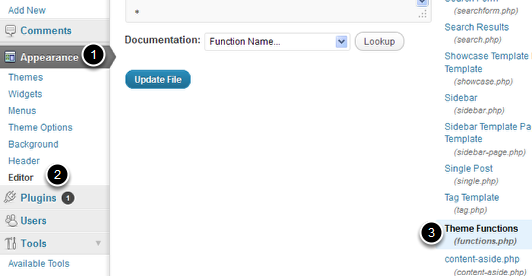
- Under Editor section Select Functions.php in the list of php files on the right of your screen (or just see image below)
- Paste Below code in functions.php
// Display or Count how many times a post has been viewed. // id = the post id and action = display or count function arixWp_PostViews( $id, $action ) { $axCountMeta = 'ax_post_views'; // Your Custom field that stores the views $axCount = get_post_meta($id, $axCountMeta, true); if ( $axCount == '' ) { if ( $action == 'count' ) { $axCount = 0; } delete_post_meta( $id, $axCountMeta ); add_post_meta( $id, $axCountMeta, 0 ); if ( $action == 'display' ) { echo "0 Views"; } } else { if ( $action == 'count' ) { $axCount++; update_post_meta( $id, $axCountMeta, $axCount ); } else { echo $axCount . ' Views'; } } }
- After adding above code Click Update File
Step 2: Showing Posts Views Counter in WordPress Posts
- Select Single.PHP from right of your screen (See image below)
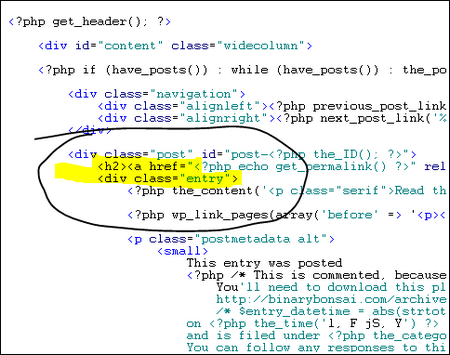
- Now Paste below code just after High Lighted Section in above image.
<?php echo arixWp_PostViews( get_the_ID(), 'count' ); ?>
To display the count outside the loop use this:
<?php echo arixWp_PostViews( get_the_ID(), 'display' ); ?>
If you want them to show in the loop use this instead.
<?php echo arixWp_PostViews( $post->ID, 'display' ); ?>
- Finally Click on Update File and You had done.
Check your blog post to check whether counter is working or not!. Feel Free to Ask any question about this Post Views Counter In WordPress
<credit>

No, But thanks bro i have installed WP-PostViews plugin what you recommend to Bilal Akbar
i added the code in Functions.php but post views are not showing is it my theme problem or something else ?
Had you done adding the code in single.php too?
I have added the code I used to a pastebin in case anyone needs it, I did change a few things. . . . but all in all its about the same code.
pastebin.com/r8XSYLwB
Thanks for the great work!!
The first time I view a single post, the counter displays 0 Views. I’m viewing it! I am the first viewer, I want to be counted right now!
maybe changing:
if ( $action == ‘display’ ) { echo “0 Views”;
for
if ( $action == ‘display’ ) { echo “1 View (YOU!)”;
Thanks a lot dear for this hack. Can you please tell me how can I add post views counter in blogger blog for individual posts? Please reply!
Hi Ankit, There is no article available on my blog about this. However, you can read this here in details
does this count for views from the index page as well? or just views on each individual post
It counts just views on each individual post! :)
Please tell after which line or where we have to insert the code in functions.php
Please check image I have added above!
IF you still can’t understand. I recommend you to install this plugin -> http://wordpress.org/extend/plugins/wp-postviews/screenshots/ :)
Hi Anmar Ali,
Thanks for this useful piece of code. I put the code in a custom plugin and in content-single.php (twenty eleven). Works perfect. I put the code in content-single.php in a div so styling is easy.
I had to alter the function code a little as after copy/paste some line breaks were missing and it appeared all as a comment. After adding line breaks after
// Display or Count how many times a post has been viewed.
// id = the post id and action = display or count
and
// Your Custom field that stores the views
all was fine.
Hello there, thanks for the snippet and it works perfectly! :)
but I have a one question, whether this Post views can still work well when combined with total w3 cache plugin?
thanks in advance
It will be work with W3 cache. Because its a simple code not plugin!
Thanks for useful tips, I’ll try it on my website… :mrgreen:
Cheers!
Thanks a lot!
So how can add most viewed posts without plugin?
I will write post on it. But you need to wait a little bit :)
where to add css and html codes of ]]b:skin in wordpress.
You are using WordPress not Blogger and you there is not code ]]b:skin in WordPress
where to add css and html codes of ]]> in wordpress.
You are using WordPress not Blogger and you there is no code ]]b:skin in WordPress
how to add css in wordpress
Goto Appearance > Editor and select Style.PHP to add desired CSS code!
Its Style.CSS not Style.PHP.I don’t see you tracking number of page views for this website.
In between thanks a lot.Cheers