
I recently shared Sleek and Cool Search Boxes widget for Blogger. Response was pretty good. Lots of my blog readers asked me to provide these cool search boxes for WordPress. So today I am sharing 5 awesome, Sleek and Cool Search Boxes Pack for WordPress. Actually these are PSD source designed by Design3edge. We work hard in converting this to WordPress for YOU. Hope you enjoyed with this!
Update: For Blogspot Version Click Here!
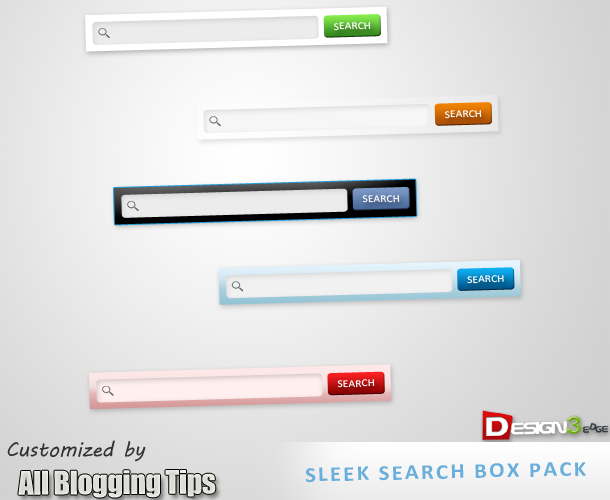
Cool Search Boxes For WordPress?
- Go to Dashboard > Appearance > Widgets > Available Widgets.
- Drag Text widget into a sidebar.
- Paste in the code.
- Save.
Style 1

<style>
.search_form2 {
border-radius:10px !important;-moz-border-radius: 13px;
        -webkit-border-radius: 13px;
        -o-border-radius: 13px;
        -ms-border-radius: 13px;
        -khtml-border-radius: 13px;
        border-radius: 13px;
background:URL(http://2.bp.blogspot.com/-vGjST2sX6Ts/T88uy-eRYUI/AAAAAAAAAog/xhJ2A0nGnpw/s1600/black.png) no-repeat scroll center center transparent;height:50px;display:block; width:302px;}</style>
<center><form method="get" style="-moz-border-radius: 13px;
        -webkit-border-radius: 13px;        -o-border-radius: 13px;
        -ms-border-radius: 13px;        -khtml-border-radius: 13px;
        border-radius: 13px;"

 class="search_form2" action=""><p>

<input type="text" id="s" style="background:transparent;
width:180px; border-radius:10px;
border:none;
margin:11px;
padding:4px; padding-top:6px !important;
padding-left:17px !important;
" name="s" value="Search in site..." onfocus="if(this.value==this.defaultValue)this.value='';" onblur="if(this.value=='')this.value=this.defaultValue;"/><input type="submit" value="Go" style="border:1px
solid rgba(0, 0, 0, .25);color:#FFF!important;margin-left:3px;background:#316ca4 url(http://3.bp.blogspot.com/-L3o3uwrf0Sk/T9CO3hbq1XI/AAAAAAAAApg/8RmMXmM6-MY/s320/blue.png) repeat-x top;display:inline-block;
border-radius:5px; font-weight:bold;
width:57px; float:right; margin-right:11px;margin-top:11px; height:30px;" id="searchsubmit"></p></form></center>
Style 2

<style>
.search_form2 {
border-radius:10px !important;-moz-border-radius: 13px;
        -webkit-border-radius: 13px;
        -o-border-radius: 13px;
        -ms-border-radius: 13px;
        -khtml-border-radius: 13px;
        border-radius: 13px;
background:URL(http://4.bp.blogspot.com/-hxd1468RbE4/T88u0xTfk1I/AAAAAAAAApQ/BZ1WB9VG_3g/s400/whitez%2Bby%2Babt.png) no-repeat scroll center center transparent;height:50px;display:block; width:302px;}</style>
<center><form method="get" style="-moz-border-radius: 13px;
        -webkit-border-radius: 13px;        -o-border-radius: 13px;
        -ms-border-radius: 13px;        -khtml-border-radius: 13px;
        border-radius: 13px;"

 class="search_form2" action=""><p>

<input type="text" id="s" style="background:transparent;
width:180px; border-radius:10px;
border:none;
margin:11px;
padding:4px; padding-top:6px !important;
padding-left:17px !important;
" name="s" value="Search in site..." onfocus="if(this.value==this.defaultValue)this.value='';" onblur="if(this.value=='')this.value=this.defaultValue;"/><input type="submit" value="Go" style="border:1px
solid rgba(0, 0, 0, .25);color:#FFF!important;margin-left:3px;background:#316ca4 url(http://3.bp.blogspot.com/-L3o3uwrf0Sk/T9CO3hbq1XI/AAAAAAAAApg/8RmMXmM6-MY/s320/blue.png) repeat-x top;display:inline-block;
border-radius:5px; font-weight:bold;
width:57px; float:right; margin-right:11px;margin-top:11px; height:30px;" id="searchsubmit"></p></form></center>
Style 3

<style>
.search_form2 {
border-radius:10px !important;-moz-border-radius: 13px;
        -webkit-border-radius: 13px;
        -o-border-radius: 13px;
        -ms-border-radius: 13px;
        -khtml-border-radius: 13px;
        border-radius: 13px;
background:URL(http://4.bp.blogspot.com/-Z_Bf8C64sWs/T88uy_rLu3I/AAAAAAAAAow/EcYyd6sKjxA/s400/bluez%2Bby%2Ballbloggingtips.png) no-repeat scroll center center transparent;height:50px;display:block; width:302px;}</style>
<center><form method="get" style="-moz-border-radius: 13px;
        -webkit-border-radius: 13px;        -o-border-radius: 13px;
        -ms-border-radius: 13px;        -khtml-border-radius: 13px;
        border-radius: 13px;"

 class="search_form2" action=""><p>

<input type="text" id="s" style="background:transparent;
width:180px; border-radius:10px;
border:none;
margin:11px;
padding:4px; padding-top:6px !important;
padding-left:17px !important;
" name="s" value="Search in site..." onfocus="if(this.value==this.defaultValue)this.value='';" onblur="if(this.value=='')this.value=this.defaultValue;"/><input type="submit" value="Go" style="border:1px
solid rgba(0, 0, 0, .25);color:#FFF!important;margin-left:3px;background:#316ca4 url(http://3.bp.blogspot.com/-L3o3uwrf0Sk/T9CO3hbq1XI/AAAAAAAAApg/8RmMXmM6-MY/s320/blue.png) repeat-x top;display:inline-block;
border-radius:5px; font-weight:bold;
width:57px; float:right; margin-right:11px;margin-top:11px; height:30px;" id="searchsubmit"></p></form></center>
Style 4

<style>
.search_form2 {
border-radius:10px !important;-moz-border-radius: 13px;
        -webkit-border-radius: 13px;
        -o-border-radius: 13px;
        -ms-border-radius: 13px;
        -khtml-border-radius: 13px;
        border-radius: 13px;
background:URL(http://4.bp.blogspot.com/-T2F6d51MVw8/T88u0v_kIqI/AAAAAAAAApE/pB5bbugoVoM/s400/transparent%2Bby%2Ballbloggingtips.png) no-repeat scroll center center transparent;height:50px;display:block; width:302px;}</style>
<center><form method="get" style="-moz-border-radius: 13px;
        -webkit-border-radius: 13px;        -o-border-radius: 13px;
        -ms-border-radius: 13px;        -khtml-border-radius: 13px;
        border-radius: 13px;"

 class="search_form2" action=""><p>

<input type="text" id="s" style="background:transparent;
width:180px; border-radius:10px;
border:none;
margin:11px;
padding:4px; padding-top:6px !important;
padding-left:17px !important;
" name="s" value="Search in site..." onfocus="if(this.value==this.defaultValue)this.value='';" onblur="if(this.value=='')this.value=this.defaultValue;"/><input type="submit" value="Go" style="border:1px
solid rgba(0, 0, 0, .25);color:#FFF!important;margin-left:3px;background:#316ca4 url(http://3.bp.blogspot.com/-L3o3uwrf0Sk/T9CO3hbq1XI/AAAAAAAAApg/8RmMXmM6-MY/s320/blue.png) repeat-x top;display:inline-block;
border-radius:5px; font-weight:bold;
width:57px; float:right; margin-right:11px;margin-top:11px; height:30px;" id="searchsubmit"></p></form></center>
Style 5

<style>
.search_form2 {
border-radius:10px !important;-moz-border-radius: 13px;
        -webkit-border-radius: 13px;
        -o-border-radius: 13px;
        -ms-border-radius: 13px;
        -khtml-border-radius: 13px;
        border-radius: 13px;
background:URL(http://1.bp.blogspot.com/-D98wjamWcwk/T88u0dnSPuI/AAAAAAAAAo4/U4Oy3x-zhRg/s400/pinkz.png) no-repeat scroll center center transparent;height:50px;display:block; width:302px;}</style>
<center><form method="get" style="-moz-border-radius: 13px;
        -webkit-border-radius: 13px;        -o-border-radius: 13px;
        -ms-border-radius: 13px;        -khtml-border-radius: 13px;
        border-radius: 13px;"

 class="search_form2" action=""><p>

<input type="text" id="s" style="background:transparent;
width:180px; border-radius:10px;
border:none;
margin:11px;
padding:4px; padding-top:6px !important;
padding-left:17px !important;
" name="s" value="Search in site..." onfocus="if(this.value==this.defaultValue)this.value='';" onblur="if(this.value=='')this.value=this.defaultValue;"/><input type="submit" value="Go" style="border:1px
solid rgba(0, 0, 0, .25);color:#FFF!important;margin-left:3px;background:#316ca4 url(http://3.bp.blogspot.com/-L3o3uwrf0Sk/T9CO3hbq1XI/AAAAAAAAApg/8RmMXmM6-MY/s320/blue.png) repeat-x top;display:inline-block;
border-radius:5px; font-weight:bold;
width:57px; float:right; margin-right:11px;margin-top:11px; height:30px;" id="searchsubmit"></p></form></center>
-
Credits
Sleek and Cool Search Boxes For WordPress tutorial is a first time shared tutorial guide by AllBloggingTips. These scripts, widget and style sheets are provided only by ABT therefore if you wish to share this tutorial with your readers and friends then kindly link back to this post as the only favour in return. :D
That’s all!. We hope you enjoyed this Cool Search Boxes for WordPress. You can also subscribe us to get our next tutorial in your inbox ;)
Subscribe Here!

How do you control where the results of the search are displayed?
It will show up on default wordpress search page! :)
This is not working well. after saving text widget, its alignment is very bad and i am getting this code line written above the search bar… class=”search_form2″ action=”https://allbloggingtips.com”>
Please make sure to copy above code perfectly and replace allbloggingtips.com with your current site URL. It will works :D