

• Skip to primary navigation
  • Skip to main content
  • Skip to primary sidebar
  • Skip to footer
logo

All Blogging Tips

Everything About Blogging

  • Home
  • Start a Blog
  • Grow Your Blog
  • About
  • Contact
  • Privacy Policy
  • Tools I Use

AllBloggingTips Redesigned Version 2.0

By Ammar Ali 41 Comments

ABTHi all, We are very proud to announce that we redesigned out blog to meet better experience of you.  Our blog runs on Thesis Theme and is customized by me. We now comes with more cool features and design of this blog. First Check Out our new look of design v2.
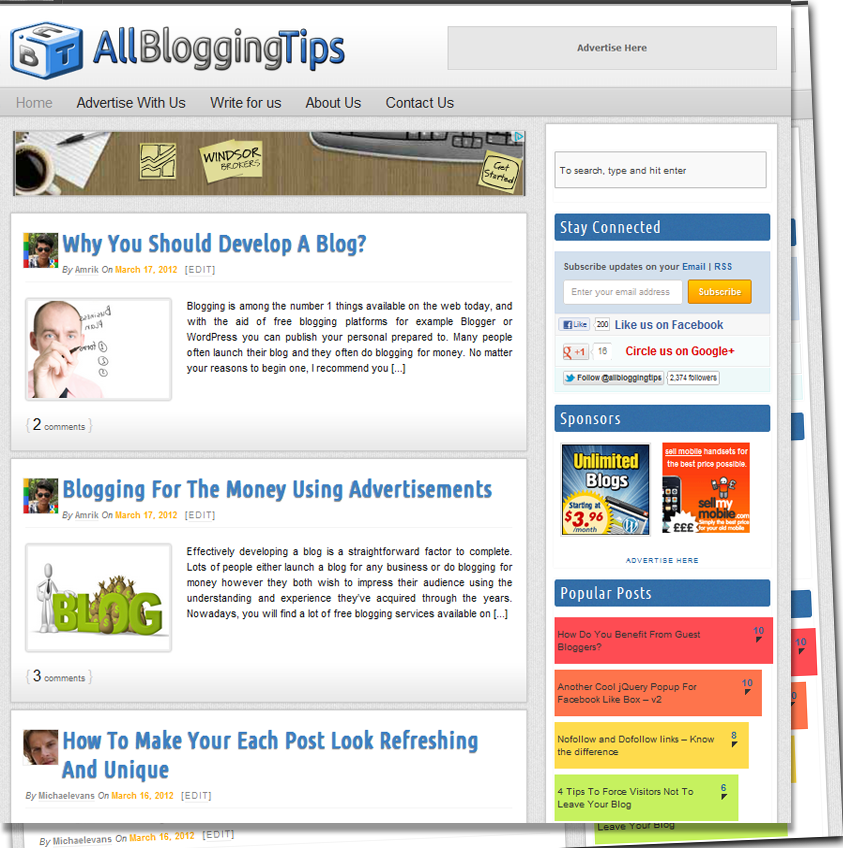
allbloggingtips new design v2 0


Table of Contents
  • Features of New Design Version 2.0
  •  Some Numbers

Features of New Design Version 2.0

This theme is coded with HTML5, CSS3 and using latest version of WordPress 3.3. Valid HTML5 markup, and also a Responsive Design. Check out some features of this new design.

  • Full Width Header and Menu Bar
  • New Logo Added and Favicon
  • Site Background with Texture
  • Post Body with new style
  • Cool Sidebar
  • Animating Footer on Hover
  • Comment Section Updated
  • Stylish Author Box
  • Related Posts with Thumbnails
  • Heading Styles with Author Avatar on Homepage
  • Top Commentators and Author Widget Added

What’s More?

 Not only above features are added we all updated some of our recent pages , widgets and much more some of them are:

  • About Us Page Updated
  • Advertise with AllBloggingTips Page Launched
  • Write For Us Page Updated
  • New Contact Form Added

 Some Numbers

Stats recorded on 18/03/2012

Number of Posts : 96
Number of Comments : 600
Fans at Facebook 200+
Twitter Followers 2440+
Alexa Rank : 64k
Pagerank : 3


This site is in Version 2.0 , and open for your Feedback. if you found any Dispute or Error, then please let me know through Comments or Contact form.

Share this post:

Share on X (Twitter) Share on Facebook Share on Pinterest Share on Email Share on WhatsApp

About Ammar Ali

A blogger, web designer, front-end developer and WordPress specialist since 2011. I started this blog during high school. Here I share what I've learned so far and what I continue to learn through blogging so that I can be of assistance in some way to improve your blog. Read more here.

Reader Interactions

Comments

  1. Olawale Daniel says

    May 3, 2012 at 9:55 pm

    Great design, I love this new redesigned version of ABT. You did a great job guy. :)

    Reply
  2. Pavan Somu says

    April 15, 2012 at 10:46 am

    Nice design and the site is also fast loading

    Reply
  3. Paul Santosh says

    March 24, 2012 at 2:42 pm

    Nice design buddy :)

    Reply
  4. Ramnadh says

    March 23, 2012 at 1:43 pm

    Nice design. Clean and elegant look.

    Reply
  5. Chiranjeev says

    March 20, 2012 at 10:24 pm

    Nice going. Just going your way!

    Reply
  6. pulkit says

    March 20, 2012 at 3:10 pm

    hey its so awesome.
    i just love it
    please can u provide me the link from where you downloaded this template please
    thanks

    Reply
    • Ammar says

      March 20, 2012 at 4:03 pm

      This is custom theme build on Thesis Premium WP theme by DIYTHEMES

      Reply
  7. Ankit says

    March 20, 2012 at 11:54 am

    WOW, nice blog.Keep it up Ammar. Way to go :)
    Happy blogging!

    Reply
  8. Ifham khan says

    March 20, 2012 at 11:13 am

    Awesome update buddy keep it up :)

    Reply
  9. Ashish says

    March 20, 2012 at 8:06 am

    nice buddy.. clean and easy on eye.. liked the Author Box..

    Reply
    • Ammar says

      March 20, 2012 at 8:20 am

      Thanks Ashish. Glad to like our new design :)

      Reply
  10. Rahul Mehta says

    March 19, 2012 at 7:04 pm

    Ammar its looking good then d previous design .. good keep it up .

    Reply
  11. omegle tricks says

    March 19, 2012 at 4:11 pm

    great logo:)

    Reply
  12. John says

    March 18, 2012 at 11:21 pm

    Looks awesome!

    Reply
  13. Zeeshan says

    March 18, 2012 at 10:11 pm

    Wow this new look is so awesome from logo to sidebar i am loving each and every thing of it. Your old logo was so cool but new one is also great.

    Reply
    • Ammar says

      March 19, 2012 at 9:25 am

      Glad to know this :) Keep Visiting

      Reply
  14. Janmejaya says

    March 18, 2012 at 9:57 pm

    Amazing look.

    Reply
  15. Kulwant Nagi says

    March 18, 2012 at 7:33 pm

    Nice Look !! And quite fast too

    Reply
    • Ammar says

      March 18, 2012 at 8:17 pm

      Thanks Kulwant. We work hard to increase this blog loading time..

      Reply
  16. Gaurav says

    March 18, 2012 at 5:48 pm

    I am not the getting the responsive design of ABT in my Android btw really nice design

    Reply
    • Ammar says

      March 18, 2012 at 6:05 pm

      Thanks for your feedback. We will solve this issue soon :D

      Reply
  17. Irfan says

    March 18, 2012 at 5:37 pm

    Cool design bro! Keep it adding good stuff.

    Reply
    • Ammar says

      March 18, 2012 at 5:40 pm

      Thanks Irfan !

      Reply
  18. Jafar says

    March 18, 2012 at 5:34 pm

    No words to appreciate your work but there is a problem with the sliding share bar at Left.

    All things are supreme .

    Reply
    • Ammar says

      March 18, 2012 at 5:43 pm

      Thanks Jafar. But can we know what is problem with floating sharebar?

      Reply
      • Jafar says

        March 18, 2012 at 6:02 pm

        Yes sure I am sharing the prob.’s screen shot on this blog’s group on facebook. Check it .

        Reply
  19. Amit Shaw says

    March 18, 2012 at 5:17 pm

    Hey Amar Nice Desg. Keep it up bro.

    Reply
    • Ammar says

      March 18, 2012 at 5:26 pm

      Thanks Amit :) . By the way My name is “Ammar” not amar. you always do this mistake :)

      Reply
      • Rahul kuntala says

        March 18, 2012 at 7:29 pm

        Call him Ammit :P he never do that again that mistake then

        Reply
  20. Rahul kuntala says

    March 18, 2012 at 5:07 pm

    Hey looking cool.. how to get the link with blue hover??

    Reply
    • Ammar says

      March 18, 2012 at 5:37 pm

      Here is code to do this a:hover {color:#fff; background:#478DD4;border-radius:2px;} add this code to your theme style.css

      Reply
      • Rahul kuntala says

        March 18, 2012 at 7:34 pm

        It’s getting through out my blog.. Even on my alexa rank, fb fan page everywhere looking very ugly.. I need to hover only on the links like you are getting now.

        Reply
        • Ammar says

          March 18, 2012 at 8:18 pm

          Rahul use this code .post a:hover {color:#fff; background:#478DD4;border-radius:2px;} Hope this works :)

          Reply
  21. Osho Garg says

    March 18, 2012 at 4:58 pm

    Awesome Design, Specially Logo And And Background :)

    Reply
    • Ammar says

      March 18, 2012 at 5:42 pm

      We work hard on Logo and Background. Glad you like this :)

      Reply
  22. Nalaka Prasad says

    March 18, 2012 at 4:48 pm

    Very nice design Ammar!!! keep rocking

    Reply
    • Ammar says

      March 18, 2012 at 4:49 pm

      Thanks Nalaka!!

      Reply
  23. Sandeep Chaudhary says

    March 18, 2012 at 4:40 pm

    hey, bro your new design is awesome and it is very professional. You are doing great job. Best of Luck bro for your bright future.

    Reply
    • Ammar says

      March 18, 2012 at 4:42 pm

      Thanks Sandeep. Its good to hear you like this theme. :D

      Reply
  24. Ahmad Awais says

    March 18, 2012 at 4:38 pm

    Keep it up!!

    Reply
    • Ammar says

      March 18, 2012 at 4:42 pm

      Sure: Thanks for your comment.

      Reply

Leave a Reply Cancel reply

Your email address will not be published. Required fields are marked *

Primary Sidebar

Get Blogging & SEO Tips by Email

Get helpful blogging, SEO, and content tips delivered straight to your inbox. No spam.

Join 3,489 other subscribers

Popular Posts

  • Is Your Blog Properly Optimized for Performance and SEO?
  • 10 Powerful Ways to Become a Famous Blogger
  • Google AdSense vs Affiliate Marketing: A Simple Comparison for Beginners
  • Effective Ways to Increase Content Reach and Audience Engagement
  • 12 Things to Do Before Applying for Google AdSense
  • Are Backlinks Becoming Less Valuable in Modern SEO?
  • Step-by-Step Guide to Creating a Successful Travel Blog
  • How to Start as a Freelance Writer & Is It Worth?
  • Add Smooth Multi Level Drop-Down Menu In Blogger
  • How To Delete A Blogger Blog Permanently In 5 Minutes (+ FAQs)

Blogging Tools I Use

Over the years, I’ve tested dozens of blogging and WordPress tools. Below are the tools I personally use and recommend for blogging, performance, SEO, and monetization.

Blogging Tools I Use →

Categories

  • Announcement (12)
  • Ask The Readers (2)
  • Blogger (56)
    • Blogger Hacks (4)
    • Blogger Tips (24)
  • Blogging (108)
    • Blogging Tips (81)
    • Writing Tips (6)
  • Coupons (2)
  • Design (5)
  • Email Marketing (4)
  • Free Themes (1)
    • WordPress Themes (1)
  • Free Traffic (40)
    • Guest Blogging (7)
    • Search Engine Optimization (4)
    • Social Media (13)
  • Giveaway (16)
  • Hosting (14)
  • How To (48)
  • Latest News (1)
  • Make Money Online (37)
    • Adsense (7)
    • Affiliate Marketing (8)
  • Reviews (17)
  • SEO (46)
  • Social Media (13)
    • Facebook (5)
      • Tips and Tricks (3)
    • Twitter (2)
  • WordPress (54)
    • WordPress Plugins (17)
    • WordPress Themes (5)
    • WordPress Tricks (2)
    • WordPress Widgets (14)

Footer

About This Site

All Blogging Tips helps beginners learn how to start, grow, and monetize blogs using WordPress. I share practical guides and honest recommendations based on real blogging experience.

Read more →

Site & Resources

  • Tools I Use
  • About
  • Advertise Here
  • Contact
  • Disclosure Policy
  • Copyright Policy
  • Privacy Policy

Start & Grow Your Blog

  • A Ridiculously Helpful Guide to Start Your Own Blog In 10 Minutes
  • How To Grow Your Blog And Build An Audience
  • How To Make Money From Your Blog
  • Cheap WordPress Hosting
  • Free WordPress Hosting

Copyright © 2026 All Blogging Tips · Powered by InMotion Hosting · WordPress · Log in