
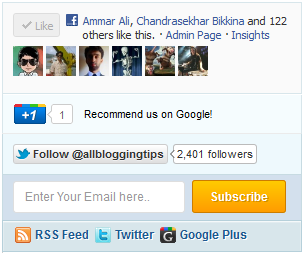
 Today we comes with New Mashable Style Social Subscription Widget. You can add this to your wordpress or blogger/blogspot blogs. It includes Like Button, Google+, Twitter follower with a cool subscribe box. New Mashable Style Social Subscription Widget an attractive subscription form that will further increase the number of your Email subscribers. The conversion didn’t took me very long and I am pleased to present it to all of you. Kindly see a demo first:
Adding New Mashable Style Social Subscription Widget
You just need to place a code to your blog widget Follow following steps to add New Mashable Style Social Subscription Widget to WordPress and Blogger.
Adding To Blogger
- Go to Design > Page Elements.
- Click Add A Gadget.
- In Add A Gadget window, select HTML/Javascript .
- Copy the code below and paste it inside the content box.
- Save the gadget.
- Drag the gadget and reposition it under Blog Posts gadget.
- Click Save button (top right hand corner).
Adding To WordPress
- Go to Dashboard > Appearance > Widgets > Available Widgets.
- Drag Text widget into a sidebar.
- Paste in the code.
- Save.
Note: If This widget is not working on you blogspot and wordpress blogs then download this code and place it as a widget nstead of give below.
<style>
/* Social Widget */
#ABT-mashable-bar {
border: 0;
margin-bottom: 10px;
margin: 0 auto;
width:300px;
}
.fb-likebox {
background: #fafafa;
padding: 10px 10px 0 10px;
border: 1px solid #D8E6EB;
margin-top: -2px;
height:80px;
}
.googleplus {
background: #F5FCFE;
border-top: 1px solid #FFF;
border-bottom: 1px solid #ebebeb;
border-right: 1px solid #D8E6EB;
border-left: 1px solid #D8E6EB;
border-image: initial;
font-size: .90em;
font-family: "Arial","Helvetica",sans-serif;
color: #000;
padding: 9px 11px;
line-height: 1px;}
.googleplus span {
color: #000;
font-size: 11px;
position: absolute;
display:inline-block;
margin: 9px 70px;}
.g-plusone { float: left;}
.twitter {
background: #EEF9FD;
padding: 10px;
border: 1px solid #C7DBE2;
border-top: 0;}
#mashable {
background: #EBEBEB;
border: 1px solid #CCC;
border-top: 1px solid white;
padding: 2px 8px 2px 3px;
text-align: right;
border-image: initial;}
#mashable .author-credit {}
#mashable .author-credit a {
font-size: 10px;
font-weight: bold;
text-shadow: 1px 1px white;
color: #1E598E;
text-decoration:none;}
#email-news-subscribe .email-box{
padding: 5px 10px;
font-family: "Arial","Helvetica",sans-serif;
border-top: 0;
border-right: 1px solid #C7DBE2;
border-left: 1px solid #C7DBE2; background: #d3e0ed;
border-image: initial;
height:35px;}
#email-news-subscribe .email-box input.email{
background:#FFFFFF;
border: 1px solid #dedede;
color: #999;
padding: 7px 10px 8px 10px;
-moz-border-radius: 3px;
-webkit-border-radius: 3px;
-o-border-radius: 3px;
-ms-border-radius: 3px;
-khtml-border-radius: 3px;
border-radius: 3px;
border-image: initial;
font-family: "Arial","Helvetica",sans-serif;}
#email-news-subscribe .email-box input.email:focus{color:#333}
#email-news-subscribe .email-box input.subscribe{
background: -moz-linear-gradient(center top,#FFCA00 0,#FF9B00 100%);
background: -webkit-gradient(linear,left top,left bottom,color-stop(0,#FFCA00),color-stop(1,#FF9B00));
background: -moz-linear-gradient(center top,#FFCA00 0,#FF9B00 100%);
-pie-background: linear-gradient(270deg,#ffca00,#ff9b00);
font-family: "Arial","Helvetica",sans-serif;
border-radius:3px;
-moz-border-radius:3px;
-webkit-border-radius:3px;
border:1px solid #cc7c00;
color:white;
text-shadow:#d08d00 1px 1px 0;
padding:7px 14px;
margin-left:3px;
font-weight:bold;
font-size:12px;
cursor:pointer;
border-image: initial;}
#email-news-subscribe .email-box input.subscribe:hover{
background: #ff9b00;
background-image:-moz-linear-gradient(top,#ffda4d,#ff9b00);
background-image:-webkit-gradient(linear,left top,left bottom,from(#ffda4d),to(#ff9b00));
filter:progid:DXImageTransform.Microsoft.Gradient(startColorStr=#ffffff,endColorStr=#ebebeb);
outline:0;-moz-box-shadow:0 0 3px #999;
-webkit-box-shadow:0 0 3px #999;
box-shadow:0 0 3px #999
background:-webkit-gradient(linear,left top,left bottom,color-stop(0,#ffda4d),color-stop(1,#ff9b00));
background:-moz-linear-gradient(center top,#ffda4d 0,#ff9b00 100%);
-pie-background:linear-gradient(270deg,#ffda4d,#ff9b00);
border-radius:3px;
-moz-border-radius:3px;
-webkit-border-radius:3px;
border:1px solid #cc7c00;
color:#FFFFFF;
text-shadow:#d08d00 1px 1px 0}
#other-social-bar {
background-color: #D8E6EB;
box-shadow: 0 1px 1px #FFFFFF inset;
padding: 0px;
font-family: "Arial","Helvetica",sans-serif;
font-weight:bold;
overflow: hidden;
border: 1px solid #B6D0DA;
height:30px;
}
#other-social-bar ul {list-style: none outside none; padding-left: 4px;}
#other-social-bar .other-follow {
float: left;
color:#1E598E;
overflow: hidden;
height:20px;
padding:7px;
width: 270px;}
#other-social-bar .other-follow ul {
list-style: none outside none;
padding-left: 4px;}
#other-social-bar .other-follow ul li {
font-size: 12px;
font-weight: bold;
display:inline;
border:0;
text-shadow: 1px 1px white;}
#other-social-bar .other-follow ul li a {
font-size: 12px;
color:#1E598E;
font-weight: bold;
display:inline;
text-shadow: 1px 1px white;}
#other-social-bar .other-follow li {
font-size: 12px;
font-weight: bold;
display:inline;
border:0;
text-shadow: 1px 1px white;}
#other-social-bar .other-follow li a {
font-size: 12px;
color:#1E598E;
font-weight: bold;
display:inline;
text-shadow: 1px 1px white;}
#other-social-bar .other-follow li.my-rss {
background: url('http://3.bp.blogspot.com/-sR72SM_Wets/TwHZG9y4hXI/AAAAAAAAFv8/0bP2R3Qkl8c/s400/rss-16x16.png') no-repeat transparent;
line-height: 1;
padding: 0px 3px 1px 20px;
width: 60px;
margin-bottom:0px;
margin-left:5px;}
#other-social-bar .other-follow li.my-rss a, #other-social-bar .other-follow li.my-linkedin a, #other-social-bar .other-follow li.my-gplus a{
text-decoration:none;
}
#other-social-bar .other-follow li.my-rss a:hover, #other-social-bar .other-follow li.my-linkedin a:hover, #other-social-bar .other-follow li.my-gplus a:hover{
text-decoration:underline;
}
#other-social-bar .other-follow li.my-linkedin {
background: url('http://madbaydesigns.com/shop/images/social_bookmarks/twitter.png') no-repeat transparent;
line-height: 1;
padding: 0px 3px 1px 20px;
width: 60px;
margin-bottom:0px;}
#other-social-bar .other-follow li.my-gplus {
background: url(http://4.bp.blogspot.com/-cC729VpBxrk/TwHZE71ZgoI/AAAAAAAAFvk/_UMyIgA8vj8/s400/gplus-16x16.png) no-repeat transparent;
line-height: 1;
width: 60px;
padding: 0px 3px 1px 20px;
margin-bottom:0px;}
</style>
<!--[if IE]>
<style>
#email-news-subscribe .email-box input.subscribe{
background: #FFCA00;
}
</style>
<![endif]-->
<!--begin of social widget--> <div style="margin-bottom:10px;"> <div id="ABT-mashable-bar" > <!-- Begin Widget --> <div> <!-- Facebook --> <iframe src="//www.facebook.com/plugins/like.php?href=http://facebook.com/allbloggingtips&send=false&layout=standard& width=200px&show_faces=true&action=like&colorscheme=light&
font&height=100px&appId=234513819928295" scrolling="no" frameborder="0" style="border:none; overflow:hidden; "></iframe> </div> <div> <!-- Google --> <span>Recommend us on Google!</span><div data-size="medium"></div> <script type="text/javascript" src="https://apis.google.com/js/plusone.js"></script> </div> <div> <!-- Twitter --> <iframe title="" style="width: 300px; height: 20px;" src="http://platform.twitter.com/widgets/follow_button.html#_=1319978796351&
align=&button=blue&id=twitter_tweet_button_0&
lang=en&link_color=&screen_name=allbloggingtips&show_count=&
show_screen_name=&text_color=" frameborder="0" scrolling="no"></iframe> </div>
<div id="email-news-subscribe"> <!-- Email Subscribe --> <div>
<form action="http://feedburner.google.com/fb/a/mailverify" method="post" target="popupwindow" onsubmit="window.open('http://feedburner.google.com/fb/a/mailverify?uri=tntbystc', 'popupwindow', 'scrollbars=yes,width=550,height=520');return true">
<input type="text" style="width: 150px; font-size: 12px;" id="email" name="email" value="Enter Your Email here.." onfocus="if(this.value==this.defaultValue)this.value='';" onblur="if(this.value=='')this.value=this.defaultValue;" />
<input type="hidden" value="tntbystc" name="uri" />
<input type="hidden" name="loc" value="en_US" />
<input name="commit" type="submit" value="Subscribe" />
</form>
</div> </div>
<div id="other-social-bar"> <!-- Other Social Bar --> <ul> <li> <a rel="nofollow" title="RSS" href="http://feeds.feedburner.com/allbloggingtips" target="_blank">RSS Feed</a> </li> <li> <a rel="nofollow" title="linkedin" rel="author" href="AllBloggingtips" target="_blank">Twitter</a> </li> <li> <a rel="nofollow" title="Google Plus" rel="author" href="http://plus.google.com/44448117245314564536" target="_blank">Google Plus</a> </li> </ul> </div><div id="mashable" style="background: #e3e3e3;border: 1px solid #CCC;border-top: 1px solid white;padding: 1px 8px 1px 3px;text-align: right;border-image: initial;font-size:10px;font-family: "arial","helvetica",sans-serif;"> <span style="font-family: Arial, Helvetica, sans-serif;"></span></div></div>
<!-- End Widget --> </div> <!--end of social widget-->
Make these important changes:
- Replace AllBloggingTips with your Facebook username
- Replace AllBloggingTips with your twitter username
- Replace AllBloggingTips with your Feedburner title. Your Feedburner title is the word added at the end of your Feedburner link. Example: Allbloggingtips
- Replace AllBloggingTips with your feedburner link.
- Replace Allbloggingtips with your Twitter profile link
- Replace Google+Profile Link with your Google Plus profile link
5. Hit save and you are all done!
Visit your blogs to see it working just perfectly. :)
I have set the width of the widget to 290px. If in case your sidebar is small or big, you may then have to adjust the two width values in brown highlight color. The first will set the width of the entire container and the second value will set the width of the subscription input box.
Credits:
You are most welcomed to share this widget with your readers. You will have to give credits to AllBloggingTips blog by attaching a link back to this post. You may also give credits to the author for the wordpress version of this sharing plugin.

Hi Ammar,
Thanks for recommendation, I have switched to that plugin on my WordPress site and its look awesome.
Ammar Please Help Me Use This Widget On WordPress. I have tried pasting other codes also in text widget but it just doesent work please help
Hi Saad,
Download this code https://allbloggingtips.com/wp-content/uploads/2012/03/mashable-style-social-subscription-widget-code.txt and place it in sidebar widget it will works :)
bro i want to add this widget to my blog..but can not adjust the width as width of my side bar is less! So plz say me where to edit so that i can set it properly!
Hi Shekhar,
I visited your blog and saw that your template contain 2 sidebar of very less width. Better use 1 right sidebar template. You can also try iThesis Free Premium Blogger Template
And If you still want to add this widget in your current template just find this code
width:300px;and replace 300px with your desire sidebar widget :D~Ammar
This is really cool stuff. I’m going to use this widget. Thanks for sharing this Ali.
Welcome Bharat ;)
It’s not at all working
its not working for blogger,
when i am adding this widget ,then “PAGE NOT FOUND”
error is coming in that particular widget space.