• Skip to primary navigation
  • Skip to main content
  • Skip to primary sidebar
  • Skip to footer
logo

All Blogging Tips

Everything About Blogging

  • Home
  • Start a Blog
  • Grow Your Blog
  • About
  • Contact
  • Privacy Policy
  • Tools I Use

Tips and Tricks

5 No-Name Facebook Pages with Insane Engagement (And Why)

By Rohan Ayyar 7 Comments

6.15 percent.

That’s the reach of the average Facebook post.

The free ride has come and gone. You can’t count on Facebook to put your posts in front of your audience. The average user Likes 40 Pages on Facebook, and has 200 friends.

Even if Facebook distributed all posts evenly, your followers would only see one of your posts for every 240 others they skimmed through.

But there’s hope.
[Read more…] about 5 No-Name Facebook Pages with Insane Engagement (And Why)
Another Cool jQuery Popup For Facebook Like Box – v2

By Ammar Ali 32 Comments

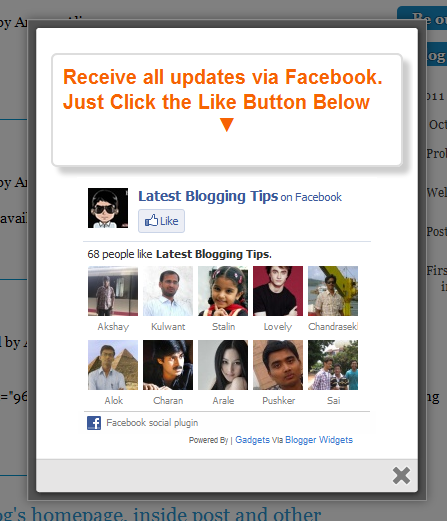
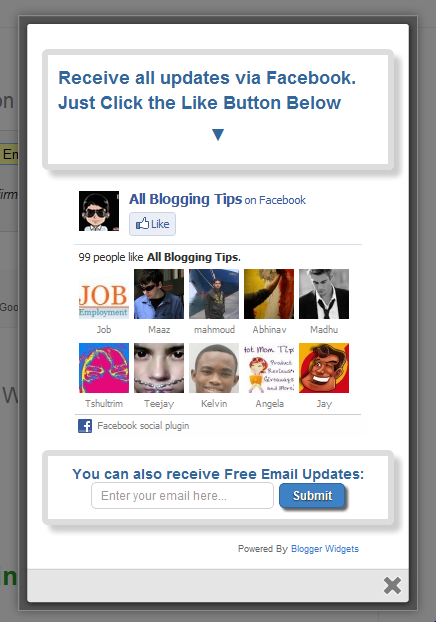
jQuery Popup For Facebook Like BoxAfter our previous Cute jQuery Popup For Facebook Like Box.  We decided to release Another Cool jQuery Popup For Facebook Like Box – v2. This is a great widget to increase likes. You may see on most sites or blogs which are using Popups to increase there subscribers, fans and followers.  As soon as new visitors arrive your blog the popup will be showed to your visitors which can help you to increase likes and get more traffic from Facebook.

Check out demo below and than I show you How to Add Another Cool jQuery Popup For Facebook Like Box – v2  in Blogger or WordPress?

Live Demo

How To Another Cool jQuery Popup For Facebook Like Box – v2

I am discussing here steps for WordPress and Blogger but if you know how to deal simple HTML code then you can easily add it to your any blog too.

Adding To Blogger

  1. Go to Design > Page Elements.
  2. Click Add A Gadget.
  3. In Add A Gadget window, select HTML/Javascript .
  4. Copy the code below and paste it inside the content box.
  5. Save the gadget.
  6. Drag the gadget and reposition it under Blog Posts gadget.
  7. Click Save button (top right hand corner).

Adding To WordPress

  1. Go to Dashboard > Appearance > Widgets > Available Widgets.
  2. Drag Text widget into a sidebar.
  3. Paste in the code.
  4. Save.


Download Code Here!

Make this simple change:

  • Replace allbloggingtips with your facebook username.
  • Replace latestbloggingtips4u with your feedburner name

Are you Want the widget to appear Repeatedly

If you want to prompt the likebox every time the visitor enters your blog then simply delete this *30 from the code above.
Visit your blog to see Facebook popup. To review the widget again and again just delete your browser cookies and refresh the page to see it appearing again. That’s it a cool Facebook pop up widget that will surly increase your facebook fan count.Thanks again to MBT for the original gadget.

jQuery Popup For Facebook Like Box

Need Help?

I hope that all unanswered queries on the previous tutorial are covered in this post. If you still need help in changing colors and other stuff then you are most welcomed to post your queries below. Have a nice day pals! )

Add Cute jQuery Popup For Facebook Like Box

By Ammar Ali 9 Comments

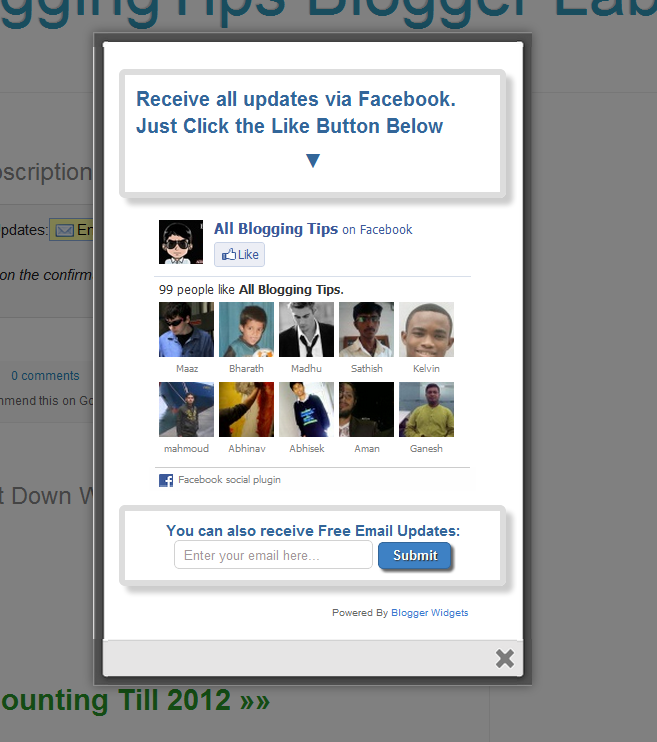
cute facebook popupAfter my recent widget Popup for Adsense. Now i decided to present some cool to you so I comes with a Cute jQuery Popup For Facebook Like Box. This is a great widget to increase likes. You may see on most sites or blogs which are using Popups to increase there subscribers, fans and followers. This Cute jQuery Popup For Facebook Like Box is a great widget for blogger. As soon as new visitors arrive your blog the popup will be showed to your visitors which can help you to increase likes and get more traffic from Facebook.In my next tutorials I will try  to make it more interactive with social media links, profiles and a complete version with everything in it which you may need.Check out demo below and than I show you How to Add Cute jQuery Popup For Facebook Like Box To Blogger or WordPress?

Live Demo


  • Add Cute jQuery Popup For Facebook Like Box To Blogger

I am discussing here steps for blogger but if you know how to deal simple HTML code then you can easily add it to your wordpress blog too.

  1. Go To Blogger > Design
  2. Click choose a gadget
  3. Select HTML/javascript widget
  4. Paste the following code inside it
  •  Add Cute jQuery Popup For Facebook Like Box To WordPress Blogs?

You can add  jQuery Facebook Like Box Popup To WordPress Blogs. Follow following steps to add this.

  1. Goto WordPress Dashboard > Appearance >Widget
  2. Drop a Text Widget to your sidebar.
  3. Now Paste above code in Text Widget.
  4. And CLick on save button. and see your blog
<style>

    /*
       ColorBox Core Style:
       The following CSS is consistent between example themes and should not be altered.
    */
    #colorbox, #cboxOverlay, #cboxWrapper{position:absolute; top:0; left:0; z-index:9999; overflow:hidden;}
    #cboxOverlay{position:fixed; width:100%; height:100%;}
    #cboxMiddleLeft, #cboxBottomLeft{clear:left;}
    #cboxContent{position:relative;}
    #cboxLoadedContent{overflow:auto;}
    #cboxTitle{margin:0;}
    #cboxLoadingOverlay, #cboxLoadingGraphic{position:absolute; top:0; left:0; width:100%;}
    #cboxPrevious, #cboxNext, #cboxClose, #cboxSlideshow{cursor:pointer;}
    .cboxPhoto{float:left; margin:auto; border:0; display:block;}
    .cboxIframe{width:100%; height:100%; display:block; border:0;}
    /*

       User Style:
       Change the following styles to modify the appearance of ColorBox.  They are
       ordered & tabbed in a way that represents the nesting of the generated HTML.
    */
    #cboxOverlay{background:#000;opacity:0.5 !important;}
    #colorbox{
            box-shadow:0 0 15px rgba(0,0,0,0.4);
           -moz-box-shadow:0 0 15px rgba(0,0,0,0.4);
            -webkit-box-shadow:0 0 15px rgba(0,0,0,0.4);
           }

    #cboxTopLeft{width:14px; height:14px; background:url(http://4.bp.blogspot.com/-_VSGGUcsUPE/TwNIXL6W2qI/AAAAAAAAFwQ/5KR8F-N3Mqk/s1600/controls.png) no-repeat 0 0;}
    #cboxTopCenter{height:14px; background:url(http://3.bp.blogspot.com/-dJQm3QEd5Iw/TxohpCter-I/AAAAAAAAF0Q/GRny7olLbv8/s400/border.png) repeat-x top left;}
         #cboxTopRight{width:14px; height:14px; background:url(http://4.bp.blogspot.com/-_VSGGUcsUPE/TwNIXL6W2qI/AAAAAAAAFwQ/5KR8F-N3Mqk/s1600/controls.png) no-repeat -36px 0;}
         #cboxBottomLeft{width:14px; height:43px; background:url(http://4.bp.blogspot.com/-_VSGGUcsUPE/TwNIXL6W2qI/AAAAAAAAFwQ/5KR8F-N3Mqk/s1600/controls.png) no-repeat 0 -32px;}
         #cboxBottomCenter{height:43px; background:url(http://3.bp.blogspot.com/-dJQm3QEd5Iw/TxohpCter-I/AAAAAAAAF0Q/GRny7olLbv8/s400/border.png) repeat-x bottom left;}
         #cboxBottomRight{width:14px; height:43px; background:url(http://4.bp.blogspot.com/-_VSGGUcsUPE/TwNIXL6W2qI/AAAAAAAAFwQ/5KR8F-N3Mqk/s1600/controls.png) no-repeat -36px -32px;}
         #cboxMiddleLeft{width:14px; background:url(http://4.bp.blogspot.com/-_VSGGUcsUPE/TwNIXL6W2qI/AAAAAAAAFwQ/5KR8F-N3Mqk/s1600/controls.png) repeat-y -175px 0;}
         #cboxMiddleRight{width:14px; background:url(http://4.bp.blogspot.com/-_VSGGUcsUPE/TwNIXL6W2qI/AAAAAAAAFwQ/5KR8F-N3Mqk/s1600/controls.png) repeat-y -211px 0;}
         #cboxContent{background:#fff; overflow:visible;}
             #cboxLoadedContent{margin-bottom:5px;}
             #cboxLoadingOverlay{background:url(http://2.bp.blogspot.com/-bMneOFi_UDo/Txohpge3Z9I/AAAAAAAAF0s/AbVgxX9pXtQ/s400/loadingbackground.png) no-repeat center center;}
             #cboxLoadingGraphic{http://3.bp.blogspot.com/-SKktU1-SCCw/TxohpRB19LI/AAAAAAAAF0Y/iwIo3LnjoE0/s400/loading.gif) no-repeat center center;}
             #cboxTitle{position:absolute; bottom:-25px; left:0; text-align:center; width:100%; font-weight:bold; color:#7C7C7C;}
             #cboxCurrent{position:absolute; bottom:-25px; left:58px; font-weight:bold; color:#7C7C7C;}
             #cboxPrevious, #cboxNext, #cboxClose, #cboxSlideshow{position:absolute; bottom:-29px; background:url(http://4.bp.blogspot.com/-_VSGGUcsUPE/TwNIXL6W2qI/AAAAAAAAFwQ/5KR8F-N3Mqk/s1600/controls.png) no-repeat 0px 0px; width:23px; height:23px; text-indent:-9999px;}
             #cboxPrevious{left:0px; background-position: -51px -25px;}
             #cboxPrevious.hover{background-position:-51px 0px;}
             #cboxNext{left:27px; background-position:-75px -25px;}
             #cboxNext.hover{background-position:-75px 0px;}
             #cboxClose{right:0; background-position:-100px -25px;}
             #cboxClose.hover{background-position:-100px 0px;}
             .cboxSlideshow_on #cboxSlideshow{background-position:-125px 0px; right:27px;}
             .cboxSlideshow_on #cboxSlideshow.hover{background-position:-150px 0px;}
             .cboxSlideshow_off #cboxSlideshow{background-position:-150px -25px; right:27px;}
             .cboxSlideshow_off #cboxSlideshow.hover{background-position:-125px 0px;}

    /*-----------------------------------------------------------------------------------*/
    /*   Facebook Likebox popup For Blogger
    /*-----------------------------------------------------------------------------------*/
    #subscribe {
        font: 12px/1.2 Arial,Helvetica,san-serif; color:#666;
    }
    #subscribe a,
    #subscribe a:hover,
    #subscribe a:visited {
        text-decoration:none;
    }
    .box-title {
       color: #F66303;
       font-size: 20px !important;
       font-weight: bold;
       margin: 10px 0;
    border:1px solid #ddd;
    -moz-border-radius:6px;
    -webkit-border-radius:6px;
    border-radius:6px;
    box-shadow: 5px 5px 5px #CCCCCC;
    padding:10px;
    line-height:25px; font-family:arial !important;
    }
    .box-tagline {
       color: #999;
       margin: 0;
       text-align: center;
    }
    #subs-container {
        padding: 35px 0 30px 0;
        position: relative;
    }
    a:link, a:visited {
    border:none;
    }
    .demo {
    display:none;
    }
    </style>

    <script src='https://ajax.googleapis.com/ajax/libs/jquery/1.6.1/jquery.min.js'></script>

    <script src="http://mybloggertricks.googlecode.com/files/jquery.colorbox-min.js"></script>
    <script type="text/javascript">
    jQuery(document).ready(function(){
       if (document.cookie.indexOf('visited=true') == -1) {
           var fifteenDays = 1000*60*60*24*30;
           var expires = new Date((new Date()).valueOf() + fifteenDays);
           document.cookie = "visited=true;expires=" + expires.toUTCString();
       $.colorbox({width:"400px", inline:true, href:"#subscribe"});
           }
    });
    </script>
        <!-- This contains the hidden content for inline calls -->

            <div style='display:none'>
       <div id='subscribe' style='padding:10px; background:#fff;'>
            <h3 class="box-title">Receive all updates via Facebook. Just Click the Like Button Below<center><p style="line-height:3px;" >▼</p></center></h3> 
          <center>

    <iframe src="//www.facebook.com/plugins/likebox.php?href=http%3A%2F%2Fwww.facebook.com%2Fallbloggingtips&amp;width=300&amp;colorscheme=light&amp;show_faces=true&amp;border_color=%23ffffff&amp;stream=false&amp;header=false&amp;height=258" scrolling="no" frameborder="0" style="border:none; overflow:hidden; width:300px; height:258px;" allowtransparency="true"></iframe>

    </center>

</div>
</div>

Visit your blog to see Facebook popup. To review the widget again and again just delete your browser cookies and refresh the page to see it appearing again. That’s it a cool Facebook pop up widget that will surly increase your facebook fan count.Thanks again to MBT for the original gadget.

Are you Want the widget to appear Repeatedly

If you want to prompt the likebox every time the visitor enters your blog then simply delete this *30 from the code above.


Primary Sidebar

Get Blogging & SEO Tips by Email

Get helpful blogging, SEO, and content tips delivered straight to your inbox. No spam.

Join 3,490 other subscribers

Popular Posts

  • Is Your Blog Properly Optimized for Performance and SEO?
  • 10 Powerful Ways to Become a Famous Blogger
  • Google AdSense vs Affiliate Marketing: A Simple Comparison for Beginners
  • Effective Ways to Increase Content Reach and Audience Engagement
  • 12 Things to Do Before Applying for Google AdSense
  • Are Backlinks Becoming Less Valuable in Modern SEO?
  • Step-by-Step Guide to Creating a Successful Travel Blog
  • How to Start as a Freelance Writer & Is It Worth?
  • Add Smooth Multi Level Drop-Down Menu In Blogger
  • How To Delete A Blogger Blog Permanently In 5 Minutes (+ FAQs)

Blogging Tools I Use

Over the years, I’ve tested dozens of blogging and WordPress tools. Below are the tools I personally use and recommend for blogging, performance, SEO, and monetization.

Blogging Tools I Use →

Categories

  • Announcement (12)
  • Ask The Readers (2)
  • Blogger (56)
    • Blogger Hacks (4)
    • Blogger Tips (24)
  • Blogging (108)
    • Blogging Tips (81)
    • Writing Tips (6)
  • Coupons (2)
  • Design (5)
  • Email Marketing (4)
  • Free Themes (1)
    • WordPress Themes (1)
  • Free Traffic (40)
    • Guest Blogging (7)
    • Search Engine Optimization (4)
    • Social Media (13)
  • Giveaway (16)
  • Hosting (14)
  • How To (48)
  • Latest News (1)
  • Make Money Online (37)
    • Adsense (7)
    • Affiliate Marketing (8)
  • Reviews (17)
  • SEO (46)
  • Social Media (13)
    • Facebook (5)
      • Tips and Tricks (3)
    • Twitter (2)
  • WordPress (54)
    • WordPress Plugins (17)
    • WordPress Themes (5)
    • WordPress Tricks (2)
    • WordPress Widgets (14)

Footer

About This Site

All Blogging Tips helps beginners learn how to start, grow, and monetize blogs using WordPress. I share practical guides and honest recommendations based on real blogging experience.

Read more →

Site & Resources

  • Tools I Use
  • About
  • Advertise Here
  • Contact
  • Disclosure Policy
  • Copyright Policy
  • Privacy Policy

Start & Grow Your Blog

  • A Ridiculously Helpful Guide to Start Your Own Blog In 10 Minutes
  • How To Grow Your Blog And Build An Audience
  • How To Make Money From Your Blog
  • Cheap WordPress Hosting
  • Free WordPress Hosting

Copyright © 2026 All Blogging Tips · Powered by InMotion Hosting · WordPress · Log in