
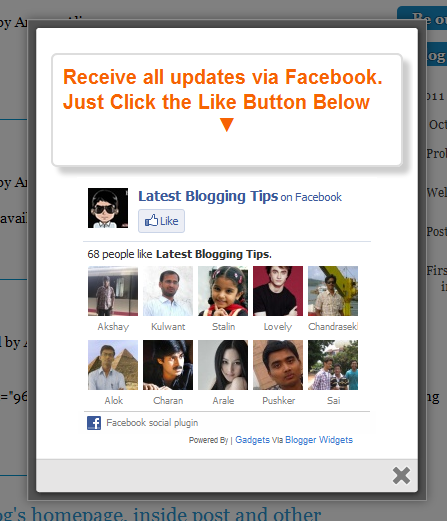
 After my recent widget Popup for Adsense. Now i decided to present some cool to you so I comes with a Cute jQuery Popup For Facebook Like Box. This is a great widget to increase likes. You may see on most sites or blogs which are using Popups to increase there subscribers, fans and followers. This Cute jQuery Popup For Facebook Like Box is a great widget for blogger. As soon as new visitors arrive your blog the popup will be showed to your visitors which can help you to increase likes and get more traffic from Facebook.In my next tutorials I will try to make it more interactive with social media links, profiles and a complete version with everything in it which you may need.Check out demo below and than I show you How to Add Cute jQuery Popup For Facebook Like Box To Blogger or WordPress?
- Add Cute jQuery Popup For Facebook Like Box To Blogger
I am discussing here steps for blogger but if you know how to deal simple HTML code then you can easily add it to your wordpress blog too.
- Go To Blogger > Design
- Click choose a gadget
- Select HTML/javascript widget
- Paste the following code inside it
- Add Cute jQuery Popup For Facebook Like Box To WordPress Blogs?
You can add jQuery Facebook Like Box Popup To WordPress Blogs. Follow following steps to add this.
- Goto WordPress Dashboard > Appearance >Widget
- Drop a Text Widget to your sidebar.
- Now Paste above code in Text Widget.
- And CLick on save button. and see your blog
<style>
/*
ColorBox Core Style:
The following CSS is consistent between example themes and should not be altered.
*/
#colorbox, #cboxOverlay, #cboxWrapper{position:absolute; top:0; left:0; z-index:9999; overflow:hidden;}
#cboxOverlay{position:fixed; width:100%; height:100%;}
#cboxMiddleLeft, #cboxBottomLeft{clear:left;}
#cboxContent{position:relative;}
#cboxLoadedContent{overflow:auto;}
#cboxTitle{margin:0;}
#cboxLoadingOverlay, #cboxLoadingGraphic{position:absolute; top:0; left:0; width:100%;}
#cboxPrevious, #cboxNext, #cboxClose, #cboxSlideshow{cursor:pointer;}
.cboxPhoto{float:left; margin:auto; border:0; display:block;}
.cboxIframe{width:100%; height:100%; display:block; border:0;}
/*
User Style:
Change the following styles to modify the appearance of ColorBox. They are
ordered & tabbed in a way that represents the nesting of the generated HTML.
*/
#cboxOverlay{background:#000;opacity:0.5 !important;}
#colorbox{
box-shadow:0 0 15px rgba(0,0,0,0.4);
-moz-box-shadow:0 0 15px rgba(0,0,0,0.4);
-webkit-box-shadow:0 0 15px rgba(0,0,0,0.4);
}
#cboxTopLeft{width:14px; height:14px; background:url(http://4.bp.blogspot.com/-_VSGGUcsUPE/TwNIXL6W2qI/AAAAAAAAFwQ/5KR8F-N3Mqk/s1600/controls.png) no-repeat 0 0;}
#cboxTopCenter{height:14px; background:url(http://3.bp.blogspot.com/-dJQm3QEd5Iw/TxohpCter-I/AAAAAAAAF0Q/GRny7olLbv8/s400/border.png) repeat-x top left;}
#cboxTopRight{width:14px; height:14px; background:url(http://4.bp.blogspot.com/-_VSGGUcsUPE/TwNIXL6W2qI/AAAAAAAAFwQ/5KR8F-N3Mqk/s1600/controls.png) no-repeat -36px 0;}
#cboxBottomLeft{width:14px; height:43px; background:url(http://4.bp.blogspot.com/-_VSGGUcsUPE/TwNIXL6W2qI/AAAAAAAAFwQ/5KR8F-N3Mqk/s1600/controls.png) no-repeat 0 -32px;}
#cboxBottomCenter{height:43px; background:url(http://3.bp.blogspot.com/-dJQm3QEd5Iw/TxohpCter-I/AAAAAAAAF0Q/GRny7olLbv8/s400/border.png) repeat-x bottom left;}
#cboxBottomRight{width:14px; height:43px; background:url(http://4.bp.blogspot.com/-_VSGGUcsUPE/TwNIXL6W2qI/AAAAAAAAFwQ/5KR8F-N3Mqk/s1600/controls.png) no-repeat -36px -32px;}
#cboxMiddleLeft{width:14px; background:url(http://4.bp.blogspot.com/-_VSGGUcsUPE/TwNIXL6W2qI/AAAAAAAAFwQ/5KR8F-N3Mqk/s1600/controls.png) repeat-y -175px 0;}
#cboxMiddleRight{width:14px; background:url(http://4.bp.blogspot.com/-_VSGGUcsUPE/TwNIXL6W2qI/AAAAAAAAFwQ/5KR8F-N3Mqk/s1600/controls.png) repeat-y -211px 0;}
#cboxContent{background:#fff; overflow:visible;}
#cboxLoadedContent{margin-bottom:5px;}
#cboxLoadingOverlay{background:url(http://2.bp.blogspot.com/-bMneOFi_UDo/Txohpge3Z9I/AAAAAAAAF0s/AbVgxX9pXtQ/s400/loadingbackground.png) no-repeat center center;}
#cboxLoadingGraphic{http://3.bp.blogspot.com/-SKktU1-SCCw/TxohpRB19LI/AAAAAAAAF0Y/iwIo3LnjoE0/s400/loading.gif) no-repeat center center;}
#cboxTitle{position:absolute; bottom:-25px; left:0; text-align:center; width:100%; font-weight:bold; color:#7C7C7C;}
#cboxCurrent{position:absolute; bottom:-25px; left:58px; font-weight:bold; color:#7C7C7C;}
#cboxPrevious, #cboxNext, #cboxClose, #cboxSlideshow{position:absolute; bottom:-29px; background:url(http://4.bp.blogspot.com/-_VSGGUcsUPE/TwNIXL6W2qI/AAAAAAAAFwQ/5KR8F-N3Mqk/s1600/controls.png) no-repeat 0px 0px; width:23px; height:23px; text-indent:-9999px;}
#cboxPrevious{left:0px; background-position: -51px -25px;}
#cboxPrevious.hover{background-position:-51px 0px;}
#cboxNext{left:27px; background-position:-75px -25px;}
#cboxNext.hover{background-position:-75px 0px;}
#cboxClose{right:0; background-position:-100px -25px;}
#cboxClose.hover{background-position:-100px 0px;}
.cboxSlideshow_on #cboxSlideshow{background-position:-125px 0px; right:27px;}
.cboxSlideshow_on #cboxSlideshow.hover{background-position:-150px 0px;}
.cboxSlideshow_off #cboxSlideshow{background-position:-150px -25px; right:27px;}
.cboxSlideshow_off #cboxSlideshow.hover{background-position:-125px 0px;}
/*-----------------------------------------------------------------------------------*/
/* Facebook Likebox popup For Blogger
/*-----------------------------------------------------------------------------------*/
#subscribe {
font: 12px/1.2 Arial,Helvetica,san-serif; color:#666;
}
#subscribe a,
#subscribe a:hover,
#subscribe a:visited {
text-decoration:none;
}
.box-title {
color: #F66303;
font-size: 20px !important;
font-weight: bold;
margin: 10px 0;
border:1px solid #ddd;
-moz-border-radius:6px;
-webkit-border-radius:6px;
border-radius:6px;
box-shadow: 5px 5px 5px #CCCCCC;
padding:10px;
line-height:25px; font-family:arial !important;
}
.box-tagline {
color: #999;
margin: 0;
text-align: center;
}
#subs-container {
padding: 35px 0 30px 0;
position: relative;
}
a:link, a:visited {
border:none;
}
.demo {
display:none;
}
</style>
<script src='https://ajax.googleapis.com/ajax/libs/jquery/1.6.1/jquery.min.js'></script>
<script src="http://mybloggertricks.googlecode.com/files/jquery.colorbox-min.js"></script>
<script type="text/javascript">
jQuery(document).ready(function(){
if (document.cookie.indexOf('visited=true') == -1) {
var fifteenDays = 1000*60*60*24*30;
var expires = new Date((new Date()).valueOf() + fifteenDays);
document.cookie = "visited=true;expires=" + expires.toUTCString();
$.colorbox({width:"400px", inline:true, href:"#subscribe"});
}
});
</script>
<!-- This contains the hidden content for inline calls -->
<div style='display:none'>
<div id='subscribe' style='padding:10px; background:#fff;'>
<h3 class="box-title">Receive all updates via Facebook. Just Click the Like Button Below<center><p style="line-height:3px;" >▼</p></center></h3>
<center>
<iframe src="//www.facebook.com/plugins/likebox.php?href=http%3A%2F%2Fwww.facebook.com%2Fallbloggingtips&width=300&colorscheme=light&show_faces=true&border_color=%23ffffff&stream=false&header=false&height=258" scrolling="no" frameborder="0" style="border:none; overflow:hidden; width:300px; height:258px;" allowtransparency="true"></iframe>
</center>
</div>
</div>
Visit your blog to see Facebook popup. To review the widget again and again just delete your browser cookies and refresh the page to see it appearing again. That’s it a cool Facebook pop up widget that will surly increase your facebook fan count.Thanks again to MBT for the original gadget.
Are you Want the widget to appear Repeatedly
If you want to prompt the likebox every time the visitor enters your blog then simply delete this *30 from the code above.