
 We all are similar with Facebook Like Box and also how important they are to increase followers or likes. Cool Twitter Follower Box Widget Also works just like facebook like box. This will help you to increase twitter followers and get better position in twitter. The code for this Fan box is created by Mark carey. Other twitter users can also see which of their friends is already following your blog or website so it gives a more social blend to your blog and helps in bringing more traffic from twitter. Follow the steps below to add Cool Twitter Follower Box Widget For Blogger.
How To Add Twitter Followers Box To Blogger?
-
Go To Blogger > Design
-
Select HTML/JavaScript widget
-
Paste the code below inside it,
<start twitter fan box –><script type="text/javascript"
src="http://s.moopz.com/fanbox_init.js"></script><div
id="twitterfanbox"><script
type="text/javascript">fanbox_init("allbloggingtips");</script
type="text></div
id="twitterfanbox"> <!– end twitter fan box –></!–></start>
4. Change AllBloggingTips with your username name.
5. Save your widget and you are done!
After adding this. It will looks like.
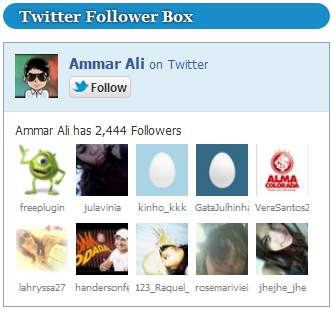
If you needed any help about Twitter Follower Box Widget then feel free to post your question. Peace! :)

Hi Am,
I tried installing this for my blog http://www.hautekutir.com but it does not seem to be working. Kindly help.
I have checked out that solution and I must say it was superb… but I want the exact button that is placed on your blog named as given in the former comment near the scrolling bar, if you hover on them the box of the selected button would open….
Thank you…
Liked your article very much… it was so informative…. but, can you provide me the exact code for the buttons of Facebook and twitter which would be placed at the scrolling bar of my blog like you have placed on your blog named as amarblog4hacking.blogspot.com….
Thank you…
Did you followed this tutorial ? https://allbloggingtips.com/new-floating-social-media-buttons-with-cool-hover-effect/
Hi Ali,
I think Now this widget is not working.
if you check the JS file which the script refers, you can Find that the script uses the result from another page
when I checked , that page returns a page with only an Iframe loaded in it
Si I think it need an updation
Thanks
Jose
Thanks for sharing this widget! I wish it could be a little bit smaller, so it will suit better with the renovation work I am doing in my blog right now… I will try to modify!
How can I change the width of it please? BTW, I love it :)
No Dude, right now its not possible. I think its width is auto adjustable.
Yes, You can edit it all because it is now available in iframe code. Hope you like it.Twitter iFrame Box
Can’t we edit its width? :
It’s width is auto adjustable. ! :D
Dear Webmaster,
Thanks indeed for posting Twitter Follower Widget Post. I want to reduce the width of the box. Kindly provide me the details.
Thanks and Regards,
Kashif Shah
No you can’t change its width.. :? It’s width is auto adjustable !
Thanks for your reply Ammar. Take a look at my blog with the twitter follower box widget on Lively Pakistan ..
I think You can change the width by editing that Javascript code and save that .js file in you server.
Ah, Great, I’ll do that and will update this article. :)
Nice one Ammar i really like it. I will try it on my blogger blog. Please also share more tricks like this.
Thanks Mohsin. I will comes with some more cool in future :D