
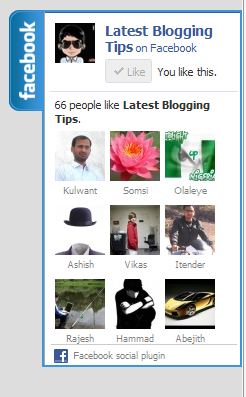
 I found this great Floating Facebook Like Box Widget on internet. This will Floating Facebook Button when to move your cursor on it it pop out with stylish floating facebook like box. This is a great widget for blogger. Which will help you to increase facebook likes. You just need to put Jquery and CSS . HTML code to your blogger blog. I will soon share more floating widgets like Google+, Twitter Follower Box and Floating Subscription box in future. Now lets move to how you can add this in blogger I will show you How You Can Add Stylish Floating Facebook Like Box Widget In Blogger.
Updated Widget!
How To Add Stylish Floating Facebook Like Box Widget In Blogger
- Go To Blogger>>>Design>>>Edit HTML
- Tick Expand Widget Template
- Search For The Tag </head> (Using ctrl + f )
- Copy n Paste Below Code Before </head>
<script src=‘http://ajax.googleapis.com/ajax/libs/jquery/1.4.2/jquery.min.js‘ type=’text/javascript’/>
<script src=’http://apis.google.com/js/plusone.js’ type=’text/javascript’/>
<script type=’text/javascript’>
jQuery(document).ready(function(){
jQuery("#facebook_right").hover(function(){ jQuery(this).stop(true,false).animate({right: 0}, 500); },function(){ jQuery("#facebook_right").stop(true,false).animate({right: -200}, 500); }); jQuery("#twitter_right").hover(function(){ jQuery(this).stop(true,false).animate({right: 0}, 500); },function(){ jQuery("#twitter_right").stop(true,false).animate({right: -250}, 500); }); jQuery("#google_plus_right").hover(function(){ jQuery(this).stop(true,false).animate({right: 0}, 500); },function(){ jQuery("#google_plus_right").stop(true,false).animate({right: -154}, 500); }); jQuery("#feedburner_right").hover(function(){ jQuery(this).stop(true,false).animate({right: 0}, 500); },function(){ jQuery("#feedburner_right").stop(true,false).animate({right: -303}, 500); }); });
</script>
5. Now Save Your Template
Now Adding HTML Code It’s Simple
- Go to Blogger>>Design>>>Add a Gadget
- Choose HTML/Javascript
- Copy n paste below HTML code Into It,
<div id=”facebook_right” style=”top: 18%;”>
<div id=”facebook_div”>
<img src=”http://1.bp.blogspot.com/-XyYjgghpO7A/TwqccHW47QI/AAAAAAAACSU/OvETkV56ui8/s1600/%255Bwww.gj37765.blogspot.com%255Dfacebook_right.png” alt=”” /><iframe src=”http://www.facebook.com/plugins/likebox.php?href=http%3A%2F%2Ffacebook.com/allbloggingtips&locale=en_GB&width=200&connections=9&stream=&header=false&show_faces=0&height=356″ scrolling=”no”></iframe>
</div>
</div>
</div>
5.Now Click on Save Widget.
Visit your Blogs to see it floating at the right side of your webpage. I hope this widget helps you in increasing the number of your Facebook Readers. That’s all. If you face any problem in floating facebook like box or any problem than don’t stop just drop your comments and Feel free to ask.

Friend, you did a great job by providing this great tips to the bloggers. This facebook like box is looking awesome than the default like box. You change the way of blogging. I will definitely add this facebook like box into one of my website. Great Job Buddy!
it works well for me
It works for every one how is using Blogspot. Thanks for your comment!
LOL, really? No, it won’t.
Take out the script you currently have on your page and put the one above in. You’ll see…
Looks cool, but it shows me xml error massage -“Open quote is expected for attribute “{1}” associated with an element type “href”” any help?
May be you placed code in wrong place. Kindly read whole article again..
it say same thing to me Error parsing XML, line 740, column 12: Open quote is expected for attribute “{1}” associated with an element type “href”. i did put in right spot
yaa.u r rite…it have some error….