
You have created Facebook page of your blog.
But what about page likes?
Do you just keep waiting for likes to come to your page itself?
Ofcourse not, you’ve to follow proper methods to get likes to your facebook pages.
It’s recommended to use some type of Facebook like box on your blogs and encourage users to like your page.
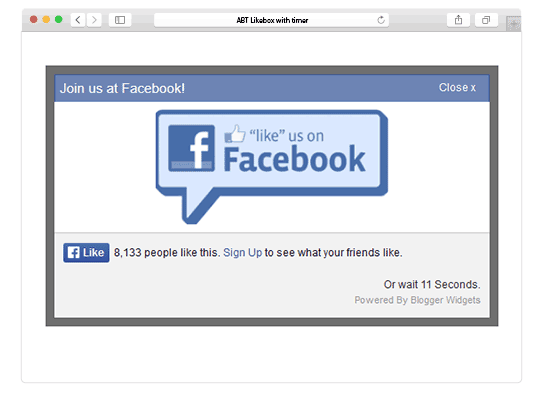
Facebook has always become a useful and resourceful site to every bloggers. Today I brought a new stylish facebook popup like box with timer. It is a beautiful facebook like box popup with timer.
This one includes a time counter and instead of likebox it displays a like button that links to your facebook page and an attractive image that also links to your fan page letting your visitors to either join your fan page by clicking the like button or by simply visiting your fan page by clicking the image. It also include a timer too!
Features of Facebook Like Box With Timer
- Easy to install and configure
- Helps to increase fans
- Full control over customization
- Countdown timer
- Clean and simple
- Close button
Installation is totally simple just follow following steps to add jQuery Popup For Facebook Like Box With Timer to WordPress and Blogspot blogs.
If you want to see like demo. Just copy the code given give below and paste it inside html editor to see live demo.
TIP: I see many people who make a big mistake by setting timer to more than 20 seconds. Dont do that. Set the popup timer between 10-20. Don’t go beyond that. It will bother your visitors and you’ll start loosing potential visitors. So, it’s always better idea to keep the popup time less than 20 second.
Adding Popup For Facebook Like Box With Timer
You just need to place the facebook like box with timer code given below in your blog widget. Follow steps given below to add Like Box popup to WordPress and Blogger.
Adding To Blogger
- Go To Blogger > Design > Edit HTML
- Backup your template
- Paste the following code just above </body>
Adding To WordPress
- Go to Dashboard > Appearance > Editor > Header.php
- Paste the following code just above </body>
<style>#fblikepop {    background-color: #fff;
    display: none;
    position: fixed;
    top: 200px;
    _position: absolute;
 /* hack for IE 6*/
    width: 450px;
    border: 10px solid #6F6F6F;
    z-index: 200;
    -moz-border-radius: 9px;
    -webkit-border-radius: 9px;
    margin: 0pt;
    padding: 0pt;
    color: #333333;
    text-align: left;
    font-family: arial,sans-serif;
    font-size: 13px;
}#fblikepop body {
    background: #fff none repeat scroll 0%;
    line-height: 1;
    margin: 0pt;
    height: 100%;
}

.fbflush {
    cursor: pointer;
    font-size: 11px !important;
    color: #FFF !important;
    text-decoration: none !important;
    border: 0 !important;
}
#fblikebg {
    display: none;
    position: fixed;
    _position: absolute;
 /* hack for IE 6*/
    height: 100%;
    width: 100%;
    top: 0;
    left: 0;
    background: #000000;
    z-index: 100;
}#fblikepop #closeable {
    float: right;
    margin: 7px 15px 0 0;
}#fblikepop h1 {
    background: #6D84B4 none repeat scroll 0 0;
    border-top: 1px solid #3B5998;
    border-left: 1px solid #3B5998;
    border-right: 1px solid #3B5998;
    color: #FFFFFF !important;
    font-size: 14px !important;
    font-weight: normal !important;
    padding: 5px !important;
    margin: 0 !important;
}#fblikepop #actionHolder {
    height: 30px;
    overflow: hidden;
}#fblikepop #buttonArea {
    background: #F2F2F2;
    border-top: 1px solid #CCCCCC;
    padding: 10px;
    min-height: 50px;
}#fblikepop #buttonArea a {
    color: #999999 !important;
    text-decoration: none !important;
    border: 0 !important;
    font-size: 10px !important;
}#fblikepop #buttonArea a:hover {
    color: #333 !important;
    text-decoration: none !important;
    border: 0 !important;
}#fblikepop #popupMessage {
    font-size: 12px !important;
    font-weight: normal !important;
    line-height: 22px;
    padding: 8px;
    background: #fff !important;
}#fblikepop #counter-display {
    float: right;
    font-size: 11px !important;
    font-weight: normal !important;
    margin: 5px 0 0 0;
    text-align: right;
    line-height: 16px;
}</style>
<script src="http://www.google.com/jsapi"></script><script>google.load("jquery", "1");</script>
<script type="text/javascript" src="http://connect.facebook.net/en_US/all.js#xfbml=1"></script>
<script type="text/javascript">
//<![CDATA[
 kakinetworkdotcom01username="allbloggingtips",
 kakinetworkdotcom01title="Join us at Facebook!",
 kakinetworkdotcom01skin="04",
 kakinetworkdotcom01time="20",
 kakinetworkdotcom01wait="0",
 kakinetworkdotcom01lang="en"
//]]>
</script>
<script type="text/javascript" src="https://allbloggingtips.com/wp-content/uploads/2012/06/popup-with-timer-codez.js"></script>
<script type="text/javascript">
//<![CDATA[
 $(document).ready(function(){$().kakinetworkdotcom({ closeable: true });});
//]]>
</script>
Make following important changes:
- Replace this AllBloggingTips with your Facebook username
- The timer is set to 20 seconds to change it simply edit timeout: Search for kakinetworkdotcom01time=”20″, and replace “20” with any time you want (it should be in seconds)
- The widget appears immediately after a visitor enter your blog/site. If you want it to appear after one minute or more then edit kakinetworkdotcom01wait=”0″,
More Widgets:
If the popup is not working or if you’re facing any issue. Please feel free to comment below. I’ll make sure to resolve your problem!

Hello Ali, very nice script!
Could you kindly tell me how I can add some text below the Like box?
Thank you in advance
Cant copy the codes. give me the code in mail or tinypaste pls. kakinetwork.com was not working previously. have you updated the code?
I’ve updated the code as whole. You should be able to find everything working perfectly.
I did like the script, but I want it to use my own “APP ID” instead the generic FB app id when people clicks on like, which then redirects to FB Login Screen (where its the FB Generic App ID) So I wanna use my own instead? Possible.
can be, you need to play with code. I’m not much expert in this!:)
Hi ammar,can i get the facebook pop up code that u have on your blog currently.I liked it very much.
Hi, Its mini popup plugin for WP. Get it here https://wordpress.org/plugins/mini-popup/ :D
How about one like the one you are using now ?? please
Its mini popup for WordPress. You can download here http://www.wordpress.org/extend/plugins/mini-popup/
How do I run a one-time 24 hours per ip?
Hi Anmar,
How do we show the fan box just like yours in the pop-up?
Thank you
You can download here Download Facebook Page Promoter Plugin :D
If i put this poup on my website it is agree from google adsense ? I want to put this pop-up, but dont want to broke my google adsense account.
You know if this things it s ok for adsense?
Thanks!
No! This popup won’t harm your adsense account! :D You can use it! Many blogs are using this.
Is this like box appear only @ one time ?
Yes, But you can do changes! :D
Also, it appears that this script disabled my pirobox script. Any ideas on how to get them both to work? my site (www.jguffphotography.com) has the pirobox working (without your script), and on my practice page (www.jguffphotography.com/prac.html) i have your script in there, which disables the pirobox)
i cant seem to get the “wait” function to change from loading when the page first loads. what are the parameters? are they seconds or minutes? Ive tried 10, 15, 30, .10. I’d like it to load 10 seconds after the page is loaded.
Just search for
kakinetworkdotcom01time="20",and The timer is set to 20 seconds to change it simply edit timeout: 20 to any time (seconds) you want!@All,
Code is update. Please try again and let me know if you are facing problems :D
Not working…….
Hey it’s super cool. Really amazing work! Ammar you’re becoming a pro :D
I tried applying this code on my wordpress site but it didn’t appears can give me the same jquery that will work for wordpress
Hi
Well to be honest I don’t think it works well with your wordpress blog by just adding above code :) Just download this plugin WP Super Popup and than put above code within this plugin setting page hope it will work :D
~Ammar
Amazing bro !!!!!!
This one is superb…………