
• Skip to primary navigation
  • Skip to main content
  • Skip to primary sidebar
  • Skip to footer
logo

All Blogging Tips

Everything About Blogging

  • Home
  • Start a Blog
  • Grow Your Blog
  • About
  • Contact
  • Privacy Policy
  • Tools I Use

Stylish Followers Counts Widget for WordPress Using SocialBox

By Ammar Ali 8 Comments

Today I was searching for good widget that adds Stylish Followers Counts Widget to wordpress and I landed to CodeCanyon.net one of the best website that provide scripts, tutorials, plugins, widgets. I chooses SocialBox Plugin for WordPress to add Stylish Followers Counts Widget with ease.

With  SocialBox Plugin for WordPress. You get an absolutely very easy to use WP Plugin that enables you to add a sleek social widget to any WordPress site or blog.  It all top social networks and displays current numbers of Counts for your Facebook Page Likes, Twitter Followers and YouTube Subscribers and Feedburner Feed Subscriptions. You can easily customize it as per your needs for just 4$ ;)

SocialBox preview

Live Demo   |   Download   |   More Info

Table of Contents
  • Features of Stylish Followers Counts Widget Using SocialBox
    • What's More?

Features of Stylish Followers Counts Widget Using SocialBox

  • Social Box Displays the number of:
    • Facebook Page Likes
    • Twitter Followers
    • YouTube and Feedburner Feed Subscribers
  • You can easily Rearrange and disable any of  social networks that fit your needs.
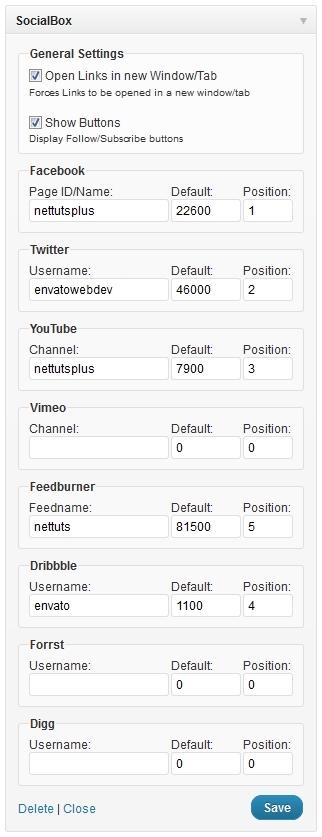
social box widget setting

  • Stylish Buttons and Look
  • Awesome Background that attract visitors
  • Automatic update notifications.
  • Full support for all major browsers like Chrome, Firefox, Internet Explorer
  • Free future updates to support even more social networks with many more additional features.

What’s More?

With social box plugin you can easily attract visitors to like your FB page, follow you and subscribe to your feed. Really easy to use plugin just for 4$ isn’t that too good ? you are getting awesome plugin just for 4$ ? :P

I personally not tried this Stylish Followers Counts Widget plugin but I am sure it will help you to increase your like, followers etc. All I can say you that you can get awesome Stylish Followers Counts Widget for WordPress Using SocialBox just for 4$.

SO what you are waiting for?  Visit SocialBox plugin page and buy it now and rock your wordpress blog. Before you go to buy make sure to use our affiliate link. So that we will get some bounce if you buy through our affiliate link. :)

Share this post:

Share on X (Twitter) Share on Facebook Share on Pinterest Share on Email Share on WhatsApp

About Ammar Ali

A blogger, web designer, front-end developer and WordPress specialist since 2011. I started this blog during high school. Here I share what I've learned so far and what I continue to learn through blogging so that I can be of assistance in some way to improve your blog. Read more here.

Reader Interactions

Comments

  1. Sandip Bhagat says

    July 17, 2012 at 9:52 am

    I think wp mashable social widget is good one. It is more advanced this. and i too have been using it. which do u recommend ?

    Reply
    • Ammar Ali says

      July 17, 2012 at 10:16 am

      Yup, This is also good. :) I am using custom code for this!

      Reply
  2. Ankit Khurrana says

    June 5, 2012 at 4:00 pm

    Well, I’ve been searching for similar kind of widget for a long, but was unable to find. Thanks for sharing this cheap and awesome widget.

    Reply
  3. Blogger Tips says

    May 30, 2012 at 4:11 pm

    really nice and beautiful widget. kindly share a post with how to add this widget to blogger. i want to add it to my blog. Thanks. I am waiting for your reply.

    Reply
    • Ammar Ali says

      May 30, 2012 at 4:29 pm

      Currently this is only for WordPress and its paid WP plugin ;)

      Reply
  4. Peter Lee says

    May 27, 2012 at 7:11 am

    This widget looks simple but elegant. I really love it Ammar. But too bad it still don’t have G+ for the time being. It would be even better if it could add in email subscribers feature. Thanks for sharing.

    Reply
    • Honey says

      May 27, 2012 at 5:17 pm

      definitely , Need G+ and Pinterest

      Reply
      • Ammar Ali says

        May 27, 2012 at 7:50 pm

        According to its author. He said he will add more cool features like G+, Pinterest in future. We will update it when new version comes :D

        Reply

Leave a Reply Cancel reply

Your email address will not be published. Required fields are marked *

Primary Sidebar

Get Blogging & SEO Tips by Email

Get helpful blogging, SEO, and content tips delivered straight to your inbox. No spam.

Join 3,489 other subscribers

Popular Posts

  • Is Your Blog Properly Optimized for Performance and SEO?
  • 10 Powerful Ways to Become a Famous Blogger
  • Google AdSense vs Affiliate Marketing: A Simple Comparison for Beginners
  • Effective Ways to Increase Content Reach and Audience Engagement
  • 12 Things to Do Before Applying for Google AdSense
  • Are Backlinks Becoming Less Valuable in Modern SEO?
  • Step-by-Step Guide to Creating a Successful Travel Blog
  • How to Start as a Freelance Writer & Is It Worth?
  • Add Smooth Multi Level Drop-Down Menu In Blogger
  • How To Delete A Blogger Blog Permanently In 5 Minutes (+ FAQs)

Blogging Tools I Use

Over the years, I’ve tested dozens of blogging and WordPress tools. Below are the tools I personally use and recommend for blogging, performance, SEO, and monetization.

Blogging Tools I Use →

Categories

  • Announcement (12)
  • Ask The Readers (2)
  • Blogger (56)
    • Blogger Hacks (4)
    • Blogger Tips (24)
  • Blogging (108)
    • Blogging Tips (81)
    • Writing Tips (6)
  • Coupons (2)
  • Design (5)
  • Email Marketing (4)
  • Free Themes (1)
    • WordPress Themes (1)
  • Free Traffic (40)
    • Guest Blogging (7)
    • Search Engine Optimization (4)
    • Social Media (13)
  • Giveaway (16)
  • Hosting (14)
  • How To (48)
  • Latest News (1)
  • Make Money Online (37)
    • Adsense (7)
    • Affiliate Marketing (8)
  • Reviews (17)
  • SEO (46)
  • Social Media (13)
    • Facebook (5)
      • Tips and Tricks (3)
    • Twitter (2)
  • WordPress (54)
    • WordPress Plugins (17)
    • WordPress Themes (5)
    • WordPress Tricks (2)
    • WordPress Widgets (14)

Footer

About This Site

All Blogging Tips helps beginners learn how to start, grow, and monetize blogs using WordPress. I share practical guides and honest recommendations based on real blogging experience.

Read more →

Site & Resources

  • Tools I Use
  • About
  • Advertise Here
  • Contact
  • Disclosure Policy
  • Copyright Policy
  • Privacy Policy

Start & Grow Your Blog

  • A Ridiculously Helpful Guide to Start Your Own Blog In 10 Minutes
  • How To Grow Your Blog And Build An Audience
  • How To Make Money From Your Blog
  • Cheap WordPress Hosting
  • Free WordPress Hosting

Copyright © 2026 All Blogging Tips · Powered by InMotion Hosting · WordPress · Log in