
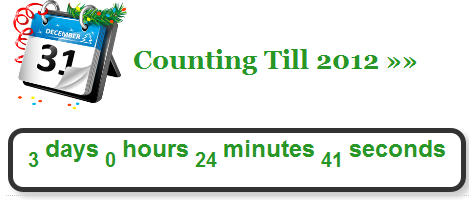
 First of all I would like to wishes you Happy New Year 2012. I now comes with a cool New Year CountDown Widget For Blogger And WordPress Blogs for all Muslims, Christian and others. The countdown widget counts down to 31 December 2011 and in military time format by counting days, hours, minutes and seconds left for the coming New Year 2012 event. It also alerts and wishes New Year 2012 by generating a pop-up once the count down ends.
Add CountDown Gadget To Blogspot
- Go To Blogger > Design
- Choose HTML/JavaScript widget
- Paste the following code inside it,
<style style=”text/css”>
.lcdstyle{ /*Example CSS to create LCD countdown look*/
background:#fff;
color:#289728;
font: bold 20px arial;
padding: 15px;border:5px solid #333333;
border-radius:15px;
-moz-border-radius:15px;
-webkit-border-radius:15px;
box-shadow: 5px 5px 5px #CCCCCC;
}.lcdstyle sup{ /*Example CSS to create LCD countdown look*/
font-size: 120%
}</style>
<script type=”text/javascript”>
function cdtime(container, targetdate){
if (!document.getElementById || !document.getElementById(container)) return
this.container=document.getElementById(container)
this.currentTime=new Date()
this.targetdate=new Date(targetdate)
this.timesup=false
this.updateTime()
}cdtime.prototype.updateTime=function(){
var thisobj=this
this.currentTime.setSeconds(this.currentTime.getSeconds()+1)
setTimeout(function(){thisobj.updateTime()}, 1000) //update time every second
}cdtime.prototype.displaycountdown=function(baseunit, functionref){
this.baseunit=baseunit
this.formatresults=functionref
this.showresults()
}cdtime.prototype.showresults=function(){
var thisobj=this
var timediff=(this.targetdate-this.currentTime)/1000 //difference btw target date and current date, in seconds
if (timediff<0){ //if time is up
this.timesup=true
this.container.innerHTML=this.formatresults()
return
}
var oneMinute=60 //minute unit in seconds
var oneHour=60*60 //hour unit in seconds
var oneDay=60*60*24 //day unit in seconds
var dayfield=Math.floor(timediff/oneDay)
var hourfield=Math.floor((timediff-dayfield*oneDay)/oneHour)
var minutefield=Math.floor((timediff-dayfield*oneDay-hourfield*oneHour)/oneMinute)
var secondfield=Math.floor((timediff-dayfield*oneDay-hourfield*oneHour-minutefield*oneMinute))
if (this.baseunit==”hours”){ //if base unit is hours, set “hourfield” to be topmost level
hourfield=dayfield*24+hourfield
dayfield=”n/a”
}
else if (this.baseunit==”minutes”){ //if base unit is minutes, set “minutefield” to be topmost level
minutefield=dayfield*24*60+hourfield*60+minutefield
dayfield=hourfield=”n/a”
}
else if (this.baseunit==”seconds”){ //if base unit is seconds, set “secondfield” to be topmost level
var secondfield=timediff
dayfield=hourfield=minutefield=”n/a”
}
this.container.innerHTML=this.formatresults(dayfield, hourfield, minutefield, secondfield)
setTimeout(function(){thisobj.showresults()}, 1000) //update results every second
}/////CUSTOM FORMAT OUTPUT FUNCTIONS BELOW//////////////////////////////
//Create your own custom format function to pass into cdtime.displaycountdown()
//Use arguments[0] to access “Days” left
//Use arguments[1] to access “Hours” left
//Use arguments[2] to access “Minutes” left
//Use arguments[3] to access “Seconds” left//The values of these arguments may change depending on the “baseunit” parameter of cdtime.displaycountdown()
//For example, if “baseunit” is set to “hours”, arguments[0] becomes meaningless and contains “n/a”
//For example, if “baseunit” is set to “minutes”, arguments[0] and arguments[1] become meaningless etc
function formatresults(){
if (this.timesup==false){//if target date/time not yet met
var displaystring=arguments[0]+” days “+arguments[1]+” hours “+arguments[2]+” minutes “+arguments[3]+” seconds left until December 25, 2011 18:25:00″
}
else{ //else if target date/time met
var displaystring=””
}
return displaystring
}function formatresults2(){
if (this.timesup==false){ //if target date/time not yet met
var displaystring=”<span class=’lcdstyle’>”+arguments[0]+” <sup>days</sup> “+arguments[1]+” <sup>hours</sup> “+arguments[2]+” <sup>minutes</sup> “+arguments[3]+” <sup>seconds</sup></span> ”
}
else{ //else if target date/time met
var displaystring=”” //Don’t display any text
alert(“HAPPY NEW YEAR EVERYBODY!“) //Instead, perform a custom alert
}
return displaystring
}</script>
<table><tbody>
<tr>
<td>
<img style=”float:left; ” src=”http://3.bp.blogspot.com/-id6x2AOCGc4/TvoJfxRT-oI/AAAAAAAAFso/HKKnQ5bcnGY/s400/NEW%2BYEAR.png” width=”125px”/>
<h1 style=”color:#289728; padding-top:40px;”>Counting Till 2012 »»</h1><br/>
</td></tr><tr><td>
<div id=”countdowncontainer”></div>
<br />
<div id=”countdowncontainer2″></div><script type=”text/javascript”>
var futuredate=new cdtime(“countdowncontainer”, “March 23, 2009 18:25:00”)
futuredate.displaycountdown(“days”, formatresults)var currentyear=new Date().getFullYear()
//dynamically get this Christmas’ year value. If Christmas already passed, then year=current year+1
var thischristmasyear=(new Date().getMonth()>=11 && new Date().getDate()>31)? currentyear+1 : currentyear
var christmas=new cdtime(“countdowncontainer2”, “December 31, “+thischristmasyear+” 0:0:00″)
christmas.displaycountdown(“days”, formatresults2)</script>
</td></tr>
</tbody></table>
Add CountDown Widget to WordPress
Add below code to your sidebar widget and you have done.
.lcdstyle{ /*Example CSS to create LCD countdown look*/
background:#fff;
color:#289728;
font: bold 20px arial;
padding: 15px;
border:5px solid #333333;
border-radius:15px;
-moz-border-radius:15px;
-webkit-border-radius:15px;
box-shadow: 5px 5px 5px #CCCCCC;
}
.lcdstyle sup{ /*Example CSS to create LCD countdown look*/
font-size: 120%
}
</style>
<script type=”text/javascript”>
function cdtime(container, targetdate){
if (!document.getElementById || !document.getElementById(container)) return
this.container=document.getElementById(container)
this.currentTime=new Date()
this.targetdate=new Date(targetdate)
this.timesup=false
this.updateTime()
}
cdtime.prototype.updateTime=function(){
var thisobj=this
this.currentTime.setSeconds(this.currentTime.getSeconds()+1)
setTimeout(function(){thisobj.updateTime()}, 1000) //update time every second
}
cdtime.prototype.displaycountdown=function(baseunit, functionref){
this.baseunit=baseunit
this.formatresults=functionref
this.showresults()
}
cdtime.prototype.showresults=function(){
var thisobj=this
var timediff=(this.targetdate-this.currentTime)/1000 //difference btw target date and current date, in seconds
if (timediff<0){ //if time is up
this.timesup=true
this.container.innerHTML=this.formatresults()
return
}
var oneMinute=60 //minute unit in seconds
var oneHour=60*60 //hour unit in seconds
var oneDay=60*60*24 //day unit in seconds
var dayfield=Math.floor(timediff/oneDay)
var hourfield=Math.floor((timediff-dayfield*oneDay)/oneHour)
var minutefield=Math.floor((timediff-dayfield*oneDay-hourfield*oneHour)/oneMinute)
var secondfield=Math.floor((timediff-dayfield*oneDay-hourfield*oneHour-minutefield*oneMinute))
if (this.baseunit==”hours”){ //if base unit is hours, set “hourfield” to be topmost level
hourfield=dayfield*24+hourfield
dayfield=”n/a”
}
else if (this.baseunit==”minutes”){ //if base unit is minutes, set “minutefield” to be topmost level
minutefield=dayfield*24*60+hourfield*60+minutefield
dayfield=hourfield=”n/a”
}
else if (this.baseunit==”seconds”){ //if base unit is seconds, set “secondfield” to be topmost level
var secondfield=timediff
dayfield=hourfield=minutefield=”n/a”
}
this.container.innerHTML=this.formatresults(dayfield, hourfield, minutefield, secondfield)
setTimeout(function(){thisobj.showresults()}, 1000) //update results every second
}
/////CUSTOM FORMAT OUTPUT FUNCTIONS BELOW//////////////////////////////
//Create your own custom format function to pass into cdtime.displaycountdown()
//Use arguments[0] to access “Days” left
//Use arguments[1] to access “Hours” left
//Use arguments[2] to access “Minutes” left
//Use arguments[3] to access “Seconds” left
//The values of these arguments may change depending on the “baseunit” parameter of cdtime.displaycountdown()
//For example, if “baseunit” is set to “hours”, arguments[0] becomes meaningless and contains “n/a”
//For example, if “baseunit” is set to “minutes”, arguments[0] and arguments[1] become meaningless etc
function formatresults(){
if (this.timesup==false){//if target date/time not yet met
var displaystring=arguments[0]+” days “+arguments[1]+” hours “+arguments[2]+” minutes “+arguments[3]+” seconds left until December 25, 2011 18:25:00″
}
else{ //else if target date/time met
var displaystring=””
}
return displaystring
}
function formatresults2(){
if (this.timesup==false){ //if target date/time not yet met
var displaystring=”<span class=’lcdstyle’>”+arguments[0]+” <sup>days</sup> “+arguments[1]+” <sup>hours</sup> “+arguments[2]+” <sup>minutes</sup> “+arguments[3]+” <sup>seconds</sup></span> ”
}
else{ //else if target date/time met
var displaystring=”” //Don’t display any text
alert(“HAPPY NEW YEAR EVERYBODY!”) //Instead, perform a custom alert
}
return displaystring
}
</script>
<table><tbody>
<tr> <td>
<img style=”float:left; ” src=”http://3.bp.blogspot.com/-id6x2AOCGc4/TvoJfxRT-oI/AAAAAAAAFso/HKKnQ5bcnGY/s400/NEW%2BYEAR.png” width=”125px”/>
<h1 style=”color:#289728; padding-top:40px;”>
Counting Till 2012 »»</h1>
</td></tr>
<tr><td>
<div id=”countdowncontainer”>
</div>
<div id=”countdowncontainer2″>
</div>
<script type=”text/javascript”>
var futuredate=new cdtime(“countdowncontainer”, “March 23, 2009 18:25:00”)
futuredate.displaycountdown(“days”, formatresults)
var currentyear=new Date().getFullYear()
//dynamically get this Christmas’ year value. If Christmas already passed, then year=current year+1
var thischristmasyear=(new Date().getMonth()>=11 && new Date().getDate()>31)? currentyear+1 : currentyear
var christmas=new cdtime(“countdowncontainer2”, “December 31, “+thischristmasyear+” 0:0:00″)
christmas.displaycountdown(“days”, formatresults2)
</script>
</td></tr>
</tbody></table>
- To change font color of the clock edit color:#289728;
- To change border color edit border:5px solid #333333;
- To change the text color edit color:#289728 4. Save your widget and drag it just above your blog posts body.
- The purple texts can be easily edited to any message you wish to write.

I just wanted to inform you how much my partner and i appreciate almost everything you’ve discussed to help improve lives of folks in this subject matter. Through the articles, we’ve gone out of just a beginner to an expert in the area. It truly is truly a tribute to your endeavours. Thanks