• Skip to primary navigation
  • Skip to main content
  • Skip to primary sidebar
  • Skip to footer
logo

All Blogging Tips

Everything About Blogging

  • Home
  • Start a Blog
  • Grow Your Blog
  • About
  • Contact
  • Privacy Policy
  • Tools I Use

template

The Beginner Guide To Make Money Selling eBooks

By Anirudh Karthik 27 Comments

The Beginner Guide To Make Money Selling eBooks

Selling eBooks is a great method of online income and it will be interesting, if you write what you desire. The world of paper books/newspapers has gone; it has all turned to digital.

True to say, Reading something in eBook is quite good than reading in paperback form, with lots of animation, Bright screen. I hope that, there would be no paperback form books in coming years.

[Read more…] about The Beginner Guide To Make Money Selling eBooks

Five Quick Tips for Better Blog Monetization

By Zac Johnson 9 Comments

Everyone is always looking to monetize their blogs to the fullest. Unfortunately, placing banner ads on your site isn’t one of the best ways to make money, and not only are they hard to sell if you don’t have a done of traffic or an authority blog, but they are also quite ugly when you have a bunch of “Advertise Here” banners throughout your site.blog-money

Below we are going to cover five quick alternatives to selling banner ads on your blog and how you can start cashing in on the process.

1.) Sell Your Own Product

An easy no brainer way to start making money from your blog is to sell your own products/services or banner. Best of all you will earn 100% on all sales!

Read Also: 4 Tips to Sell Ad Spots Quickly!

2.) Link Up With Quality Brands and Merchants

Whenever you mention a brand or service currently offered on the internet, you can look to see if they currently have an affiliate program of their own. If they do, you should start linking to them within your blog content. This will results in higher click rates and commissions versus traditional banner ads that no one clicks on. Amazon.com is a great brand to link up with, and one of the world’s top affiliate marketing programs to join.

3.) Monetize the Text within Your Content

There are plenty of web sites out there that offer contextual based advertising, such as INTENTclick.com. Through their advertising network they can turn your regular text content into links to advertisers, web sites and products. Whenever someone clicks on this content, you would earn a commission per click.

4.) Build Up Your Mailing List

This is one of the easiest and most effective ways to get people to keep coming back to your blog. Incentivize your audience to sign up for your mailing list by offering a free ebook or guide that is already relevant to your traffic.

5.) Affiliate Marketing

Just like we mentioned about linking yourself up to well known brands and services, nearly every web site niche and topic has an associated affiliate program that you can start earning money from. No matter what you are writing about on your blog, there is a great chance you will find a quality affiliate program that would love to have your site traffic. Read Also: Top 5 Tips for Affiliate Marketing.

Take a look at your web site and if you are currently overwhelmed with open ad space and unsold banners, it’s probably time you started to look at better monetization options. Go through the list above to see which options are best for you and your site.

Releasing iThesis Free Premium Blogger Template

By Ammar Ali 68 Comments

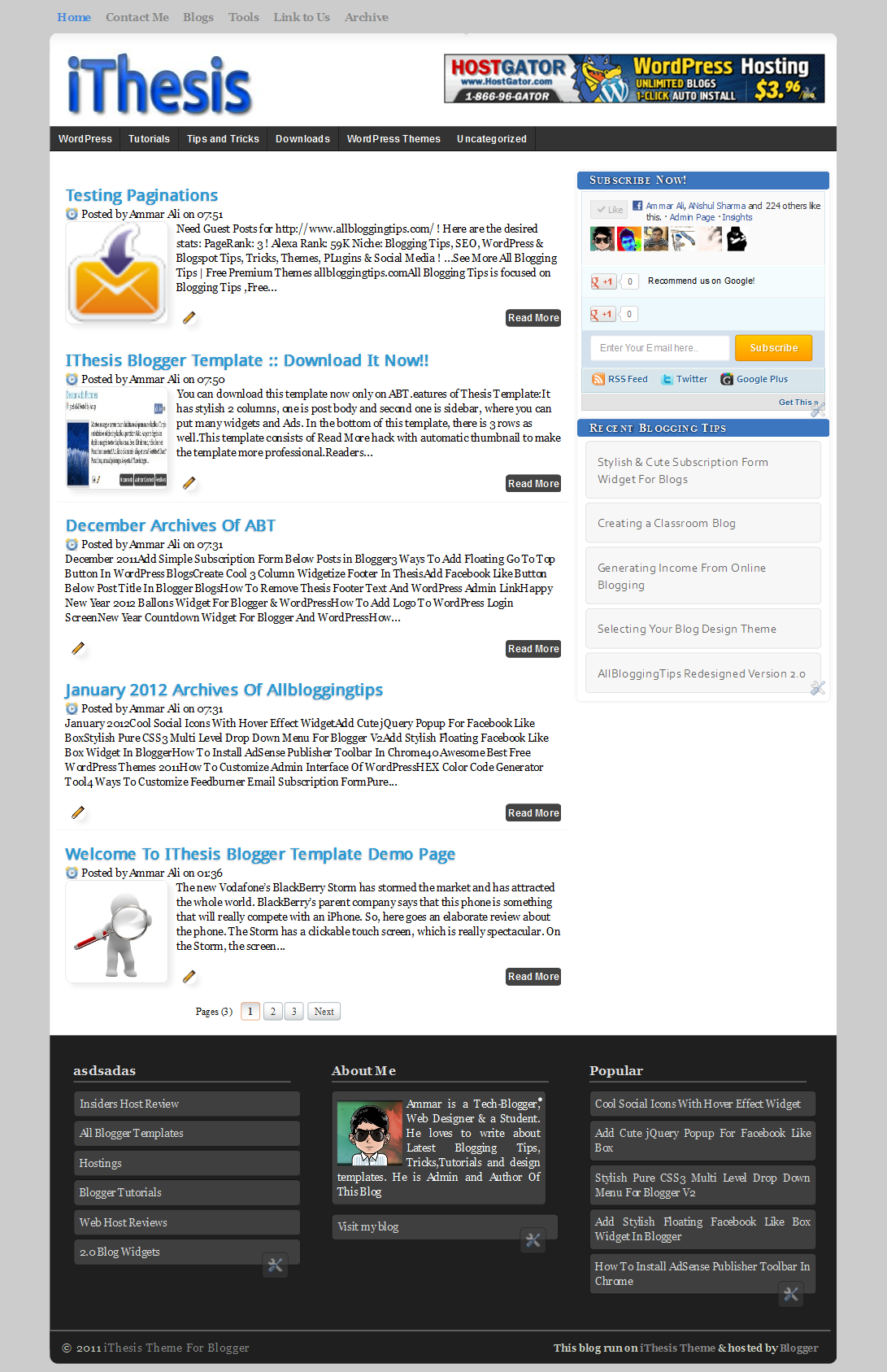
Today we are proud to release our first Free Premium Blogger Template “iThesis”. This is our 100th post so we are Releasing iThesis Theme For Blogger. This is simple, clean, seo optimized . iThesis Blogger Template have 2 columns, where you can place many widgets and Ads.

iThesis Theme For BloggerLive Demo

Features of iThesis Blogger Template

  • SEO optimized
  • Clean and neat interface
  • Premium features like , page numbered navigation
  • Easy to customize
  • Stylish Footer
  • Cool Sidebar
  • Cool with Header Banner Ad
  • Navigation bar with sub nav
  • Awesome Heading styles
  • 2 Navigation Menu for easy interface
  • WordPress Like Stylish Commenting system

How To Get This  iThesis Blogger Template For Free

I offer resources to loyal subscribers only.

Like us and get download button :


Subscribe and Download

You can download this template now just by liking our page or subscribing.


Respect Copyrights:

credits

This kind of Template is Usually for Premium sale.But i am giving it free for you guys and may not be redistributed or republished without having permission from AllBloggingtips. Kindly respect the several hours of effort placed in scripting this web template and giving it for free. The template includes a link back to AllBloggingTips Blog as a attribution.Do not ever try to remove it. Regarding to any infringement I will report that Blog URL to DMCA. The violator will probably be pushed aside as a reader and removed from the subscription list.

Just kidding guys i won’t report to DMCA .I am no that much hard.It’s just a small footer link only no one is going to see this man then why you are removing.

Customization

Below are step by step guides to customize this ithesis theme

Top Menu Configuration

To customize your menu find below code and replace all links to your link and text is not that simple?

<div id=’top’>
<ul class=’nav1′>
<li class=’current_page_item’><a href=’#’><span>Home</span></a></li>
<li class=’page_item’><a href=’#’><span>Contact Me</span></a></li>
<li class=’page_item’><a href=’#’><span>Blogs</span></a></li>
<li class=’page_item’><a href=’#’><span>Tools</span></a></li>
<li class=’page_item’><a href=’#’><span>Link to Us</span></a></li>
<li class=’page_item’><a href=’#’><span>Archive</span></a></li>
</ul>
</div>

Sub Navigation Bar

To customize sub navigation bar, search for the following code code and replace the link with your own.

<div id=’category_menu_container’>
<ul id=’category_menu’>
<li><a href=’#’>WordPress</a>
</li>
<li><a href=’#’>Tutorials</a>

</li>
<li><a href=’#’>Tips and Tricks</a>
</li>
<li><a href=’#’>Downloads</a>
</li>
<li><a href=’#’>WordPress Themes</a>
</li>
<li><a href=’#’>Uncategorized</a>
</li>
</ul>
</div>


Header Banner

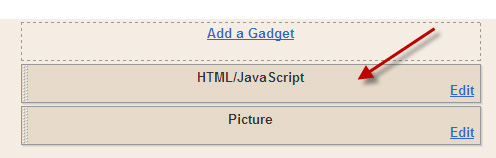
You can see, a default ad display on the header bar, to place your ad instead of that – Go toPage Elements and click on HTML/Javascript box and replace the code with your banner code.

header-ad

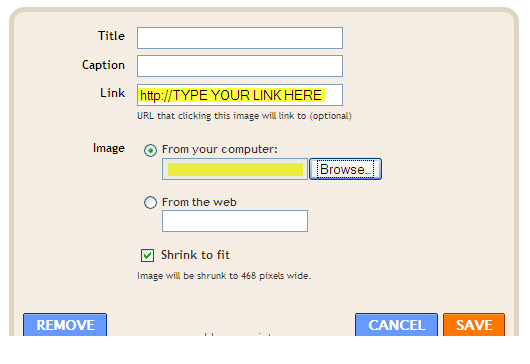
I have also added a picture box, where you can add an image and link the image to any affiliate links. You can either upload image from your computer or you can link it from your web server. By default all the image will be shrink to 468 pixels wide.

haeder-ad1 copy

Now, you are ready to use this template! Enjoy the new Thesis Blogger Template. If you have any problem regarding this template, you are free to ask me. You can suggest me any thing that you are thinking to do new in this template.

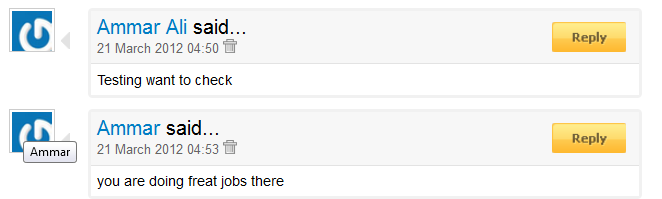
Customize Threaded Comments with Reply Options

threaded comments

To customize threaded comment and reply option just find XXXXXXXXXXXXXXXX and replace it with your current blog ID.

I’ll update this template with more new feature. Please subscribe to our feed using your Email address to get the new updated template direct to your inbox.


Primary Sidebar

Get Blogging & SEO Tips by Email

Get helpful blogging, SEO, and content tips delivered straight to your inbox. No spam.

Join 3,493 other subscribers

Popular Posts

  • Is Your Blog Properly Optimized for Performance and SEO?
  • 10 Powerful Ways to Become a Famous Blogger
  • Google AdSense vs Affiliate Marketing: A Simple Comparison for Beginners
  • Effective Ways to Increase Content Reach and Audience Engagement
  • 12 Things to Do Before Applying for Google AdSense
  • Are Backlinks Becoming Less Valuable in Modern SEO?
  • Step-by-Step Guide to Creating a Successful Travel Blog
  • How to Start as a Freelance Writer & Is It Worth?
  • Add Smooth Multi Level Drop-Down Menu In Blogger
  • How To Delete A Blogger Blog Permanently In 5 Minutes (+ FAQs)

Blogging Tools I Use

Over the years, I’ve tested dozens of blogging and WordPress tools. Below are the tools I personally use and recommend for blogging, performance, SEO, and monetization.

Blogging Tools I Use →

Categories

  • Announcement (12)
  • Ask The Readers (2)
  • Blogger (56)
    • Blogger Hacks (4)
    • Blogger Tips (24)
  • Blogging (108)
    • Blogging Tips (81)
    • Writing Tips (6)
  • Coupons (2)
  • Design (5)
  • Email Marketing (4)
  • Free Themes (1)
    • WordPress Themes (1)
  • Free Traffic (40)
    • Guest Blogging (7)
    • Search Engine Optimization (4)
    • Social Media (13)
  • Giveaway (16)
  • Hosting (14)
  • How To (48)
  • Latest News (1)
  • Make Money Online (37)
    • Adsense (7)
    • Affiliate Marketing (8)
  • Reviews (17)
  • SEO (46)
  • Social Media (13)
    • Facebook (5)
      • Tips and Tricks (3)
    • Twitter (2)
  • WordPress (54)
    • WordPress Plugins (17)
    • WordPress Themes (5)
    • WordPress Tricks (2)
    • WordPress Widgets (14)

Footer

About This Site

All Blogging Tips helps beginners learn how to start, grow, and monetize blogs using WordPress. I share practical guides and honest recommendations based on real blogging experience.

Read more →

Site & Resources

  • Tools I Use
  • About
  • Advertise Here
  • Contact
  • Disclosure Policy
  • Copyright Policy
  • Privacy Policy

Start & Grow Your Blog

  • A Ridiculously Helpful Guide to Start Your Own Blog In 10 Minutes
  • How To Grow Your Blog And Build An Audience
  • How To Make Money From Your Blog
  • Cheap WordPress Hosting
  • Free WordPress Hosting

Copyright © 2026 All Blogging Tips · Powered by InMotion Hosting · WordPress · Log in