
• Skip to primary navigation
  • Skip to main content
  • Skip to primary sidebar
logo

All Blogging Tips

Everything About Blogging

  • Home
  • Start a Blog
  • Blogging Resources
  • About
  • Contact
  • Work With Me

Design

How to Make Thesis Theme Responsive ?

By Ammar Ali 27 Comments

responsiveFinally, DIY Themes officially announced that now we can easily make thesis theme responsive with  “Responsive Skin + Child Theme Starter Set” for Thesis Theme.  All this work is done by Alex “the kid” Mangini. ;)
 
The starter kit is free. Here are thing which you need to make thesis theme responsive. 

  • Thesis Theme Framework (If you don’t have!)
  • Responsive Child Theme for Thesis
  • Responsive Starter Skin Set for Thesis

Some of you may be confused what is responsive design? Well, below I am writing a short info about what is responsive design!

What is responsive design?

Responsive design is, the design that will automatically adjust your website/blog/ based on width of device. You can say In the simple words, your blog will work perfectly on all the mobiles/smartphones/tablets without any mobile version WP plugin.
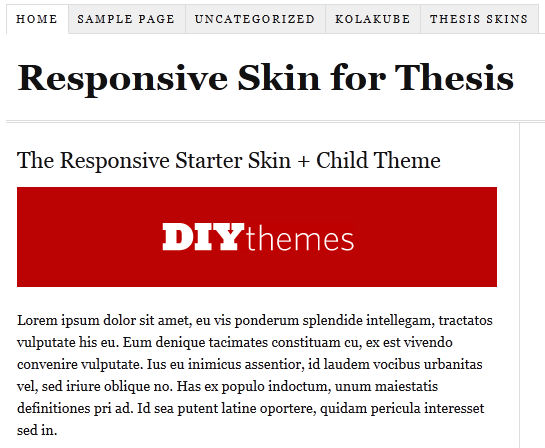
make thesis responsive

Now without wasting anytime. Let move on How to Make Thesis Theme Responsive ?

How to Make Thesis Theme Responsive ?

Below I am mentioning 2 simple ways you can do to make thesis theme responsive! If you are confused at any step just leave comment below :D

  • Manual Method.

Just download the thesis starter set and delete the current “ custom_functions.php ”  and  “ custom.css ” files  (remember to keep the backup of both the files in case if something went wrong ), then upload the custom_functions.php and custom.css files that you download recently from this link :) .

  • By Installing child theme easily !!

If you don’t want to manually upload the files, you can also use a child theme, instead. That won’t take much efforts from your side but it will only work with the fresh installations.

If you face any problem in installing that you are most welcome to ask any question in below comments. I will help you for sure :D

Filed Under: How To, WordPress Tagged With: Design, responsive, thesis

Selecting Your Blog Design Theme

By Amrik Virdi 5 Comments

If you wish to earn money with blogs or doing blogging for money, you will find a variety of options to think about, for example: What your blog’s focus ought to be, where it ought to be located, what advertising programs you need to use, and exactly what the blog need to look like. When it comes to the feel and look of the blog, you will want to select a great blog theme. WordPress may be the top blogging service and you’ll find lot of different WordPress styles available to select from. See Also. : 6 tips to design your website like pro.

Blogging For Money

Themes for blogs could be free of charge, premium, and custom. Here are a few benefits of Selecting Your Blog Design Theme and drawbacks of three options:

Free Blog Themes

A totally free theme has got the large professional it is provided for free. But it is frequently have a couple of cons because of that $ cost. You’ll routinely have to help keep links within the footer from the site, listing the designer’s title and URL. You will also have limited options when it comes to altering the appearance and the design of your blog. You might discover that your site does not look everything unique from others because many writers opt for a totally free WordPress theme and you will find only a lot of offered out there. Another disadvantage of free options is you will not have the ability to rely on any tech support team for those who have an issue. It is a “use at the own risk” kind of factor. You can choose these free themes for your wordpress or blogger blog.

  • 40 Great Looking Best Free Blogger Templates Of 2011
  • 40 Awesome Best Free WordPress Themes 2011

Premium Blog Themes

Premium styles for WordPress include tech support team and several options. They are typically very easy to customize, too, meaning you are able to change photos and colour schemes, and simply manipulate the headers and footers. They routinely have some popular features and therefore are highly enhanced for search engines like google, which could improve your capability to easier get the blog available on search engines like google. Premium options include a fee attached and you will want to be certain you purchase from the trustworthy templates marketplace to ensure that you’re pleased with your outcomes. Below are most commonly used top premium wordpress theme providers.

  • Elegant Themes
  • WooThemes
  • Theme Junkie

Custom Blog Themes

Custom blog themes may have all you want in addition to connected support. But they are likely to include the steepest cost you’ll also find to hold back as the programmer produces the theme for you personally. You can also hire us to design your template or theme in cheap rates.

Selecting your site theme is really a personal decision. Whether you decide to go with free, custom, or premium, search for something that will assist you to increase your blog’s success. Search for simplicity of use, great looks, as well as for something which can help you achieve the goals you’ve for that blog.

Filed Under: Blogging, Blogging Tips, Design Tagged With: Design, free

Primary Sidebar

Subscribe to Blog via Email

Enter your email address to subscribe to this blog and receive notifications of new posts by email.

Popular Posts

  • Is Your Blog Properly Optimized? 5 SEO Must-Haves to Check Off Your List
  • 10 Powerful Ways to Become a Famous Blogger in No Time!
  • 10 Proven Ways To Make Money Without Google AdSense
  • Google AdSense Vs Affiliate Marketing: Which One Should You Choose?
  • 5 Tactics To Boost Your Content Reach & Engagement
  • 12 Things to Do Before Applying for Google AdSense
  • Are Backlinks Becoming Less Valuable?
  • Step by Step Guide to Creating a Travel Blog
  • How to Start as a Freelance Writer & Is It Worth?
  • Add Smooth Multi Level Drop-Down Menu In Blogger

Let Me Help You!

Let me take care of your website and make it run like a champ. I can help you with blog setup, migration, quick fixes or maintenance services.

Work With Me

Copyright © 2026 · Genesis Sample on Genesis Framework · WordPress · Log in