• Skip to primary navigation
  • Skip to main content
  • Skip to primary sidebar
  • Skip to footer
logo

All Blogging Tips

Everything About Blogging

  • Home
  • Start a Blog
  • Grow Your Blog
  • About
  • Contact
  • Privacy Policy
  • Tools I Use

Why My Guest Post Got Rejected ??

By Guest 46 Comments

Earlier this month my blogging freedom got snatched from me. I planned to start a guest posting campaign. I made my goals and targets according to it. I started writing articles with a motto 1 article a day and kept my frequency low and thought to speed it up with time but sadly that day hasn’t arrived yet because I faced rejection from many blogs. Almost 20% of all my guest post got rejected.

First thing that came to my mind was the feeling that I am a failure later I realize I am failure for sure but not a loser at all.  I will try and win. ;)

Whenever my guest post got rejected I simply use to write to the author of the blog politely inquiring what was the reason behind not accepting my article. Most of the time bloggers reply because they have legit reasons for the disapproval.

As time passed on, I had a huge list of my mistakes and that were my weaknesses which now I am recovering from and sighting the positivity around my blogging career.

I have already realized guest posting is a very essential way to promote your word and market your blog and apart form it it is a great way of interaction and every other time when we write as a guest blogger we try to hit that blog which is ranking higher than ours so that ultimately it will benefit me and my efforts will pay me in future for sure.

One thing every blogger should learn is never lose the hope, never give-up and always be ready to learn from everyone around you. I began to lose but I was never late to press “Play Again”

Coming back to the point after being the rejected one I still have courage to accept it that even those of my post which were published got much criticism but that is not the end but then on the other side there were bloggers and their communities that supported and appreciated my work.

Read Also : 10 Tips To Right Compelling Guest Posts

So why my Guest Post Got rejected?

There were probably more reasons then you might expect from anyone though I don’t mind being called a Blogger in the making.

Intention:

When I started to guest post my only goal was to get more traffic only. I didn’t cared for any other thing and this was the point where I declined. Of-course you can not conquer the ground until you don’t have any good intention with the game. This was the only reason which is the base of all the reasons which I am going to share ahead.

I learned that what matters most is your intention not just in this field but everywhere else, in this life and hereafter too so make your intentions good, don’t turn that much hungry for traffic, readers, sales and what not.

All that counts in life is intention ~ Andrea Bocelli

Quantity over Quality:

I just wanted more traffic and the only possible way to get it done is writing more quest posts. Even today I write so less per week just 2 or 3 articles and when I am not mood there are weeks break but this summer I tried to write regularly and made up to 4 post every week even then I wasn’t writing 1 article per day and I really don’t take steroids to write 3 articles/day there are writers who do so but I can’t and that is why I lost the quality.

High Goals:

Well here the problem is not setting high goals. I must say have goals bigger than yourself but then do make them possible, do something for it. it is not just about setting them the actual part is how much of your time do you spend to make it a reality. How much do you kick out yourself from your comfort zone and do something which will make you successful.

I learned to go on skies step by step on my own pace which I enjoyed. I observed that don’t limit your goals but start from the beginning. Let the first things be first always, don’t skip it.

Going for Ease:

I am lazy as every other blogger out there. I just wanted to enjoy the perks of Guest Blogging without doing anything hard. I thought I am the guest so I will be treated like it as in real life but I was dreaming. When it comes to Blogging, your host acts like a guest. You are the one who provides him cookie so that he can publish your article. I use to submit articles without formatting and adding images and doing nothing related to tags/categories and other options in their dashboard. I don’t even proofread some of the articles because of my super laziness and procrastination skills.

I now understand the fact that I need to polish my article myself no matter how good is my article. if I will not do my work perfectly the host is not going to even read my submission especially if I am doing it for blogs that have ranking under 10k because if they have opened guest posting they possibly have more drafts from other and they literally don’t need my articles.

How I made my Winning Path?

sucess

Since now I have gone through the most common mistakes I made, the requirement of the time was changing but first comes the realization. I realized that I am not doing good which saved me from some big failures. I did a lot of research on :

5 changes I adopted are as follows:

  • Write on the basis of quality
  • Do research work, don’t just brag about what’s their in your mind
  • Follow the guidelines
  • Don’t set high expectations
  • Publish the article on your blog after rectifying mistakes :P

For sure mistakes are stepping stones in learning: make mistakes, correct them and WIN. Make sure to read this post about 6 Tips to Write Guest Post that Will Get Accepted Immediately..

Over To You!

One thing I really wanted to tell is that Bloggers are awesome people. They don’t pull you down by rejecting your Guest posts they want you to rise in a better way :) so never get disappointed the next time your guest post is rejected. Think that you can do better and prove it.

SO what you do when your guest post got rejected? I’d love to hear from you!

When Should You Care About Comments and When Shouldn’t You?

By Ahmed Safwan 40 Comments

Do comments matter a lot?

Should I answer all the comments?

Does this indicate my success?

Many ask these same questions and there is no specific answer. Many pro bloggers answer with yes and many others answer with no.

There is no specific answer for this question.

But here in this post I will show you when you should care about comments and when you shouldn’t.

So are you ready ? ;)

Let’s dive in!
get more comments

Here are the stages in a nutshell:

1-      New blogger (comments don’t matter a lot):

2-      You are building your community (comments matter a lot):

3-      You are an authority now (comments don’t matter):

Let’s explore each stage: before we go also read Why You Should Comment on Other Blogs?

1-New blogger (comments don’t matter a lot):

When you are still new, comments matters but it doesn’t matter a lot.You may have many posts with no comments.Maybe all your posts don’t have any comment.

That’s why it doesn’t matter a lot.

What you can do now is to try to get more comments and respond to the small no. of comments you get. You must encourage people to comment. Try to increase it

You can also read Tips from my friend Rahul about How To Get More Comment Here!.

2-You are building Community (comments matter a lot):

Now, you are trying to build community. You want to build relationships with more readers. So, you must respond to each comment.

Also you can guest blog to get more people in your community and you must respond to each comment on that blog also.

You are building a community.

Try to comment on each post, if it’s yours on your blog or it’s yours on other blogs or even not yours on other blogs but it feathers your blog.

By commenting on yours you will build relationships with new readers. When you comment on others posts you will build a relationship with the owner themselves and with new readers also.

3-You are an authority (comments don’t matter):

Now you have your community.

You receive many comments on each post.

You are considered an authority on your niche.

When you reach this level comments will not matter a lot, why?

Because:

1-You have big community: they can comment on each other.

2-You receive many comments: you can’t comment on all of them.

3-You are an authority: this will make people read your posts and they will not expect a comment from you but they will comment.

Last words:

This is not last words about this topic. This topic is very big, but I liked to show you when you should care about comments and when you shouldn’t.

However, comments are very important even if you are an authority. If you will not comment then no problem but what will happen if you commented on the new visitor’s comment?

You have added another one to your community with this simple comment, because you are an authority, so when you answer the question of one of your readers, he will be happy and will be your loyal reader forever.

Did you see how does comment matter even if you are an authority?

Over to you:

What do you think about this post? What is your stage? Can we add other stages? :)

Is It Really Worth To Buy Traffic For Websites?

By Deny Saputra 21 Comments

When you run a business, it is imperative that you bring in customers who will make purchases.  Otherwise, how would you ever turn a profit?  The same holds true of website businesses.  If you can’t get people to your site where they can make their purchases, you’re not going to be in business for long.  That’s why businesses invest in marketing to help expose their company and product and attract new customers. paid rafficSometimes, part of that marketing budget might actually include the purchase of actual site visitors themselves.  With this kind of strategy, businesses are hoping just getting customers there once will be enough to get them to make a purchase and to boost their search engine ranking for more exposure.  Some business owners are afraid to make this leap though, because they are unsure as to whether or not buying traffic will be a profitable investment or just another cost to add to their budget.


[Read more…] about Is It Really Worth To Buy Traffic For Websites?

Knowing When to Hire New Writers for Your Blog

By Zac Johnson 11 Comments

As a site owner and blogger, at some point you might want to start looking at the possibility of bringing in new content writers for your blog. There are many reasons why this can be a good thing and can help propel your blog to new levels that you aren’t able to achieve on your own.

Let’s quickly run through a list of reasons why you should think about bringing in more content writers for your blog.

Bring Fresh New Content to Your Readers


Depending on what type of blog you have, it may be easier for you to bring in writers than not. If you are using your personal name as your domain name and brand, you may be more reluctant to bring in guest bloggers and a new writing staff, as they may be representing your name whenever they write new content.
 
However, there are many generic and wide focused blogs out there that can greatly benefit from having new content added to their site. By bringing in new staff writers, not only are you freeing up time for yourself, you are also adding more content to your site and throwing in a new style of writing and probably a bunch of blog topic ideas you might not have thought of.

Content Generation isn’t that Expensive


 The days of having to pay high prices for original web content is over. There are now more freelance writers looking for work than ever. In addition to writers, there are also a ton of freelance and content generation sites out there like Blogging.org, that will allow you to connect with other bloggers and content writers that can start writing for you right away. The concept behind these types of content generation sites is simple. All you need to do is create an account, add some writing jobs and you will get to review each article before accepting and paying for them.

Using content generation marketplace web sites is a great way to bring in new content for any site or blog without the need to hire a full time user or teach users how to manage and write for your sites. There are thousands of writers out there just waiting for new jobs to be listed. All you need to do is tell them what you are looking for, how many words and in what style of writing.

Guest Bloggers are Everywhere


Ever since Google put the smack down on unethical link building methods, there are more people turning to guest blogging every day. There is nothing wrong with guest blogging and it’s a great way to bring in free content for your site, but you will also have to spend a good amount of time reviewing each of the posts that you may receive.

In the end, many guest bloggers are out there to make money and they just want a link back to their site or their client’s site in the footer area. Don’t accept every post you receive and make sure to always check for duplicate content and proper grammar usage. I would highly recommend that you take the time to create your own guest blogging guidelines and section on your blog with the type of content and quality you expect to receive.

Your Blog Writers have their Own Social Networks


One of the best reasons to bring in new part-time and long term bloggers is because they can massively expand the current promotion you are receiving on your blog. Every time one of your writing team posts a new article on your site, they should be promoting those same posts to all of their social networks, like Twitter and Facebook. If you bring in around five new writers, just think about how many thousands of new people who may be visiting your blog based off their social presence and postings.

How to Get Started with Bringing in New Writers

When you first start thinking about bringing in new writers or buying content for your blog, it can be quite overwhelming. What you really need to focus on is making sure you are only going after quality content. It’s easy to pay for cheap content and accept as many guest posts as you can, but in the end you still want to offer your blog readers high value content that will keep them coming back.

To start looking for potential writers for your blog or web site, be sure to check out the top blogger job boards and also start ordering some content through freelance writer market places. Once you go through a few writers and look at what they are offering, you will quickly be able to weed through the good ones and bad ones. Make sure you keep the good ones happy as they are true gems!


Best Advanced Social Subscription Widget for WordPress

By Ammar Ali 27 Comments

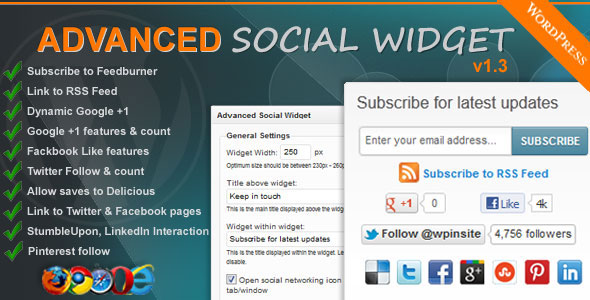
Recently we shared Stylish followers count widget for WordPress. Now its time for something new and advance. Today we came with Best Advance Social Subscription Widget for WordPress. This plugin is provided by CodeCanyon one of best marketplace that provide wordpress plugins and much more.

Right now Advance Social Subscription widget comes with 2 editions for WordPress. If you are using feedburner than 1st edition works perfect for you ;) cost is just 8$

  1. Advanced Social Widget FeedBurner Edition
  2. Advanced Social Widget – MailChimp Edition WordPress Plugin

Advanced Social Widget Subscription widget FeedBurner Edition Adds an advanced widget box to your sidebar giving users the ability to link your site/blog to all popular Social Networking websites such as Delicious, Twitter, Facebook, StumbleUpon, Pinterest and awesome FeedBurner Email Subscription with easy.

Advance Social Subscription Widget Preview!
Advance Social Subscription Widget!

Live Demo   |   Download   |   More Info

Features of Advanced Social Subscription Widget

  • Highly functional dynamic widget interface
  • Allow visitors to easily and effortlessly subscribe to your FeedBurner also display link to your sites RSS feed
  • Dynamic Google +1 features & follower count, Facebook Like features and Like count, Twitter Follows features & follower count
  • Allows you to save to Delicious. Automatically determines whether you are on homepage, category pages, single pages or other and dynamically creates the Delicious link to share
  • Links to your Twitter page, Facebook page, Pinterest account and page, LinkedIn
  • Open links in same window or new window with 1 click.
  • Decide whether to display social networking site name under social icons or not to display it.
  • Multiple widgets configurations
  • Inherits CSS styles from current active theme – fonts and colors

How to Install  Advanced Social Subscription Widget ?

It’s very easy. Just download widget from here (Pay 8$ ;) ) and then watch video given below!


So what you are waiting for ? Go and download this great WordPress plugin Best Advanced Social Subscription Widget for WordPress.. :) Let me know if you face any problem?

  • « Go to Previous Page
  • Page 1
  • Interim pages omitted …
  • Page 40
  • Page 41
  • Page 42
  • Page 43
  • Page 44
  • Interim pages omitted …
  • Page 72
  • Go to Next Page »

Primary Sidebar

Get Blogging & SEO Tips by Email

Get helpful blogging, SEO, and content tips delivered straight to your inbox. No spam.

Join 3,489 other subscribers

Popular Posts

  • Is Your Blog Properly Optimized for Performance and SEO?
  • 10 Powerful Ways to Become a Famous Blogger
  • Google AdSense vs Affiliate Marketing: A Simple Comparison for Beginners
  • Effective Ways to Increase Content Reach and Audience Engagement
  • 12 Things to Do Before Applying for Google AdSense
  • Are Backlinks Becoming Less Valuable in Modern SEO?
  • Step-by-Step Guide to Creating a Successful Travel Blog
  • How to Start as a Freelance Writer & Is It Worth?
  • Add Smooth Multi Level Drop-Down Menu In Blogger
  • How To Delete A Blogger Blog Permanently In 5 Minutes (+ FAQs)

Blogging Tools I Use

Over the years, I’ve tested dozens of blogging and WordPress tools. Below are the tools I personally use and recommend for blogging, performance, SEO, and monetization.

Blogging Tools I Use →

Categories

  • Announcement (12)
  • Ask The Readers (2)
  • Blogger (56)
    • Blogger Hacks (4)
    • Blogger Tips (24)
  • Blogging (108)
    • Blogging Tips (81)
    • Writing Tips (6)
  • Coupons (2)
  • Design (5)
  • Email Marketing (4)
  • Free Themes (1)
    • WordPress Themes (1)
  • Free Traffic (40)
    • Guest Blogging (7)
    • Search Engine Optimization (4)
    • Social Media (13)
  • Giveaway (16)
  • Hosting (14)
  • How To (48)
  • Latest News (1)
  • Make Money Online (37)
    • Adsense (7)
    • Affiliate Marketing (8)
  • Reviews (17)
  • SEO (46)
  • Social Media (13)
    • Facebook (5)
      • Tips and Tricks (3)
    • Twitter (2)
  • WordPress (54)
    • WordPress Plugins (17)
    • WordPress Themes (5)
    • WordPress Tricks (2)
    • WordPress Widgets (14)

Footer

About This Site

All Blogging Tips helps beginners learn how to start, grow, and monetize blogs using WordPress. I share practical guides and honest recommendations based on real blogging experience.

Read more →

Site & Resources

  • Tools I Use
  • About
  • Advertise Here
  • Contact
  • Disclosure Policy
  • Copyright Policy
  • Privacy Policy

Start & Grow Your Blog

  • A Ridiculously Helpful Guide to Start Your Own Blog In 10 Minutes
  • How To Grow Your Blog And Build An Audience
  • How To Make Money From Your Blog
  • Cheap WordPress Hosting
  • Free WordPress Hosting

Copyright © 2026 All Blogging Tips · Powered by InMotion Hosting · WordPress · Log in