Search Results for: ai content

Are You Ignoring One Rule for Making Money Blogging?

Let’s cut to the chase: We all want making money blogging from our blogs.

Of course! ;)

During consulting sessions with bloggers it’s one of the first items we discuss. Everyone has seen the success stories, and we’d all love to be the next blogging superstar and making money blogging. But how?

When my clients ask how they can make money, I pause the conversation there and change directions. The conversation goes something like this.

Me: “So you’d like to earn money blogging?”

Client: “Yes, but I don’t know how.”

Me: “If you want to earn money for your efforts, you have to provide people with something, right?”

Client: “Yeah, sure.”

Me: “So I ask you, what do you provide to your readers that is so valuable?”

The conversation usually stops dead here. :D

I suggest that the client takes a day or two to ponder that question. Sometimes they come back with a solid idea, and we can build from there. Other times, though, they come back stumped. They’ll ask, “What do readers find valuable?” There’s a good answer to that, and it constitutes my one rule for making money from a blog.

You have to teach them something.

If you’re just re-blogging the news, or blogging your opinion on current events, you’re not teaching the reader much of anything. There’s an old saying about how everyone has opinions and how they all stink. That applies to bloggers, though you wouldn’t know it by the number of opinion-based blogs out there.

To stand out in the blogging world today, you have to be remarkable. That’s sad for opinion bloggers, because opinions are not remarkable. If you want an opinion on any subject, from the latest political news to the hot new gadget release, you can find it on any number of websites. Dozens of writers race to post updates to blogs, hoping that if they post first that readers will find them. But it’s just a shell game. There is no winner when blogging opinions.

If you ignore that rat race and focus on how you can become valuable to readers, then you might be onto something. And you might find not just one way, but many ways to make money from your blog. When you teach people something new, all sorts of opportunities start appearing.

Of course, after I tell clients about teaching through blogging, they always have a follow-up question: How can I teach people with my blog?. Here is my three-part answer.

Read Also : Want To Become A Famous Blogger? Then Read This!

How Can I teach people with blog & make money?

OK, So How can I teach people with my blog and start making money blogging? Here is my three-part answer.

1. Start with something you know

With the internet as your guide, you can learn about almost anything. Even if you’ve never known a thing about home improvement projects, you can learn plenty from instructional texts and videos on the web. But if you want to teach readers how to do something, chances are you’ll need a bit more knowledge. They’re looking for something deep and real, and your understanding based on other home improvement blogs won’t cut it.

Start by blogging about one of your passions. If you know a lot about using the internet to save money when shopping, then start a blog about that. You might not know everything there is to know, but you sure know something. You can start blogging with that knowledge. Of course, that won’t always be enough. You have to be always learning, which brings me to Part 2.

2. Dig deep, then deeper

Picking a familiar topic will help at first, but eventually you’ll have to learn even more about your subject. Why? Because if you don’t you’ll run out of material. Using the above example, if you don’t learn more about saving money online, you’ll never be able to keep up and teach your readers something new. You’ll eventually have taught them everything you know, and from there what can you do?

This goes especially for high-tech subjects. I have a buddy who installs video surveillance equipment for businesses and residences. Take a look at that link and look at all the stuff listed just on the very first page. If he didn’t keep up with those products, he’d never be able to keep up. The same goes for you and your blog. Learn it all, and then learn more.

3. Connect with readers

This goes for any blog, but it bears repeating in this instance. So many bloggers I know neglect to respond to their comments and emails*. If you’re

connect with readers

ignoring those, then how are you getting a feel for what your readers like and don’t like? It’s through these reader connections that we can help our blogs go. Unsurprisingly, this holds true even more so for blogs that teach.

* I submitted a guest post a few months ago and forgot to reply to the comments. Ammar was not happy, and I don’t blame him. Every blogger needs to respond to comments, or else why blog in the first place?

When you connect with readers you can find out your weak points. Maybe you explain certain points in an unclear way. Maybe you use too many words to describe something that needs only a few words. Whatever the reasons, your readers are able and willing to point them out. If you learn from them, as they learn from you, you’ll see enormous growth.

Read : 12 Tips For Writing Engaging Content For Readers

Why teaching works?

So many blog posts I read start with theories but never explain them. We’re just supposed to believe that this works, because the author said so. So before wrapping up, I’d just like to outline how you can make more money with a teaching blog than almost any other type of blog.

  1. Advertisers like teaching blogs. When you teach people things, they often need to buy resources that they don’t already own. That’s a perfect opportunity for an advertiser to step in. Display ads from ad networks typically don’t pay much, but on blogs with a teaching angle you can earn a higher CPM.
  2. Articles that teach people something spread on social media. If I read an article and learn something from it, you can bet I’ll share it to Twitter and Facebook. If I learned something, then maybe others in my social graph will learn something. And if they learn something, they might pass it on to their social graph. If you want to create content that spreads, try teaching people something. It’s the best form of blogging.
  3. Affiliate sales rule. Teaching blogs are tailor-made for affiliate marketing opportunities. You’ll have to be up-front about it, but it can be a big money-maker on a teaching blog. If you link people to the tools and resources they need, they’ll be more apt to buy from you. That means an opportunity to make even more money blogging.

Starting a blog that teaches, like a DIY blog, is never easy. But if you put in the time and effort you’ll find it more rewarding than any other kind of blog. You’ll be helping people do things, and you’ll be rewarded with a modest income. If you play your cards right, maybe even a high income. :)

Giveaway: 5 Web Hosting Accounts From Zyma

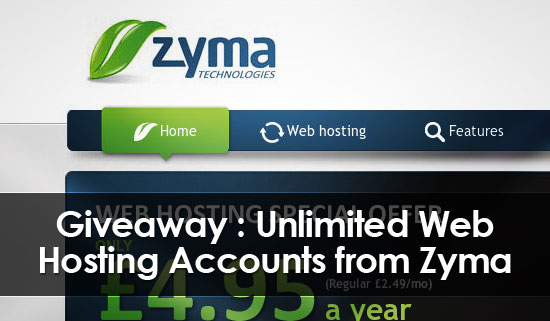
I’m happy to announce first giveaway on AllBloggingTips. That is 5 Unlimited Web Hosting Accounts From Zyma. :)

Zyma web hosting company is launched in 2010. One of the best web hosting provider. They are award winning company which  offers web hosting, offers and comprehensive lot of features at affordable prices. It has partnered with us to give 5 Unlimited Web Hosting Accounts From Zyma for one year absolutely FREE!!
Web-Hosting-Giveaway-Zyma

Features of Zyma Web Hosting.

  •    Unlimited Web space
  •     Unlimited Traffic
  •     Unlimited Email Accounts
  •     Unlimited SQL Databases
  •     Unlimited Addon-domains
  •     99.9% Uptime Guarantee
  •     Free Google Vouchers
  •     Free Transfer & Setup
  •     Free Tech Support
  •     cPanel Web Hosting
  •     Fantastico De Luxe
  •     Softaculous Premium
  •     Attracta seo tools via cPanel
  •     CloudFlare CDN Support

For more complete list of features you can visit their features page!

Giveaway Prize:

We’ll choose 5 winners and each winner will get Unlimited Web Hosting Account. Isn’t that good? You can start your own new self hosted wordpress blog.

Contest Duration :

This contest will be open for 10 days. So participate now!

Contest Starts – 30 August 2012

Contest Ends –10  September 2012

Winners Announced – Winners will be Announced on 11 September 2012.

We will contact you through your emails for prize. So please make sure to provide valid email address while entering into giveaway!

How to participate in this Unlimited Web Hosting Giveaway ?

It’s very simply to Win or Enter in to Unlimited Web Hosting Accounts From Zyma Giveaway, just follow the Rafflecopter below and post a Quality Comment with your valid email.

Enter Now!

a Rafflecopter giveaway

Quick Tip! Tweet and Share this giveaway everyday to have a higher chance of winning

Best of Luck to all Participants! :D
Customized and Stylized Subscription Widget

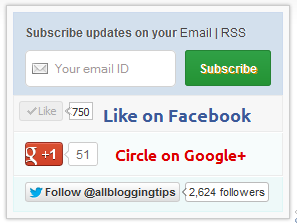
ABT widget sidebarMany of this blog readers asked me which plugin/code I’m using in sidebar for Stylized Subscription Widget. So today I decide to share this with you! because It’s almost more than 2 months. I’ve not shared any Stylized Subscription for Widget Blogger and WordPress Widget.

Coming back to topic this widget simple uses HTML and CSS. It’ll keep your sidebar clean! ;) It contains FeedBurner Form, Twitter Follow Button, Facebook and Google buttons.

To see demo copy code below and place it in our HTML Editor.

Adding Customized and Stylized Subscription Widget

You just need to place a code to your blog widget Follow following steps to add Customized and Stylized Subscription Widget to WordPress and Blogger both!

Adding Subscription Widget To Blogger

  1. Go to Dashboard > Design > Page Elements.
  2. Click Add A Gadget. In window, select HTML/Javascript .
  3. Copy the code below and paste it inside the box.
  4. Save the gadget. Drag the gadget and reposition it under Blog Posts gadget.
  5. Click Save button.

Adding Subscription Widget To WordPress

  1. Go to Dashboard > Appearance > Widgets > Available Widgets.
  2. Drag Text widget into a sidebar.
  3. Paste in the code.
  4. Save.

Code for Stylized Subscription Widget

<style>

 #ABT-mashable-bar {
background-color: #f9f9f9; box-shadow: 0 0 3px #b0b0b0;
     border:1px solid #ccc;
       padding:6px; 
width: 270px;

    }

#subscribe-box .fb-like-box { border: 1px solid #EBEBEB; padding: 5px; background:#f7f7f7;}
	#subscribe-box .gplusone { background: #f7fcfc; border: 1px solid #EBEBEB; border-top: 1px solid #fff; color: #000; font-size: 10px; line-height: 1px; padding: 9px 11px;}
	#subscribe-box .twitter-follow { background: #eef9f9; border: 1px solid #dff6f6; border-top: 1px solid #fff; padding:5px 11px;}

	#subscribe-box .email-box { 
   border-right: 1px solid #C7DBE2;
        border-left: 1px solid #C7DBE2;         background: #d3e0ed;

border: 1px solid #ccdaed;  padding:11px; margin-bottom: -4px;}

		#subscribe-box .email-box h4{color: #555;font-family: Arial;font-size: 12px; margin: 0 0 10px;}

#subscribe-box .email-box .txt,#subscribe-box .email-box .txt:focus{

border: 1px solid #d2d2d2;

color: #a19999; font-size: 12px;

border-radius: 5px;
-moz-border-radius: 5px;
-webkit-border-radius: 5px;

height:21px;

padding: 6px 28px 8px; width: 93px;

}

		#subscribe-box .email-box .btn,#subscribe-box .email-box .btn:focus{ float:right;

margin-top: 0px;

background: #30a146; 	background: linear-gradient(top, #30a146 0%, #249334 100%);  background: -moz-linear-gradient(top, #30a146 0%, #249334 100%);   background: -webkit-gradient(linear, left top, left bottom, color-stop(0%, #30a146), color-stop(100%, #249334));  background: -webkit-linear-gradient(top, #30a146 0%, #249334 100%);   text-shadow: 1px 1px 0 rgba(0, 0, 0, .4);  font-weight:bold;    font-family: "Droid Sans","Lucida Grande",Tahoma,sans-serif; 

    font-family: "Arial","Helvetica",sans-serif;
    border-radius:3px;
    -moz-border-radius:3px;
    -webkit-border-radius:3px;
    border:1px solid #248334 ;
    color:white;
    text-shadow:#d08d00 1px 1px 0;
    padding:8.5px 10px;
    margin-left:3px;
    font-weight:bold;
    font-size:12.2px;
    cursor:pointer;
    border-image: initial;} 

			#subscribe-box .email-box .btn:hover{

opacity: .8;
    border-radius:3px;
    -moz-border-radius:3px;
    -webkit-border-radius:3px;
    border:1px solid #248334  ;
    color:#FFFFFF;
    text-shadow:#d08d00 1px 1px 0}  

</style>

<div id="ABT-mashable-bar">
<div id="subscribe-box">
<div class="email-box">
<h4>Subscribe updates on your <a href="http://feedburner.google.com/fb/a/mailverify?uri=latestbloggingtips4u" target="_blank">Email</a> | <a href="http://feeds.feedburner.com/latestbloggingtips4u" target="_blank">RSS</a></h4>
<form action="http://feedburner.google.com/fb/a/mailverify" method="post" onsubmit="window.open('http://feedburner.google.com/fb/a/mailverify?uri=latestbloggingtips4u', 'popupwindow',  'scrollbars=yes,width=700px,height=700px');return true" target="popupwindow">
<input class="txt" style="background: #FFF  url('http://i.imgur.com/2BCD0.png') no-repeat 6px !important;" onfocus="if (this.value == 'Your email ID ')  {this.value = '';}" onblur="if (this.value == '') {this.value = 'Your email ID ';}" type="text" name="email" value="Your email ID " />

<input type="hidden" name="uri" value="latestbloggingtips4u" />

<input type="hidden" name="loc" value="en_US" />

<input class="btn" style="margin-left: 4px;" type="submit" value="Subscribe" />
<div style="clear: both;"></div>
</form></div>

<div class="fb-like-box"><iframe style="border: none; overflow: hidden; width: 80px; height: 21px;" src="//www.facebook.com/plugins/like.php?href=http%3A%2F%2Fwww.facebook.com%2Fallbloggingtips&send=false&layout=button_count&width=80&show_faces=false&action=like&colorscheme=light&font&height=21" frameborder="0" scrolling="no" width="320" height="240"></iframe><a style="color: #3b5998; font-family: ubuntu; font-size: 18px; font-weight: bold; line-height: 20px;" href="http://www.facebook.com/allbloggingtips" rel="nofollow" target="_blank"> Like on Facebook </a>
<div class="clear"></div>
</div>

<div class="gplusone">
<div style="float: left; width: 90px;">
<div id="___plusone_0" style="height: 24px; width: 106px; display: inline-block; text-indent: 0pt; margin: 0pt; padding: 0pt; background: none repeat scroll 0% 0% transparent; border-style: none; float: none; line-height: normal; font-size: 1px; vertical-align: baseline;"><iframe id="I1_1322986463651" style="position: static; left: 0pt; top: 0pt; width: 106px; margin: 0px; border-style: none; height: 24px; visibility: visible;" title="+1" name="I1_1322986463651" src="https://plusone.google.com/_/+1/fastbutton?url=http%3A%2F%2Fwww.allbloggingtips.com%2F&size=standard&count=true&annotation=&hl=en-US&jsh=m%3B%2F_%2Fapps-static%2F_%2Fjs%2Fwidget%2F__features__%2Frt%3Dj%2Fver%3D-8uDua_W7bo.en_GB.%2Fsv%3D1%2Fam%3D%218NuGo4ypxRCIwtBaLA%2Fd%3D1%2F#id=I1_1322986463651&parent=http%3A%2F%2Fwww.allbloggingtips.com&rpctoken=511986996&_methods=onPlusOne%2C_ready%2C_close%2C_open%2C_resizeMe" frameborder="0" marginwidth="0" marginheight="0" scrolling="no" width="100%" height="240"></iframe></div>
</div>
<a style="color: #dd0000; font-family: ubuntu; font-size: 16px; font-weight: bold; line-height: 24px;" href="https://plus.google.com/103280517588083500359" rel="author" target="_blank">Circle on Google+</a>
<div class="clear"></div>
<!-- Place this render call where appropriate -->

<script type="text/javascript">// <![CDATA[
  (function() {

    var po = document.createElement('script'); po.type = 'text/javascript'; po.async = true;

    po.src = 'https://apis.google.com/js/plusone.js';

    var s = document.getElementsByTagName('script')[0]; s.parentNode.insertBefore(po, s);

  })();
// ]]></script></div>
<div class="twitter-follow">
 <iframe style="width: 300px; height: 20px;" title="" src="http://platform.twitter.com/widgets/follow_button.html#_=1322986464549&button=blue&id=twitter-widget-22&lang=en&screen_name=allbloggingtips" frameborder="0" scrolling="no" width="320" height="240"></iframe>

<script type="text/javascript" src="//platform.twitter.com/widgets.js"></script></div>
<div id="mashable" style="height: 12px; background: #f9f9f9; border: 0px solid #CCC; border-top: 1px solid white; text-align: right; border-image: initial; font-size: 10px;"><span class="author-credit" style="font-family: Arial, Helvetica, sans-serif;"><a href="http://www.allbloggingtips.com" target="_blank">Widget »</a></span></div>
</div>
</div>

If you face any problem with code. Please download this code..

Customization!

Due to some issue. I can’t highlight changes you’ve to make in above code. Hope you won’t mind ;) . Now look for bold letter above and replace it with your Username, IDs like;

  • Replace latestbloggingtips4u with your feedburner Feed URL.
  • Replace allbloggingtips with your facebook Page URL.
  • Replace allbloggingtips with your twitter url.
  • Replace allbloggingtips with your blog URL.
  • And at least replace 103280517588083500359 with your Google+ Profile Link.

Credits!

This widget is first shared on AllBloggingTips. Readers are requested to link back if you’re going to share this widget on their blog!

That’s all. I hope you’ll like this widget. Let me know if I missed anything or you face any issue!

Happy Blogging :D

How To Get Traffic To A New Blog – 5 Great Ways

increase blog traffic[Most of the newbie bloggers quit their blogging just because they don’t see any traffic from their blog(s). Even who have started their blogging career long time ago don’t see much improvisation in their traffic.

Why?

Because they don’t follow few tips which has to be followed to get traffic to a new blog. ;)

How can any blogger Get Traffic to A New Blog?

Though there are many ways to Get Traffic to A New Blog, the most important factor is NETWORK. The more network you have the more traffic you’ll get.

The best way to build a network around your blog is: start interacting with others using

  • Facebook
  • Twitter

Why I’m mentioning only these two sites because, it’s easy to spread your word and follow other bloggers easily using this social media sites and  get traffic to a new blog.

Following are some EXCEPTIONAL ways to bring traffic to a new blog or any blog.

1. Blog Comments:

Comment on top blogs in your niche try to be the first 5 commenters.

Tips: Subscribe to their RSS feeds.

Don’t spam their blogs by writing one liners. Add value to your comments.

If you want to get traffic daily this is the best way to go.

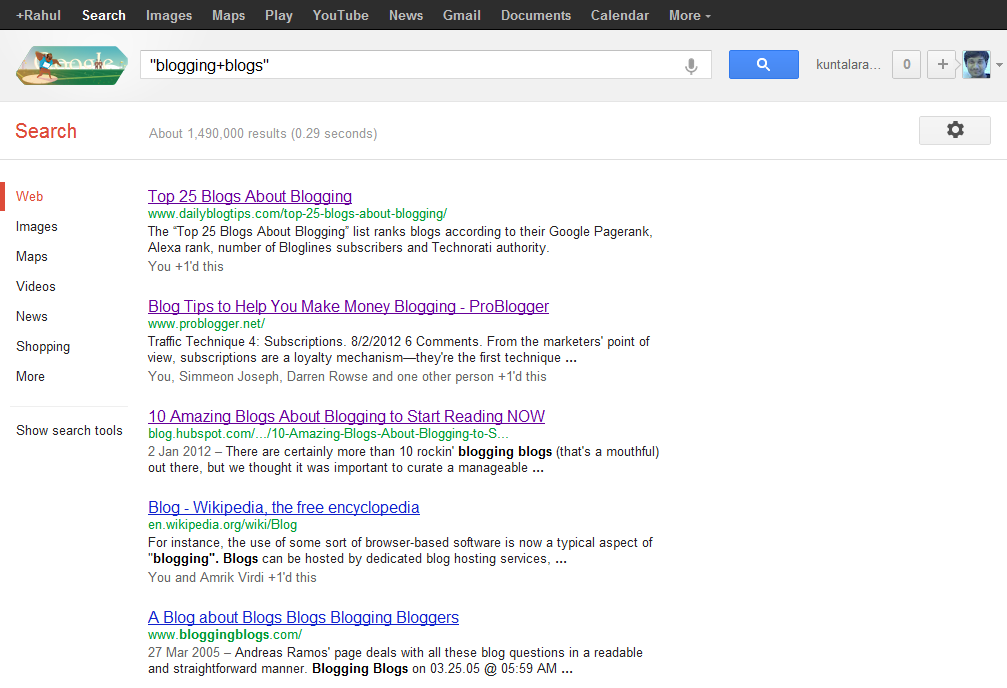
Type “your niche + blog” in google to know which are the top blogs in your niche.blogging blogs

Ex: “blogging + blog”

Read : Why You should comments on other blogs?

2. Network with others using Facebook and twitter

Facebook: Join in Groups.. Promote yourself out there.. BTW facebook alone is giving me 100+ leads daily (even without promoting everyday!). Ammar Ali is also getting huge traffic from Facebook ;) . So don’t neglect bringing Facebook traffic to your blog.

You may find it difficult in the beginning but when you start promoting others content and when you get to know each other on Facebook, it becomes very easy!

Twitter: Follow top bloggers in your niche and follow their followers. This is the simple yet effective way of increasing your targeted twitter followers. Once you have done this, you can tweet your new articles and ask your followers to retweet it.

3. Video Marketing:

Create a 2 min.video and add your blog link at the starting

Submit them to YouTube, metacafe etc.

Tools to use: Use Screenr to create free videos

4. Spend time on writing detailed articles.

Never assume that you can bring quality traffic without much efforts.

You need to differentiate yourself with others to become successful. It takes time to create content, I agree but you shouldn’t spend whole time creating only normal or average 600 words posts.

Spend time to create great content.

Write detailed posts with 1000 or 1500+ words once in a while. If you’re not a full time blogger like me, at least try to create detailed posts once or twice a month.

So that you can grab others attention and you can show your blogging expertise to your readers.

It’s really important for you to create killer articles regularly to survive in blogosphere. This can bring your quality traffic from other sites or search engines.

4. Don’t forget SEO

Most people say forget about SEO (Search Engine Optimization) when you’re just starting out.SEO TACTICS
 
I think that’s the dumbest suggestion!
 
You need to focus on what keywords to use and how much keyword density you should maintain in your content to get search engine traffic to your blog.

It’s extremely important to bring organic (search engine) traffic to your blog. Because it’s free and highly effective!

Make sure that you’re not keyword stuffing your content. It makes your readers hard to digest what you’re saying in your articles.

And do proper keyword analysis before you’re writing the articles. Then embed them into your posts. If you’re a beginner then this is enough! Don’t go beyond, you’ll better understand about SEO when you’re spending more time on blogging.

Don’t Miss : 5 Basic Pillars of Creating Successful and Profitable Blog!

Conclusion:

Always try to retweet and promote your fellow bloggers before asking them to promote your content. This can make others to promote your content sooner or later and you will have high chances of getting their attention if they find it useful. 

I dint recommend guest blogging here in this post. Major reason is without having any online reputation you can’t cope up with other bloggers to get accepted your guest posts. When they reject you, you’ll feel down to submit another guest post to them.

So, focus on building a network by blog commenting, writing great stuff and social media networking using above tips.

Have I missed any other way to  get traffic to a new blog? Take your action by commenting below.

SEO Over Optimization Rings Troubles For Your Blog

You are doing Over Optimization For Your Blog ??

Stop this now! ;)

Because SEO Over Optimization Rings Troubles For Your Blog.

Blogging starts with the basics which is why this article should be considered as an eye opener for those who think that italicizing their keywords or using all them in H1, H2, H3 headlines would mean they would achieve the top spot in Google.

SEO over optimizationGoogle can turn your blog upside down if it senses any diversion on your page. So, through this article I will be conveying the important message of where to put a full stop when it comes to handling the SEO of your blog articles.


 
SEO or search engine optimization has been misused a number of times. You will come across a number of websites or blogs that use jumble up keywords in their article’s headline, body and meta descriptions in order to sneak past others in Google search results. This measure used to warrant a top spot for a lot of them until recently Google took all this into account. The Google Penguin update is the latest algorithm update which tends to push these websites down to the bottom. A number of these ‘over optimized’ websites are no longer even indexed on Google.

So, the question that arises is that where to put the full stop in order to prevent the page from getting SEO Over Optimization?

The truth is no one knows that. Even in case of Google, you might notice some anomalies in the search results with some of the seemingly over optimized websites, covering the top. Even the best of the SEO experts have to bang their heads before fully understanding the search capacity of search engines like Google.

In all these circumstances, our job is to adopt the best practices possible and abstain from crossing the limits. Here are 3 things that I would suggest you should do in order to prevent your blog from havocs of over optimization and saving yourself from the Google Penguin attack.

1. Stop Following the traditional Rules:

Google algorithm has been upgraded way beyond thinking. In order to keep yourself into the competition, start thinking differently. Stop using the same keywords in your headline tags over and over again as to even a normal reader these look really awkward. Forget about keyword density, concentrate on writing quality content. If a sentence requires that keyword and cannot be completed without it then only use that keyword.

2. Stop Writing for Bots, Start Writing for People:

Yes, Write for your blog readers not for bots! ;)
writing-unique-content
A search engine bot might span your content but it is read only by a human being who is fully capable of judging your content. Not that bots haven’t got the intelligence for judging your stuff as I have discussed earlier the advancement of Google’s code. So, in order to attain the best results start writing quality stuff for readers and in return the search engine bots will favor you as well.

Read :  12 Tips For Writing Engaging Content For Readers

3. Limit your Blog’s accessibility to Google crawlers:

Each blog has a number of units ranging from categories to pages. Nowadays, even the attachments get a separate page and URL. In order to prevent these useless pages from getting into search results, you have to limit access to your blog. The reason I called these useless is because categories and pages links never get exposure in the search engine while attachment URLs might increase your Google image search traffic but in the long run it will damage your overall traffic and trust of your readers who would be simply looking on some bunch of images with no text.

Recommendations:

In order to follow these leads, you will require some basic SEO tools and plugins.. SEO for Yoast plugin is my favorite as it gives a deeper insight of links from your pages, keywords concentration and most importantly it redirects your attachments post to your main article page in which this attachment was in the first place. You can also use the SEO pressor plugin.

Have  I missed any points about seo over optimization? Do let me know in comments! Happy Blogging! :D