• Skip to primary navigation
  • Skip to main content
  • Skip to primary sidebar
  • Skip to footer
logo

All Blogging Tips

Everything About Blogging

  • Home
  • Start a Blog
  • Grow Your Blog
  • About
  • Contact
  • Privacy Policy
  • Tools I Use

Search Results for: ai

Killer Tips To Adopt Before You Start a Blog!

By Jaykrishna 33 Comments

Do you want to start your own blog?

Have you ever thought that you also might get name, fame and money and your thoughts will reach the sky from your fruitful blog.

If yes then this post will surely going to work for you . :D

Being an owner of a blog is a responsible work  and you are ready to take responsibilities then match your thinking and responsibilities from the mentioned points below ,if this what you are thinking they go ahead start a blog and success will be on your way.

Read Also : 5 Basic Pillars of Creating Successful and Profitable Blog!

Tips To Adopt Before You Start a Blog!

Define Goals for your blog

Before you start a blog you need to set goals regarding its SEO as well as what would you expect from your blog, what you want to make it in next six months, what’s your main aim of starting a blog .Focus on your blog’s aim and you will get success for sure but if you do not know what you want to achieve from your blog then I suggest think of it because blogging is not a joke it needs lots of temperament and patience.

Know your Targeted Audience

 This is one of the most common tips that you should adopt that you should manage your contents and blog design according to the targeted audience. Suppose if your blog targets teenagers then you must avoid using technical writings that is generally used for professionals or corporate. Also you might keep in mind that the design should be well enough to bind teenagers so do some work on designing too. If you have a budget, work on an impressive logo and then start a blog.

Keep stock of Updated contents

Always remember that you need to update your blog with contents because people will not visit daily and look your older post so you must have a stock of updating your blog regularly, this will entertain your visitors and also would enhance your blogging style. So it is recommended that you save some contents in draft and then make them ready to publish when ever you need this will also help you to gain confidence with in you that you have a stock of contents .

Read : 12 Tips For Writing Engaging Content For Readers

Time is Money

Hope you all have heard this phrase .So if you want your blog to produce money for you then you must spend time on your blog. Visibility will add a glory to success of your blog. You must make sure that you have enough time to interact with your blog visitors through comments as if you will not respond to them they will also just ignore your blog. So be visible and let your blog loved by all not ignored by all.

Sharing your thoughts

Now days no one has been left from the craze of social media so before you start a blog it is my personal advice to build some reputation among bloggers by joining bloggers groups and liking fan pages of bloggers. So this reputation will work for your blog. As you have a reputation when you will share your blog contents in this groups and pages your contents will be loved by all and this will add glory to your blog and you will see much traffic coming from social media. This will surely make your blog successful.

Conclusion

Hope you have liked my views and pro bloggers will surely have adopted before starting a blog , it’s a secret that has been shared by you all so if you are thinking of having your own blog then try these tips and see your blog growing with in few months. It’s a trusted method and it works for sure, I would love to know any techniques if I had missed by mistake as a sack cannot stand alone it needs your support and encouragement.

5 Unusual But Important Places to Add Subscription Box

By Ahmed Safwan 53 Comments

Money is in the list.

All of us know this. That’s why you should care about increasing your subscribers.

A lot of blogs shows to you the most common places to add your subscription box, but I thought why don’t we share the uncommonly used places and that can bring us more subscribers.

So, usual places + unusual places = more subscribers and most importantly more money.

If you are really looking for places to increase your subscribers, you are on the right place, so continue reading. [Read more…] about 5 Unusual But Important Places to Add Subscription Box

Bluehost Vs Hostgator – Which One Should You Use?

By Ammar Ali 43 Comments

bluehost vs hostgator
Are you looking to start your own website or a blog but confused which one to choose Bluehost or Hostgator?

There are too many things that are common in Hostgator to Bluehost which makes choosing one of them hard.

I’m going to make your decision a lot easier.

Because..I’ve great experience using both hosting companies and I can definitely guide you which one worth your penny and which one doesn’t.

This is based on my own personal experience using both hosting companies.

First, let me give share comparison of Bluehost Vs Hostgator. I’ll also share my experience and conclusion at the end of this post.

Whether you are a webmaster or a beginner, it is important to have adequate knowledge about the essential features provided by a company. Before you pay and rely on a hosting service, these differences in major features will strengthen your ultimate decision. That’s how I decided.

In this elaborated article, every feature is clearly mentioned to provide an ease and help you decide whether to choose Bluehost or Hostgator. Sit back and read it patiently.

Bluehost Vs Hostgator – Quick Overview

Company Bluehost Hostgator
Basic plan $3.49 $3.96
Site Migration Paid ✓
Auto Backup ✓ ✓
Control Panel ✓ ✓
Free Domain(s) ✓ ✗
Good
  • Ease of use
  • 99.9% uptime
  • 24×7 customer support
  • Highly affordable
  • Anytime money back guarantee
  • Recommended by WordPress.org
  • Free site migration
  • Transparent about features
  • 45 days money back
Bad
  • Occasional slow site speed
  • Slow response on live chat
  • No free migration.
  • Negative reviews all over the web
  • Poor customer support
Overall A great option for those who are looking to host basic websites and need cheap hosting Not recommended
Website Visit Website

Bluehost Vs Hostgator: Detail Comparison

So here’s the detail comparison between Bluehost and Hostgator. Let’s jump in!

Uptime and Speed

If it is about the utter performance and reliability of web hosting companies, then both maintain equality. Performance is the only reason that has kept these companies at the top and in the competition.

The use of incredible technologies has made Bluehost and Hostgator to stand out among other web hosting services.

Bluehost

It has spent a huge amount of 20 Billion USD for the data centers. The company has developed three dedicated data centers in Utah, equipped with latest technologies. It also uses CPU Segregation technology to control CPU smartly and prevent the website from negative users. Another point is the solid infrastructure that provides brilliant performance.

Hostgator

They have built data centers in UT, Provo, and Houston. Every data center is well-equipped. The company is in partnership with famous SoftLayer to control data centers and all other functions. Hostgator also invests big amounts in brand new technologies in improving performance.

If you are planning to host your domain, it is important to consider the reliability of the provider. Page loading always influences the user experience. If the web page loads faster, then most likely visitors will stay on your page for a longer time. And, if web page loading is slow, then it definitely upsets the users.

In this specific feature, both the companies devote to better performance.

In order to sustain your website in the market, it is compulsory to value the network uptime. Most important, both the companies offer high website uptime of 99.99%. But, if it’s true or not?

Talking about the responsive time, both the companies approximate to 320ms which are faster and appreciating.

With my personal experience, I can tell you that Bluehost is a bit faster than Hostgator. I faced several downtime when I hosted my site on Hostgator. However, the reasons were unidentified but, it was quite unsatisfactory.

Website downtime definitely brings bad user experience for the visitors.

Just like uptime, website speed is also an essential feature to note down. The faster the speed of the website, there are more chances that it will gain maximum followers.

Both Bluehost and HostGator provide an excellent responsive time to the users. However, there are several tools by which you can identify the response time of your website. Overall, both the hosting companies are worthy to spend money in view of uptime and speed.

Pricing Comparison

When it comes to pricing and hosting packages, both the companies offer three great plans. From beginner to experts, anyone can opt for a starter, Plus or business pro.

Whether you are a professional webmaster or a newbie, everyone considers the affordable web hosting package. That’s right. If you’re a beginner, you would desire for a plan that is reliable and cost-effective. However, experts want impressive plans for the better hosting.

In both the cases, Bluehost and Hostgator present three main packages with slight differences. As a decision maker, you should consider every little detail and go for the one, which suits you better. Don’t worry, I would recommend my personal choice in the conclusion part according to the features.

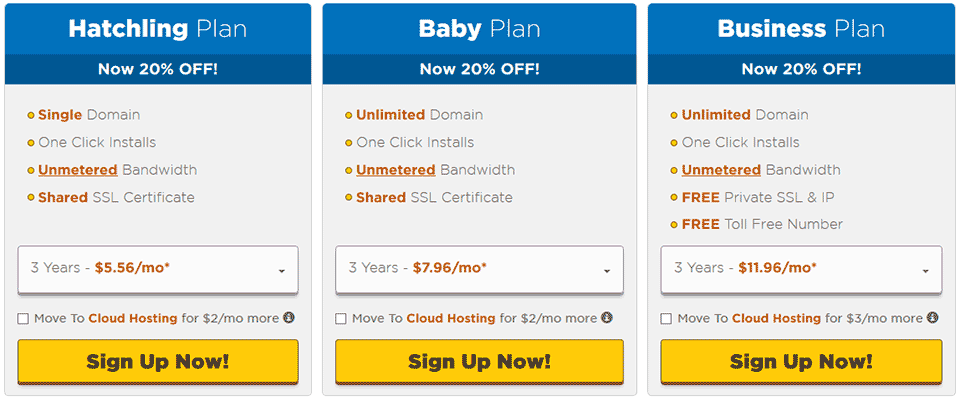
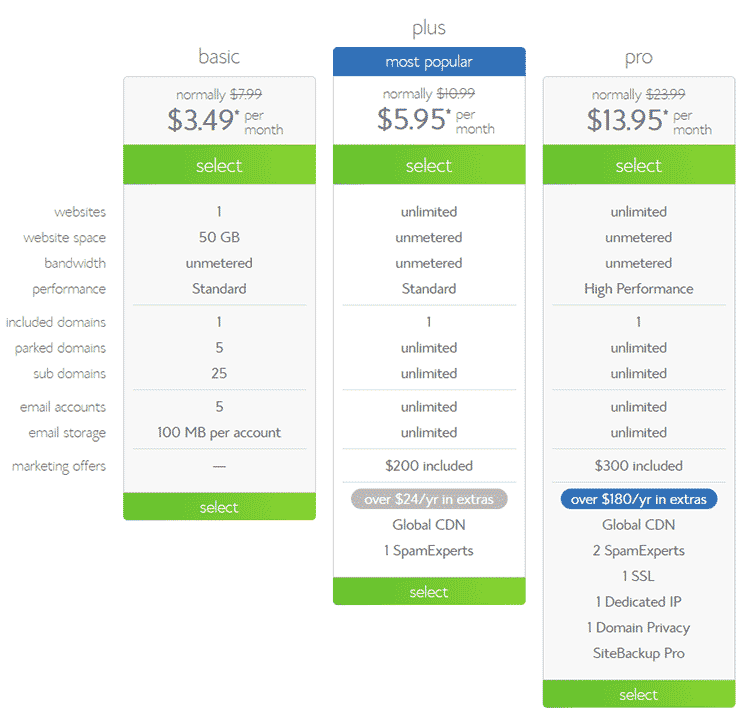
Hostgator Bluehost
Hatchling plan – $3.96/month Basic plan – $3.49/month
Baby plan – $6.36/month Plus plan – $5.95/month
Business plan – $7.99/month Business Pro plan – $10.36/month

Bluehost Pricing Details

Let’s take a closer look at Bluehost pricing.

bluehost pricing

Starter Plan

  • 12 months prepay at $4.95/month=$59.40
  • 24 months prepay at $3.95/month=$94.80
  • 36 months prepay at $2.95/month=$106.20

Plus Plan

  • 12 months prepay at $7.95/month=$95.40
  • 24 months prepay at $6.95/month=$166.80
  • 36 months prepay at $5.95/month=$214.20

Business Pro Plan

  • 12 months prepay at $18.95/month=$227.40
  • 24 months prepay at $15.95/month=$382.80
  • 36 months prepay at $13.95/month=$502.20

Note: When you signup make sure you uncheck all the other additional charges for Site Backup, Domain Privacy protection, site lock security etc. It will save your total amount.

Hostgator Pricing Details

Now here us the detailed pricing package offered by HostGator.

hostgator plans

Hatchling Plan

  • 12 months prepay at $5.95/month= (33.52% off)
  • 24 months prepay at $4.95/month= (37.74% off)
  • 36 months prepay at $3.95/month= (43.17% off)

Baby Plan

  • 12 months prepay at $8.95/month= (25.10%off)
  • 24 months prepay at $6.95/month= (36.53% off)
  • 36 months prepay at $5.95/month= (40.20% off)

Business Plan

  • 12 months prepay at $8.95/month= (47.20% off)
  • 24 months prepay at $6.95/month= (56.43% off)
  • 36 months prepay at $5.95/month= (60.20% off)

However, both Bluehost or Hostgator have dedicated, reseller and dedicated hosting. Even, there are other multiple free services offered by the companies with each hosting package.

Customer Support

Not everyone is a technical person and you really can’t fix everything yourself.

It’s true that people only trust those websites that are prompt and offer excellent technical support. In the matter of technical assistance, both the companies are fairly fast and supportive.

If you get stuck in any process, 24/7 available online technical teams of Bluehost and Hostgator will solve your queries without a glitch. From email support to phone call and online instant chat, the hosting services are extremely fast.

I face many issues with my blog. In those circumstances, I take no long to contact the technical support team for the problem.

There are no automated machines to help you but real persons ask your problem and assure to bring quick solutions.

But, if I compare Bluehost Vs Hostgator support quality and response time I would say Bluehost is the winner. My client recently contacted to the technical team of Bluehost and they quickly respond. That’s too impressive. Please keep in mind that sometimes they experience high number of chat support requests so it may take longer to respond to your support issue.

User interface

As a newbie, this particular part plays a significant role. A friendly user interface attracts new as well experts. Both the hosting providers offer standard cPanel. The control panel of Bluehost and Hostgator provide a quick 1-click installer for multiple scripts.

It can a daunting task to manage a website by your own, along with domains, email setup and hosting account.

With the option of icon-based interface, it has become quite easier to install any popular script. A newbie can install WordPress with just 1-click and it is super fast and incredibly easy.

To your knowledge, user-friendly control panel like cPanel is easy to use. I personally suggest you to use these hosting providers because of friendly control panel that allows you to learn installation process without a mishap.

If I compare the control of both hosting companies, I would say Bluehost is little more customized. Your hosting cpanel, domain management, support center and billing everything is managed in one dashboard.

Whereas, HostGator provides separate cPanel interface and portal for billing and technical support.

Conclusion

After detailed comparison between the top most web hosting services, I’ve ended up with a solid conclusion.

Undoubtedly, Bluehost and Hostgator services are reputable hosting companies that have developed utter trust and reliability from their users.

Both the rival companies are in the race for a long time and each one is giving tough competition to the other one. With my experience and personal observation, I would suggest you go for Bluehost.

When it comes to exceptional services and quality, Bluehost wins the race. Hostgator still needs to improve the performance and customer support. It somehow disperses the users to other hosting services. I have received enormous good reviews about Bluehost as compared to HostGator.

If you only have to choose between Bluehost vs Hostgator, I would recommend you to go with Bluehost.

If you are looking for even better web hosting as compared to Hostgator or Bluehost. My recommendation would be InMotion hosting. This blog is currently hosted on InMotion and the performance of this host is excellent. The customer support is very responsive. I don’t have to wait for more than 5 minutes to get connected with their live support team. Use this special link to save 38% off and get a FREE domain name.

How to Choose the Best Web Hosting?

By Ammar Ali 43 Comments

Are you going to launch a new website for establishing your foothold on the internet marketing business? Then you are in a need of better best web hosting services.

Am I right? :D

Hosting is one of the few things you need to have when going to start a new website. Since, your website will be the face of your business and clients will look through it to know you and your business, hosting plays a vital role. Generally, the first timers commit the mistake on the very first stage when they choose a “not-so-effective” best web hosting services for their websites. It can definitely effect upon your website raking, quality and maintenance.

web hosting, best hosting

Therefore, before the mistakes turn grave you should switch to better web hosting provider to ensure the quality of your website remains the best always.

See Also: How To Choose Best SEO Service

Search online to find out the reputable best web hosting services!

There are many established web hosting companies which provide best solutions to make your website grow big. When you go online to look out for such web hosting service providers some of the name that comes up in the front are-

  • HostGator
  • BlueHost

You can definitely go for one of the service providers to get better quality services.

Know their commitments

Being committed towards your say makes reputation of the companies. So, when you are choosing the hosting service providers note if they are capable of fulfilling their commitments or not. If they have good reputation in the market, you can depend upon them. If they don’t have the reputation of meeting the deadlines, you should not go for the company.

Know about their customer support team

Efficient customer support care services will be the primary thing that you should look for when you want good web hosting services, because all the necessary information you will get from there.

Now, when you got a web hosting service provider who is capable of giving you all the services you want with affordable rates, you should clear to them what you want. Hostgator is best for their excellent support! ;)

Read : Advantages and Disadvantages Of Free Domains

Before signing up the deal clear your needs

You get the right services when you sign up the deal with your service provider by letting him know all the things you want. You must clear details like- the deadline to finish the works related to building the website, minimum storage space, bandwidth, SMTP mail services etc.

Search for the best quotations

Generally the website hosting service providers give you quotations before hand to inform you about their charges. However, you must not stick to the service provider who quotes the least amount for you; rather you should pick up the one who quote you an affordable amount including all the services in the package that you want.

Read Also: 5 Basic Pillars of Creating Successful and Profitable Blog!

RECOMMENDED HOSTING SERVICES


HostGator – Hostgator new  AN 125x125 HostingHost Gator provides Shared, Reseller and Dedicated web hosting solutions. They’ve excellent support, Uptime, Unlimited space, unlimited bandwidth, 24/7 support and a 45-day money back guarantee. Use coupon “AllBloggingTips25” to get 25% off on any host gator plan.

Bluehost promo 125x125 HostingBlueHost – If you are looking for a reliable, affordable and good shared hosting with good support, BlueHost is best. This is another best wordpress hosting provider with 99.9% Uptime, Unlimited space, unlimited bandwidth, 24/7 support.


Follow these tips before relying upon a hosting service provider. It will definitely help you get the best service to make your website flourish to the heights..

Which hosting do you use and Why? Do let me know in comments! :)

Why You Should Use Premium WordPress Themes?

By Ammar Ali 31 Comments

The WordPress has become the most favorite tool for bloggers and website owners. It has a great range of usability and flexibility that make it the easiest yet most powerful tool.

There are many themes available online for the WordPress and people mainly use the free themes for their blogs or website.

Am I right?

The free themes are really good enough for many but if you want to be serious with your online presence then using premium WordPress themes will be best for you. The premium themes may require you to spend some money but it will make sure of the customization and security better for your blog or website.

Read Also : How To Choose WordPress Theme?

use premium wordpress theme

Why You Should Use A Premium WordPress Themes?


1. The design

There are many free WordPress themes which are really attractive but even those are nothing if you compare them with the premium themes. ;)

The premium themes for WordPress are designed by the most skillful designers and these themes come with no malfunctions. That is why if you want your blog or website to be attractive and more professional then go for the premium ones. That will make your web presence stronger for you.

2. Great features

The premium themes of WordPress comes with a long range of great features that make your website much better. The free themes don’t come with as great features as the premium themes. There are some unique features like sharing tools,  different posting plugins and dynamic galleries which you can only get with the WordPress premium themes. This is why you must need them to make the blog or website better. There are other features of premium WordPress Themes like;

  • SEO Friendly Design
  • Widgets Ready
  • Elegant Design
  • Easy to Customize
  • Life Time Support
  • Responsive Design

3. Theme customization

The one thing, which helps you to make your blog or website look how you want them to be, is the customizing options of the themes. The free themes have only few customization options when the premium themes make sure that you get more in-depth control over the customization of the theme. This way you can work on the WordPress theme to make it look exactly the way you want it to look.

4. They are more secure

The premium themes of WordPress are surely more secured than the free themes. The security options of free themes don’t generally update themselves automatically when the premium themes do. The WordPress premium themes come with a long range of security options that make the website hack free. The options are automatically updated regularly too. That is why the premium themes are more secure.

5. Free Updates

The WordPress premium themes come with free updates. Every time there is an available update for your premium theme, it will be available for you. The theme or its features will be updated for free and this facility is available for entire life. That means your premium WordPress theme will receive required options and updated security measures when available.

6. Technical support

The technical support is a very important thing for any WordPress theme user. If you are using a premium theme for your WordPress website or blog then you will be able to get technical support from the developer of the theme whenever needed. That is a great thing for you if you are a first time blogger.

Read : Freshlife: Best Magazine WordPress Theme

Best Premium WordPress Themes I Recommend!

There’re many sites that provide premium WordPress Theme. But Below I’m sharing 2 top and best, affordable WordPress Club That provide great Premium WordPress Themes!

Theme-Junkie – theme junkieThemeJunkie provide best wordpress Themes for very low price, Professional looking, Fast loading and great lifetime support. This is one of the best wordpress themes club. Use this link and enter special coupon “35OFF” to get 35% OFF on any theme! Isn’t that really cool? :D

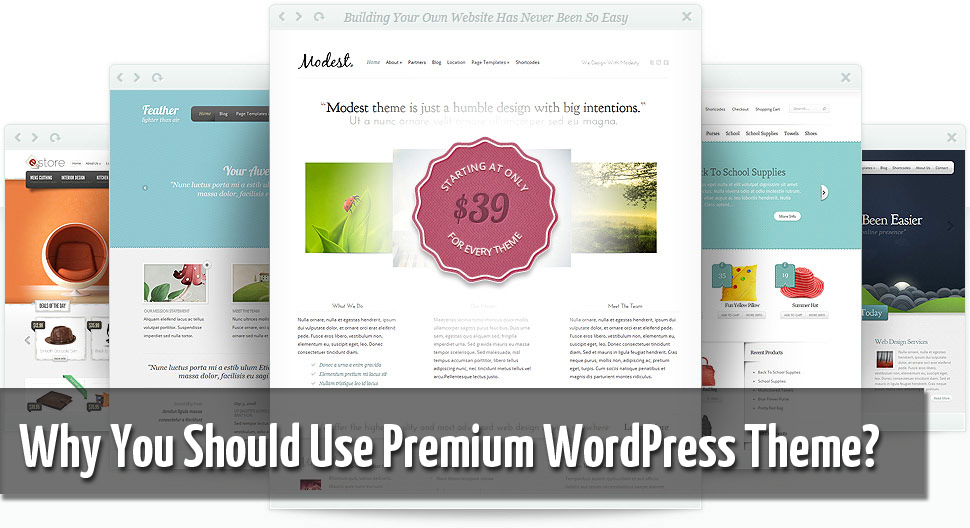
elegant themesElegantThemes – Looking for great, professional looking, elegant style wordpress themes? Elegant themes have it all. They provide great quality wordpress themes. Get 100% complete access to their entire collection of 76 themes for only $39!

Over To You!

Do you use premium WordPress Themes? Let me know in comments!

The article by Harry. He recommend that you read about Ghost Box and when you get the time, also read about Ouija Board Dangers.
  • « Go to Previous Page
  • Page 1
  • Interim pages omitted …
  • Page 38
  • Page 39
  • Page 40
  • Page 41
  • Page 42
  • Interim pages omitted …
  • Page 70
  • Go to Next Page »

Primary Sidebar

Get Blogging & SEO Tips by Email

Get helpful blogging, SEO, and content tips delivered straight to your inbox. No spam.

Join 3,489 other subscribers

Popular Posts

  • Is Your Blog Properly Optimized for Performance and SEO?
  • 10 Powerful Ways to Become a Famous Blogger
  • Google AdSense vs Affiliate Marketing: A Simple Comparison for Beginners
  • Effective Ways to Increase Content Reach and Audience Engagement
  • 12 Things to Do Before Applying for Google AdSense
  • Are Backlinks Becoming Less Valuable in Modern SEO?
  • Step-by-Step Guide to Creating a Successful Travel Blog
  • How to Start as a Freelance Writer & Is It Worth?
  • Add Smooth Multi Level Drop-Down Menu In Blogger
  • How To Delete A Blogger Blog Permanently In 5 Minutes (+ FAQs)

Blogging Tools I Use

Over the years, I’ve tested dozens of blogging and WordPress tools. Below are the tools I personally use and recommend for blogging, performance, SEO, and monetization.

Blogging Tools I Use →

Categories

  • Announcement (12)
  • Ask The Readers (2)
  • Blogger (56)
    • Blogger Hacks (4)
    • Blogger Tips (24)
  • Blogging (108)
    • Blogging Tips (81)
    • Writing Tips (6)
  • Coupons (2)
  • Design (5)
  • Email Marketing (4)
  • Free Themes (1)
    • WordPress Themes (1)
  • Free Traffic (40)
    • Guest Blogging (7)
    • Search Engine Optimization (4)
    • Social Media (13)
  • Giveaway (16)
  • Hosting (14)
  • How To (48)
  • Latest News (1)
  • Make Money Online (37)
    • Adsense (7)
    • Affiliate Marketing (8)
  • Reviews (17)
  • SEO (46)
  • Social Media (13)
    • Facebook (5)
      • Tips and Tricks (3)
    • Twitter (2)
  • WordPress (54)
    • WordPress Plugins (17)
    • WordPress Themes (5)
    • WordPress Tricks (2)
    • WordPress Widgets (14)

Footer

About This Site

All Blogging Tips helps beginners learn how to start, grow, and monetize blogs using WordPress. I share practical guides and honest recommendations based on real blogging experience.

Read more →

Site & Resources

  • Tools I Use
  • About
  • Advertise Here
  • Contact
  • Disclosure Policy
  • Copyright Policy
  • Privacy Policy

Start & Grow Your Blog

  • A Ridiculously Helpful Guide to Start Your Own Blog In 10 Minutes
  • How To Grow Your Blog And Build An Audience
  • How To Make Money From Your Blog
  • Cheap WordPress Hosting
  • Free WordPress Hosting

Copyright © 2026 All Blogging Tips · Powered by InMotion Hosting · WordPress · Log in