• Skip to primary navigation
  • Skip to main content
  • Skip to primary sidebar
  • Skip to footer
logo

All Blogging Tips

Everything About Blogging

  • Home
  • Start a Blog
  • Grow Your Blog
  • About
  • Contact
  • Privacy Policy
  • Tools I Use

Search Results for: ai

Giveaway: 5 Web Hosting Accounts From Zyma

By Ammar Ali 53 Comments

I’m happy to announce first giveaway on AllBloggingTips. That is 5 Unlimited Web Hosting Accounts From Zyma. :)

Zyma web hosting company is launched in 2010. One of the best web hosting provider. They are award winning company which  offers web hosting, offers and comprehensive lot of features at affordable prices. It has partnered with us to give 5 Unlimited Web Hosting Accounts From Zyma for one year absolutely FREE!!

Web-Hosting-Giveaway-Zyma

Features of Zyma Web Hosting.

  •    Unlimited Web space
  •     Unlimited Traffic
  •     Unlimited Email Accounts
  •     Unlimited SQL Databases
  •     Unlimited Addon-domains
  •     99.9% Uptime Guarantee
  •     Free Google Vouchers
  •     Free Transfer & Setup
  •     Free Tech Support
  •     cPanel Web Hosting
  •     Fantastico De Luxe
  •     Softaculous Premium
  •     Attracta seo tools via cPanel
  •     CloudFlare CDN Support

For more complete list of features you can visit their features page!

Giveaway Prize:

We’ll choose 5 winners and each winner will get Unlimited Web Hosting Account. Isn’t that good? You can start your own new self hosted wordpress blog.

Contest Duration :

This contest will be open for 10 days. So participate now!

Contest Starts – 30 August 2012

Contest Ends –10  September 2012

Winners Announced – Winners will be Announced on 11 September 2012.

We will contact you through your emails for prize. So please make sure to provide valid email address while entering into giveaway!

How to participate in this Unlimited Web Hosting Giveaway ?

It’s very simply to Win or Enter in to Unlimited Web Hosting Accounts From Zyma Giveaway, just follow the Rafflecopter below and post a Quality Comment with your valid email.

Enter Now!

a Rafflecopter giveaway

Quick Tip! Tweet and Share this giveaway everyday to have a higher chance of winning

Best of Luck to all Participants! :D
Customized and Stylized Subscription Widget

By Ammar Ali 39 Comments

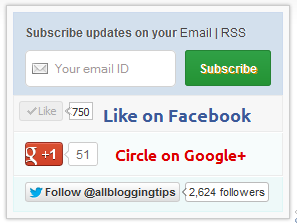
ABT widget sidebarMany of this blog readers asked me which plugin/code I’m using in sidebar for Stylized Subscription Widget. So today I decide to share this with you! because It’s almost more than 2 months. I’ve not shared any Stylized Subscription for Widget Blogger and WordPress Widget.


Coming back to topic this widget simple uses HTML and CSS. It’ll keep your sidebar clean! ;) It contains FeedBurner Form, Twitter Follow Button, Facebook and Google buttons.

To see demo copy code below and place it in our HTML Editor.

Adding Customized and Stylized Subscription Widget

You just need to place a code to your blog widget Follow following steps to add Customized and Stylized Subscription Widget to WordPress and Blogger both!

Adding Subscription Widget To Blogger

  1. Go to Dashboard > Design > Page Elements.
  2. Click Add A Gadget. In window, select HTML/Javascript .
  3. Copy the code below and paste it inside the box.
  4. Save the gadget. Drag the gadget and reposition it under Blog Posts gadget.
  5. Click Save button.

Adding Subscription Widget To WordPress

  1. Go to Dashboard > Appearance > Widgets > Available Widgets.
  2. Drag Text widget into a sidebar.
  3. Paste in the code.
  4. Save.

Code for Stylized Subscription Widget

<style>

 #ABT-mashable-bar {
background-color: #f9f9f9; box-shadow: 0 0 3px #b0b0b0;
     border:1px solid #ccc;
       padding:6px; 
width: 270px;

    }

#subscribe-box .fb-like-box { border: 1px solid #EBEBEB; padding: 5px; background:#f7f7f7;}
	#subscribe-box .gplusone { background: #f7fcfc; border: 1px solid #EBEBEB; border-top: 1px solid #fff; color: #000; font-size: 10px; line-height: 1px; padding: 9px 11px;}
	#subscribe-box .twitter-follow { background: #eef9f9; border: 1px solid #dff6f6; border-top: 1px solid #fff; padding:5px 11px;}

	#subscribe-box .email-box { 
   border-right: 1px solid #C7DBE2;
        border-left: 1px solid #C7DBE2;         background: #d3e0ed;

border: 1px solid #ccdaed;  padding:11px; margin-bottom: -4px;}

		#subscribe-box .email-box h4{color: #555;font-family: Arial;font-size: 12px; margin: 0 0 10px;}

#subscribe-box .email-box .txt,#subscribe-box .email-box .txt:focus{

border: 1px solid #d2d2d2;

color: #a19999; font-size: 12px;

border-radius: 5px;
-moz-border-radius: 5px;
-webkit-border-radius: 5px;

height:21px;

padding: 6px 28px 8px; width: 93px;

}

		#subscribe-box .email-box .btn,#subscribe-box .email-box .btn:focus{ float:right;

margin-top: 0px;

background: #30a146; 	background: linear-gradient(top, #30a146 0%, #249334 100%);  background: -moz-linear-gradient(top, #30a146 0%, #249334 100%);   background: -webkit-gradient(linear, left top, left bottom, color-stop(0%, #30a146), color-stop(100%, #249334));  background: -webkit-linear-gradient(top, #30a146 0%, #249334 100%);   text-shadow: 1px 1px 0 rgba(0, 0, 0, .4);  font-weight:bold;    font-family: "Droid Sans","Lucida Grande",Tahoma,sans-serif; 

    font-family: "Arial","Helvetica",sans-serif;
    border-radius:3px;
    -moz-border-radius:3px;
    -webkit-border-radius:3px;
    border:1px solid #248334 ;
    color:white;
    text-shadow:#d08d00 1px 1px 0;
    padding:8.5px 10px;
    margin-left:3px;
    font-weight:bold;
    font-size:12.2px;
    cursor:pointer;
    border-image: initial;} 

			#subscribe-box .email-box .btn:hover{

opacity: .8;
    border-radius:3px;
    -moz-border-radius:3px;
    -webkit-border-radius:3px;
    border:1px solid #248334  ;
    color:#FFFFFF;
    text-shadow:#d08d00 1px 1px 0}  

</style>

<div id="ABT-mashable-bar">
<div id="subscribe-box">
<div class="email-box">
<h4>Subscribe updates on your <a href="http://feedburner.google.com/fb/a/mailverify?uri=latestbloggingtips4u" target="_blank">Email</a> | <a href="http://feeds.feedburner.com/latestbloggingtips4u" target="_blank">RSS</a></h4>
<form action="http://feedburner.google.com/fb/a/mailverify" method="post" onsubmit="window.open('http://feedburner.google.com/fb/a/mailverify?uri=latestbloggingtips4u', 'popupwindow',  'scrollbars=yes,width=700px,height=700px');return true" target="popupwindow">
<input class="txt" style="background: #FFF  url('http://i.imgur.com/2BCD0.png') no-repeat 6px !important;" onfocus="if (this.value == 'Your email ID ')  {this.value = '';}" onblur="if (this.value == '') {this.value = 'Your email ID ';}" type="text" name="email" value="Your email ID " />

<input type="hidden" name="uri" value="latestbloggingtips4u" />

<input type="hidden" name="loc" value="en_US" />

<input class="btn" style="margin-left: 4px;" type="submit" value="Subscribe" />
<div style="clear: both;"></div>
</form></div>

<div class="fb-like-box"><iframe style="border: none; overflow: hidden; width: 80px; height: 21px;" src="//www.facebook.com/plugins/like.php?href=http%3A%2F%2Fwww.facebook.com%2Fallbloggingtips&send=false&layout=button_count&width=80&show_faces=false&action=like&colorscheme=light&font&height=21" frameborder="0" scrolling="no" width="320" height="240"></iframe><a style="color: #3b5998; font-family: ubuntu; font-size: 18px; font-weight: bold; line-height: 20px;" href="http://www.facebook.com/allbloggingtips" rel="nofollow" target="_blank"> Like on Facebook </a>
<div class="clear"></div>
</div>

<div class="gplusone">
<div style="float: left; width: 90px;">
<div id="___plusone_0" style="height: 24px; width: 106px; display: inline-block; text-indent: 0pt; margin: 0pt; padding: 0pt; background: none repeat scroll 0% 0% transparent; border-style: none; float: none; line-height: normal; font-size: 1px; vertical-align: baseline;"><iframe id="I1_1322986463651" style="position: static; left: 0pt; top: 0pt; width: 106px; margin: 0px; border-style: none; height: 24px; visibility: visible;" title="+1" name="I1_1322986463651" src="https://plusone.google.com/_/+1/fastbutton?url=http%3A%2F%2Fwww.allbloggingtips.com%2F&size=standard&count=true&annotation=&hl=en-US&jsh=m%3B%2F_%2Fapps-static%2F_%2Fjs%2Fwidget%2F__features__%2Frt%3Dj%2Fver%3D-8uDua_W7bo.en_GB.%2Fsv%3D1%2Fam%3D%218NuGo4ypxRCIwtBaLA%2Fd%3D1%2F#id=I1_1322986463651&parent=http%3A%2F%2Fwww.allbloggingtips.com&rpctoken=511986996&_methods=onPlusOne%2C_ready%2C_close%2C_open%2C_resizeMe" frameborder="0" marginwidth="0" marginheight="0" scrolling="no" width="100%" height="240"></iframe></div>
</div>
<a style="color: #dd0000; font-family: ubuntu; font-size: 16px; font-weight: bold; line-height: 24px;" href="https://plus.google.com/103280517588083500359" rel="author" target="_blank">Circle on Google+</a>
<div class="clear"></div>
<!-- Place this render call where appropriate -->

<script type="text/javascript">// <![CDATA[
  (function() {

    var po = document.createElement('script'); po.type = 'text/javascript'; po.async = true;

    po.src = 'https://apis.google.com/js/plusone.js';

    var s = document.getElementsByTagName('script')[0]; s.parentNode.insertBefore(po, s);

  })();
// ]]></script></div>
<div class="twitter-follow">
 <iframe style="width: 300px; height: 20px;" title="" src="http://platform.twitter.com/widgets/follow_button.html#_=1322986464549&button=blue&id=twitter-widget-22&lang=en&screen_name=allbloggingtips" frameborder="0" scrolling="no" width="320" height="240"></iframe>

<script type="text/javascript" src="//platform.twitter.com/widgets.js"></script></div>
<div id="mashable" style="height: 12px; background: #f9f9f9; border: 0px solid #CCC; border-top: 1px solid white; text-align: right; border-image: initial; font-size: 10px;"><span class="author-credit" style="font-family: Arial, Helvetica, sans-serif;"><a href="http://www.allbloggingtips.com" target="_blank">Widget »</a></span></div>
</div>
</div>

If you face any problem with code. Please download this code..

Customization!

Due to some issue. I can’t highlight changes you’ve to make in above code. Hope you won’t mind ;) . Now look for bold letter above and replace it with your Username, IDs like;

  • Replace latestbloggingtips4u with your feedburner Feed URL.
  • Replace allbloggingtips with your facebook Page URL.
  • Replace allbloggingtips with your twitter url.
  • Replace allbloggingtips with your blog URL.
  • And at least replace 103280517588083500359 with your Google+ Profile Link.

Credits!

This widget is first shared on AllBloggingTips. Readers are requested to link back if you’re going to share this widget on their blog!

That’s all. I hope you’ll like this widget. Let me know if I missed anything or you face any issue!

Happy Blogging :D

12 Tips For Writing Engaging Content For Readers

By Ammar Ali 36 Comments

Are you not getting any readership?

Why?

Because your content is not engaging!

In this post I’ll tell you 12 Tips For Writing Engaging Content For Readers. So read from top to toe! ;)

12 Tips For Writing Engaging Content For Readers

After reading your posts, your audience should feel like hanging around to ask questions, agree, disagree and see what else you’ve got to say. After all, we’re talking potential long term relationships here. Try these 12 Tips For Writing Engaging Content For Readers and you’re halfway towards bagging that customer.

Tips For Writing Engaging Content For Readers!

1. Pose Engaging Questions

At the end of a post, pose a brain-stimulating question. Make them ponder, make them wonder and churn those grey cells to figure out what you want. The idea is to put your site and business fully into your reader’s head so that they come back for more. One of the best ways to achieve this is by stimulating their thought process.

2. Put Out An Ethical Conundrum

Do you feel celebrities are doing good by adopting children from poor African countries? Should those children be taken away from their families just because they can have a better quality of life in the US? That’s an ethical conundrum right there. Put something like that out there in your post and motivate your readers to comment and argue amongst themselves.

3. Get Them To Offer Tips To Solve Something

It could be a problem that you’re facing, or something your customer is facing. It doesn’t matter. Write a post about it and open the door to your readers to contribute 5 unique tips each to combat the issue. In fact, make it a contest; publicly credit the reader with the best tips on your blog so that everyone can see.

4. Open The Door To Sharing

Share a personal problem you’ve experienced in a post and explain how you handled it. Then ask your readers to share how they would handle a similar situation. If you can get them to submit their thoughts in about 400 words or so, that’s a blog post you can use. With just one move, you manage to engage your readers plus get blog posts out of it.

Read : Top 10 Best Social Sharing Plugins For WordPress

5. Share Half A Story And Ask For Projected Outcomes

This is a spin-off from the old college game of spin the tale. Write a post detailing a problematic business or personal situation without detailing the final outcome. Ask your readers to contribute ideas for possible outcomes.  You can suggest some ideas from your side to motivate them along.

6. Start With An Engaging Opener

Your post opening should engage the reader from the word go. Remember, your readers can get all kinds of facts online. They don’t want another fact-spewing post. They want something that’ll ignite their curiosity, motivate their thought process and get them engaged. Make your opener funny, insightful, poky, witty and outrageous if need be.

 7. Make The Content Graphically Vivid

Paint a picture with your words, and draw people into the scene you’re painting. You don’t need to have Pulitzer-worthy authoring skills to do this. Just write in your speaking voice, as though you’re chatting up to your mates at the bar. Throw some adjectives and invectives in (watch out – no profanity!). Throw in some cultural flavor that reflects your background.

Read :  Short Length Post Vs Length Posts – What’s Best?

8. Use The Active Voice

Long, droning passive voice sentences are okay for legal docs and long procedural guides. When it comes to your blog post, keep the voice active. Your reader must be able to relate to the information you’re presenting in a live sense. The purpose will be totally defeated if your blog reads like old prose.

9. Use The First And Second Grammatical Person

It’s your blog; you’re talking to your readers – what’s with the third person? No more ‘they’ and ‘them’ and stuff. Write directly to your audience using first and second person only. This makes your reader feel closer to you and creates a virtual bond of familiarity.

10. Be Direct

Use active verbs instead of inactive verbs to deliver a direct, immediate and energetic impact. Instead of, “I was thinking how to address your issue”, write, “I am thinking about how to address your issue”. The difference is the directness of the tone and also the direct action mode.

11. Play With Words

There are many ways of writing what you want to say and it’s in your hands. For example, instead of saying, “I cannot put up with their holier than thou attitude anymore”, say “If I put up with their holier-than-thou attitude anymore, I’ll just call me a cow and be done with it”. I am sure you can come up with something funnier and more engaging.

12. Provide A Conclusion

Let’s face it; no one has tons of time to read every line of every post. Encapsulate the essence of your article in a short conclusion to help out these busy people. Your conclusion should ideally tie up your points together and provide a short glimpse of what the article is all about.

Read : 4 Reasons Your Blog Will Never Grow!

Need Expert Writing Help?

Sometimes people try to find some professional help with web content writing. There are a lot of companies which offer expert writing services. If you are looking for the best web content writing service, get in touch with AdvancedWriters.com.

Over To you!

I hope you’ll like these 12 Tips For Writing Engaging Content For Readers. Have I missed any? Do let me know in comments!

Happy Blogging. :D

How To Get Traffic To A New Blog – 5 Great Ways

By Rahul Kuntala 182 Comments

increase blog traffic[Most of the newbie bloggers quit their blogging just because they don’t see any traffic from their blog(s). Even who have started their blogging career long time ago don’t see much improvisation in their traffic.

Why?

Because they don’t follow few tips which has to be followed to get traffic to a new blog. ;)

How can any blogger Get Traffic to A New Blog?

Though there are many ways to Get Traffic to A New Blog, the most important factor is NETWORK. The more network you have the more traffic you’ll get.

The best way to build a network around your blog is: start interacting with others using

  • Facebook
  • Twitter

Why I’m mentioning only these two sites because, it’s easy to spread your word and follow other bloggers easily using this social media sites and  get traffic to a new blog.

Following are some EXCEPTIONAL ways to bring traffic to a new blog or any blog.

1. Blog Comments:

Comment on top blogs in your niche try to be the first 5 commenters.

Tips: Subscribe to their RSS feeds.

Don’t spam their blogs by writing one liners. Add value to your comments.

If you want to get traffic daily this is the best way to go.

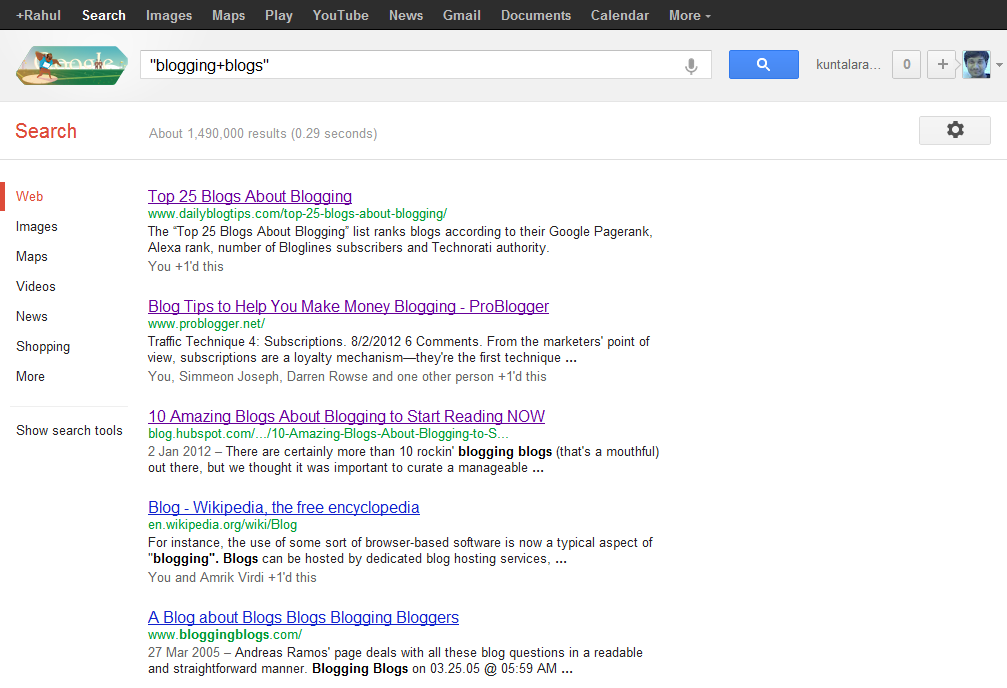
Type “your niche + blog” in google to know which are the top blogs in your niche.blogging blogs

Ex: “blogging + blog”

Read : Why You should comments on other blogs?

2. Network with others using Facebook and twitter

Facebook: Join in Groups.. Promote yourself out there.. BTW facebook alone is giving me 100+ leads daily (even without promoting everyday!). Ammar Ali is also getting huge traffic from Facebook ;) . So don’t neglect bringing Facebook traffic to your blog.

You may find it difficult in the beginning but when you start promoting others content and when you get to know each other on Facebook, it becomes very easy!

Twitter: Follow top bloggers in your niche and follow their followers. This is the simple yet effective way of increasing your targeted twitter followers. Once you have done this, you can tweet your new articles and ask your followers to retweet it.

3. Video Marketing:

Create a 2 min.video and add your blog link at the starting

Submit them to YouTube, metacafe etc.

Tools to use: Use Screenr to create free videos

4. Spend time on writing detailed articles.

Never assume that you can bring quality traffic without much efforts.

You need to differentiate yourself with others to become successful. It takes time to create content, I agree but you shouldn’t spend whole time creating only normal or average 600 words posts.

Spend time to create great content.

Write detailed posts with 1000 or 1500+ words once in a while. If you’re not a full time blogger like me, at least try to create detailed posts once or twice a month.

So that you can grab others attention and you can show your blogging expertise to your readers.

It’s really important for you to create killer articles regularly to survive in blogosphere. This can bring your quality traffic from other sites or search engines.

4. Don’t forget SEO

Most people say forget about SEO (Search Engine Optimization) when you’re just starting out.SEO TACTICS
 
I think that’s the dumbest suggestion!
 
You need to focus on what keywords to use and how much keyword density you should maintain in your content to get search engine traffic to your blog.

It’s extremely important to bring organic (search engine) traffic to your blog. Because it’s free and highly effective!

Make sure that you’re not keyword stuffing your content. It makes your readers hard to digest what you’re saying in your articles.

And do proper keyword analysis before you’re writing the articles. Then embed them into your posts. If you’re a beginner then this is enough! Don’t go beyond, you’ll better understand about SEO when you’re spending more time on blogging.

Don’t Miss : 5 Basic Pillars of Creating Successful and Profitable Blog!

Conclusion:

Always try to retweet and promote your fellow bloggers before asking them to promote your content. This can make others to promote your content sooner or later and you will have high chances of getting their attention if they find it useful. 

I dint recommend guest blogging here in this post. Major reason is without having any online reputation you can’t cope up with other bloggers to get accepted your guest posts. When they reject you, you’ll feel down to submit another guest post to them.

So, focus on building a network by blog commenting, writing great stuff and social media networking using above tips.

Have I missed any other way to  get traffic to a new blog? Take your action by commenting below.

SEO Over Optimization Rings Troubles For Your Blog

By Usama Nasir 40 Comments

You are doing Over Optimization For Your Blog ??

Stop this now! ;)

Because SEO Over Optimization Rings Troubles For Your Blog.

Blogging starts with the basics which is why this article should be considered as an eye opener for those who think that italicizing their keywords or using all them in H1, H2, H3 headlines would mean they would achieve the top spot in Google.

SEO over optimizationGoogle can turn your blog upside down if it senses any diversion on your page. So, through this article I will be conveying the important message of where to put a full stop when it comes to handling the SEO of your blog articles.

 
SEO or search engine optimization has been misused a number of times. You will come across a number of websites or blogs that use jumble up keywords in their article’s headline, body and meta descriptions in order to sneak past others in Google search results. This measure used to warrant a top spot for a lot of them until recently Google took all this into account. The Google Penguin update is the latest algorithm update which tends to push these websites down to the bottom. A number of these ‘over optimized’ websites are no longer even indexed on Google.

So, the question that arises is that where to put the full stop in order to prevent the page from getting SEO Over Optimization?

The truth is no one knows that. Even in case of Google, you might notice some anomalies in the search results with some of the seemingly over optimized websites, covering the top. Even the best of the SEO experts have to bang their heads before fully understanding the search capacity of search engines like Google.

In all these circumstances, our job is to adopt the best practices possible and abstain from crossing the limits. Here are 3 things that I would suggest you should do in order to prevent your blog from havocs of over optimization and saving yourself from the Google Penguin attack.

1. Stop Following the traditional Rules:

Google algorithm has been upgraded way beyond thinking. In order to keep yourself into the competition, start thinking differently. Stop using the same keywords in your headline tags over and over again as to even a normal reader these look really awkward. Forget about keyword density, concentrate on writing quality content. If a sentence requires that keyword and cannot be completed without it then only use that keyword.

2. Stop Writing for Bots, Start Writing for People:

Yes, Write for your blog readers not for bots! ;)
writing-unique-content
A search engine bot might span your content but it is read only by a human being who is fully capable of judging your content. Not that bots haven’t got the intelligence for judging your stuff as I have discussed earlier the advancement of Google’s code. So, in order to attain the best results start writing quality stuff for readers and in return the search engine bots will favor you as well.

Read :  12 Tips For Writing Engaging Content For Readers

3. Limit your Blog’s accessibility to Google crawlers:

Each blog has a number of units ranging from categories to pages. Nowadays, even the attachments get a separate page and URL. In order to prevent these useless pages from getting into search results, you have to limit access to your blog. The reason I called these useless is because categories and pages links never get exposure in the search engine while attachment URLs might increase your Google image search traffic but in the long run it will damage your overall traffic and trust of your readers who would be simply looking on some bunch of images with no text.

Recommendations:

In order to follow these leads, you will require some basic SEO tools and plugins.. SEO for Yoast plugin is my favorite as it gives a deeper insight of links from your pages, keywords concentration and most importantly it redirects your attachments post to your main article page in which this attachment was in the first place. You can also use the SEO pressor plugin.

Have  I missed any points about seo over optimization? Do let me know in comments! Happy Blogging! :D

  • « Go to Previous Page
  • Page 1
  • Interim pages omitted …
  • Page 41
  • Page 42
  • Page 43
  • Page 44
  • Page 45
  • Interim pages omitted …
  • Page 70
  • Go to Next Page »

Primary Sidebar

Get Blogging & SEO Tips by Email

Get helpful blogging, SEO, and content tips delivered straight to your inbox. No spam.

Join 3,489 other subscribers

Popular Posts

  • Is Your Blog Properly Optimized for Performance and SEO?
  • 10 Powerful Ways to Become a Famous Blogger
  • Google AdSense vs Affiliate Marketing: A Simple Comparison for Beginners
  • Effective Ways to Increase Content Reach and Audience Engagement
  • 12 Things to Do Before Applying for Google AdSense
  • Are Backlinks Becoming Less Valuable in Modern SEO?
  • Step-by-Step Guide to Creating a Successful Travel Blog
  • How to Start as a Freelance Writer & Is It Worth?
  • Add Smooth Multi Level Drop-Down Menu In Blogger
  • How To Delete A Blogger Blog Permanently In 5 Minutes (+ FAQs)

Blogging Tools I Use

Over the years, I’ve tested dozens of blogging and WordPress tools. Below are the tools I personally use and recommend for blogging, performance, SEO, and monetization.

Blogging Tools I Use →

Categories

  • Announcement (12)
  • Ask The Readers (2)
  • Blogger (56)
    • Blogger Hacks (4)
    • Blogger Tips (24)
  • Blogging (108)
    • Blogging Tips (81)
    • Writing Tips (6)
  • Coupons (2)
  • Design (5)
  • Email Marketing (4)
  • Free Themes (1)
    • WordPress Themes (1)
  • Free Traffic (40)
    • Guest Blogging (7)
    • Search Engine Optimization (4)
    • Social Media (13)
  • Giveaway (16)
  • Hosting (14)
  • How To (48)
  • Latest News (1)
  • Make Money Online (37)
    • Adsense (7)
    • Affiliate Marketing (8)
  • Reviews (17)
  • SEO (46)
  • Social Media (13)
    • Facebook (5)
      • Tips and Tricks (3)
    • Twitter (2)
  • WordPress (54)
    • WordPress Plugins (17)
    • WordPress Themes (5)
    • WordPress Tricks (2)
    • WordPress Widgets (14)

Footer

About This Site

All Blogging Tips helps beginners learn how to start, grow, and monetize blogs using WordPress. I share practical guides and honest recommendations based on real blogging experience.

Read more →

Site & Resources

  • Tools I Use
  • About
  • Advertise Here
  • Contact
  • Disclosure Policy
  • Copyright Policy
  • Privacy Policy

Start & Grow Your Blog

  • A Ridiculously Helpful Guide to Start Your Own Blog In 10 Minutes
  • How To Grow Your Blog And Build An Audience
  • How To Make Money From Your Blog
  • Cheap WordPress Hosting
  • Free WordPress Hosting

Copyright © 2026 All Blogging Tips · Powered by InMotion Hosting · WordPress · Log in