• Skip to primary navigation
  • Skip to main content
  • Skip to primary sidebar
  • Skip to footer
logo

All Blogging Tips

Everything About Blogging

  • Home
  • Start a Blog
  • Grow Your Blog
  • About
  • Contact
  • Privacy Policy
  • Tools I Use

Search Results for: ai

Giveaway: 5 Web Hosting Accounts For 1 Year [Closed]

By Ammar Ali 41 Comments

All Blogging Tips is going to be 1 year old on 1st Decemeber.

I’m so happy. :D

To celebrate this birthday, I am hosting Advance birthday Giveaway on my blog. That is 5 Web Hosting Accounts For One Year from a2hosting.

This giveaway is sponsored by TechFilipino.com

Giveaway

Features of this Hosting!

  •  UNLIMITED Space
  • UNLIMITED Transfer
  • UNLIMITED Email Accounts
  • UNLIMITED Domains
  • UNLIMITED Databases
  • 99.9% Uptime Guarantee
  • 24/7/365 Guru Crew Support
  • CloudLinux OS
  • cPanel + Softaculous
  •  DIY A2 SiteBuilder

For more complete list of features you can visit their a2hosting.com

Giveaway Prize:

We’ll choose 5 winners and each winner will get Unlimited Web Hosting Account. Isn’t that good? You can start your own new self hosted wordpress blog.

Contest Duration :

This contest will be open for 12 days. So participate now!

Contest Starts – 18 November 2012

Contest Ends – 30 November 2012

Winners Announce – As you know this is Advance Birthday Giveaway, as All Blogging Tips is going to be 1 year old on 1st December So, Winners will be Announced on 1 December 2012.

We will contact you through your emails for prize. So please make sure to provide valid email address while entering into giveaway!

How to participate in this Unlimited Web Hosting Giveaway ?

It’s very simply to Win or Enter in to Unlimited Web Hosting Accounts For 1 year, just follow the Rafflecopter below and post a Quality Comment with your valid email.

Enter Now!

a Rafflecopter giveaway

Quick Tip! Tweet and Share this giveaway everyday to have a higher chance of winning

Best of Luck to all Participants! :D

Condition : So simple, Each winner have to add 1 link of my website to your website. (Blogroll). Services provided by a2hosting but not sponsored by them. All technical support concerns can use a2hosting support 1 year hosting.

Update: Thanks to all the participants. Each Winner will be get email from us soon to setup hosting account. Stay tuned.

CSS3 Thread Out Social Sharing Widget for Blogger

By Abu Shaleh 25 Comments

When it comes to attracting attention to yourself on the internet, nothing does a better job than share buttons. ;)

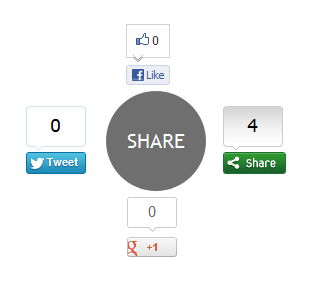
Whether its twitter or google plus, social media probably has a huge impact on your traffic. I set out to create an attention grabbing way to display buttons, and came up with this: a circle that expands revealing a bunch of Social Sharing Widget on hover.

This widget is created using Pure CSS3 and ShareThis social sharing plugin. This widget have 4 buttons: Facebook Like button, Google +1 button, Tweet button and main ShareThis button for more social sharing links.

social sharing widget

Note: This Blogger Social Sharing widget animated zoom out feature will only work on latest Browsers and won’t work with Internet Explorer ( not tested with IE 10 ).

Live Demo

Add CSS3 Thread Out Social Sharing Widget in Blogger

1. Login to Blogger Dashboard > Design tab > Edit Html

2. Click on Expand Template widgets check box

3. Search for <div class=’post-footer-line post-footer-line-1′> HTML tag

4. And Put Below Code immediately after it

<b:if cond='data:blog.pageType == &quot;item&quot;'>
<style type="text/css">
.ringMenu {
width: 100px;
margin: 150px auto;
}
.ringMenu ul {
list-style: none;
position: relative;
width: 100px;
color: white;
}
.ringMenu ul a {
color: white;
}
.ringMenu ul li {
-webkit-transition: all 0.3s ease-in-out;
-moz-transition: all 0.3s ease-in-out;
-o-transition: all 0.3s ease-in-out;
-ms-transition: all 0.3s ease-in-out;
transition: all 0.3s ease-in-out;
}
.ringMenu ul li a {
display: block;
width: 100px;
height: 100px;
background: rgba(50,50,50,0.7);
text-align: center;
line-height: 100px;
-webkit-border-radius: 50px;
border-radius: 50px;
font-size: 20px;
}
.ringMenu ul li a:hover {
background: rgba(230,150,20,0.7);
text-decoration: none;
}

.ringMenu ul li:not(.main) {
-webkit-transform: rotate(-180deg) scale(0);
-moz-transform: rotate(-180deg) scale(0);
-o-transform: rotate(-180deg) scale(0);
transform: rotate(-180deg) scale(0);
opacity: 0;
}
.ringMenu:hover ul li {
-webkit-transform: rotate(0) scale(1);
-moz-transform: rotate(0) scale(1);
-o-transform: rotate(0) scale(1);
transform: rotate(0) scale(1);
opacity: 1;
}
.ringMenu ul li.top {
-webkit-transform-origin: 50% 152px;
-moz-transform-origin: 50% 152px;
-o-transform-origin: 50% 152px;
transform-origin: 50% 152px;
position: absolute;
top: -70px;
left: 50px;
}
.ringMenu ul li.bottom {
-webkit-transform-origin: 50% -52px;
-moz-transform-origin: 50% -52px;
-o-transform-origin: 50% -52px;
transform-origin: 50% -52px;
position: absolute;
bottom: -70px;
left: 50px;
}
.ringMenu ul li.right {
-webkit-transform-origin: -52px 50%;
-moz-transform-origin: -52px 50%;
-o-transform-origin: -52px 50%;
transform-origin: -52px 50%;
position: absolute;
top: 10px;
right: -50px;
}
.ringMenu ul li.left {
-webkit-transform-origin: 152px 50%;
-moz-transform-origin: 152px 50%;
-o-transform-origin: 152px 50%;
transform-origin: 152px 50%;
position: absolute;
top: 10px;
left: -50px;
}
</style>
<div class="ringMenu">
<script type="text/javascript">var switchTo5x=false;</script>
<script type="text/javascript" src="http://w.sharethis.com/button/buttons.js"></script>
<script type="text/javascript">stLight.options({publisher: "ur-e9856caa-8f3b-40a6-82af-461e390fe167"});</script>
<ul>
<li class="main"><a href="#main">SHARE</a></li>
<li class="top"><span class='st_fblike_vcount' displayText='Like'></span></li>
<li class="right"><span class='st_sharethis_vcount' displayText='Share'></span></li>
<li class="bottom"><span class='st_plusone_vcount' displayText='+1'></span></li>
<li class="left"><span class='st_twitter_vcount' displayText='Tweet'></span></li>
</ul>
</div>
</b:if>

4. Save your Template and Done!

Related Widget : Animated Social Sharing Widget with Cool Hover!

Customization

The demo and post codes are same. You have to adjust this widget with your blog design ( how do I know your blog design look like ;) ).  No more customizations needed for this CSS3 Thread Out Social Sharing Widget CSS3 Thread Out Social Sharing Widget for Blogger for Blogger, but if you want you can replace ShareThis script with your regiestered ShareThis account script.

Once you’ve done that, save everything and check it out! Thanks for reading, and if you liked this little tutorial and socal sharing widget don’t forget to share. It really helps. :D

Click here for more stylish widgets

Twitter For Bloggers: 4 Ways To Be Successful

By Phil M 35 Comments

Twitter is one of the largest social networks out there today and with millions of people using Twitter everyday it is one of the best places to be active on as a blogger. Through using Twitter you can easily grow your blogs social media presence and find new readers. I like to think of Twitter as free advertising for my blog and therefore I am always using it to promote content and drive targeted traffic  to my blogs.

The problem with Twitter is that there is no handbook on how to get the most of Twitter and this often leaves a lot of people confused on how to gain followers and use Twitter as a great tool for their blog so in this post I am going explain 4 techniques I use to be successful on Twitter.

1. Follow People

Many people I see try to take after celebrities; following as few people as possible whist trying to gain a lot of followers. Well unless you are very popular online then you are not going to gain hardly any followers.

Following people back is not a bad thing and in my opinion.  :D

Been seen as someone who follows people back is one of the fastest ways to gain followers and it is a good idea to put that you follow back in your bio as people will follow you just because of this.

Further more you should also try following people in the first place as well, most likely a lot of them will follow you back with  in a few days and if not then you can just unfollow them and go follow some more people.

  • How to Get More Twitter Followers?

2. Be active

Another thing I see a lot on Twitter is accounts that have not been active for weeks but expect to gain followers. If you’re not tweeting then you are not going to get followed as no-one is interested in someone who does not tweet. Now I know a lot bloggers may not update their content for a few weeks so may not think they have no need to update but this is where you are wrong.

In my opinion as a blogger you should be tweeting at least once a day to promote your content. If you cannot find time to tweet then you can schedule your tweets using a website such as Hootsuite so that you can post your tweets at peak times to be seen by the most viewers as possible.


3. Use Twitter in your blog

If you are going to be successful on Twitter then it is key that you integrate it into your blog and there are two ways that you can do this. The first is to add a Twitter widget into your blogs sidebar. This will also readers to see your latest tweet and to easily follow you on Twitter direct from your blog.

The second way is to use social sharing widgets at the bottom of your posts. These will also readers to share your content on Twitter and other social media websites. By doing this you can get free promotion as other people are sharing content for you.

  • 5 Basic Pillars of Creating Successful and Profitable Blog!

4. Keep track and Analyze your account

Just like with a website it is a good idea to monitor and keep track of your Twitter account. By doing this you see when you are tweeting, what you are tweeting and how often your reply to people in your tweets.

By doing this you can see where you need to work on to get the best results our of Twitter. For example I noticed that I was not Tweeting that often in the evening so I knew when to start tweeting more.

Don’t forget to read : Top 10 Best Twitter Applications Of 2012

Did I missed any point? Do let me know in comments! :)

How To Give New Life to Old Posts : Smart Ways!

By Tarun Jaitely 52 Comments

If you happen to be a part of blogosphere, you might have noticed a couple of odd facets to which you couldn’t find immediate solutions.

Reviving old posts is one major concern of most of the bloggers as it is very painful to see their hard work moving into the archived zone.

Yet, now you can do something to revive these and to Give New Life to Old Posts, which somehow happens to get ignored by readers.

Carry on reading this article! ;)

You will get some golden rules to resolve this problem and Give New Life to Old Posts.

Image Source

How To Give New Life to Old Posts?

Update Old Posts on Your Website:

Blogosphere is a centre of changing perceptions and research. Every day you get to see something or other making its place as top content on search engine. Therefore, you must start re-working to Give New Life to Old Posts and update with your experiences on the basis of current SEO trends. This lucrative update will make your blog useful and can be truly magnetic towards traffic building.

Cross Linking:

This can actually fetch returns of multi-tasking. Most of us as a blogger has done cross linking many times, but with old blog posts it seriously creates wonders.

You can simply punch an anchor text with all appropriate keywords. This will pop up your website’s ranking on search engine as well will enhance Google PR.  There is other way out also. Blogger can employ insight plugin for cross linking in a new post and this will help them out in making people stay for longer on their website which will reduce bounce rate of their blog.

Do Read : Search Engine Optimization Through Internal Linking

Take Help of Social Media:

Social media sometimes can be good source of traffic, even if you are sharing a couple of old posts. You can harness its potential through Twitter, Facebook, stumble Upon etc. This can be a wonderful option of rejuvenating your old posts.

Check Out : Top 10 Best Social Sharing Plugins For WordPress

Create A Follow Up Post:

Although it sounds similar as cross linking part,

Isn’t it? :D

But in follow-up post you can directly link up both old and new posts. In this you easily indicate the older posts and with new post, giving it a new exposure. By this you can share your messages written in the old posts with the new readers also.

Use the Related Post/ Recommended Post Plugin:

You would find plethora of plugins/ widgets available for showing related post/ recommended posts just below the article or in sidebar. By using these plugins you can easily give new shape to your older posts. The plugins maintains a balance of PR and gets you better search engine ranking.

Optimize Your Old Blog Posts:

No one can disagree with the fact that search engine is a best corner for generating traffic. If you simply do a small research on keywords and keywords density, and punch with a little fresh description, let me tell you that it is going to help you immensely.

Must Read : 5 SEO Tips to Use Keywords Effectively

Use Subscriber Link Resource and Attract Traffic:

Subscriber list is a good place to show your cards. You can transfer all your old blog posts to subscriber list at a regular interval and in this way readers will end up in reading more of your blogs. Make sure you don’t over do this because this may force your subscriber to unsubscribe from your mailing list.

Did I miss any points? That you are using to revive and Give New Life to Old Posts, If yes then share your points with us via leaving a comment.

Has Your Blog Overslept? Revamp Your Blog Today!

By Sadhil Kumar 28 Comments

So, if you are reading this post, I presume your blog overslept or lets say you overslept.

And now you want to revamp your blog, right? :D

Before you proceed, let me make it clear that the process of revamping your old blog is very tough. And you need to give extra efforts to achieve it, like you did while launching the blog initially.

Well, launching a new blog is a daunting task. We as bloggers, are aware of the fact that, how much effort we had to put in doing so. Drawing the attention of readers and probloggers of that particular niche takes long time. And, once you have successfully promoted the blog, the job is somewhat easy. All you have to do is maintain it further.

Read : How To Get Traffic To A New Blog ?

Revamp Your Blog Today!

But, unfortunately some of us fail to do so. It may be because of a number of reasons. A busy schedule or a personal problem or not knowing what to blog next or sheer negligence, can force bloggers to abandon their blogs. Under such circumstances, do you have to go through all the initial stuffs once again or are there any other means to revamp your blog?

revamp your blog today

Beware: A sleeping blog will give you sleepless nights.


Ofcourse, launching your blog for the first time is way different from revamping your blog and launching it once again. Follow these easy steps to revamp your blog today:

Try a different content

Blogging about the same topic becomes a monotonous job. The initial passion to write something new and interesting is lost. And this loss is clearly reflected in your blog post. So it’s better to try a different style of presenting. You may even try a different type of content like making videos, presentations, infographics etc. You may even opt for a different niche to blog about, for the time being.

Read: Is video blogging worth trying

Guest post

Yes, guest post is a powerful practice to keep readers engaged. And when done properly, you do not have to think of any other means to revamp your blog. While allowing quality guest post keeps your blog ticking, writing guest posts for others will help draw traffic to your own blog.

Read: How do you benefit from guest blogger

Social media awakening

Announce your blog’s revival once again on social media sites. Engage with your fans and followers and re-built their trust. Redesign your Facebook and Twitter profiles and make them as engaging as possible. You may also consider advertising on Facebook inorder to promote your blog.

Connect with subscribers

The best and easiest way to re-connect with your blog readers is through mail. For this you don’t have to spend a penny. And this conventional means of connecting with subscribers is as effective as social network sites. All you have to do is frame a great blog post and mail it to your loyal subscribers. If it interest them, then they will start revisiting your blog, in search of more such articles/blog posts.

Read: 10 killer ways to boost your rss subscription number

Change the design

Revamp your old blog by changing the look and feel of it. Install a different theme or add new plugins and widgets. If choosing a new theme isn’t affordable, then you can try editing the CSS to bring about some changes in the overall design.

Read: 6 simple yet effective tips to design website like pro

Ok, after following these steps you revamped your blog, great. But, the analysis doesn’t stop there. Spare some more time to self-analyze on what led to this terrible act in the first place. Could it have been avoided? Now how prepared are you to prevent it further?

If you still find difficulty to revamp your blog or if I missed out some important points on revamping old blog, then do mention in the comment section. I would be happy to know.

  • « Go to Previous Page
  • Page 1
  • Interim pages omitted …
  • Page 37
  • Page 38
  • Page 39
  • Page 40
  • Page 41
  • Interim pages omitted …
  • Page 70
  • Go to Next Page »

Primary Sidebar

Get Blogging & SEO Tips by Email

Get helpful blogging, SEO, and content tips delivered straight to your inbox. No spam.

Join 3,489 other subscribers

Popular Posts

  • Is Your Blog Properly Optimized for Performance and SEO?
  • 10 Powerful Ways to Become a Famous Blogger
  • Google AdSense vs Affiliate Marketing: A Simple Comparison for Beginners
  • Effective Ways to Increase Content Reach and Audience Engagement
  • 12 Things to Do Before Applying for Google AdSense
  • Are Backlinks Becoming Less Valuable in Modern SEO?
  • Step-by-Step Guide to Creating a Successful Travel Blog
  • How to Start as a Freelance Writer & Is It Worth?
  • Add Smooth Multi Level Drop-Down Menu In Blogger
  • How To Delete A Blogger Blog Permanently In 5 Minutes (+ FAQs)

Blogging Tools I Use

Over the years, I’ve tested dozens of blogging and WordPress tools. Below are the tools I personally use and recommend for blogging, performance, SEO, and monetization.

Blogging Tools I Use →

Categories

  • Announcement (12)
  • Ask The Readers (2)
  • Blogger (56)
    • Blogger Hacks (4)
    • Blogger Tips (24)
  • Blogging (108)
    • Blogging Tips (81)
    • Writing Tips (6)
  • Coupons (2)
  • Design (5)
  • Email Marketing (4)
  • Free Themes (1)
    • WordPress Themes (1)
  • Free Traffic (40)
    • Guest Blogging (7)
    • Search Engine Optimization (4)
    • Social Media (13)
  • Giveaway (16)
  • Hosting (14)
  • How To (48)
  • Latest News (1)
  • Make Money Online (37)
    • Adsense (7)
    • Affiliate Marketing (8)
  • Reviews (17)
  • SEO (46)
  • Social Media (13)
    • Facebook (5)
      • Tips and Tricks (3)
    • Twitter (2)
  • WordPress (54)
    • WordPress Plugins (17)
    • WordPress Themes (5)
    • WordPress Tricks (2)
    • WordPress Widgets (14)

Footer

About This Site

All Blogging Tips helps beginners learn how to start, grow, and monetize blogs using WordPress. I share practical guides and honest recommendations based on real blogging experience.

Read more →

Site & Resources

  • Tools I Use
  • About
  • Advertise Here
  • Contact
  • Disclosure Policy
  • Copyright Policy
  • Privacy Policy

Start & Grow Your Blog

  • A Ridiculously Helpful Guide to Start Your Own Blog In 10 Minutes
  • How To Grow Your Blog And Build An Audience
  • How To Make Money From Your Blog
  • Cheap WordPress Hosting
  • Free WordPress Hosting

Copyright © 2026 All Blogging Tips · Powered by InMotion Hosting · WordPress · Log in