• Skip to primary navigation
  • Skip to main content
  • Skip to primary sidebar
  • Skip to footer
logo

All Blogging Tips

Everything About Blogging

  • Home
  • Start a Blog
  • Grow Your Blog
  • About
  • Contact
  • Privacy Policy
  • Tools I Use

SEOPressor Review: Get Higher Ranks In Google Fast!

By Ammar Ali 41 Comments

This is my Honest SEOPressor review, and I am very happy to tell you about it because I just started using it and could not believe the ranking difference!

SEOPressor is a On Site SEO WordPress plugin that can skyrocket your blog ranking easily. Right now SEOPressor is Powering More Than 128,825 WordPress are powered with this plugin and Growing.

Before using SEOPressor, I was using Yoast SEO Plugin which didnt included much features as SEOPressor though when I got to know about latest version of SEOPressor V5. I decided to give it a try.

After using it for a month. I’m very happy with it.  Lets not create anymore suspense and let me share SEOPressor Review.
seopressor review

Do you really need this SEOPressor Plugin?

The problem with other SEO Plugin is they are outdated. In last few years google had launched new algorithms and many more like Panda and Penguin.

The New SEOPressor V5 allows us to easily optimize Panda and Penguin Friendly Content for SEO.

Not only this, new SEOPressor V5 also added more features like Over Optimization checker, Add Rich Snippt in Search results and much more. Next I am going to share all of them in SEOPressor Review.

download-now

SEOPress Review V5 : Best On-Page SEO Plugin

Here I’m going to share the ultimate SEOPressor Review.

Keyword SEO Score
seopressor review

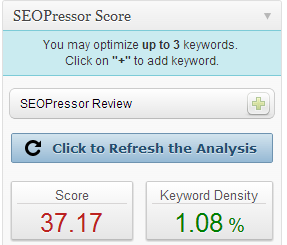
The first feature of this SEOPressor review is Keyword SEO Score.

SEOPress allows us to check the keyword density of keyword we choose easily.

All we have to do is, to select the keyword with low competition and high ranking. You can using Long Tail Pro for this.

Not only this, SEOPressor will also help you to increase the score.

  • What it analyzes: Keywords in Title, H1-H3 Tags,keyword density, content length, exact placement of your keywords, images, links and font decorations.

The new feature of this SEOPressor Keyword score is you don’t have to save post and update it again and again to check the Score. There is a button available “Click to refresh the analysis”

It will then update the SEO Keyword Score.

Over-Optimization Check
seopressor review

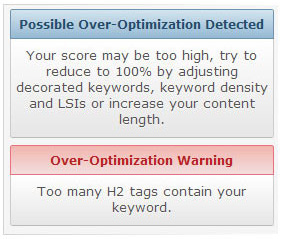
This is the new and one of the good feature of SEOPressor Review.

It Tells us  if our post is optimized or over-optimized from the score

You don’t need any expert now because SEOPressor can help you with it ;)

You just need to adjust the keyword score for NOT to over optimize the content.

  • SEO Over Optimization Rings Troubles For Your Blog

Rich Snippet

seopressor review

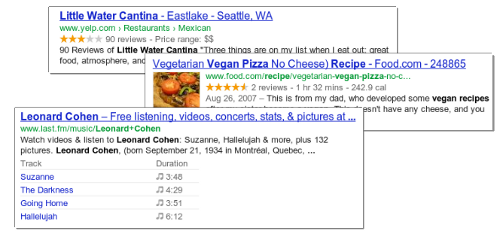
With this feature your posts will contain some additional lines of useful information shown on SERPs.

Check this image to know more about this Rich Snippet Feature in this SEOPressor Review

This allows visitors to determine how relevant and reputable your site is at a glance. Not only this, Rich Snippet feature of SEOPressor helps us to get more visitors, It makes the users easy to understand what exactly our post is about.

Target Multiple Keyword & LSI Analysis
seopressor review

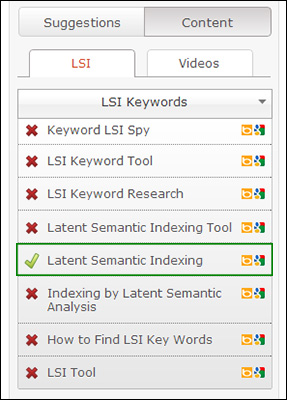
LSI means Latent Semantic Indexing. This is the new another best feature in this SEOPressor Review

Relates keywords together by extracting information from texts.

The best and new feature of this plugin and our SEOPressor Review is that we can target up to 3 keywords and for each keyword, a recommended set of LSI keywords would be given to you to use for better on-page SEO.

Social SEO
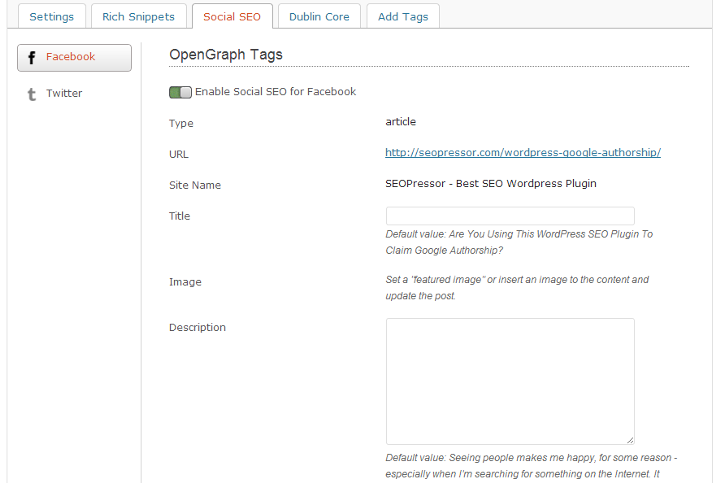
review of seopressor v5

OG tags and Twitter cards: Helps to link more data together so Google is able to see more relevance of content in your site and ranks you higher on SERPs. 

Automatic Smart Linking
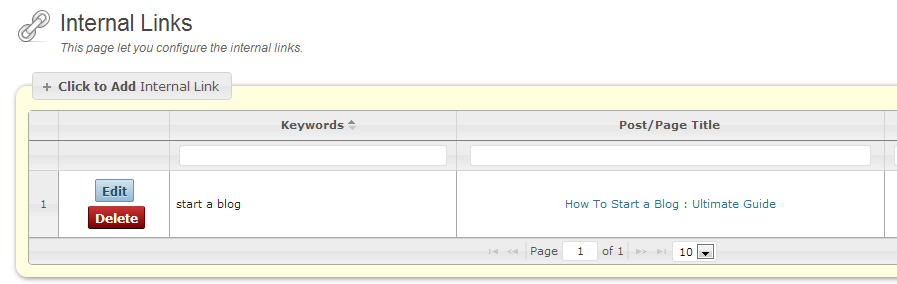
seopressor review V5

Tired of interlinking your post for better ranking?

SEOPressor allows you to automatically interlink posts from setting. It will interlink your blog post the SMART way.

All these is done by specifying only once which keyword should be linked to which URL.

Is it really Worth Buying SEOPressor?

The answer is YES.

SEOPress really worth buying because it’s latest version 5 is just awesome, It contains lot of features which I discussed above.

If you don’t have much knowledge of on page SEO then SEOPressor will be a perfect SEO plugin for you.

This plugin works similar to Yoast SEO but it contains some extra and advance features which Google loves!

SEOPressor V5 Price
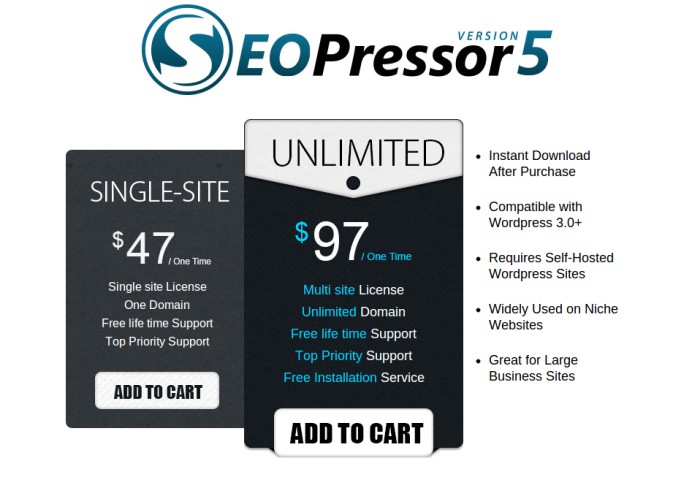
seopressor review

SEOPressor V5 is a new and premium SEO Plugin .

Do you know what? It comes with life-time free update.

  • Want to use this plugin on one site only? Buy SEOpressor Single Site License  Here
  • If you want to use it on unlimited WP blogs and domains, you can buy SEOpresser UNLIMITED Here

seopressor review

If you have websites that you are struggling to rank in the search engines, I strongly encourage you to give SEOPressor a try. It does come with a 60 day money back guarantee. Isn’t it cool?

So you are protected if you choose not to continue using it to optimize your websites.

Thank you for reading, and I hope you found this SEOPressor review helpful.

Do you use this plugin? Share with us below.

Making Money From Niche Sites – Is It Still Possible?

By Arbaz Khan 52 Comments

Making money has always been the number one priority for anyone who starts blogging. It was mine too when I started out but that’s a different story altogether.

There are hundreds of ways with which you can make money online but the best one, according to me, is making niche sites. Making money from niche sites is the most popular way but does it still work?

niche_site

[Read more…] about Making Money From Niche Sites – Is It Still Possible?

The Beginner Guide To Make Money Selling eBooks

By Anirudh Karthik 27 Comments

The Beginner Guide To Make Money Selling eBooks

Selling eBooks is a great method of online income and it will be interesting, if you write what you desire. The world of paper books/newspapers has gone; it has all turned to digital.

True to say, Reading something in eBook is quite good than reading in paperback form, with lots of animation, Bright screen. I hope that, there would be no paperback form books in coming years.

[Read more…] about The Beginner Guide To Make Money Selling eBooks

Why and How To Protect Adsense Account From Invalid Clicks?

By Krishan Kumar 105 Comments

Do you know your Adsense Account is in danger, yeah this is not an April fool prank or anything like a joke, this is as true as you are breathing from some past days many bloggers experiencing heavy invalid activity in their Adsense account.

You may have also experienced that number of clicks are much more than as comparison of the Estimated Earnings, especially from some countries like United states clicks are coming fluently but no money, CPC from such countries lies somewhere between $0.01 – $0.04 which is too less and this Cost per Click clearly saying that these clicks you are getting on your Ads are not Genuine for sure.

invalid clicks

Many Bloggers and Webmasters have lost their Adsense Ads in some past days because of this invalid activity or some other reasons.

Zac Johnson lost his 10 years old adsense acccount. Read his story

Just few days ago,  Theodore had been slapped by adsense. Read his story

and also because of their unawareness, so this is highly recommended that you won’t make such mistakes and keep your Adsense Account safe and secure.

How to know the Country from where invalid clicks are coming from ?

Many of you may already know about this but some don’t, so let me explain how to know from which country your Adsense Ads are getting unusually clicked, to find this out just follow these steps…

1.    Log in to your Adsense Account.

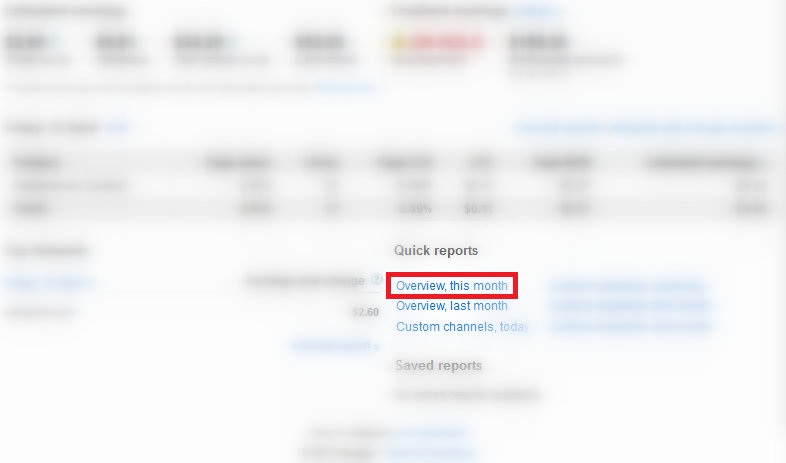
2.    Click on Overview this month.

Overview this month

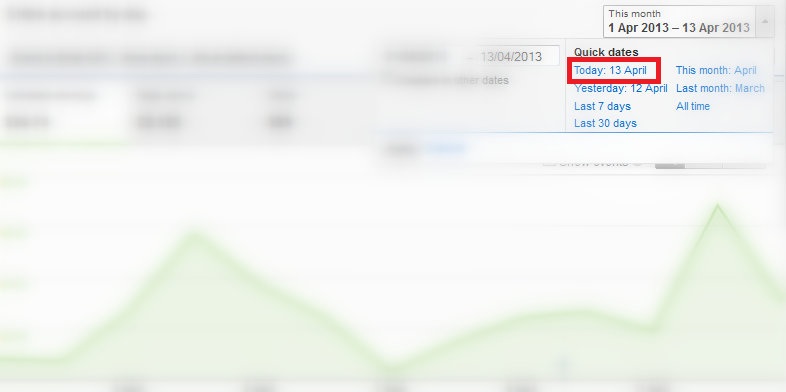
3.    Select the Today date from the upper right corner.

see todays Adsense report

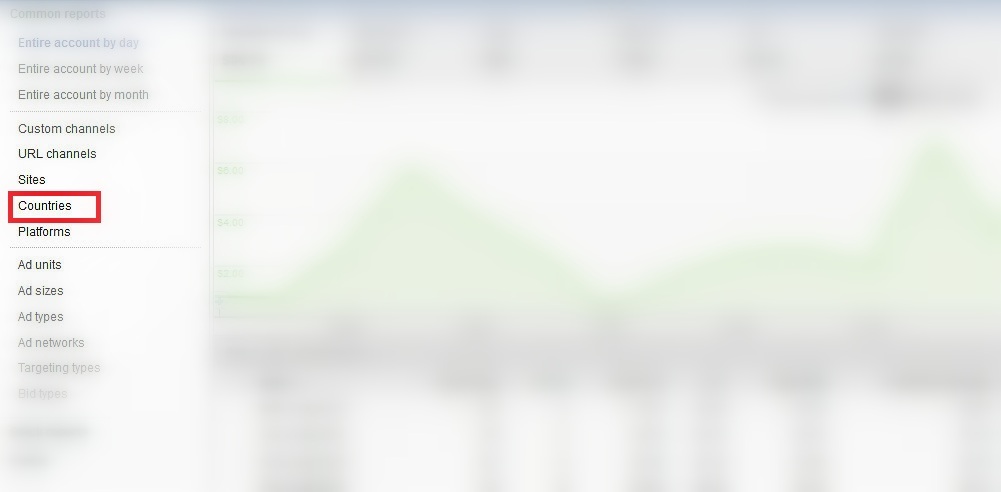
4.    Now click on Countries from Left sidebar.

click on countries

5.    Now carefully checkout the no. of clicks in front of each Country name.

Fullscreen capture 4132013 91705 PM

If you detect any country from where clicks have been done but CPC from there are very low then it simply means that your Adsense Ads are in danger.

How to Protect Your Adsense Account?

See if you are getting unusual clicks on your Ads, then first of all you try to detect the IP(s) of clicker and if you successfully detect those IP’s then just block them to showing Ads so that they won’t see your Ads and this way they cannot click on your Ads.

If you’re unable to fetch the IP address from where clicks are being performed then you most recommended way to keep your Adsense account safe is that, you must stop showing ads on your site for at least sometime, because if you stop publishing ads on your sites for some time/days it may cause loss of some Dollars to you but if you cannot prevent it then you may loss your Adsense for forever, which sounds so bitter to any blogger.

Read: 5 Question to Ask Before Using Google Adsense

Note:

It has been also seen sometimes that CPC are good and clicks are coming in bulks (more than expectations), but those were also invalid clicks.

To understand this better, suppose one person click on your Ad, Google gave you $2.0 for that one click which means click : 1 and CPC : $2.0 then 9 clicks are also done by an other person which are invalid clicks and Google haven’t gave you anything for those clicks, now your stats will show click : 10 and CPC : $0.20 which also looks good and generally we think it’s Ok if CPC is good but as you in example it’s not always okay.

So if you ever feel unusual increase in no. of clicks on your Ads you must report to Google regarding this to keep your side strong.

Click Bombing/ Invalid Clicks FAQ’s

  • I lost my Adsense Account due to invalid activity on my account, what to do ?

When Google takes adsense away then they always mentions the reason behind it, so you need to ensure that it will not happen again in future and after that you can fill Appeal form provided by the Google to claim your Adsense account back, but don’t go for appeal form in hurry first of all you must take care of point they mentioned in their mail.

  • I filled Appeal form, will I get Adsense back ?

Well nobody can say Yes for this question, it’s all depend on Google, if they realize that you have done good business with them in previous time then there are some hope you will get your Adsense back, but not sure for anyone.

  • I filled Appeal form but no reply, what to do ?

You cannot do anything for this, all we can do is that we can fill Appeal form then Google will reply you back after taking their time, sometimes they takes 2-3 days for reply back.

  • When I applied for Adsense back by `Appeal form` they rejected again, now what.

This is sad but ! even after they refused to give your adsense back to you, if you work on your blog continously for some months and you write valuable and original content then there are chances to have Adsense again on your blog, one of my friend have experienced it.

  • Even after many try Google isn’t giving me Adsense back, now what to do ?

In this annoying situation you have some other ways to get income from your blog for that you can check this `Ways to Make Money without Adsense`.

If you don’t wanna go for it then you can think of another idea which is, you make another blog then apply for Adsense for that new blog and when you get Adsense for it you can use that Adsense account Ads on your both blogs the new one and old too.

If you think this article is even a bit useful it is requested to must share the info, Take care of your Adsense Account and also help others to do so.

Ask the Readers: Why You Started Blogging?

By Ammar Ali 59 Comments

Today,  I’d like to introduce a new section on my blog that is “Ask The Readers”

In this section I’ll ask for your advice and discussion in the comments on a particular question once or twice a month. You can also request me to ask any question here, just drop me an email.

This is a reader interactive question, so I want to hear it from you. Leave Short or Long comment, I’ll appreciate every.

why you started blogging

So to start this section, I’ve got a question for you.

Question: Why You Started Blogging?

If you own a blog, it’s a really important question to ask yourself.

Here I am sharing few reasons why I blog and Why I started blogging.

  • Blogging is my passion
  • I love to learn something new
  • I like to help other (through my blog)
  • Get recognize all around
  • Make Money Blogging
  • To improve my english

Make sure to leave the comment below, as I mentioned above. Short or long comment, I’d be glad to hear from you.

I’ll Choose the best answer

If I really like your comment, I’ll choose it and will mention your name, website and comment in the next section of  “Ask The Readers”

Back to today’s question: Why You Started Blogging?

Share an especially insightful or valuable comment. You might get pick up as the winner of this first Ask The Readers section.

  • « Go to Previous Page
  • Page 1
  • Interim pages omitted …
  • Page 27
  • Page 28
  • Page 29
  • Page 30
  • Page 31
  • Interim pages omitted …
  • Page 72
  • Go to Next Page »

Primary Sidebar

Get Blogging & SEO Tips by Email

Get helpful blogging, SEO, and content tips delivered straight to your inbox. No spam.

Join 3,489 other subscribers

Popular Posts

  • Is Your Blog Properly Optimized for Performance and SEO?
  • 10 Powerful Ways to Become a Famous Blogger
  • Google AdSense vs Affiliate Marketing: A Simple Comparison for Beginners
  • Effective Ways to Increase Content Reach and Audience Engagement
  • 12 Things to Do Before Applying for Google AdSense
  • Are Backlinks Becoming Less Valuable in Modern SEO?
  • Step-by-Step Guide to Creating a Successful Travel Blog
  • How to Start as a Freelance Writer & Is It Worth?
  • Add Smooth Multi Level Drop-Down Menu In Blogger
  • How To Delete A Blogger Blog Permanently In 5 Minutes (+ FAQs)

Blogging Tools I Use

Over the years, I’ve tested dozens of blogging and WordPress tools. Below are the tools I personally use and recommend for blogging, performance, SEO, and monetization.

Blogging Tools I Use →

Categories

  • Announcement (12)
  • Ask The Readers (2)
  • Blogger (56)
    • Blogger Hacks (4)
    • Blogger Tips (24)
  • Blogging (108)
    • Blogging Tips (81)
    • Writing Tips (6)
  • Coupons (2)
  • Design (5)
  • Email Marketing (4)
  • Free Themes (1)
    • WordPress Themes (1)
  • Free Traffic (40)
    • Guest Blogging (7)
    • Search Engine Optimization (4)
    • Social Media (13)
  • Giveaway (16)
  • Hosting (14)
  • How To (48)
  • Latest News (1)
  • Make Money Online (37)
    • Adsense (7)
    • Affiliate Marketing (8)
  • Reviews (17)
  • SEO (46)
  • Social Media (13)
    • Facebook (5)
      • Tips and Tricks (3)
    • Twitter (2)
  • WordPress (54)
    • WordPress Plugins (17)
    • WordPress Themes (5)
    • WordPress Tricks (2)
    • WordPress Widgets (14)

Footer

About This Site

All Blogging Tips helps beginners learn how to start, grow, and monetize blogs using WordPress. I share practical guides and honest recommendations based on real blogging experience.

Read more →

Site & Resources

  • Tools I Use
  • About
  • Advertise Here
  • Contact
  • Disclosure Policy
  • Copyright Policy
  • Privacy Policy

Start & Grow Your Blog

  • A Ridiculously Helpful Guide to Start Your Own Blog In 10 Minutes
  • How To Grow Your Blog And Build An Audience
  • How To Make Money From Your Blog
  • Cheap WordPress Hosting
  • Free WordPress Hosting

Copyright © 2026 All Blogging Tips · Powered by InMotion Hosting · WordPress · Log in