• Skip to primary navigation
  • Skip to main content
  • Skip to primary sidebar
  • Skip to footer
logo

All Blogging Tips

Everything About Blogging

  • Home
  • Start a Blog
  • Grow Your Blog
  • About
  • Contact
  • Privacy Policy
  • Tools I Use

Search Results for: ai content

Earning Residual Income from Membership Site & Courses.

By Andi Minion Leave a Comment

One of the main goals for many internet marketers is to have a good steady flow of money coming in each month, and that usually requires a membership site or a continuity program. There are several ways of doing this, you can have a membership site where people pay each month to learn something or have access to something which only ends when the customer decides to stop or you can create a course that lasts for a time frame like a year.

Believe it or not many of us are part of a continuity program or membership system and never really thought about. Do you pay each month for satellite TV, a mobile phone or electricity supply?

membershipsites

These are a continuity programs and you could say a membership of a kind. We are all members of that organization, paying to receive an ongoing service.

As a marketer or online business builder you really want to get a monthly membership system in place so that you can make money each month making your day to day life easier.

The hardest part is trying to figure out what you can offer and charge for each month. There have been some really cheeky people who have charged a lot to learn things that are readily available to learn for free elsewhere on the web however there a few things to remember.

Not everyone knows where to find the free information and not everyone wants to look for it. Many people are happy to pay for the ease of having it in one place where they can keep going to it. It is like having the familiar & comfortable surroundings of going to your favorite members only Golf Club

Also people will happily pay to be taught by people who

  •   They believe to be an authority on the subject
  •   Is someone they can trust
  •   Gives them good value for money
  •   Is someone they like

The last one is really a powerful one,; if they like you they will happily spend money with you.

So what kind of membership site can you run? I once heard of a guy who set up a site dedicated to Yoga and then charged people to have access to videos he took from YouTube. Now I am not sure if they were his that he stored there or if he cheekily used other peoples. He wasn’t breaking any particular rules. I am sure it was padded out with related articles & photos but what it did do was save people having to search for videos and information.

Have you tried to search both Google and YouTube for something specific? The amount of rubbish that YouTube is filled with these days requires a lot of sifting through and Google? Well their new search algorithm delivers things they THINK you want and not what you were actually looking for.

One keen gardener created a gardening forum, where he could discuss gardening issues with other gardening lovers, gardening is as old as the hills and is basic natural practices. There is so much free gardening information available everywhere for free yet his forum, which charged $15 annually or $5 per month, went from a few people to having 75,000 members in a few years.

Education is the most popular form of online membership site; people pay a monthly fee to learn things like Internet Marketing, gardening, yoga and Social Media. The Social Networking Academy for example has a monthly membership site where you learn all about Google+, Facebook and Twitter etc.

Tim Lowe & Nick James have the ‘10 Minute Marketer’ which teachers people all about internet marketing, Nick James has another membership site that makes over $40,000 a month. A simple small home business idea like teaching how to use Twitter can result in big profits.

Offering services can also be charged on a monthly basis, LinkedIn is a network where business people can meet, swap details and create business friendships. It is also a great place to drive traffic to your site. It is free to join but there is the option to upgrade to different monthly paid packages that give the user more tools to use.

There are sites that provide a content based service or product that is charged on a monthly basis. For example NicheMarketingIdeas.com charges a monthly fee to have access to a huge library of Public Domain material that you can then use on your websites, as articles for article marketing, as emails or as eBooks and reports. The choice is yours.Earning incomes

 
Similar sites charge monthly fees for writing services, they pay writers to write articles and content and you pay a monthly fee to have access to this material for you to use however you like.  Now how these sites do now that websites are penalized for duplicate content I do not know.

The idea is simple; you do something once then get paid several times for it then repeat. As an example, imagine you created a ‘Learn Social Media’ membership site. You record 10 video tutorials on how to use Google+ and upload them to the site. You then charge something like $37 a month for access to your membership site. You get 20 people sign up when you go live, making you $740.

You then create 10 videos on using Facebook and again you get paid $37 a month per person. You have the 20 original people, but now you have another 5 people who have joined up, who get to see all of the videos or depending on how you set it up they get to see the first 10 before a timer releases the other 10 similar to an email sequence.

Now you are earning $925 a month. I have seen membership sites and courses where video tutorials are between 3 and 20 minutes long. Very easy to make videos too, filled out with a couple of bonus webinar recordings and some eBook & squeeze page templates.

Obviously people will now and again drop out of the system depending on certain factors, they probably have learn all they wanted to know, maybe you do not deliver enough quality info for the price people are paying, or maybe you deliver late. (I once had to wait several months for a course to be updated, which should have been monthly, I wasn’t happy)

The idea is to keep people in the system and delivery fresh new quality info each month. If you can create a service like Satellite TV where people happily pay each month for the continual delivery of things they enjoy then you are onto a winner.

Remember a membership site is in reality an online magazine, how many of you reading this do or have in the past paid to receive a magazine each and every month whether it be from cars to cooking, UFOs to model trains?

The adult industry is good at this, especially in the more unusual niches of the adult world.

If we use foot fetishism as an example, (a brilliant small home business idea if I may say so) Using a simple website, the owner takes photos of his or her foot using a mobile phone or digital camera and makes short films again with a readily available phone or camera then adds several pictures and films each month to the site, charges $20-$30 for a month’s access, they can make a reoccurring income for maybe a couple hours work tops.

We live in a digital age; we have incredible tools at our finger tips, we do not need to send pictures off to be developed, we can upload them from our phones and computers, we do not need to send our magazine to be printed instead we can upload it as soon as it is ready, we do not need to spend time packing and posting our magazines they are visible to everyone worldwide for a minimal monthly fee.

Obviously you will need traffic to turn into paying members, creating a social media campaign and a few satellite sites like having a Tumblr blog you can and will start to create an interest in your membership site.

People will pay for what they enjoy, even in times of hardship; people will try their hardest to keep paying for the things they enjoy. If they are learning some new skills that could increase their income then they will certainly keep paying.

Is it time you considered this business model? I think so.

Andi (the minion) Leeman writes for Tims Minions a blog full of blogging tips, Small Home Business Ideas and Internet Marketing advice along with easy to follow tutorials.
Awesome Mac Style Drop Down Menu With Search Box

By Ammar Ali 23 Comments

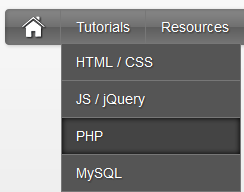
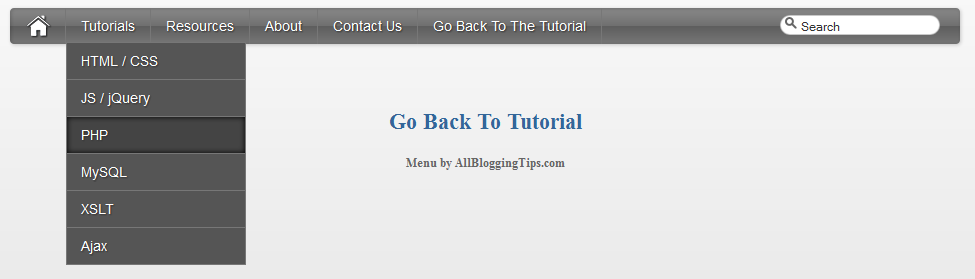
drop down menu thumb applySince the Apple-flavored Leopard-text-indent style is currently one of my favorite menu styles. So Today We just came across Stylish Apple Mac Style Drop Down Menu With Search Box. Its a simple yet stylish mac style drop down menu for blogger and wordpress and for any other use. It consists of only CSS + HTML . No jQuery No Images. Loads much faster than any menu :)

This works on almost all top web browsers. So without wasting anytime lets move on to create Stylish Apple Mac Style Drop Down Menu With Search Box for Blogger or WordPress..

Before we continue have a look at our other drop down menus.

  • Another CSS3 Menu V3
  • Css3 Pure Menu V2 For Blogger
  • Css3 Drop Down Menu For Blogger V1
  • Smooth Multi Level Drop Down Menu for Blogger

Stylish Apple Mac Style Drop Down Menu Preview!

 apply style drop down menu

Live Demo

The CSS

Below is the css of Awesome Mac Style Drop Down Menu With Search Box. You can add it to your main site css file. Like If you are using WordPress than paste CSS below in your style.css file and If you are using Blogger/Blogspot than go to Design>Edit HTML and place CSS give below just before  ]]></b:skin>

#imenu {
    background: #5e5e5e; /* Old browsers */
    background: -moz-linear-gradient(top, #8a8a8a 0%, #707070 49%, #5e5e5e 51%, #777777 100%); /* FF3.6+ */
    background: -webkit-gradient(linear, left top, left bottom, color-stop(0%,#8a8a8a), color-stop(49%,#707070), color-stop(51%,#5e5e5e), color-stop(100%,#777777)); /* Chrome,Safari4+ */
    background: -webkit-linear-gradient(top, #8a8a8a 0%,#707070 49%,#5e5e5e 51%,#777777 100%); /* Chrome10+,Safari5.1+ */
    background: -o-linear-gradient(top, #8a8a8a 0%,#707070 49%,#5e5e5e 51%,#777777 100%); /* Opera11.10+ */
    background: -ms-linear-gradient(top, #8a8a8a 0%,#707070 49%,#5e5e5e 51%,#777777 100%); /* IE10+ */
    background: linear-gradient(top, #8a8a8a 0%,#707070 49%,#5e5e5e 51%,#777777 100%); /* W3C */    
    -moz-border-radius: 4px;
    -webkit-border-radius: 4px;
    border-radius: 4px;
    color: #fff;
    border: none;
    text-decoration: none;
    text-shadow: -1px -1px 0 rgba(0, 0, 0, 0.15);
    overflow: visible;
    -moz-box-shadow: 1px 1px 3px rgba(0, 0, 0, 0.2), 1px 1px 3px rgba(0, 0, 0, 0.2) inset;
    -webkit-box-shadow: 1px 1px 3px rgba(0, 0, 0, 0.2), 1px 1px 3px rgba(0, 0, 0, 0.2) inset;
    box-shadow: 1px 1px 3px rgba(0, 0, 0, 0.2), 1px 1px 3px rgba(0, 0, 0, 0.2) inset;
    -webkit-appearance: none;
    margin-bottom: 15px;
    margin-left:0px;
}

#halfnav{float:right;}
#halfnav ul, #halfnav ul li{display:inline;list-style:none;padding:0;margin:0}
#halfnav ul li a{
    display:inline-block;
    margin: 5px;
    font-family:'Lucida Grande',Helvetica,Arial,Verdana,sans-serif;
    font-size:16px;
    padding: 5px;
    color:#fff;
    line-height:20px;
    text-decoration:none;
    background: #5e5e5e; /* Old browsers */
    background: -moz-linear-gradient(top, #8a8a8a 0%, #707070 49%, #5e5e5e 51%, #777777 100%); /* FF3.6+ */
    background: -webkit-gradient(linear, left top, left bottom, color-stop(0%,#8a8a8a), color-stop(49%,#707070), color-stop(51%,#5e5e5e), color-stop(100%,#777777)); /* Chrome,Safari4+ */
    background: -webkit-linear-gradient(top, #8a8a8a 0%,#707070 49%,#5e5e5e 51%,#777777 100%); /* Chrome10+,Safari5.1+ */
    background: -o-linear-gradient(top, #8a8a8a 0%,#707070 49%,#5e5e5e 51%,#777777 100%); /* Opera11.10+ */
    background: -ms-linear-gradient(top, #8a8a8a 0%,#707070 49%,#5e5e5e 51%,#777777 100%); /* IE10+ */
    background: linear-gradient(top, #8a8a8a 0%,#707070 49%,#5e5e5e 51%,#777777 100%); /* W3C */
    -moz-box-shadow: inset 0 1px 0 rgba(255,255,255,.5);
    -webkit-box-shadow: inset 0 1px 0 rgba(255,255,255,.5);
    text-shadow: 0 -1px 1px rgba(0,0,0,0.28);
    border: 1px solid #666;    
    -moz-border-radius: 4px;
    -webkit-border-radius: 4px;
    border-radius: 4px;
}
#halfnav ul li a:hover{border: 1px solid #222;box-shadow:inner 0 0 5px #000;-moz-box-shadow:inset 0 0 5px #000;-webkit-box-shadow:inset 0 0 5px#000;background:#444}
#halfnav .current-menu-item a{border: 1px solid #000;}

#nav{position:relative;z-index:2000}
#nav .parent > a, #nav .parent > a:hover{background-image:url(../images/arrow.png);background-position:right;background-repeat:no-repeat}
#nav ul ul .parent > a, #nav ul ul .parent:hover > a:hover, #nav ul ul li:hover ul .parent > a, #nav ul ul li:hover ul .parent > a:hover{background-image:url(../images/arrow-right.png);background-position:right;background-repeat:no-repeat}
#nav ul, #nav ul li{display:inline;list-style:none;padding:0;margin:0}
#nav ul li a{display:inline-block;font-family:'Lucida Grande',Helvetica,Arial,Verdana,sans-serif;font-size:14px;color:#fff;line-height:36px;text-decoration:none;text-shadow:1px 1px 1px #333;padding:0 15px;margin-left:-4px;border-right:#777 1px solid}
#nav ul li a:hover{box-shadow:inner 0 0 5px #000;-moz-box-shadow:inset 0 0 5px #000;-webkit-box-shadow:inset 0 0 5px#000;background:#444}
#nav .current-menu-item a{color:#ccc;}
#nav .current-menu-item .sub-menu a{color:#fff;text-shadow:1px 1px 1px #333}
#nav .menu > li:first-child a:hover{border-radius:0}
#nav .menu .sub-menu li a:hover{border-radius:0}
#nav ul li{position:relative}
#nav li ul{display:none;position:absolute;top:27px;left:7px}
#nav li ul a{background:#555}
#nav ul ul li:hover ul, #nav ul ul ul li:hover ul{left:0;margin:-37px 0 11px 180px}
#nav ul li:hover ul{display:inline-block}
#nav ul ul, #nav ul li:hover ul ul, #nav ul ul li:hover ul ul{display:none}
#nav ul li:hover ul, #nav ul ul li:hover ul, #nav ul ul ul li:hover ul{display:block}
#nav ul li:hover ul li a, #nav ul ul li:hover ul li a, #nav ul ul ul li:hover ul li a{border:#777 1px solid;margin:-1px 0 0 -11px}
#nav ul li:hover ul li a{width:150px;padding:0 14px}
#nav ul ul li:hover ul li a{width:150px;padding:0 14px;background-color:#888}
#nav ul ul ul li:hover ul li a{width:150px;padding:0 14px;background-color:#aaa}
#nav .children {z-index: 4000;}

#home {float: left;border-right:#777 1px solid;margin-right:4px;margin-left:15px; height: 36px;}
#home a:hover{opacity: .5}
#nohome {float: left; margin-right:4px;margin-left:5px; height: 35px;}

.searchform {
    -moz-border-radius: 15px;
    -webkit-border-radius: 15px;
    border-radius: 15px;
    width: 160px;
    padding: 0;
    margin: 7px 5px 5px 10px;
    height: 20px;
    box-shadow:inset 0 0 1px #222;
    background: #fff;
    float: right;
    margin-right: 20px;
}

.center .searchform {float:none;}

#morefoot .searchform {float:left;}

.searchform .s{
    margin:0;
    border: none;
    margin: 3px 2px 2px 20px;
    font-size: 12px;
    height: 14px;
    width:    130px;
    color: #333;
    overflow: hidden;
}
#magnify {float:left;position:absolute;margin: 2px 0 0 5px;}

#magnify {margin: 0 0 0 5px\0/IE8+9; /* IE8+9  */}

.searchform .s:focus {outline:0; border:none;}

.searchform .searchsubmit {display:none;}

.row { width: 100%; max-width: 980px; min-width: 727px; margin: 0 auto; }
    /* To fix the grid into a certain size, set max-width to width */
    .row .row { min-width: 0; }
    .column, .columns { margin-left: 4.4%; float: left; min-height: 1px; position: relative; }
    .column:first-child, .columns:first-child { margin-left: 0; }
    [class*="column"] + [class*="column"]:last-child { float: right; }
    .row .three     { width: 21.679%; }
    .row .nine         { width: 73.9%; }
    .row .ten         { width: 82.6%; }
    .row .twelve     { width: 100%; }

The HTML

You can add this HTML code in any place of your site/blog. If you are using WordPress than add below HTML code in your header.php file and If you are using Blogspot than add below code in header gadget (widget) ;)

<div class="container">
        <div class="row">
            <div class="twelve columns" id="imenu">
            <div id="nav" class="nine columns">
             <div id="home"><a href="http://marvblues.com"><img src="http://4.bp.blogspot.com/-btThtilNthE/T6dLHDZq9tI/AAAAAAAAAiw/E6bSVbOCeH4/s320/home.png" alt="home"></a></div>                           
     <ul id="nav_menu">
        <li><a href="#">Tutorials</a>
             <ul>
                 <li><a href="#">HTML / CSS</a></li>
                 <li><a href="#">JS / jQuery</a>
                     <ul>
                         <li><a href="#">jQuery</a></li>
                         <li><a href="#">JS</a></li>
                     </ul>
                 </li>
                 <li><a href="#">PHP</a></li>
                 <li><a href="#">MySQL</a></li>
                 <li><a href="#">XSLT</a></li>
                 <li><a href="#">Ajax</a></li>
             </ul>
         </li>
         <li><a href="#">Resources</a>
             <ul>
                 <li><a href="#">By category</a>
                     <ul>
                         <li><a href="#">PHP</a></li>
                         <li><a href="#">MySQL</a></li>
                         <li><a href="#">XSLT</a></li>
                         <li><a href="#">Ajax</a></li>
                     </ul>
                 </li>
                 <li><a href="#">By tag name</a>
                     <ul>
                         <li><a href="#">captcha</a></li>
                         <li><a href="#">gallery</a></li>
                         <li><a href="#">animation</a></li>
                     </ul>
                 </li>
             </ul>
         </li>
         <li><a href="#">About</a></li>
         <li><a href="#">Contact Us</a></li>
         <li><a href="http://www.allbloggingtips.com">Go Back To The Tutorial</a></li>
    </ul>               </div>
                            <div class="three columns">

 <form method="get" class="searchform" action="http://marvblues.com/">
     <div id="magnify"><img src="http://1.bp.blogspot.com/-Z-PCrVPeUKk/T6dLVTq-8ZI/AAAAAAAAAi8/n2DMxFGILwE/s320/magnify.png" alt="magnify"></div>
     <div><input name="s" class="s" value="Search" id="searchsubmit" onfocus="if (this.value == 'Search') this.value = '';" type="text"></div>
     <div><input class="searchsubmit" value="" type="submit"></div>
 </form>            </div>
                     </div>
     </div>
 </div>

Your turn

I hope you enjoyed this Awesome Mac Style Drop Down Menu With Search Box and the techniques I used. Please share your comments and questions below!

Top 5 Best WordPress Plugins to Beat Google Panda

By prav 24 Comments

Bloggers got hit by Panda owing to their mistakes in terms of content, SEO strategies, backlinks etc. If you are keen on getting traffic to your blog and want to regain your blog status, there is no other go than making your blog Panda love blog.

beat google pandaThere are certain WordPress plug-in that come in handy to work and fix your content. These are handy to make your blog innovative, new, virgin and unique information that satisfies the Panda easily. Be aware the fact that it is not easy to fool the Panda. Improving your own standards and making each post fresh to be better than the others is the only way to make it a Google eye candy.

Of course, making a panda recovered blog is not an easy task, it requires time, and you need to work overtime. However, it is not rocket-science as well. By understanding the basic concepts, you can make it and can beat google panda.

Some of the reasons for which your site could be hit by Panda update include:

  • Duplicate content
  • Spelling errors and grammar mistakes
  • Low quality content
  • inappropriate SEO strategies
  • Over optimization.

It is important to fix the reasons to get rid of Google Panda nightmare and beat google panda. I fixed the reasons:

  • weak On-Page optimization
  • weak internal links and broken links
  • having grammatical errors
  • Not employing Social media and bookmarking sites properly

I want to share the way in which I got rid of Panda’s clutches. WordPress Plug-ins helps me to overcome these issues and the excellent part is that these are free plug-ins.  So, now lets  start our list of Top 5 Best WordPress Plugins to Beat Google Panda in No Time  and start using some of them . But before we beat google panda , lets see this scared panda for fun:

Top 5 Best WordPress Plugins to Beat Google Panda

So, now lets start our list of Top 5 Best WordPress Plugins to Beat Google Panda in No Time and start using some of them. Just search for these plugins on wordpress.org plugin directory

1.     Meta Robots WordPress plug-in

Meta Tags plays a vital role in on-page optimization. . This plug-in comes in handy to add significant Meta tags to your page. The great part of this plug-in is that it allows to noidex low quality content that are linked by the search engine on that page. Low quality content is the prime target for Google Panda.

2.     Admin Word count Column:

This plug-in check for word counts of every post and show it in admin’s post manager. Less word count is another great reason for Google Panda hit. It is better to make your blog post’s word count around 400.

3.     SEO search terms tagging 2

It is one of the powerful on page SEO. It instantly tags the search phrases that make your page got hits. You can know the keywords that are relevant to your posts. It is extremely helpful.  However, be cautious in using this plug-in. There is a risk of tagging your post as over optimization by Google Panda. I used this plug-in to fix inferior content.

4.     Broken Link Checker

It is a handy tool to check for all broken links causing 404 errors. As I mentioned earlier, 404 errors effect my blog pathetically and this plug in is a boon to fix broken links.

5.     WordPress SEO by Yoast:

Finally yet importantly, this very effective SEO plug-in covers all the major SEO elements such as permalink, titles, Meta description and keywords.

This post is written by Prav. Prav is an article writer and marketer and loves to write for his clients all over the world. 

Search Engine Optimization Through Internal Linking

By Guest 8 Comments

Search engine optimization is not an exact science, but mostly based on speculation about how search engines index and rank websites in the SERPs. Nonetheless, it is based on observations, trials, Google webmaster news, and other educational information. One of the most important aspects of SEO, which many Internet marketers fail to focus on, is internal linking.

link-building

Why Is Internal Linking Important?

First of all, internal linking allows users to easily navigate from one page of a website to another. What many people do not know is that it also gives search engine robots an easy way to navigate through the site as well. When a web page has internal links, search engine robots can find other pages on the site and index them if they have not been indexed yet.

A lot of search engine optimization specialists say that external links carry more weight because they give your web pages more credibility. However, when you create a link that connects one of your web pages to another one of your web pages, you are giving your own site a vote of credibility as well. It is equally important, especially if the link comes from one of your high ranking pages.

The Process of Internal Linking

There are many ways to create links within your site. In your home page, you can create links within the content by choosing a keyword or phrase related to one of your pages. Use that keyword or phrase as the “anchor text” and link the related web page to it. For example, you can use the key phrase “affordable prices” as an anchor text that will link to something like your “Pricing” page.

You can also use the entire title of an article found on another webpage as your anchor text. For example, if you have an article entitled “The Pros and Cons of Using Premium WordPress Themes”, use that as an anchor text. You can write something like “Related Articles” at the bottom of the page and type the title. Highlight the entire title and link it to the actual webpage where the article content can be found.

Final Word

If you want to optimize your website for the search engines, make sure to put equal emphasis on internal linking and external linking. If you have more external links that internal links, search engines may see this as an act of desperation to rank on the search results. Therefore, keep your internal and external links at par with each other.

 Ryza Royze is an Internet marketer and SEO specialist with over 5 years experience in both fields. She has been contributing search engine optimization articles to the SEO industry since the year 2007.

Add Retweet Button Below Post Titles In Blogger

By Androidfry 3 Comments

Twitter is one of the fastest growing social networks in the recent days. Many feel it drives a lot of traffic to their blog, especially when they have a large number of followers. We should some how use this twitter to improve traffic to our blog, So how are we going to do that? Simple, just by adding a “Tweet This“ link to our blogger posts. There are certain blogs that include Tweet this in the footer of their posts, that is, at the end of the post as a social bookmarking icon.
TweetMemeRetweet
But I recommend you to place Tweet This Button at the top, next to the title of your post.
  This post basically explains, how to add tweet this and also a retweet button to blogger posts. Many blogs have links only for “Tweet this” but not for “ReTweet“. This post includes both Tweet and ReTweet option, there by, driving more traffic to your blog and making your posts more effective. Now lets move on Adding Retweet Button Below Post Titles

How To Add Tweet And Retweet Button Below Post Titles

  • Login to your dashboard. Navigate to “Template>Edit HTML” from your dashboard.
  • Make a back up of your template before you do any changes in the template.
  • Make sure that you have a tick mark in that “Expand Widget Template“.
  • Now, do a search using “CTRL+F” for the following line, if you want to show the button below the title of your post:
<div class='post-header-line-1'>

Else, search for the following piece of code to add the button at the right end of your blog posts.

<div class='post-body entry-content'>
  • Paste the following piece of code just after the above line(either below the title or embedded with your blog posts).
<div style='float:right; margin-left:14px;'> <script type="text/javascript"> tweetmeme_url = '<data:post.url/>'; </script>
<script type="text/javascript" src="http://tweetmeme.com/i/scripts/button.js"></script>
</div>
  • Save your template. That is it!! You Are done with the installation. Very simple I think!!
  • « Go to Previous Page
  • Page 1
  • Interim pages omitted …
  • Page 49
  • Page 50
  • Page 51
  • Page 52
  • Page 53
  • Interim pages omitted …
  • Page 67
  • Go to Next Page »

Primary Sidebar

Get Blogging & SEO Tips by Email

Get helpful blogging, SEO, and content tips delivered straight to your inbox. No spam.

Join 3,493 other subscribers

Popular Posts

  • Is Your Blog Properly Optimized for Performance and SEO?
  • 10 Powerful Ways to Become a Famous Blogger
  • Google AdSense vs Affiliate Marketing: A Simple Comparison for Beginners
  • Effective Ways to Increase Content Reach and Audience Engagement
  • 12 Things to Do Before Applying for Google AdSense
  • Are Backlinks Becoming Less Valuable in Modern SEO?
  • Step-by-Step Guide to Creating a Successful Travel Blog
  • How to Start as a Freelance Writer & Is It Worth?
  • Add Smooth Multi Level Drop-Down Menu In Blogger
  • How To Delete A Blogger Blog Permanently In 5 Minutes (+ FAQs)

Blogging Tools I Use

Over the years, I’ve tested dozens of blogging and WordPress tools. Below are the tools I personally use and recommend for blogging, performance, SEO, and monetization.

Blogging Tools I Use →

Categories

  • Announcement (12)
  • Ask The Readers (2)
  • Blogger (56)
    • Blogger Hacks (4)
    • Blogger Tips (24)
  • Blogging (108)
    • Blogging Tips (81)
    • Writing Tips (6)
  • Coupons (2)
  • Design (5)
  • Email Marketing (4)
  • Free Themes (1)
    • WordPress Themes (1)
  • Free Traffic (40)
    • Guest Blogging (7)
    • Search Engine Optimization (4)
    • Social Media (13)
  • Giveaway (16)
  • Hosting (14)
  • How To (48)
  • Latest News (1)
  • Make Money Online (37)
    • Adsense (7)
    • Affiliate Marketing (8)
  • Reviews (17)
  • SEO (46)
  • Social Media (13)
    • Facebook (5)
      • Tips and Tricks (3)
    • Twitter (2)
  • WordPress (54)
    • WordPress Plugins (17)
    • WordPress Themes (5)
    • WordPress Tricks (2)
    • WordPress Widgets (14)

Footer

About This Site

All Blogging Tips helps beginners learn how to start, grow, and monetize blogs using WordPress. I share practical guides and honest recommendations based on real blogging experience.

Read more →

Site & Resources

  • Tools I Use
  • About
  • Advertise Here
  • Contact
  • Disclosure Policy
  • Copyright Policy
  • Privacy Policy

Start & Grow Your Blog

  • A Ridiculously Helpful Guide to Start Your Own Blog In 10 Minutes
  • How To Grow Your Blog And Build An Audience
  • How To Make Money From Your Blog
  • Cheap WordPress Hosting
  • Free WordPress Hosting

Copyright © 2026 All Blogging Tips · Powered by InMotion Hosting · WordPress · Log in