• Skip to primary navigation
  • Skip to main content
  • Skip to primary sidebar
logo

All Blogging Tips

Everything About Blogging

  • Home
  • Start a Blog
  • Blogging Resources
  • About
  • Contact
  • Work With Me

SEO

5 Things Competitors Can Teach You About Blogging

By Ammar Ali 8 Comments

©Dmitriy Kudryavtsev
Thinstock ©Dmitriy Kudryavtsev

Most of the time we view our competitors like enemies.

Competition can be tough but it is very healthy and you can learn lot of things.

Instead of distancing ourselves from our competitors, why not learn something they know that we do not or something we can do differently to get ahead?

Here are few things that competitiors can teach you about blogging. Just make sure what not to do from your competitors mistakes. ;)
[Read more…] about 5 Things Competitors Can Teach You About Blogging

Filed Under: Blogging Tagged With: Blogging tips, SEO

7 Strategies I Use To Increase My Blog Traffic (I Bet You Can Too!)

By Akshay Hallur 42 Comments

Today, I decided to share with you some of the effective methods and strategies I am using in my blog. The strategies that I’m sharing with you require patience and hard work for implementation. Of course, they are easy. It’s not what the common bloggers commonly suggests to do. Let me put some effective sure-fire strategies to get real-time success in blogging.

Methods for Rankings and Traffic

1 – Long blog posts works for everyone, believe me.

Length of the blog post matters a lot in blog posts, Google is ranking long, insightful posts higher than those blog posts with a shorter length. As with the introduction of Google knowledge graph, the importance of the length of the content has become important.

Other advantages of lengthy content are:

1. It is easy to target, multiple keywords throughout the post and thus rank for multiple keywords.
2. We can include more internal links throughout the content.
3. Possibility of being indexed in Google in-depth articles, and thus getting loyal readers, who love more content.
4. Rank higher, and double your chances of ranking in the first page of SERPs.

There is no doubt that blog posts with great insightful content increases your blog’s search visibility in SERPs. The results may not be observed if yours is a new blog, it may take some time. However, once the blog post ranks for the keyword, there is no chance of a drop in rankings.

We can say that long form content is beneficial for long time. Content length is the sure-fire formula for getting high exposure and rankings.


2 – Quality blog posts

I think I need not stress the importance of quality content. I know all of you ABT readers are already tired of blog posts that stress the importance of quality. However, no blog post is complete without stressing the importance of quality content.

A site with optimized quality content is given more credit than other sites, it is better if you made your site content interesting for human traffic. Google algorithm will find out if a site is beneficial to the human user. Google algorithm will determine how much time a user spends while visiting a site based on different search queries. If a site is visited often and user likes to visit it again, its ranking stays better due to decrease in bounce rate and increase in click through rate.


3 – Include LSI keywords instead of keyword stuffing

Victim of keyword stuffing? No worries, it happens to the best of us. So use LSI keywords. So, what are LSI keywords? Keywords related to the main keyword is called LSI keywords. Let me make myself clear to you now.

Take an example, you are writing a post on “Google Plus and its benefits”.  For this topic, LSI keywords may be hashtags, G+, communities, just all terms related to it.

Instead of including the main keyword throughout the post and be a victim of keyword stuffing, include LSI keywords throughout the post, which may look natural.

Chaitanya wrote a nice guide on using LSI keywords you can read here.

4 – Diversify anchor texts

Anchor texts are the texts that come in links. For example, in subscription button “Subscribe now” may be an anchor text, which leads you to the subscription page.

Like this while obtaining backlinks, do not include the large number of exact anchor texts, it may look unnatural. Some of the examples of diversified anchor texts are “Post title (exact match)”, “this post”, “click here”.

Keeping the same anchor texts for a single post gives an impression to Google that you are indulging in the bulk backlinks scheme or black hat practices. Writing blog posts focusing on SEO, link, rankings, rather than focusing on quality content leads to these problems. Be natural.

5 – Target a keyword

I know that with the ineffectiveness of the Google keyword planner and extinction of Google Adwords keywords tool, it has been never easy to find and implement effective keyword.

So it’s now the time to make use Google suggest. I don’t tell you to head over to Google search, type in and look for suggestions.

There is an awesome tool called UberSuggest that gives you never ending list of Google suggestions for a keyword. You can make use of this tool, make a list of surefire long tail keywords and put them in the Keyword planner for search volumes and competitions. This is one of the effective free ways. I am also using this to find worthy long-tail keywords.

If you want premium, WordTracker is the best of all.

6 – Regularly update your site

Loyal readers of your blog expect quality content from you very often. So in order to keep them from visiting and alerting Google about your blog, it is necessary to publish QUALITY posts more often. If you got a blog, keep it updated and post regularly, write quality content and do not forget to get customers or users’ feedback.

Keep the posting frequency between 3-4 times a week. Frequency is less important than quality. If you have extraordinary quality, unique content, then posting 2 times a week is enough. But you know…

7 – Make use of bold and italics

Typography matters a lot. Readers tend to love great content with great typography. The majority of readers are speed-readers, to stop them from doing so, use speed breakers, like bold and italic texts. Italize sentences like conversations and bold important points.

This also helps attract the readers and improve your blog’s typography.

Conclusion

So, above are the strategies I am using in my blog, and my blog is responding very well to these strategies. Implementing these strategies in your blog will surely lead to your blogging success, but it may take some time to get results. If you are a newbie and followed all these strategies, I can assure that you will stand out of the crowd within a year or 6 months. As with anything hard work and patience is important.

I’m sure you have liked this article. Please make those static share buttons, dynamic.

Which methods are you using to increase your blog traffic? I’d love to hear from you in comments!

Filed Under: Free Traffic Tagged With: Blogging tips, SEO, Website Traffic

11 Rarely Known Ways To Build High Quality Backlinks

By Nikhil Ganotra 69 Comments

Well, you may be familiar with what is a backlink?

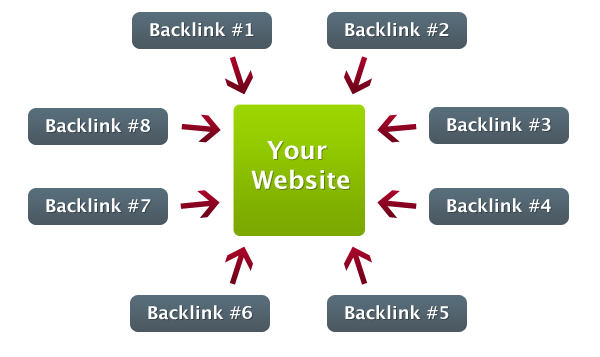
If not, here is a brief description. When we talk about page rank actually we are indirectly pointing to number  of backlinks. Backlink is an incoming hyperlink from one web-page to another website.Backlinks play a very essential role in page rankings.

“Links are still the best way that we’ve found to discover [how relevant or important somebody is], and maybe over time social or authorship or other types of markup will give us a lot more information about that.” – Matt Cutts

Build High Quality Backlinks

When I started Blogging I usually ignored the purpose of blog commenting, guest posting but time by time I realized its benefits. 10- 20 quality backlinks are far better that 100’s of crap.

I hope you are understanding. Gaining quality backilnks in a day or two is an impossible task. You have to work hard on it. Treat blogging as marathon not a race. Hence, taking my personal experience into consideration I’ve compiled some useful tips for you to Build High Quality Backlinks.

Forum participation

Active participation in forums have a great impact on SERP’S as it helps in building high quality backlinks. It has many other benefits too like relationship building, creating interactions with other bloggers working on similar to your niche. I am active participator of indiblogger helping people in their problems and submitting my content to it for high response.Hence, I got maximum links from indiblogger.

Active participation in the forums is a must for a blog to grow and Build High Quality Backlinks.

Creating long tutorial posts 

Creating a post in more that 1200 words builds a great probability of quality backlinks. Going in the depth of the content and making use of pictures, flowcharts, infographics etc. makes your readers to share or insert your link to their websites. Writing “how to” guides creates an ultimate effect.

Like writing “how to install wordpress” , “how to lose weight” blah Thus, it’s a great procedure for building good quality links.

  • Difference Between Short Length Post Vs Length Posts – What’s Best?

Special post for special days

Plan your writing tasks for special days like writing a special post for valentine’s day. Offer them discounts on your services. This creates a great opportunity for people to visit your site and comment. Thus, you can gain backlinks easily without much effort. Do market research and try to find out the topics which are in great demand. Write about them and obviously you would be the winner.

Build High Quality Backlinks

Request to your readers to add your link in exchange of some offers. Offer them free products in exchange to embed your link tag in their blog or run a contest by offering an ultimate prize in exchange of linking so they are compelled  to participate.

Start writing e-books

Write an ebook. Insert your links within the content of your e-book. Ask your friends to share it on the web through social media.

Submit your links to best of the best social bookmarking sites like stumpleupon, digg, delicious and reddit.

“The philosophy that we’ve always had is if you make something that’s compelling then it would be much easier to get people to write about it and to link to it. […] Make a fantastic website that people love and tell their friends about and link to and want to experience. As a result, your website starts to become stronger and stronger in the rankings.” – Matt Cutts

Write attractive headlines

It’s an essential art of writing. You must give attractive headings to your content that compel readers to open your article. Like “best dongles, $500 giveaway contest, top social media strategies. Etc..

Start offering free products

Free offers have a great impact on visitors. It helps in increasing traffic and eventually more backlinks. Either it can be e-book or free blog installation service.

Build High Quality Backlinks

Start collecting paid products and offer them for free to your visitors. I know it’s not easy but you can get it if you are having high technical knowledge.

Create rocking videos

Create your own videos and submit it to YouTube. Nowadays, most of the bloggers are using this technique to increase their backlinks. P.s Don’t forget to add your link to it. Use “screenr” to record your own videos for free. Give tutorials on “how to guides” like how to blog migration, how to install wordpress etc. And I’m sure you will be successful for sure.

Guest blogging

Guest blogging is one of the simplest and effective way to increase backlinks thus traffic.Do a research and find out the reputed blogger of your niche. ;)

Create an ultimate post that goes viral. Give more relevance to guest post than your own blog post. This is most effective way to Build High Quality Backlinks.

But you have to follow the given tips for successful guest blogging –

  •  It’s very essential to do a research for before posting on other website. Start interacting with its owner and commenting on his posts. Find out whether it is a reputed blog or not. See whether it is gaining high response or not.Before guest posting start interacting with its readers from a week before.
  • Make sure you are having a gravatar for your email i’d.
  • Have a look at the published posts because you need to write a unique content which is not yet published on his blog.
  • Check out previous guest posts on his blog. See whether it is gaining high response or not.You need to also look at its targeted audience whether it is targeting newbies or professionals.
  • Try to make the content relevant as much as you can because they are allowing you to post so that it adds value to their blog and  increases their reputation.
  • Make it a habit. It’s not that posting once you can gain huge popularity. It needs time. You need to keep patience and keep posting on highly reputed blogs.

    My friend and I started blogging at the same time on the similar niche but at present he his having more backlinks than me. Why?

Because he is a regular guest blogger and is very active on forums. And seriously, For this I’m very jealous of him.

Blog Commenting

Ahaann.. The most easiest one to build high quality backlinks. Just leaving the most appropriate comment on others blogs drives traffic as well as backlinks. Here are some tips which you must follow-

  • Never just comment “good article” and “thanks  “. Share your views and give your suggestions. Never mind giving a negative comment if you are sure that it is relevant.

  • Deliver high quality comments to receive high quality backlinks. So Simple. ;)

  • Make sure to reply every commenter of your post. This generates a sympathetic feeling in the reader and he loves to visit again.

  • Make sure you have a gravatar.

  • Don’t comment by registering with different id’s every time.

Interviews

I know you might be thinking how the professional bloggers would give us time to take interview. It may a tough task but not impossible. Be an active reader of their blog.

Build High Quality Backlinks

Keep in touch with them by actively commenting and sharing their posts.Keep re-tweeting their tweets. Give best of the best comments as much as you can. Share their products to all around web by social media. Through this the owner will contact you soon and you can easily ask for an interview.

Read  Guidelines You Must Follow Before Interviewing a Blogger

Deliver Relevant content

Make sure you are providing great content to your readers that they are actually seeking for and love to share it.Add videos, infographics, relevant pictures. And… keep patience. Relevant content links over time.

Wrapping up….

Building quality backlinks is not a one day task. It needs some time. Just keep patience and keep implementing the above given tips and I’m sure you would be successful.

What methods are you using to build backlinks?

Filed Under: SEO Tagged With: Backlinks, Build High Quality Backlinks, SEO

The Beginners Guide to Creating Profitable Niche Sites with Alexa

By Kingsley Agu 57 Comments

Earlier, We already done explaining in great details on how to actually find long tail key words which one can use the build profitable niche sites that’ll pump in money on end. So today, I’d like to elongate more on that topic by showing you exactly the process I’d take if I were you use Alexa for niche site creation.

Now, assuming I want to start.

There will be 3 significant things I’ll do first. And they’re:

  • Run sites through Alexa.com to find Long Tail keywords
  • Do keyword analysis on the long tails found
  • Build Niche site

So in other to let you comprehend more, I’ll try and expand the points as follow –

Run sites through Alexa.com to find Long Tail keywords

This part actually involves getting sites on the niche that you are trying to enter in other to get long tail key phrases on them through Alexa. This means that if you were planning to start a tech niche site, then finding tech sites will be your priority so that Alexa can show you long tail keywords on that niche.

Where is the best place to look for sites on different niches?

  1. Technocrati
  2. Dmoz 

So let’s say I want to start a niche site on the “writing tips” niche. What I’ll do first is to find sites on “writing tips” through those directories.

But for the sake of example, I’ll be using one site to show you how you can do yours effectively.

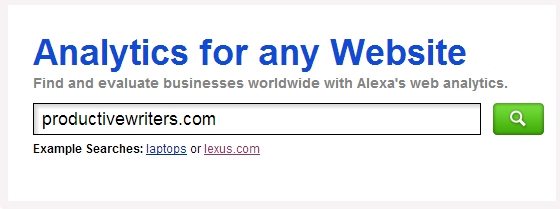
Once I get a site, www.productivewriters.com which is in the writing tips niche, I’ll quickly head to www.alexa.com; enter the URL and hit search.

create profitable niche site

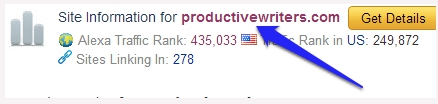
A page will load.

I’ll go ahead to click on the URL.

create micro niche site

This will immediately take me to the main analytic page of productivewriters.com where the long tail keywords are situated.
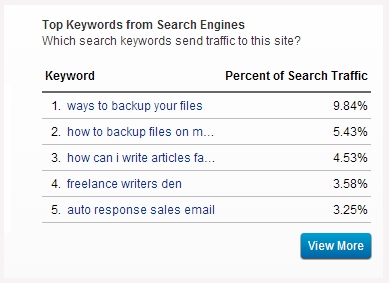
Once there, in other to find the long tail keywords, I’ll scroll down and locate the part termed: Top Keywords from Search Engines (as shown by the screenshot below.)

create profitable micro niche website

What you’re looking at are the top search key phrases sending the most traffic to productivewriters.com. These keywords are sometimes very profitable key phrases that are good to start-up niche sites with.

These are the search keywords (culled from the above screenshot):

  1.  Ways to backup your files
  2. How to backup files on my pc
  3. How can I write articles faster
  4. Freelance writers den
  5. Auto response sales email

So, now that I’ve gotten 5 not too popular long tail key phrases on the niche I want to enter. The next thing to check now is to ascertain which of the keywords are profitable and quite easy to rank for.

Do Thorough Keyword Analysis on the Long Tails Found

The beauty of a long tail keyword is the gift of not being too competitive or hard to rank for.

However, under normal circumstances I should normally do keyword analysis on each of the keywords above so that I can choose the best to use for a niche site.

But for the sake of this example, I’ll use the number 2 long tail keyword:

How to backup files on my pc

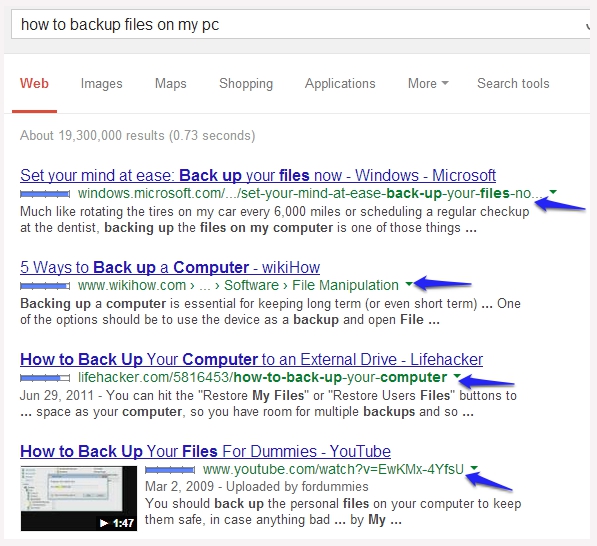
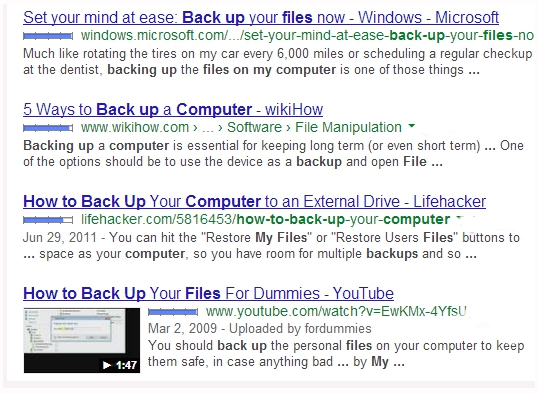
So in other to know whether this keyword is competitive, I’ll run it through Google first to know which sites are ranking for the top positions for the long tail keyword.

These are the current search engine ranking placement of websites for the keyword –

make moey with micro niche site

Now that we know which sites are ranking for “how to backup my files on pc”, the next thing is to check why those posts on those sites are ranking top for the key phrase.

However, since we know that Google uses some metric like backlinks pointing to a post and site authority to rank websites on SERPS, then it would be really clever to find out how many backlinks each post has.

I’ll use www.opensiteexplorer.com and www.ahrefs.com to check the backlinks of the posts on those sites.

So, to check the backlink each post has I will quickly open the first 4 posts in a new tab (I believe that the first 4 posts on SERPS are quite the most important posts to pay attention to if you want to outrank and gain the number 1 spot.).

(These are the 4 top ranking posts for “how to backup my files on pc”)

make money with niche websites

After opening them in new tabs, I’ll copy the first ranking post URL and paste it into Ahrefs and OpenSiteExplorer in other to check how many backlinks are pointing to the post URL.

I’ll go ahead to apply the same action to the other remaining 3 posts URL too.

These are the breakdown of their backlinks according to their position in SERPS –
– – – – – – – – – – – – – – – – – – – – – – – – – – – – – – – – – – – – – – – – – – – – – – – – – – – – – – –
Position in SERPS: 1st
Topic: Set Your Mind At Ease: Back Up Your Files Now – Windows
Site URL: windows.microsoft.com/en-us/windows-vista/set-your-mind-at-ease-back-up-your-files-now
OpenSiteExplorer: 3 backlinks
Ahrefs: 2 backlinks
– – – – – – – – – – – – – – – – – – – – – – – – – – – – – – – – – – – – – – – – – – – – – – – – – – – – – – – – –
Position in SERPS: 2nd
Topic: 5 Ways to Back up a Computer
Site URL: www.wikihow.com/Back-up-a-Computer
OpenSiteExplorer: 39 backlinks
Ahrefs: 76 backlinks
– – – – – – – – – – – – – – – – – – – – — – – – – – – – – – – – – – – – – – – – – – – – – – –
Position in SERPS: 3rd
Topic: How to Back up Your Computer to an External Drive
Post URL: www.lifehacker.com/5816453/how-to-back-up-your-computer
OpenSiteExplorer: 145 backlinks
Ahrefs: 337 backlinks
– – – – – – – – – – – – – – – – – – – – — – – – – – – – – – – – – – – – – – – – – – – – – – – – – – – –
Position in SERPS: 4th
Topic: How to Back up Your Files for Dummies
Post URL: https://www.youtube.com/watch?v=EwKMx-4YfsU
OpenSiteExplorer: 1 backlink
Ahrefs: 1 backlink
– – – – – – – – – – – – – – – – – – – – – – – – – – – – – – – – – – – – – – – – – – – – – – –

Well, what you’ve just looked at is the backlink profile of the 4 top posts ranking for the keyword “how to backup my files on pc” and the outstanding thing I noticed is that none of the posts has more than 400 backlinks pointing to it.

So this basically means that these posts are ranking at the top of the search engine as a result of the authority of the sites that are hosting it.

With this discovery, it basically mean that getting to rank at the top for that key phrase won’t be that hard as a result of the low backlink profile of each posts ranking for it on SERPS.

With that said, I can go ahead to build a niche site on that keyword since if I could just get more high authority blogs linking to my niche site, then I will surely claim the top of the search engine for that term.

  • Common SEO Mistakes & Tips From Google for New Bloggers

Build Niche site for That Keyword

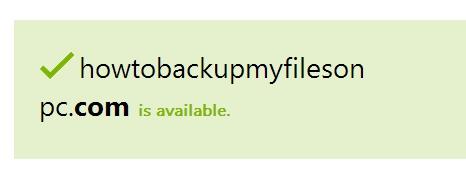
In other to build a niche site that’s profitable for that keyword, it would be wise to find an “Exact match domain” that has every key phrase in “how to backup my files on pc”; a domain like www.howtobackupmyfilesonpc.com is a good fit. But to know whether it’s available I’ll run the domain through Godaddy. And luckily, it’s available.
build niche site

So from this stand point, I can go ahead to build a site with that domain (if assuming I bought it).

The next thing to engage in is to build backlink back to the site after I must have set the niche site up and added enough content on it.

Likewise, once I keep on with this on a continually level, my niche site would get to the top of that search term in no time.

And finally, once the niche site has gotten to the first page of Google for the search term, “how to backup my files on pc”, I may then decide to find affiliate products on backup softwares to promote on the site which will inevitably get me some very good affiliate income on the long run.

These are some of the affiliate companies you need to know if you want to start a niche site soon using this Alexa method that I used for this post –

  • Commission Junction
  • Click Bank
  • EBay
  • Plimus
  • JVZoo

So once you’ve been able to get on the first page of Google for your own key phrase, along with constant traffic, then you can decide to leverage any of the products these affiliate companies above have in the line of your key phrase and also earn some side bucks too from your niche site.

In conclusion

Alexa, like I said before, shouldn’t be ignored as a long tail keyword finder. When you leverage it and find profitable keywords; make sure to do thorough keyword analysis on the long tail before you proceed to build a niche around that key phrase.

Remember, do your keyword analysis thoroughly in other not to enter the wrong niche.

So finally before I go, I’d like to ask, “Which niche are you currently targeting for your new niche site?”

Let’s discuss this below at the comment. Don’t forget to share.

Thanks for reading.

Filed Under: SEO Tagged With: SEO, SEO Guide

Why You Should Use Google Webmaster Tools?

By Rizwan Shajahan 37 Comments

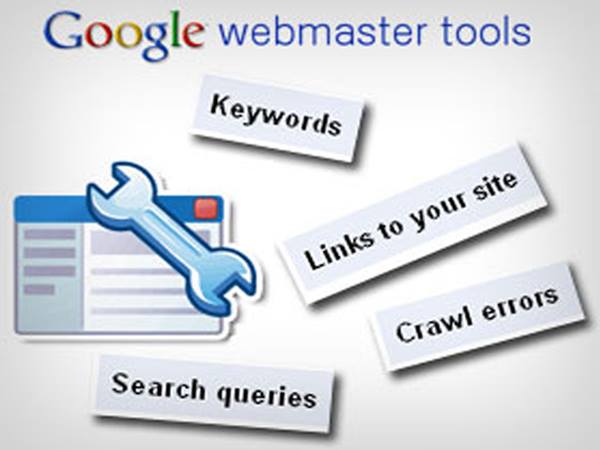
Google Webmaster Tools is an online tool used by millions of bloggers for checking most of the statistics about their Website/Blog. It allows us to check almost all the stats to related to the site performance in the Google Search results .

Webmaster Tools is used by many bloggers and webmasters, but most of them do not know what is Webmaster Tools and what are the capabilities of Google Webmaster Tools .

This article will guide you through all the objectives that can be done through this online tool provided for free by our favorite search engine, Google .

This online tool does not show the traffic stats of a blog, instead it shows the amount of clicks on a certain link of your blog in the search engine . The traffic and other related stats are shown in the Google Analytics which is also another free service provided by Google .

1014419_10152085455666040_1475835767_n

It is a must for every blogger to use this service as it helps us to improve our site and its performance in the search engines.

Sitemap Submission

There is no other way to submit a sitemap to Google . Submitting the sitemap is an important factor in building up the search ranking of your blog. Sitemap is a list of all your posts . It is indeed very essential as it can help the search engines to index our blog and all its link easily . Else , the search engine crawler can miss some of the posts of your blog .

To get a higher ranking and traffic , it is better to add a sitemap through Webmaster Tools rather than doing some other long SEO processes. Sitemap Submission is an easy way to get a lot of optimization through a short process .

Search Queries

This section of the Webmaster Tools provide us with the search terms which are performing well for our blog . It shows a list of queries which are bringing us the highest organic traffic . In my case, my highest performing keyword is still ‘QADABRA REVIEW’ . It has a good search result position between 1 and 4 .

I only came to know of such a great thing I did after a long time when i started using Google Webmaster Tools . After , i came to know of this keyword ranking high in the search engines , i optimized that post again and again till it got the first position . Now , it is changing at times .

Crawl Errors

This is the most useful tool in the Webmaster Tools . Sometimes , we might miss some 404 error pages which do not exists . So, people who come to this post will most probably press the back button of the browser . So , you are losing a lot of targeted visitors through this error . Google Webmaster Tools shows us all the pages and posts that are showing the 404 error .

So , it becomes easy for us to correct it and redirect that page if it does not exist . So again , this wonderful tool helps us regain our targeted visitors who were going to leave our blog .

  • Common SEO Mistakes & Tips From Google for New Bloggers

Backlinks

Google Webmaster Tools also helps you find out the number of backlinks that your blog has obtained . All those links out there on the internet pointing towards your website/blog will be listed here with all the details .

Backlinks are necessary for a blog to become a popular one . Guest Blogging , Commenting , etc are some good ways to get a good number of backlinks .

Malware Checking

Malware is virus or some infectious things that can ruin your blog as well as others who visit your blog . Malware should be removed instantly as it is spotted . But , to spot it , you will have to Use Google Webmaster Tools or some other Malware checker available over the net .

A Malware affected Blog can become a blog with zero visitors within one night . So , it is important to check if your blog is containing any malware scripts in the widgets or any other places that can be easily crawled by search engines .

Structured Data

Structured Data is a way of making search engines know about the way your blog is and how all the pags and posts are categorized . You might have spotted in the search results that some of the search results have a different type of appearance thus increasing the attention that result receives .

Again , Webmaster Tools is essential to form a structured data markup for your blog/website. Structured Data Markup can be optimized through the Data Highlighter . If your website do not have a Structured Data, then you can form one using the Data highlighter.

HTML Improvement

Google Webmaster Tools also has a feature which shows all the errors in your HTML Website or Blogger Template . We all should try to improve our website as much as we can .

So , using Webmaster Tools also helps you to improve the HTML of your website thus improving the whole website . Sometimes , even a small mistake that escapes from your eyes will feature in this section of this free online service provided by Google .

Google Authorship

authorship-serp

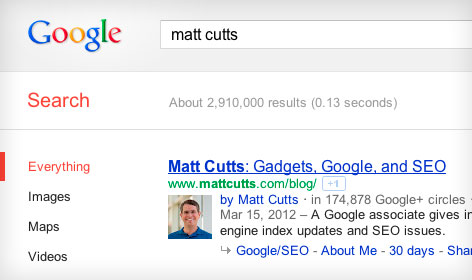
Google Authorship is a feature of Google which shows the photo of the author of specific articles in the search results along with the links . This increases the attention of the people who are searching . Moreover, your photo will become famous . Google Authorship can be obtained only through linking your Google+ Profile to your webpage and vice-versa using a tag .

In case, if Google Authorship is not working , you can visit the Structured Data Testing Tool option in the Additional Tools of Google Webmaster Tools . Here , You can check if authorship is working for any webpages on the internet . Indeed, This is another great feature of Google Webmaster Tools .

And don’t forget that showing your photo in the search results can gradually increase website traffic !

Final Words

These were some important features of Webmaster Tools . Well , there are a lot many more that can be used to make a blog a superhit blog by optimizing it for the search engines as well as the readers . Happy Blogging!

Filed Under: SEO Tagged With: How To, SEO

  • « Go to Previous Page
  • Page 1
  • Page 2
  • Page 3
  • Page 4
  • Go to Next Page »

Primary Sidebar

Subscribe to Blog via Email

Enter your email address to subscribe to this blog and receive notifications of new posts by email.

Popular Posts

  • Is Your Blog Properly Optimized? 5 SEO Must-Haves to Check Off Your List
  • 10 Powerful Ways to Become a Famous Blogger in No Time!
  • 10 Proven Ways To Make Money Without Google AdSense
  • Google AdSense Vs Affiliate Marketing: Which One Should You Choose?
  • 5 Tactics To Boost Your Content Reach & Engagement
  • 12 Things to Do Before Applying for Google AdSense
  • Are Backlinks Becoming Less Valuable?
  • Step by Step Guide to Creating a Travel Blog
  • How to Start as a Freelance Writer & Is It Worth?
  • Add Smooth Multi Level Drop-Down Menu In Blogger

Let Me Help You!

Let me take care of your website and make it run like a champ. I can help you with blog setup, migration, quick fixes or maintenance services.

Work With Me

Copyright © 2026 · Genesis Sample on Genesis Framework · WordPress · Log in