• Skip to primary navigation
  • Skip to main content
  • Skip to primary sidebar
  • Skip to footer
logo

All Blogging Tips

Everything About Blogging

  • Home
  • Start a Blog
  • Grow Your Blog
  • About
  • Contact
  • Privacy Policy
  • Tools I Use

Search Results for: ai image

5 Things Competitors Can Teach You About Blogging

By Ammar Ali 8 Comments

©Dmitriy Kudryavtsev
Thinstock ©Dmitriy Kudryavtsev

Most of the time we view our competitors like enemies.

Competition can be tough but it is very healthy and you can learn lot of things.

Instead of distancing ourselves from our competitors, why not learn something they know that we do not or something we can do differently to get ahead?

Here are few things that competitiors can teach you about blogging. Just make sure what not to do from your competitors mistakes. ;)
[Read more…] about 5 Things Competitors Can Teach You About Blogging

Unleash Your Inner Content Marketer To Make Money Blogging

By Joe Pawlikowski 2 Comments

Make Money Blogging

When we talk about making money blogging, we’re usually talking about making money with your own blog. With so many ways to monetize your blog, your options are seemingly endless.

Unfortunately, some blogs just won’t make money. Sometimes they’re in a crowded niche. Other times their niches aren’t profitable. Whatever the reason, the great majority of blogs will never make money.
[Read more…] about Unleash Your Inner Content Marketer To Make Money Blogging

How to Turn Your Website into a Social Media Hub

By Rohan Ayyar 14 Comments

Who is not on social media these days? It’s become a rhetorical question. From 80 year old Grandmas to 8 year old pre-teens, everyone’s a part of the social media circus that makes marketers jump through hoops to control the reputation and engagement of our brands. Pew Research reports that about 73% of all online American adults are active on some social media or another. 41% of these use multiple social media platforms.

Social Media is Stealing Your Visitors

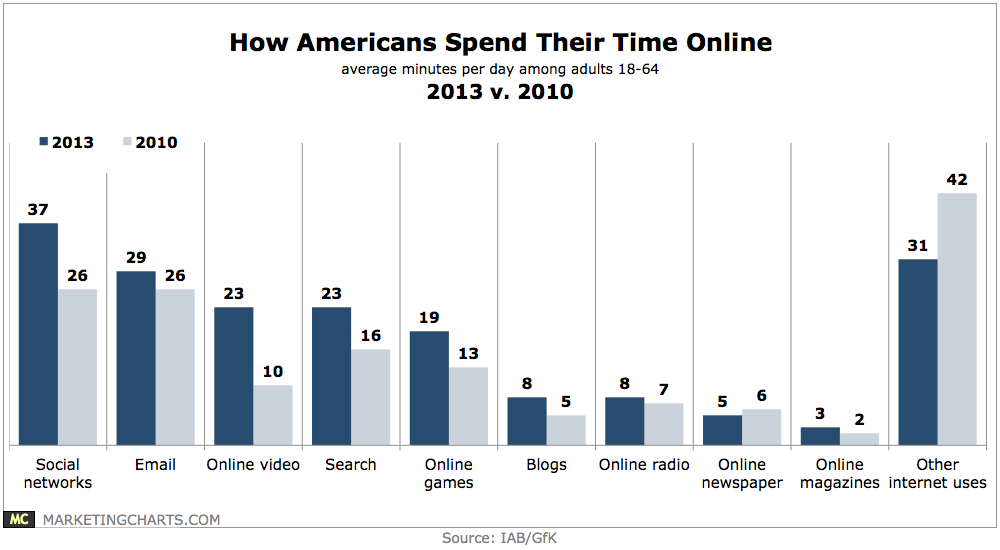
Even after being around for over a decade, social media shows no signs of a real slowdown. The time that people used to spend on other things like browsing through the web, visiting websites of brands they like, they now spend on social media.

Americans already devote the largest proportion of the time they expend online by networking with each other and brands they like on social media.

1

As Jeff Bullas points out, this social media frenzy seems to be coming at the expense of visits to corporate websites. Coca-Cola which has over 22 million Facebook fans, saw traffic to its site drop by 40% in under 12 months.

Your website is your own little piece of real estate on the web!

On your site, you have 100% control over what is said about your brand. It is your digital spokesperson who does exactly what you say and does not charge a dime. So why would you want to drive precious traffic to ‘rented’ properties like social media whose rules you have no control over? Why not drive these eyeballs to your own site where you can convert these visitors into actual customers?

Bring Social Media to your Website – Turn it into a Social Hub

No one can deny the pull of social media. However, you need to combine the attractiveness of social media with the flexibility of your own website by turning social media’s strengths into traffic for your own site. Here’s how you do it:

1. Host your blog on your website

A blog is step one in content marketing. Companies that have blogs also have 97% more inbound links than those that do not. If you are serious about reclaiming your content and making your website a social media hub in its own right, create a blog and post on it regularly.

A blog builds its own readership which is beneficial to your website and its conversions. It can also be the destination that hosts other content used on your social networks, so that you maintain an archive of all your content on your own web property, as against leaving it solely on social networks where you just rent space without owning the property.

2. Publish regular content on your website or blog

Create content that is shareable and publish it first on your blog. You can either put a teaser of this content or in some cases the entire content itself as a link on your social networks. The idea is to give away only enough to arouse curiosity, so your fans and followers head to your site or blog to access the real meat of your content.

3. Social sharing buttons on the site and your blog

Allow readers to share their favorite posts from your blog to their network on social media with social sharing buttons. Selling handcrafted jewelry on your website? Add a Pinterest button on the image and other social sharing buttons on the product listing to allow your trinket aficionado to share their find with the rest of their friends. Who would complain about some free publicity on social media after all!

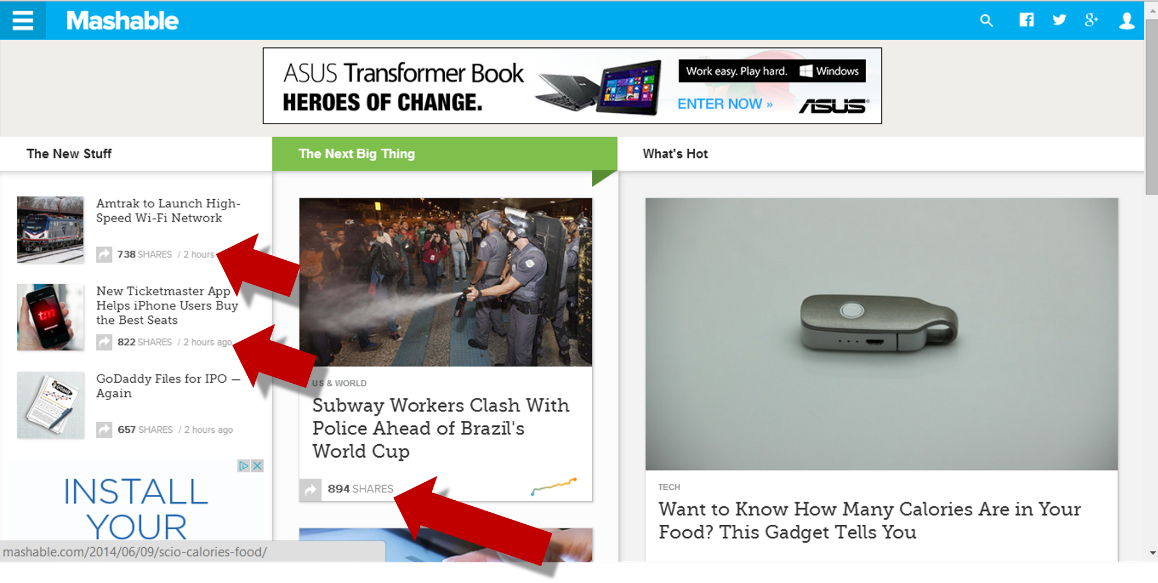
4. Show popularity index of each post on your post previews

Once you start posting regularly on your blog, readers will have a plethora of posts to pick from. In your post previews, show the popularity index of each post in the form of ‘number of likes’ or ‘number of shares’ or ‘number of retweets’.

2

When readers see that a certain piece has been recommended highly by other readers they are more likely to read it, out of a fear of missing out on important information. They are similarly also more motivated to share it with their friends on social media. This simple action can give you a viral post with no extra hard work on your part.

5. “Come here for more!”

Great content can make people go to great lengths to access it. Once you have a repository of exciting, interesting content, use this as a hook to drive traffic from your social networks to your blog or website.

With every piece of content you publish, ask them to head over to your blog to get their hands on more such delightful content. The content you share on your site can be created by you; it could also be relevant content created by others that you share after receiving their permission to use it and attributing it properly.

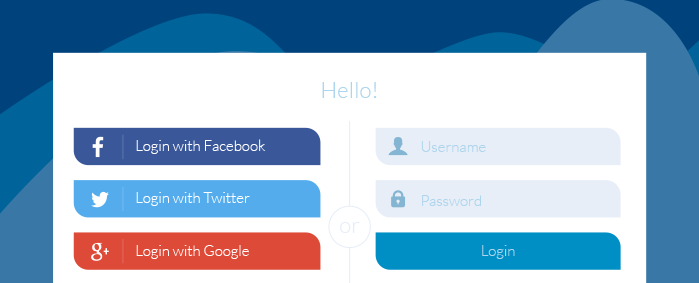
6. Bring social to your login process

When you ask customers to leave a social network and head to your site or blog for more, it could be seen as an irritant. This is especially true if the user has to login to your site to access your premium content or share and comment on it. Avoid the hassle of filling up long winded registration forms that most customers balk at, by instead using social login solutions like LoginRadius that create a seamless transition between social media and third party websites.

3

Social sign-on allows your users to log into your website using any of their social media IDs and with the correct implementation, it gives you access to targeted data that the customer shares on their social networks. This has the potential to become a win-win situation!

7. Create a vibrant community on your blog

Encourage interaction between your readers on your blog. Invite comments and respond to opinions of readers on your posts. Give back constructive feedback to your readers that will make them come back over and over again to your blog in times to come. Share valuable insights relevant to your readers exclusively on your blog, making it a sought-after destination for users in your industry.

Allow comments on your blog via social networks – this makes it easier for the reader to comment without creating an account with your site first. The comment will be flashed on the timelines of the readers’ friends on their social networks, giving your original post more visibility in the process.

8. Send email alerts whenever you create new content

Remember to touch base with your newsletter subscribers whenever you have something informative or interesting. The idea is to draw traffic to your website by all means possible. If you have been capturing and nurturing an email database, put it to good use by informing customers via email whenever you have new content for them on your blog.

Make sure you include a teaser or preview of your content in the email to pique their interest and make them click through to your website. My friend Tracy Vides has put up some excellent examples of email marketing on Steamfeed that will help you get started.

Over to You

Your corporate website allows you to showcase the best side of your brand, without any outside filters or negative inputs that may color the opinion of a visitor. It is your brand’s face on the web and is something that you probably have invested a lot of money building and driving traffic to via SEO, Content Marketing, PPC, email marketing and more.

Add social media to this list of tools that you use to grow your website’s online reputation. Engaging with fans on social media is great. But getting them to land on your site and actually buy from you is even better. A social media hub is an idea whose time has come.

Don’t wait for your competition to beat you to it. Go ahead and do build your website into a social magnet!


Do You Know These SEO Rules To Build a Popular Blog In Record Time?

By Ammar Ali 14 Comments

SEO RulesAre you frightened by the term SEO?

It seems too technical for you righ? After all you are just interested in running a successful business.

But you have been told that you can’t have a successful one if you fail at SEO, so you make up your mind to learn it.  ;)

But it still seems to complex to understand and become a PRO.

[Read more…] about Do You Know These SEO Rules To Build a Popular Blog In Record Time?

6 Productivity Tips for Getting Things Done Fast

By Aeromick 22 Comments

Do you find it hard sometimes to focus on your important tasks? Do you start too many tasks and projects but never finish any? And you’re not achieving the results you’re looking for as a result?

If you answer yes to any of the questions, it’s probably because you’re not managing your time very effectively. The following tips will help you manage your time and get things done fast and efficiently.

2477878611_0edc57e7f8

1. Become clear of what you want to achieve

Firstly, you work at a project or task to achieve something. But if you’re not clear or don’t know exactly what you want to achieve, it will be difficult for you to know the steps you need to take to achieve your goals and you can’t stay motivated.

So determine what your short term and long term goals are and set deadlines for them. For example, what do you want to get or achieve in a year, or five years from now? What about in a week, a month, or 6 months? And what do you need to do to achieve both your long term and short term goals and when?

First get the general, big picture of the steps you need to take in the long term. Then list down specifically what tasks you need to undertake now.

2. Find an accountability partner

One of the greatest things about being self-employed is the freedom of not having to report to a boss or do what you choose to do.  However, that can also be a bad thing if you don’t know how to keep yourself accountable.

The truth is, it’s not always easy to keep yourself accountable or set your goals, create action plans, and check your progress, all on your own.

What you can do instead is agree with someone else to become accountability partners of each other. You’ll share with them about your goals, and plan of actions and they’ll continually check your progress, remind you of your action plans, and from time to time give you a friendly kick in the butt. You’ll also reciprocate and do the same to them so you both can stay on track and focused on achieving your goals.

3. Tackle your important tasks first

Sometimes, your to-do list can have a lot of items and if you start your day with tasks that are not important or urgent, you might reach the end of the day without accomplishing anything of significance.

To avoid this happening, determine what your important tasks are and do them first. Even if you haven’t done everything on your to do list by the end of the day, you’ll still accomplish a lot. Remember, the 80/20 rule always applies.

4. Arrange your files and folders in an organized manner

We sometimes can waste several minutes in the middle of a task browsing through folders just to find a single file.

Not being able to find what you want when you want it, will not only waste your time but also destruct you from focusing on what you’re working at.

Take some time and organize your folders in a way that you can to find files fast and easily. For example, if you were working on a number of websites, you could create different folders for each website with names such as “Site1”, “Site2” etc…

If, then you wanted to start an article marketing campaign to promote your site number 1, for example, you would create a new folder named “Articles” under the “Site1” folder and store your newly written articles in that folder.

Come up with a file management system that works best for you as soon as you can. By doing so you can save time and stay focused.

5. Get a private working place

Another good part about running an online business is that you can work from anywhere or any place. You can work in a coffee shop or in your bedroom in your pajamas as long as you have a computer an internet access.

But if you really want to take your business to the next level, you need to consider getting some private space that is free from destruction so that you can work uninterruptedly. This way, your productivity level will rise and you can achieve more.

6. Block social media websites

How many times have you ever found yourself chatting, watching videos, checking emails or instant messaging on social media websites in the middle of a task? You can get sidetracked easily and find yourself spending more time than necessary on those sites.

If you can’t stop or limit yourself, you can use tools like “Anti-Social” to block out social media websites on your computer.

There you have it, six tips for becoming more productive. All in all, if you set clear goals, become accountable, and avoid destructions, you can achieve what you want in your online marketing endeavors.

Do you have any other tips for getting things done even faster?

  • « Go to Previous Page
  • Page 1
  • Interim pages omitted …
  • Page 15
  • Page 16
  • Page 17
  • Page 18
  • Page 19
  • Interim pages omitted …
  • Page 65
  • Go to Next Page »

Primary Sidebar

Get Blogging & SEO Tips by Email

Get helpful blogging, SEO, and content tips delivered straight to your inbox. No spam.

Join 3,494 other subscribers

Popular Posts

  • Is Your Blog Properly Optimized for Performance and SEO?
  • 10 Powerful Ways to Become a Famous Blogger
  • Google AdSense vs Affiliate Marketing: A Simple Comparison for Beginners
  • Effective Ways to Increase Content Reach and Audience Engagement
  • 12 Things to Do Before Applying for Google AdSense
  • Are Backlinks Becoming Less Valuable in Modern SEO?
  • Step-by-Step Guide to Creating a Successful Travel Blog
  • How to Start as a Freelance Writer & Is It Worth?
  • Add Smooth Multi Level Drop-Down Menu In Blogger
  • How To Delete A Blogger Blog Permanently In 5 Minutes (+ FAQs)

Blogging Tools I Use

Over the years, I’ve tested dozens of blogging and WordPress tools. Below are the tools I personally use and recommend for blogging, performance, SEO, and monetization.

Blogging Tools I Use →

Categories

  • Announcement (12)
  • Ask The Readers (2)
  • Blogger (56)
    • Blogger Hacks (4)
    • Blogger Tips (24)
  • Blogging (108)
    • Blogging Tips (81)
    • Writing Tips (6)
  • Coupons (2)
  • Design (5)
  • Email Marketing (4)
  • Free Themes (1)
    • WordPress Themes (1)
  • Free Traffic (40)
    • Guest Blogging (7)
    • Search Engine Optimization (4)
    • Social Media (13)
  • Giveaway (16)
  • Hosting (14)
  • How To (48)
  • Latest News (1)
  • Make Money Online (37)
    • Adsense (7)
    • Affiliate Marketing (8)
  • Reviews (17)
  • SEO (46)
  • Social Media (13)
    • Facebook (5)
      • Tips and Tricks (3)
    • Twitter (2)
  • WordPress (54)
    • WordPress Plugins (17)
    • WordPress Themes (5)
    • WordPress Tricks (2)
    • WordPress Widgets (14)

Footer

About This Site

All Blogging Tips helps beginners learn how to start, grow, and monetize blogs using WordPress. I share practical guides and honest recommendations based on real blogging experience.

Read more →

Site & Resources

  • Tools I Use
  • About
  • Advertise Here
  • Contact
  • Disclosure Policy
  • Copyright Policy
  • Privacy Policy

Start & Grow Your Blog

  • A Ridiculously Helpful Guide to Start Your Own Blog In 10 Minutes
  • How To Grow Your Blog And Build An Audience
  • How To Make Money From Your Blog
  • Cheap WordPress Hosting
  • Free WordPress Hosting

Copyright © 2026 All Blogging Tips · Powered by InMotion Hosting · WordPress · Log in