• Skip to primary navigation
  • Skip to main content
  • Skip to primary sidebar
  • Skip to footer
logo

All Blogging Tips

Everything About Blogging

  • Home
  • Start a Blog
  • Grow Your Blog
  • About
  • Contact
  • Privacy Policy
  • Tools I Use

Search Results for: ai

Tips for Building Real Connections to Help Your Blog Succeed

By chadgoulde 17 Comments

Who don’t want to make the blog successful in short time?

Building real and strong network can help you to do so..

Building real connections with your target audience is very critical to the success of your blog.

However, building these relationships may be easier said than done for beginner bloggers. If you’re looking for ways to attract unique viewers and maintain loyal readers, we’re here to help.

Think of your blog as a party you’re hosting. Very few important people will ever show up if you never attend parties hosted by other industry leaders.

You need to inform others that you want to connect with them by interacting with them on their blogs as well. Many blog owners will return the favor by interacting with you on your blog. You’ll also get an increase of traffic from other visitors to that site who are interested in what you have to say.

How to Make Blog Connections That Work?

Many beginner bloggers have no idea how to make real blog connections to help their blogs succeed.

Well, in an effort to help you get the most out of your blog, here are some tips for you:

1) Leave Comments on Other Relevant Blogs

  • Search the web for other bloggers within your industry. Use relevant keywords to find popular blogs with content related to your niche, product or service.
  • Make a list of the various blogs you come across during your searches.
  • Visit each of these blogs at least once per week. Look for relevant, valuable blog posts.
  • Leave comments that will intrigue readers. This will encourage them, as well as the blog owner, to respond and reply to your comments.
  • Also, be sure to read comments left by other readers. Add your thoughts in your replies to these comments as well.

Don’t forget to read :

  • Why You Should Comment on Other Blogs?

2) Join Some Relevant Blogging Communities

Once again, one of the most effective ways to build real relationships is by connecting with other bloggers.

You’d be amazed how many are interested in connecting with you. When evaluating the relevancy of a blog, here are some things to consider:

  • Are the topics relevant to your niche or industry?
  • Is the business located in the same geographical location as your business?
  • Does the content have the potential to bring value to the lives of your readers?

Here are some tips for doing online searches to find relevant blogging communities. Use variations of the search terms below:

  • blog community (your city)
  • blog community (your industry)
  • blog community (SEO keyword)

3) Only Blog What You Know and Care About

Remember that blogging is about showcasing your skills and knowledge about a specific industry, topic, product or service. One of your blogging goals should be to provide content that profiles you as an industry leader. This requires knowing what you’re blogging about… and knowing it well.

You also want to make sure that you blog about topics that actually interest you. Blogging can be pretty hard work sometimes.

It can be grueling when you’re trying to create content about a topic you could care less about. Readers will be able to tell that you’re not excited about what you’ve published. You’ll also find that there will be many days when you simply don’t want to be bothered with writing.

Just like any writer, you must have a passion for the topics you write about. If not, you’ll lose interest quickly, and your blog will become dead.

Do you want to make your blog dead very soon?

Ofcourse, not! ;)

Oftentimes, those who start blogs solely for the purpose of increasing traffic, fall into this category. After just a couple months of blogging, they simply lose interest and stop blogging altogether.

When you blog about topics you’re passionate about, this will shine through in your content. Your readers will appreciate the value your posts bring to their lives. To show their appreciation, they’ll return to your blog regularly to see what new content has been published.

Many will also subscribe to your blog or RSS feed to stay up-to-date on all newly published content. Now, that’s a way to build real connections to help your blog succeed.


SEOPressor V5 Giveaway [Closed]

By Ammar Ali 40 Comments

It’s almost 2 months, there is no new giveaway here on All Blogging Tips.

So today, I decided to organize a giveaway of SEOPressor V5 Plugin.

After reviewing this plugin, I got some good response and my readers are much interested in giving a try to this plugin. So after contacting the SEOPressor team, they agreed to giveaway 3 Single Site Licences of SEOPressor V5 Plugin.

Quick Review of SEOPressor V5

SEOPressor V5 is a premium SEO plugin that can skyrocket your blog ranking, I’ve started using it from last month and couldn’t believe the ranking difference!

seopressor
Here are quick features of this all new V5 plugin.

  • Keyword SEO Score
  • LSI and Target Multiple Keywords
  • Over Optimization Check
  • Rich Snippet
  • Social SEO
  • Automatic Smart Linking

Check out complete SEOPressor V5 Review

More giveaways are coming soon:: I’ll be organizing more giveaways here in next few days. Enter your email below & Subscribe to my newsletter for FREE and never miss another giveaway. (No spam, we promise!)


Giveaway Prize:

I’ll choose 3 winners and each winner will get Single Site License of SEOPressor V5 Plugin.

Winners will be announced 1 week from today. (On Sunday)

We will contact you through your emails for prize. So please make sure to provide valid email address while entering into giveaway!

Signup to win SEOPressor V5!

Leave high quality Comment on this post and let us know why you need this plugin and just follow the Rafflecopter below.


a Rafflecopter giveaway

Quick Tip! Tweet and Share this giveaway everyday on social network to have a higher chance of winning

Best of Luck to all Participants!

When Will Be The Next PageRank Update?

By Ammar Ali 88 Comments

When will be the next pagerank update?

When google will update pagerank?

What’s next pagerank update schedule?

These are the most common question, I get asked these days. Even many bloggers are searching on search engines about when will be the next pagerank update.

I’ve decide to list the expected date, when will google update pagerank. These are expected date NOT confirmed.

next google pagerank update

When will be next PageRank update?

Last google pagerank update was on 4 February 2013. Google pagerank basically ranks a page on the basis of its backlinks and how authoritative that link is. And high Google pagerank may boost ranking of the site and reputation.

Google page rank update happens after 3-4 months after previous update. Here is the schedule of next PageRank update of 2013. These are expected date.

  • 1st Update : May be on January 28 to February 6 (Confirmed)
  • 2nd update : May be on June 27 to July 7
  • 3rd Update : May be on September 29 to 4 October
  • 4th Update : May be on 24 December to 29 December

Please note: 

These are the expected date NOT confirmed. I’ve asked this question about next pagerank update on facebook. And got to know that Google never announces the date then who else will know the exact one? ;)

Some said that the update might be in the first or two week of May. Let’s see when it’ll be.

Get notified by email about next page rank update.:: I’ll send you update about next pagerank. Enter your email below & Subscribe to my newsletter for FREE and never miss anything. (No spam, we promise!)


Should you rely too much on PageRank?

Now, that’s really important question to ask yourself, Should you reply much on pagerank?

Let me explain, I’ve seen many blogs with PR2, Pr3 that are getting thousands of visitors per day than others PR5, PR6 blogs.

That means Pagerank has nothing to do with your blog traffic. Try not to worry about pagerank / alexa rank.

Focus on providing useful content to your blog readers.

Your priority must be like this;

  1. Readership
  2. Traffic
  3. Alexa Rank
  4. Page Rank

Here I am also sharing some of the most frequently asked questions about pagerank.

Why my PageRank is not increasing?

Did you asked yourself this question? Why your pagerank is not increasing? There can be many reasons like;

  1. Poor SEO Structure
  2. Poor Link Bulding
  3. Not enough Dofollow baclinks
  4. No quality content in your blog
  5. Blog not optimized for search engines

How to increase PageRank quickly?

Here I am sharing some important tips to increase your page rank for next pagerank update.

Few Tips to Increase your Page Rank.

  • Guest posting
  • Article marketing or Directory Submission
  • Blog commenting
  • Forum Posting
  • Submit Feed to Feed directories
  • Submit blog to Social bookmarking sites
  • Proper SEO structure
  • Register your domain for longer period (3-4) year.
  • Don’t sell Links!
  • Read more tips here!

I hope above tips will help you a lot to increase page rank in the next pagerank update.

If not? then Also read below helpful articles to increase your page rank in no time..

  • Top 15 Killer Tips To Increase Page Rank!
  • Tips on How to Improve Google Ranking
  • 8 Secrets for Boosting Your Page Ranking
  • 5 Reasons How Blog Comments can Increase Your Blog Ranking

Over to YOU!

What do you think about next pagerank update? Do you know when will be the next pagerank update? What’s your current pagerank?

Do share with us below.

SEOPressor Review: Get Higher Ranks In Google Fast!

By Ammar Ali 41 Comments

This is my Honest SEOPressor review, and I am very happy to tell you about it because I just started using it and could not believe the ranking difference!

SEOPressor is a On Site SEO WordPress plugin that can skyrocket your blog ranking easily. Right now SEOPressor is Powering More Than 128,825 WordPress are powered with this plugin and Growing.

Before using SEOPressor, I was using Yoast SEO Plugin which didnt included much features as SEOPressor though when I got to know about latest version of SEOPressor V5. I decided to give it a try.

After using it for a month. I’m very happy with it.  Lets not create anymore suspense and let me share SEOPressor Review.

seopressor review

Do you really need this SEOPressor Plugin?

The problem with other SEO Plugin is they are outdated. In last few years google had launched new algorithms and many more like Panda and Penguin.

The New SEOPressor V5 allows us to easily optimize Panda and Penguin Friendly Content for SEO.

Not only this, new SEOPressor V5 also added more features like Over Optimization checker, Add Rich Snippt in Search results and much more. Next I am going to share all of them in SEOPressor Review.

download-now

SEOPress Review V5 : Best On-Page SEO Plugin

Here I’m going to share the ultimate SEOPressor Review.

Keyword SEO Score

seopressor review

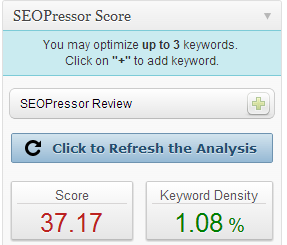
The first feature of this SEOPressor review is Keyword SEO Score.

SEOPress allows us to check the keyword density of keyword we choose easily.

All we have to do is, to select the keyword with low competition and high ranking. You can using Long Tail Pro for this.

Not only this, SEOPressor will also help you to increase the score.

  • What it analyzes: Keywords in Title, H1-H3 Tags,keyword density, content length, exact placement of your keywords, images, links and font decorations.

The new feature of this SEOPressor Keyword score is you don’t have to save post and update it again and again to check the Score. There is a button available “Click to refresh the analysis”

It will then update the SEO Keyword Score.

Over-Optimization Check

seopressor review

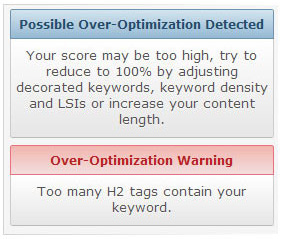
This is the new and one of the good feature of SEOPressor Review.

It Tells us  if our post is optimized or over-optimized from the score

You don’t need any expert now because SEOPressor can help you with it ;)

You just need to adjust the keyword score for NOT to over optimize the content.

  • SEO Over Optimization Rings Troubles For Your Blog

Rich Snippet

seopressor review

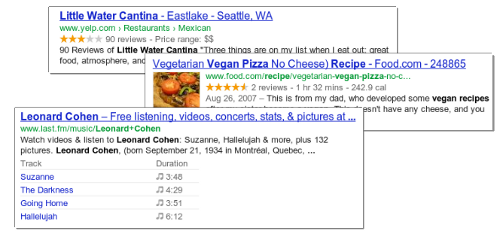
With this feature your posts will contain some additional lines of useful information shown on SERPs.

Check this image to know more about this Rich Snippet Feature in this SEOPressor Review

This allows visitors to determine how relevant and reputable your site is at a glance. Not only this, Rich Snippet feature of SEOPressor helps us to get more visitors, It makes the users easy to understand what exactly our post is about.

Target Multiple Keyword & LSI Analysis

seopressor review

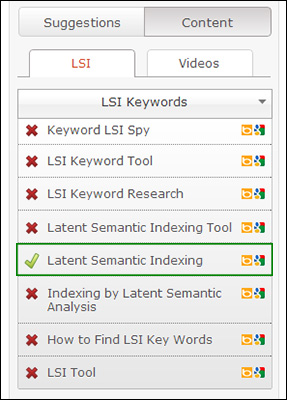
LSI means Latent Semantic Indexing. This is the new another best feature in this SEOPressor Review

Relates keywords together by extracting information from texts.

The best and new feature of this plugin and our SEOPressor Review is that we can target up to 3 keywords and for each keyword, a recommended set of LSI keywords would be given to you to use for better on-page SEO.

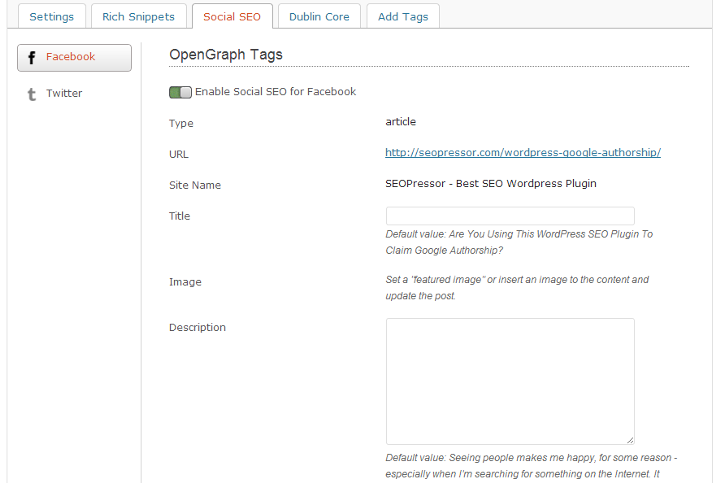
Social SEO

review of seopressor v5

OG tags and Twitter cards: Helps to link more data together so Google is able to see more relevance of content in your site and ranks you higher on SERPs. 

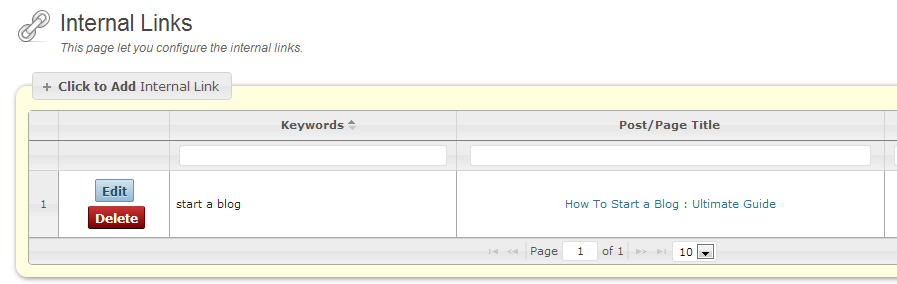
Automatic Smart Linking

seopressor review V5

Tired of interlinking your post for better ranking?

SEOPressor allows you to automatically interlink posts from setting. It will interlink your blog post the SMART way.

All these is done by specifying only once which keyword should be linked to which URL.

Is it really Worth Buying SEOPressor?

The answer is YES.

SEOPress really worth buying because it’s latest version 5 is just awesome, It contains lot of features which I discussed above.

If you don’t have much knowledge of on page SEO then SEOPressor will be a perfect SEO plugin for you.

This plugin works similar to Yoast SEO but it contains some extra and advance features which Google loves!

SEOPressor V5 Price

seopressor review

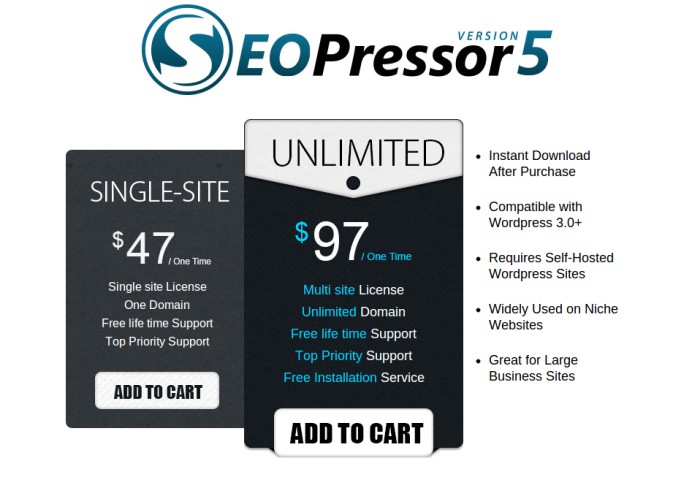
SEOPressor V5 is a new and premium SEO Plugin .

Do you know what? It comes with life-time free update.

  • Want to use this plugin on one site only? Buy SEOpressor Single Site License  Here
  • If you want to use it on unlimited WP blogs and domains, you can buy SEOpresser UNLIMITED Here

seopressor review

If you have websites that you are struggling to rank in the search engines, I strongly encourage you to give SEOPressor a try. It does come with a 60 day money back guarantee. Isn’t it cool?

So you are protected if you choose not to continue using it to optimize your websites.

Thank you for reading, and I hope you found this SEOPressor review helpful.

Do you use this plugin? Share with us below.

Making Money From Niche Sites – Is It Still Possible?

By Arbaz Khan 52 Comments

Making money has always been the number one priority for anyone who starts blogging. It was mine too when I started out but that’s a different story altogether.

There are hundreds of ways with which you can make money online but the best one, according to me, is making niche sites. Making money from niche sites is the most popular way but does it still work?

niche_site

[Read more…] about Making Money From Niche Sites – Is It Still Possible?

  • « Go to Previous Page
  • Page 1
  • Interim pages omitted …
  • Page 30
  • Page 31
  • Page 32
  • Page 33
  • Page 34
  • Interim pages omitted …
  • Page 70
  • Go to Next Page »

Primary Sidebar

Get Blogging & SEO Tips by Email

Get helpful blogging, SEO, and content tips delivered straight to your inbox. No spam.

Join 3,489 other subscribers

Popular Posts

  • Is Your Blog Properly Optimized for Performance and SEO?
  • 10 Powerful Ways to Become a Famous Blogger
  • Google AdSense vs Affiliate Marketing: A Simple Comparison for Beginners
  • Effective Ways to Increase Content Reach and Audience Engagement
  • 12 Things to Do Before Applying for Google AdSense
  • Are Backlinks Becoming Less Valuable in Modern SEO?
  • Step-by-Step Guide to Creating a Successful Travel Blog
  • How to Start as a Freelance Writer & Is It Worth?
  • Add Smooth Multi Level Drop-Down Menu In Blogger
  • How To Delete A Blogger Blog Permanently In 5 Minutes (+ FAQs)

Blogging Tools I Use

Over the years, I’ve tested dozens of blogging and WordPress tools. Below are the tools I personally use and recommend for blogging, performance, SEO, and monetization.

Blogging Tools I Use →

Categories

  • Announcement (12)
  • Ask The Readers (2)
  • Blogger (56)
    • Blogger Hacks (4)
    • Blogger Tips (24)
  • Blogging (108)
    • Blogging Tips (81)
    • Writing Tips (6)
  • Coupons (2)
  • Design (5)
  • Email Marketing (4)
  • Free Themes (1)
    • WordPress Themes (1)
  • Free Traffic (40)
    • Guest Blogging (7)
    • Search Engine Optimization (4)
    • Social Media (13)
  • Giveaway (16)
  • Hosting (14)
  • How To (48)
  • Latest News (1)
  • Make Money Online (37)
    • Adsense (7)
    • Affiliate Marketing (8)
  • Reviews (17)
  • SEO (46)
  • Social Media (13)
    • Facebook (5)
      • Tips and Tricks (3)
    • Twitter (2)
  • WordPress (54)
    • WordPress Plugins (17)
    • WordPress Themes (5)
    • WordPress Tricks (2)
    • WordPress Widgets (14)

Footer

About This Site

All Blogging Tips helps beginners learn how to start, grow, and monetize blogs using WordPress. I share practical guides and honest recommendations based on real blogging experience.

Read more →

Site & Resources

  • Tools I Use
  • About
  • Advertise Here
  • Contact
  • Disclosure Policy
  • Copyright Policy
  • Privacy Policy

Start & Grow Your Blog

  • A Ridiculously Helpful Guide to Start Your Own Blog In 10 Minutes
  • How To Grow Your Blog And Build An Audience
  • How To Make Money From Your Blog
  • Cheap WordPress Hosting
  • Free WordPress Hosting

Copyright © 2026 All Blogging Tips · Powered by InMotion Hosting · WordPress · Log in